


Windows
Windows 11 Pro
Original price was: $38.99.$25.99Current price is: $25.99.Buy Now Windows 11 Pro
Windows, Office and Windows Server keys. Pay once, get the key by email and activate online with Microsoft.
Three steps. The only one that takes thought is picking the right edition.
Pick the edition you need. Each product page says which PC it fits and what is included.
Checkout runs on Stripe: card, Apple Pay or Google Pay. We never see your card details.
Instant delivery to your email. Enter the key, and Windows or Office activates online with Microsoft.
Short answer
HypestKey sells genuine Windows, Office and Windows Server product keys by email. Keys are delivered instantly to your email after payment; you enter the 25-character key in Settings › System › Activation (or in any Office app), and the license activates online with Microsoft.
HypestKey is an online store for genuine Microsoft product keys: Windows for home and work PCs, Microsoft Office for Windows and Mac, Project and Visio, and Windows Server with its client access licenses. Every product is a digital license. There is no box and nothing is shipped: you choose the edition, pay at a secure checkout and receive the 25-character product key by email, together with the official Microsoft download link and step-by-step activation instructions. We have been selling Microsoft licenses since 2020 and have delivered more than 30,000 of them.
Once you have bought your software, you can download it immediately and activate your key. Keys are delivered instantly to your email after payment; in rare cases, such as very high demand or a fraud check, it can take up to 24 hours. The download always comes from Microsoft itself, so you install the original, unmodified software and receive every official update for the life of the version.
Every purchase is protected with SSL encryption for your security. Payments are processed by Stripe: Visa, Mastercard, American Express and other cards, Apple Pay, Google Pay and Link. HypestKey never sees or stores your card details, and the price you see on the product page is the price you pay, in US dollars, with no extra fees added at checkout. You do not need to create an account to buy: the key is sent to the email address you enter at checkout.
Simply buy, install and activate the software. Windows keys are entered in Settings › System › Activation › Change product key; Office keys are entered at the first start of any Office app or on the Microsoft setup page; Windows Server keys are entered in Server Manager or with the slmgr command. The license then activates online, directly with Microsoft. Each product page explains which PC the edition fits, how many devices it covers and how to activate it, and our guides cover installation, upgrades and the most common activation errors. Please feel free to contact us if you have any questions.
| You want to… | Get this key |
|---|---|
| Activate a new or rebuilt PC for home use | Windows 11 Home or Windows 11 Pro |
| Get BitLocker, Remote Desktop and Hyper-V | Windows 11 Pro |
| Word, Excel, PowerPoint and Outlook without a subscription | Office 2024 Professional Plus or Office 2021 Professional Plus |
| Office on a Mac | Office Home and Business 2024 (PC/Mac) |
| Plan projects or draw diagrams | Project Professional 2024 or Visio Professional 2024 |
| Run a business server | Windows Server 2022 or Windows Server 2025 |
Choose Windows 11 for any current PC: Home covers everyday use, while Pro adds BitLocker drive encryption, Remote Desktop host, Hyper-V and Group Policy. If you already run Windows 11 Home, a Pro key upgrades the same installation without reinstalling. Windows 10 keys remain available for computers that cannot run Windows 11. Not sure which edition fits? Our Windows 11 Home vs Pro comparison walks through the differences.
Microsoft Office keys are one-time purchases: pay once and keep the apps, with no monthly subscription. Professional Plus editions include Word, Excel, PowerPoint, Outlook, OneNote and Access (and Publisher up to the 2021 version). Home and Business editions cover the core apps plus Outlook. Office for Mac, Project and Visio are sold as separate products, each with its own price and page.
For businesses we offer Windows Server 2012 to 2025 in Standard, Datacenter and Essentials editions, Remote Desktop Services CALs and SQL Server. The Windows Server activation guide explains how to activate each edition, including converting an evaluation installation.
Activation is a short online check with Microsoft. You enter the key, Windows or Office contacts the Microsoft activation servers, and the license is confirmed within a minute or two. After that, the product stays activated and keeps receiving official updates. If you see an error code instead, the activation errors guide lists the fixes for the most common ones.
HypestKey is a Microsoft Partner, and you will receive lifetime support after purchase: if a key does not activate, we fix it or send a replacement. Real-time support is run by people, not bots: we answer by live chat and by email at support@hypestkey.com every day of the week, including holidays. Key delivery is instant, 24/7. Write to us before you buy if you are unsure which edition you need, or after you buy if activation needs a hand.
Answers about orders, activation and payment. Didn't find yours? Write to us; a real person answers.
Contact usKeys are delivered instantly to your email after payment. In rare cases (high demand or a fraud check) it can take up to 24 hours. The key is also shown on the order confirmation page.
HypestKey uses electronic delivery only: nothing is shipped. The key is sent in your order confirmation email to the address you enter at checkout, together with the official Microsoft download link and activation instructions.
In rare cases we hold an order to protect against fraud. An advisor checks it by hand, usually within about one hour, and contacts you by email if anything else is needed. Also check your spam folder. Still nothing after 10 minutes? Email support@hypestkey.com with your order number and we will resend it.
No. Guest checkout works: the key is sent to the email address you enter at checkout.
Yes. Set the quantity on the product page or add different products to the cart; every key in the order is delivered by email.
A product key (license key) is a code of 25 letters and numbers used to activate Windows, Office or Windows Server. It is unique to your purchase.
Open Settings › System › Activation › Change product key, enter the 25-character key and confirm. Windows activates online with Microsoft within a minute or two.
Yes, you can upgrade and activate — everything you need comes with your order.
Retail licenses can be moved: uninstall the product from the old computer first, then enter the same key on the new one, so keep your key safe. OEM licenses stay with the PC they first activate. Each product page says which license type it is.
Yes, we recommend removing all other versions of Microsoft Office before installing the new one; it avoids most installation issues. Uninstalling Office only removes the apps, not your documents, workbooks or other files.
Something went wrong? We'll help you fix it. Write to support@hypestkey.com or open the live chat; most issues are solved in a few minutes.
Visa, Mastercard, American Express and other cards, Apple Pay, Google Pay and Link, processed by Stripe. Prices are in US dollars.
We work closely with our suppliers and buy in large volumes, which gets us lower prices. As an online store with electronic delivery, we also keep our overheads minimal.
Yes. Every purchase is protected with SSL encryption, and payments run on Stripe: we never see or store your card details.
No. What you see on the product page is what you pay; no fees are added at checkout.
HypestKey sells genuine Microsoft software keys online. We started in 2020 and have delivered more than 30,000 licenses since then. Every key is delivered electronically: it is sent to your email instantly after payment, together with full activation instructions and everything else you need to activate your product.
HypestKey is a Microsoft Partner. The partner badge is shown at the end of this page. Our guides, comparisons and free PC tools (such as the keyboard polling rate test, FPS calculator and PC price calculator) are written and maintained by the HypestKey Editorial Team.
More about usQuick facts

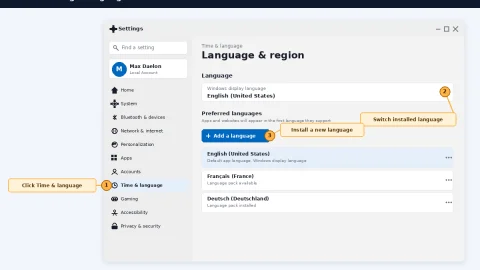 Windows · Windows 11 Change Language: The Complete Guide for Display, Keyboard, and System Locale
Office · Microsoft Office Error Code 147-0: Why It Happens and How to Fix the Click-to-Run Lock
Office · Microsoft Office Trial: What You Get, How to Cancel, and When to Just Buy a Key
Pay once, get the key with instant delivery to your email and activate with our step-by-step guide.