Short answer: Unable to reach Windows activation servers: Windows sent its activation request and got no answer. We'd check the connection, the date and time, the firewall and any VPN first. Microsoft's servers may also be down for a while. Then retry, run the Activation troubleshooter, or use offline activation through Microsoft's Product Activation portal.
Unable to reach Windows activation servers means Windows asked Microsoft, or your company’s KMS host, to confirm the license and got no answer. Usually the connection, the clock or a firewall is in the way; sometimes the server side is down. We’d check those first, then retry or use offline activation through the Product Activation portal.
- Open a few websites to confirm the connection.
- Set date, time and time zone automatically.
- Disconnect any VPN, or try another network.
- Give Microsoft’s servers some time.
- Run the Activation troubleshooter.
- Still failing? Offline activation through Microsoft’s Product Activation portal.
What “unable to reach Windows activation servers” tells you
Windows activates against a server. For a retail or OEM key, that’s Microsoft. For a company PC with a volume license, it’s the KMS host on the company network.
Either way, the request didn’t get an answer. Nothing bad about the key yet. Nobody has judged it.
The wording shifts with the situation. Three you’ll meet:
| Message | When it shows | Where to look |
|---|---|---|
| Unable to reach Windows activation servers | Activation page, no answer from the server | The codes and checks below |
| We can’t reactivate Windows as our servers aren’t available right now | Reactivation after a hardware change | The hardware change section |
| We can’t activate Windows on this device as we can’t connect to your organization’s activation server | Work or school PC away from the company network, code 0xC004F074 | The work and school section |
Error codes that come with the message
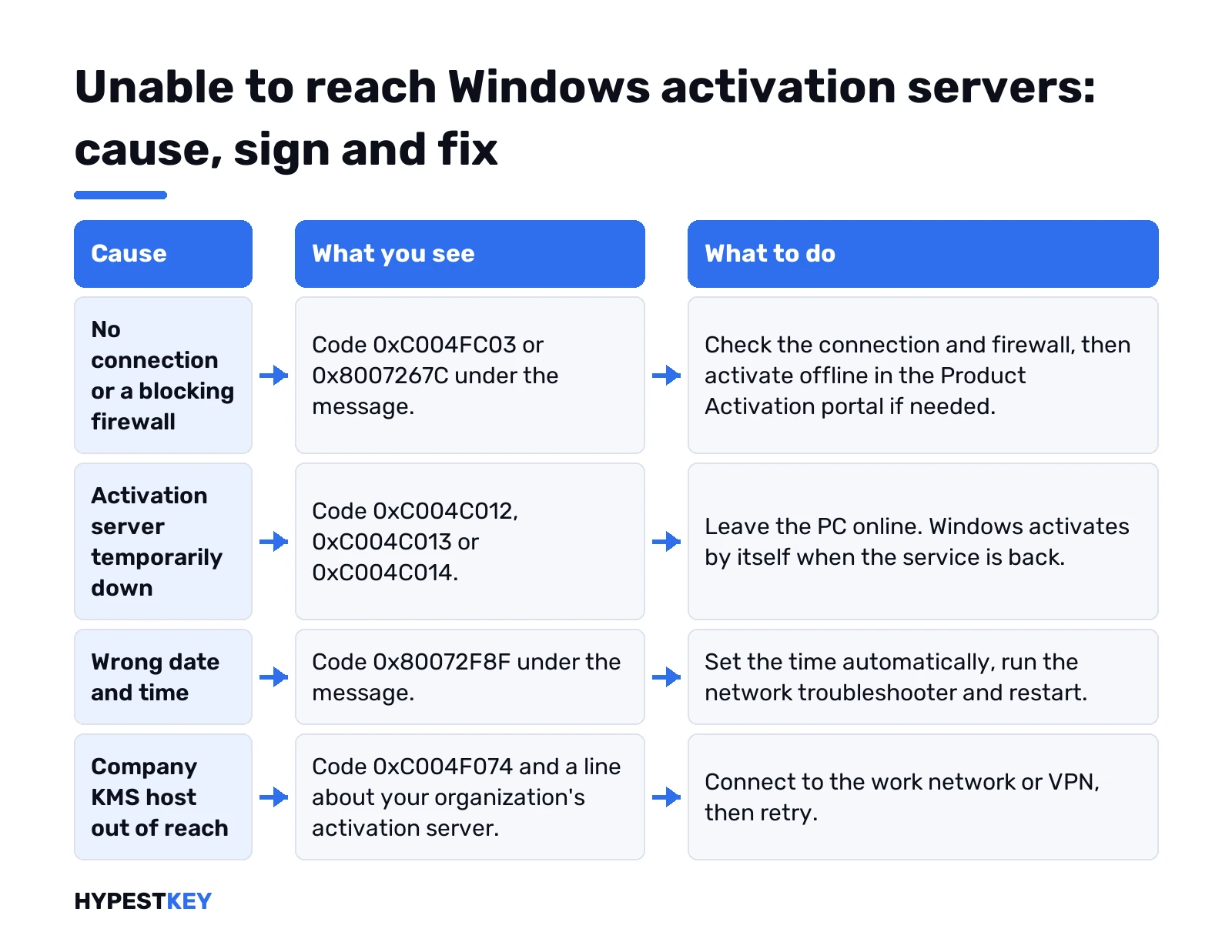
The code under the message tells you which page to open. Each one has its own fix there. Microsoft’s Get help with Windows activation errors page covers most of them too.
| Code | What it points to |
|---|---|
| 0xC004FC03 | No internet, or a firewall in the way |
| 0xC004C012, 0xC004C013, 0xC004C014 | The activation server is temporarily unavailable |
| 0x8007267C | No internet, or the server is busy |
| 0x80072F8F | Wrong date and time |
| 0x80072EE7 | The server name doesn’t resolve |
| 0x80072EE2 | The connection timed out |
| 0xC004F074, 0x8007232B | No KMS host reachable, or a volume key on a home PC |
No code at all, just the sentence? Then the message is about the road to the server, not about one specific fault. Microsoft’s requirements for online activation are short. A working internet connection. A firewall that doesn’t block Windows from activating. A correct date and time. On a work PC, access to the workplace network.
Behind a proxy
Offices, schools and some hotels route traffic through a proxy. That’s a common hiding place for this message.
The catch is Basic authentication. A proxy that asks for a username and password gets no answer, because the activation window has nowhere to type them. So activation fails without ever prompting you. Sometimes with 0x8004FE33 or 0x80004005, sometimes with just the sentence.
Microsoft’s workarounds, in order of effort:
- Offline activation. Phone activation used to be the route here; Microsoft moved it to the Product Activation portal, and the PC itself never goes through the proxy.
- Basic authentication off on the proxy. A job for whoever runs it.
- An exception for the activation addresses, so they pass without a login.
The list of addresses is on Microsoft’s 0x8004FE33 article. A few from it:
activation.sls.microsoft.com
activation-v2.sls.microsoft.com
validation.sls.microsoft.com
validation-v2.sls.microsoft.com
licensing.mp.microsoft.com
go.microsoft.com
login.live.com
One detail admins ask about. Microsoft gives no IP ranges for these servers, only the names. So a firewall rule has to be written by name. Then go through the next sections in order.
Check the connection, clock and firewall
Boring checks first. Windows activation requires an internet connection, and the clock has to be right.
- Connection: open two or three websites. Slow or nothing? Fix that before anything else.
- Clock: Settings, Time & language, Date & time. Turn on automatic time and time zone, then Sync now.
- Firewall: a rule that blocks online activation is how Microsoft explains 0xC004FC03. Turn third-party firewalls off for one test, then back on.
- VPN or proxy: we’d disconnect and retry.
- Another network: a phone hotspot rules out the router.
Names that don’t resolve point to DNS. Our guide to changing DNS servers in Windows 11 covers that part.
Then the troubleshooter. Settings, System, Activation, Troubleshoot. Administrator only, and the button shows only while Windows isn’t activated.
On Windows 10 the Activation page sits under Update & Security instead. Same checks, same order.
When Microsoft’s activation servers are down
Sometimes it really isn’t you. For 0xC004C012 and its two neighbours, Microsoft’s answer is one sentence:
“If the activation server is temporarily unavailable, your copy of Windows will automatically be activated when the service comes back online.”
So leave the PC online and look again later. No click needed from you.
Hammering the button doesn’t help. A request that’s still running can add 0xC004E028, activation already in progress, on top.
Websites, Store and updates all work, and still nothing after a long wait? Then offline activation through the portal is worth a try.
Unable to reach Windows activation servers after a hardware change
New motherboard, fresh install, and Windows says the servers aren’t available. Here the reactivation path matters more than the network.
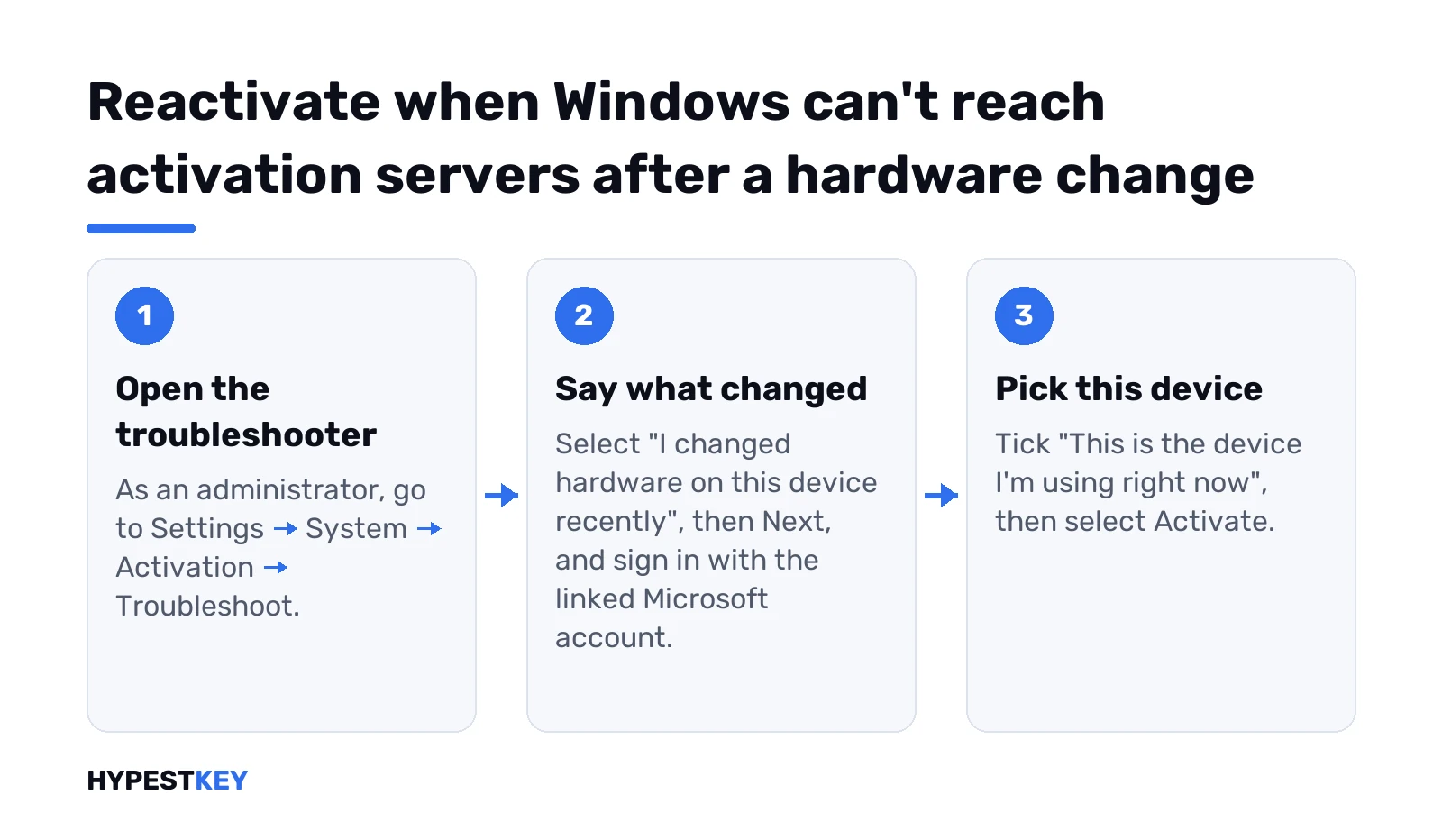
Microsoft’s steps for a digital license:
- Sign in as an administrator, online.
- Settings, System, Activation, Troubleshoot.
- “I changed hardware on this device recently”, then Next.
- Sign in with the Microsoft account linked to the license.
- Tick “This is the device I’m using right now”, then Activate.
It works only if the account was linked before the change, and only for the same edition. Pro stays Pro. Home stays Home.
Account never linked? With a product key, type it under Change product key instead. Microsoft’s reactivation after a hardware change article has the full list of reasons it can fail.
Our guides on activation after a hardware change and 0xC0EA000A, try again later cover the codes you may see next.
Work and school PCs: your organization’s activation server
Company laptops activate through a KMS host on the company network. Away from it, the PC can’t find that host. Microsoft’s text for the case:
We can't activate Windows on this device as we can't connect to your organization's activation server. Make sure you're connected to your organization's network and try again. Error code: 0xC004F074.Back on the office network or the company VPN, the next retry usually works. We’d not worry about a few days away: KMS clients try to renew every seven days, and an activation stays valid for 180 days.
Admins, the client finds the host through a DNS SRV record and talks to it on TCP port 1688. Our KMS activation guide explains the rest.
Your own PC, never part of a company? Then a volume key sits on it. A retail key for your edition fixes that for good.
Windows Server and Azure virtual machines
Same rules for servers. With a retail key, a server activates online with Microsoft. With a generic KMS client key, it looks for a KMS host.
No host on your network? Then that server keeps saying it can’t reach the activation server. Generic keys only install an edition; they never activate it alone. Our Windows Server 2022 activation guide walks through each edition, and activating Windows Server via DISM covers evaluation copies.
Windows Server 2016 and 2022 behave alike here. The key type decides where the server goes for activation, not the version. We’d run the activation status line first to see which key type is installed.
Azure VMs are their own case. They activate against Azure’s KMS at azkms.core.windows.net on port 1688. Custom routes or firewall rules that miss the two current KMS addresses block it, and the VM shows the 0xC004F074 message.
Microsoft’s check, in PowerShell on the VM:
Test-NetConnection azkms.core.windows.net -Port 1688
Test-NetConnection 20.118.99.224 -Port 1688
Test-NetConnection 40.83.235.53 -Port 1688
Any of them failing? Add both addresses on port 1688 to the route or the firewall rule.
Offline activation: the Product Activation portal
Internet activation keeps failing and you need Windows activated today? Years ago? A phone call and slui 4. That route is gone. Microsoft moved telephone activation online, to the Product Activation portal at aka.ms/aoh.
The PC that can’t reach the activation servers doesn’t need to reach the portal. Any other device with internet does it, a phone too.
On the PC first, Command Prompt as administrator. This shows the installation ID:
slmgr /dti- Open aka.ms/aoh on the other device.
- Pass the CAPTCHA, then Proceed to Sign In.
- A Microsoft account or a work or school account.
- Activate a Microsoft Product. Windows, then your version.
- Type in the installation ID and note the confirmation ID you get back.
Back on the PC. Your confirmation ID goes after the switch:
slmgr /atp ConfirmationIDThe sign-in doesn’t tie the account to your license. It only guards the portal. Retail, OEM and volume licenses all go through it.
Our page on activating Windows without internet goes through it in more detail.
Two exceptions from Microsoft: Windows 11 Pro Education and Pro for Workstations must activate over the internet.
Retry and check from the command line
Network fixed? We’d ask for activation right away instead of waiting for the next automatic try. Command Prompt, as administrator:
slmgr /atoThen read the state. Licensed is what you want to see:
slmgr.vbs /dli
slmgr.vbs /xpr
On a company PC the detailed output also names the KMS machine the client used last. Handy when IT asks.
Every switch is in our slmgr commands list. Prefer Settings? See how to check Windows activation status.
Mistakes that make it worse
- A new key bought before any server has even looked at the old one.
- A clean reinstall. Same servers afterwards, same answer.
- The firewall switched off for a test and left off.
- Generic keys from a list. They install an edition and never activate it.
- Unofficial “activation fix” tools from the internet. They change system files and bring errors of their own.
Still nothing after all of it? Microsoft support is the next stop; our page on contacting Microsoft support lists the ways in.
Key the problem after all? Our Windows 11 Pro and Windows 11 Home keys are retail licenses, instant to email.
FAQ
Are Microsoft's activation servers down right now?
Sometimes. With codes 0xC004C012 to 0xC004C014 the server side is temporarily unavailable, and Windows activates by itself once it's back.
Can I activate Windows without internet?
Yes. The phone line is gone, but the Product Activation portal at aka.ms/aoh works from any other device: installation ID in, confirmation ID back.
Is my product key bad if I see this?
Not from this message alone. No server has judged the key yet, so it may be perfectly fine.
Why does it happen after I replaced the motherboard?
Windows can't match the license to the new hardware. Reactivate with the Activation troubleshooter and the Microsoft account linked to the license.
Does a VPN cause it?
It can get in the way. We'd disconnect the VPN and retry. On a company laptop it's the reverse: the VPN is what reaches the KMS host.
My server says it can't reach the activation server. Why?
With a generic KMS client key it looks for a KMS host, and there's none on your network. A retail key activates online with Microsoft instead.