Short answer: The 0xC004FC03 activation error appears when Windows isn't connected to the internet or a firewall blocks online activation. I'd check the connection in a browser, disconnect VPN and proxy, pause a third-party firewall and press Activate again. With no way online, phone activation does the job.
The 0xC004FC03 activation error appears when Windows tries to activate online and can’t get through. The PC isn’t connected, or a firewall is in the way.
| What you notice | First move |
|---|---|
| No websites open either | Fix the connection, then press Activate again |
| Websites open, activation doesn’t | Look at the firewall, the VPN and the security suite |
| Office or school network | The network filters it; use another network or ask the admin |
| No way to get online today | Activate by phone |
The message under the code says as much: “Windows can’t activate. Try again later.” Your key hasn’t been judged yet. It never reached the server.
What 0xC004FC03 stands for
Microsoft’s activation errors page names two reasons.
- You’re not connected to the internet.
- Your firewall settings are preventing Windows from completing the activation process online.
Its advice comes in two steps. Make sure you’re connected and the firewall isn’t blocking Windows. If that doesn’t do it, activate by phone.
Activation runs as a short exchange over a secure web connection. Anything that filters, redirects or inspects that kind of traffic can break it.
Causes
| Cause | Detail |
|---|---|
| No connection | Wi-Fi not joined after a fresh install, missing network driver, flight mode |
| Sign-in page not passed | Hotel, train and campus Wi-Fi hold all traffic until you accept their terms in a browser |
| Third-party firewall | A security suite that blocks system services until you allow them |
| Strict router or parental filter | Microsoft’s activation addresses are on a block list |
| VPN or proxy | Traffic leaves through a server that Microsoft or your network refuses |
| Company network | Outbound traffic goes through a proxy that asks for a login |
| Servers busy | Rare, and gone an hour later |
How to fix the 0xC004FC03 activation error
Go from the simple to the less simple. Press Activate after each step.
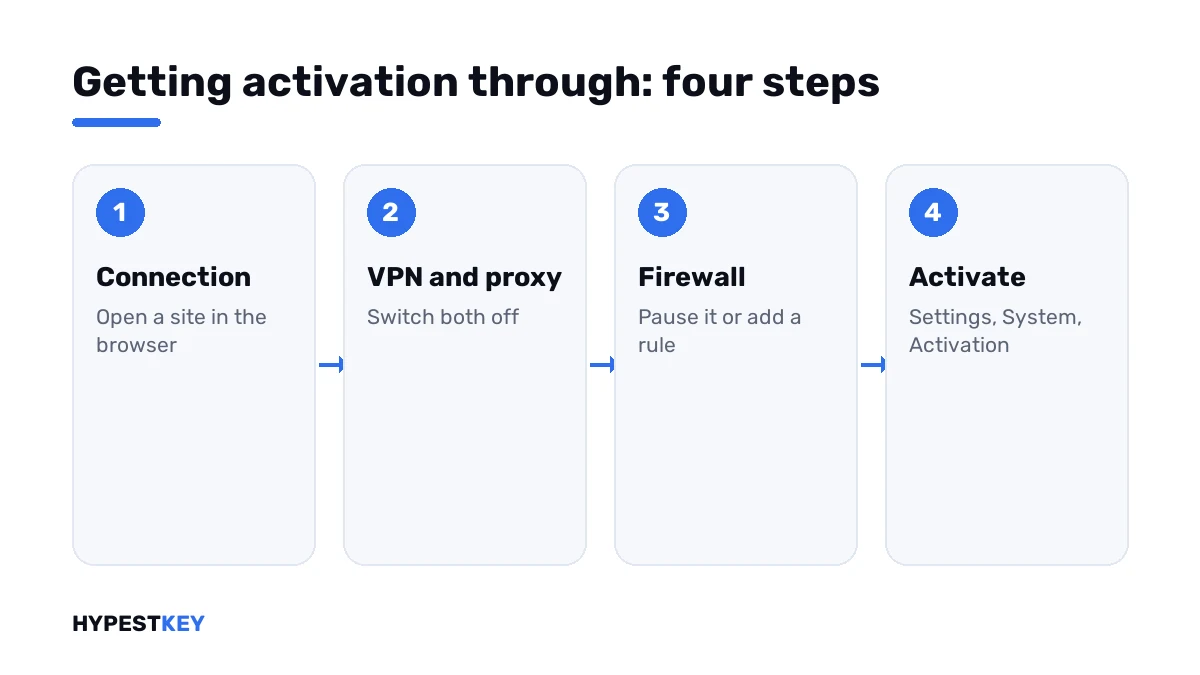
- Open a browser and load two or three sites, including a sign-in page if the network has one.
- Disconnect any VPN and switch off a manual proxy under Settings, Network and internet, Proxy.
- Pause the firewall of your security suite for a minute, or add an allow rule for Windows activation.
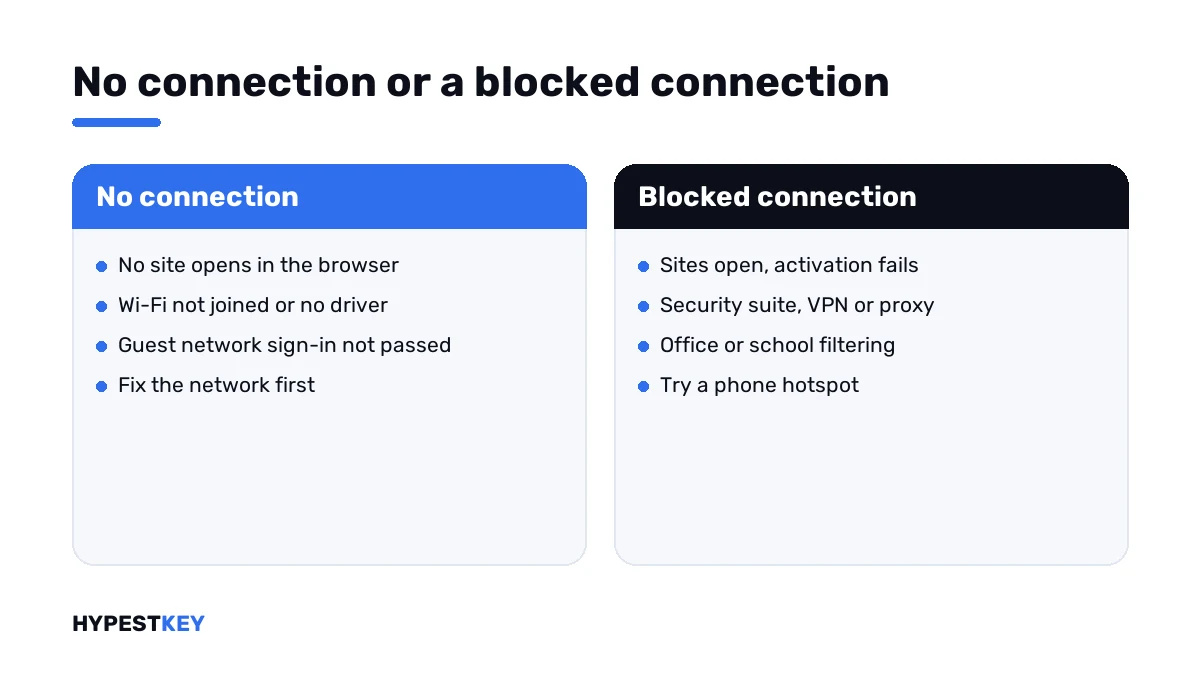
- Try a different network; a phone hotspot is the quickest test.
- Run the network troubleshooter, then restart the PC.
- Open Settings, System, Activation and press Activate, or run the activation line.
- Still stuck: start phone activation and follow the voice menu.
ping www.microsoft.com
ipconfig /flushdns
slmgr /ato
slui 4| Line | What it does |
|---|---|
ping www.microsoft.com |
Shows whether the name resolves at all; some servers don’t answer pings, so a timeout alone proves little |
ipconfig /flushdns |
Empties the local name cache |
slmgr /ato |
Asks for online activation |
slui 4 |
Opens phone activation |
Turn the firewall back on right after the test. If activation only works with it off, add a permanent allow rule there and leave the protection running.
The firewall part
Windows’ own firewall lets activation out by default. I wouldn’t start there unless someone tightened the outbound rules.
| What’s installed | Where to look |
|---|---|
| Only Windows Security | Firewall and network protection, Restore firewalls to default |
| A security suite with its own firewall | Its application or network rules; look for blocked Windows services |
| A router with filtering or parental controls | The block list and the “safe browsing” switches |
| A DNS filter | Its log of blocked names from the last few minutes |
Changed DNS servers recently? Put them back to automatic for a test. Our DNS settings guide shows the page.
No internet on that PC at all
A workshop machine, a PC in a lab, a build that has no network driver yet. Online activation isn’t an option there.
Phone activation was made for this. The PC shows an installation ID, you pass it to Microsoft’s automated line, and you type the confirmation ID that comes back.
Microsoft makes one exception. Pro Education and Pro for Workstations have to activate over the internet, so those PCs need a connection at least once.
A missing Wi-Fi driver after a clean install is a classic. Our guide to Wi-Fi problems in Windows 11 has the driver steps.
On a work or school network
There the filter is deliberate. I wouldn’t switch anything off. Two things usually work.
- Activate once on another network, at home or on a hotspot. Activation stays after you return.
- Ask the administrator. Company PCs often activate through the organisation’s own server, and that’s a different setup.
A company PC that can’t find that server shows other numbers: 0xC004F074 or 0x8007232B.
Is the key the problem
Not with this code. A key that’s refused comes back with a refusal, and you’d see another number.
| Code | What it points at |
|---|---|
| 0xC004FC03 | No connection, or a firewall in the way |
| 0x80072F8F | Wrong date and time, or a secure connection that fails |
| 0xC004C003 | The key is blocked |
| 0xC004C770 | The key is already used on another device |
| 0x803F7001 | No license was found on the device |
All codes side by side: our list of Windows 11 activation errors.
No key on this PC yet? Ours are genuine and arrive instant to email: Windows 11 Pro and Windows 10 Pro. Where it goes is shown in how to activate Windows 11.
Where these steps apply
| System | Notes |
|---|---|
| Windows 11 | All steps as written |
| Windows 10 | Same steps; Activation sits under Settings, Update & Security |
| Pro Education and Pro for Workstations | Online activation only |
| Work devices | Don’t change firewall or proxy settings without IT |
Mistakes we see most
- Blaming the key for a connection problem.
- Leaving the firewall off after the test.
- Activating through a free VPN.
- Forgetting the sign-in page of a guest network.
- Reinstalling Windows when a hotspot would have done it.
Terms used on this page
| Term | Meaning |
|---|---|
| Online activation | A short exchange between Windows and Microsoft’s servers |
| Firewall | Software or a device that decides which connections may pass |
| Proxy | A server that relays your web traffic |
| Sign-in page | The page a guest network shows before it lets traffic through |
| Installation ID | The number your PC shows for phone activation |
| Confirmation ID | The number the phone line gives back |
FAQ
What does error 0xC004FC03 mean?
Windows couldn't complete activation online. Microsoft names two reasons: no internet connection, or firewall settings that stop the activation process. The key itself hasn't been checked, so I'd look at the network first.
How do I fix 0xC004FC03?
Make sure websites open in a browser. Disconnect any VPN, switch off a manual proxy and pause a third-party firewall for the test. Then press Activate under Settings, System, Activation.
Does Windows Defender Firewall block activation?
Not with its default rules. We'd only suspect it if someone tightened the outbound rules. In that case, the Restore firewalls to default link in Windows Security puts them back.
Can I activate Windows without an internet connection?
Yes, by phone. The PC shows an installation ID and the automated line returns a confirmation ID. Microsoft excludes two editions from this. Pro Education and Pro for Workstations activate over the internet only.
The message says "Try again later". Should I just wait?
Once, yes. Busy servers do happen, and an hour later it works. If the code is still there the next day, the cause is on your side of the connection. I'd test with a phone hotspot.
Is my key bad if I get 0xC004FC03?
No. A bad key gets an answer from Microsoft, and the answer has its own code. This one shows that no answer arrived. We'd only look at the key after activation gets through.
Why does it fail on my office network but work at home?
Office networks filter outbound traffic and often route it through a proxy. Activation can't pass without the right exceptions. I'd activate at home once, or ask the administrator how company PCs are meant to activate.