Short answer: 0xC004F015 activation error: the KMS host can't activate this client, since its host key doesn't cover it. Microsoft's example? A Windows 10 host key on an older Windows Server host. We'd install the server group key from VLSC plus the host update, then let the clients activate again.
The 0xC004F015 activation error means the KMS host your PC reached can’t activate it: the host runs a key that doesn’t cover this Windows. In Microsoft’s own example, a Windows 10 host key sits on an older server. The client is fine. We’d fix the host key and the host’s updates.
| Situation | Fix |
|---|---|
| Windows 10 host key on a Server 2012 R2 or 2008 R2 host | Install the “Windows Srv 2012R2 DataCtr/Std KMS for Windows 10” key from VLSC |
| Host missing the update for newer clients | Install the update Microsoft lists for that host |
| Host key group doesn’t list the client | Install a host key from a newer group |
| Home PC with a volume license | Change to a retail key for your edition |
What the 0xC004F015 activation error stands for
Microsoft documents it as an event, logged as Event ID 12290. The text:
0xC004F015
Error details 0xc004f042 - SL_E_VL_KEY_MANAGEMENT_SERVICE_ID_MISMATCH
The Software Licensing Service determined that the specified Key Management Service (KMS) cannot be used.
Look at the second line. It carries 0xC004F042, the code for a KMS host that can’t be used by this client. Same story, another number.
In Microsoft’s article the client runs a volume-licensed Windows 10 Enterprise. It can’t activate, and the host isn’t broken. Wrong key for the job, that’s all.
The source is Microsoft’s article on error 0xC004F015, KB 3086418.
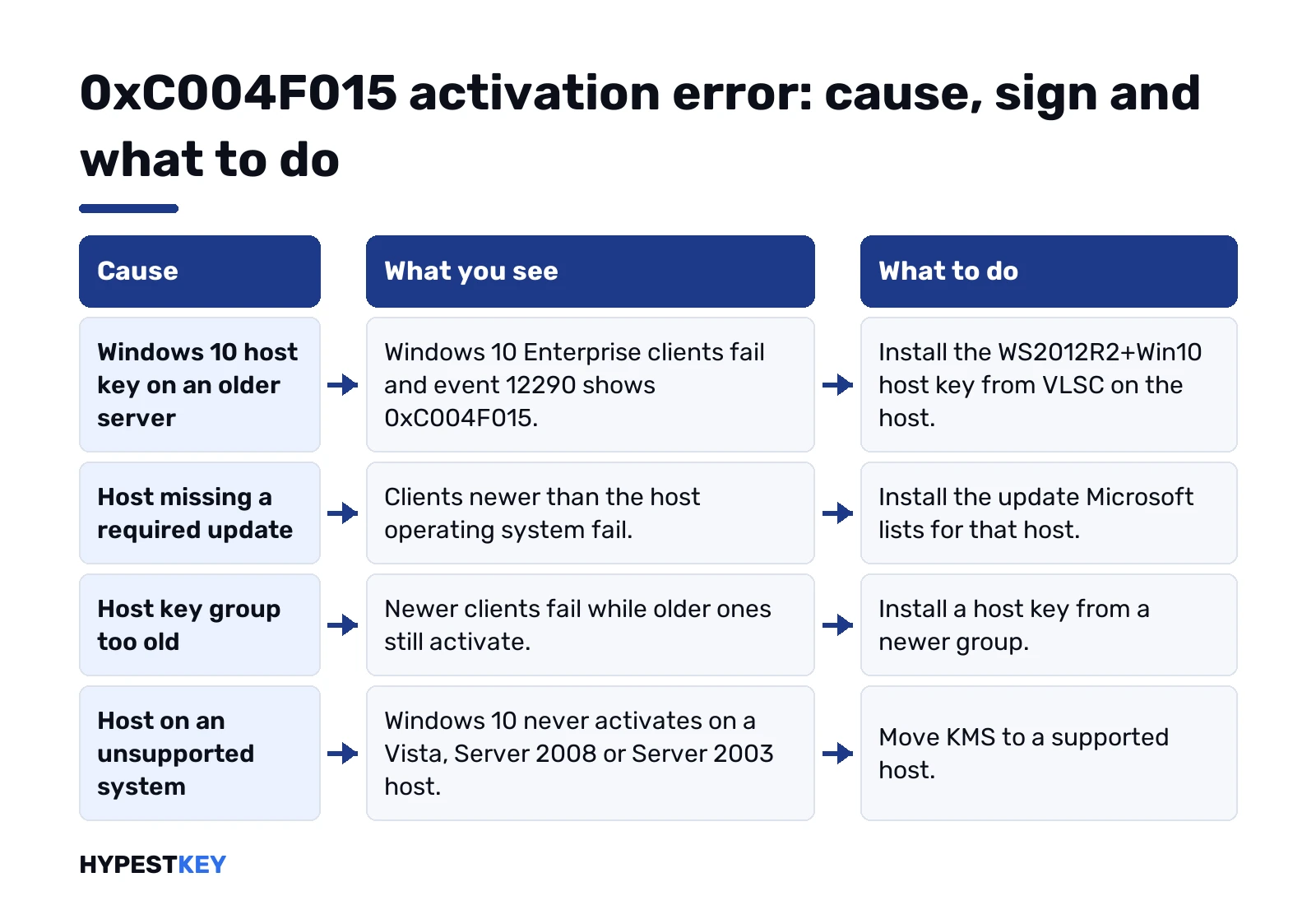
Cause, sign and fix for 0xC004F015
| Cause | What you see | Fix |
|---|---|---|
| Windows 10 host key on a Server 2012 R2 or 2008 R2 host | Windows 10 Enterprise clients fail; event 12290 shows 0xC004F015 | Install the WS2012R2+Win10 host key from VLSC |
| Host missing a required update | Clients newer than the host OS fail | Install the update listed for that host |
| Host key group doesn’t list the client edition | Newer clients fail, older ones activate | Install a host key from a newer group |
| Host on Vista, Server 2008 or Server 2003 | Windows 10 never activates there | Move KMS to a supported host |
One more detail from Microsoft. A KMS host on Windows client shouldn’t run into this at all.
Which host key covers which Windows
A KMS host activates what its host key covers. Microsoft calls that key a CSVLK. Server hosts can activate servers and clients. A host on Windows client activates client editions only.
| Host key group | Can be hosted on | Activates |
|---|---|---|
| Windows Server 2025 | Server 2025, 2022, 2019 | Server 2025 down to 2008; Windows 11, Enterprise LTSC 2024 included; Windows 10, 8.1 and 7 Pro or Enterprise |
| Windows Server 2022 | Server 2022, 2019, 2016 | Server 2022 down to 2008; Windows 11; Windows 10, 8.1 and 7 Pro or Enterprise |
| Windows Server 2019 | Server 2019, 2016, 2012 R2 | Server 2019 down to 2008; Windows 10, 8.1 and 7 Pro or Enterprise; no Windows 11 |
| Windows Server 2016 | Server 2016, 2012 R2, 2012 | Server 2016 down to 2008; Windows 10 with LTSB 2015 and 2016; 8.1 and 7 Pro or Enterprise |
| Windows 10 | Windows 10, 8.1, 7 | Windows 10 client editions, 8.1 and 7 Pro or Enterprise; no servers |
Read across the row of your host key. Client missing from it? The host turns it away. Full table: Microsoft’s KMS activation planning page.
Clients carry generic KMS client keys, listed in our Windows Server KMS keys page. Those install an edition. They don’t activate it without a host.
How to fix the 0xC004F015 activation error on the KMS host
Microsoft’s fix runs through the Volume Licensing Service Center. You’ll need access to your organization’s agreement there.
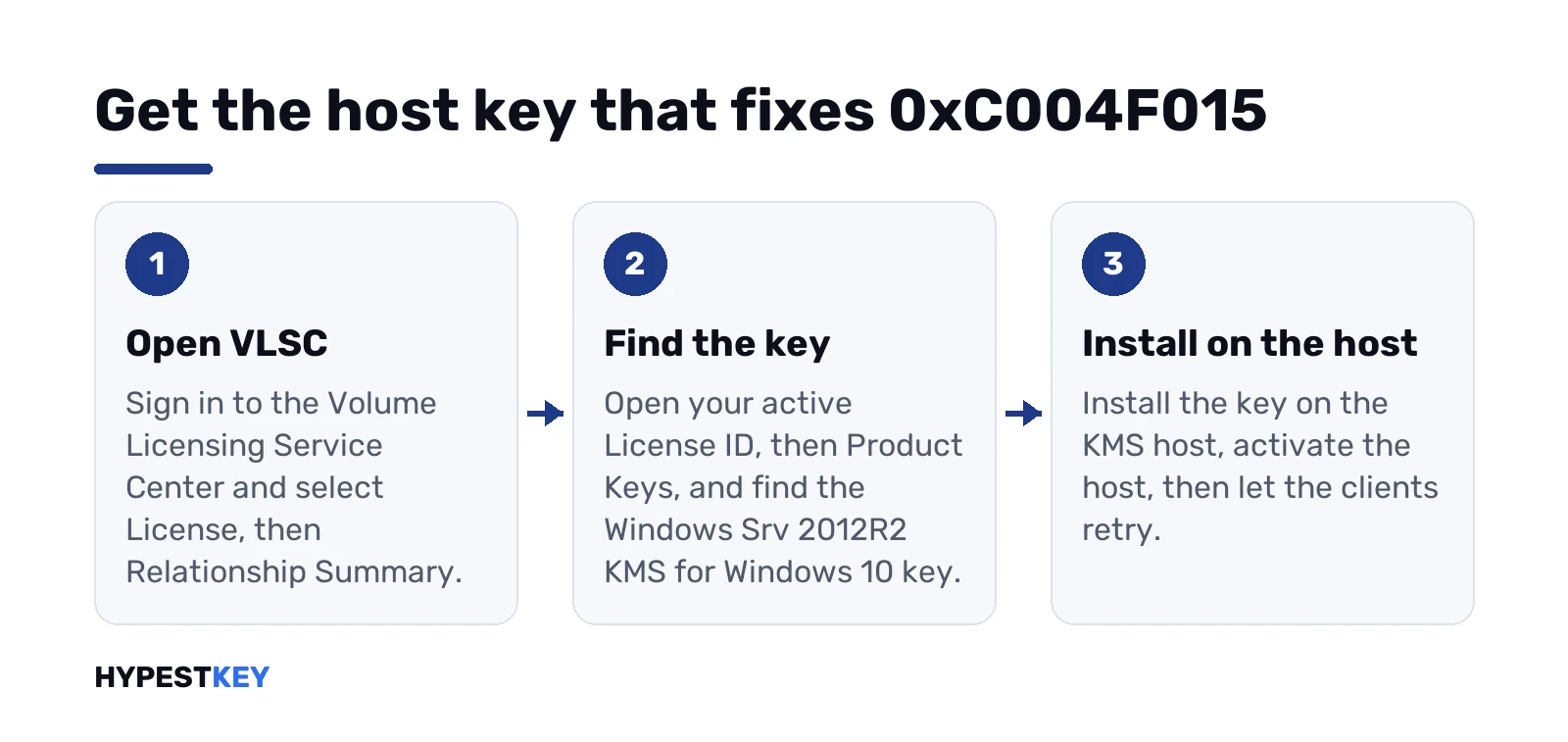
- Sign in to VLSC.
- License, then Relationship Summary.
- Open the License ID of your current active license.
- Product Keys.
- Find “Windows Srv 2012R2 DataCtr/Std KMS for Windows 10”.
- Install that key on the KMS host.
Prerequisites first. A Server 2012 R2 host needs the Volume Activation role and update 3172614. On Server 2008 R2 it’s the same role plus update 3079821.
On the host, Command Prompt as administrator. Install the key, activate the host, check it:
slmgr /ipk <KMS host key>
slmgr /ato
slmgr /dlv
Restart the Software Protection service or the server after the key goes in; Microsoft asks for that to keep the license service stable. License Status should read Licensed.
Then the clients. Unactivated ones retry by themselves every two hours. Impatient? On a client:
slmgr.vbs /atoOur slmgr commands list explains every switch used here.
Updates the KMS host needs
A host activates Windows newer than itself only after the right update. Microsoft’s minimum list, without the release dates:
| Host runs | To activate | Minimum update |
|---|---|---|
| Windows Server 2022 | Server 2025 | KB5034765 or a later cumulative update |
| Windows Server 2019 | Server 2025 | KB5034768 or later |
| Windows Server 2019 | Server 2022 | KB5003646 or later |
| Windows Server 2016 | Server 2022, 2019 | KB5003638 or later |
| Windows Server 2016 | Server 2019 | KB4478877 or later |
| Windows Server 2012 R2 | Server 2019, 2016, Windows 10 | KB4467695 or a later monthly rollup |
| Windows Server 2012 R2 | Server 2016, Windows 10 | KB3172614 or a later monthly rollup |
| Windows Server 2012 | Server 2016, 2012 R2, Windows 10 | KB3172615 or a later monthly rollup |
| Windows Server 2008 R2 | Server 2012 R2, 2012, Windows 10 | KB3079821 |
| Windows 8.1 | Windows 10 | KB3172614 or a later monthly rollup |
| Windows 7 | Windows 10 | KB3079821 |
These are minimums. We’d put the newest cumulative update the host can get on it anyway.
The Version Information line at the top of the host’s detailed slmgr output tells you if the service is current enough for the key you plan to install. We check it before touching keys.
Event 12290 and slmgr output on the host
Every client that knocks leaves event 12290 on the host. Event Viewer, Applications and Services Logs, Key Management Service.
What it holds: the minimum count the client needs, its CMID, its license state and the time left in it. Found a 12290 for that client? Then it got through. The refusal is about the key, not the network.
No 12290 at all? Different problem. Network, DNS or a blocked TCP port 1688, which is 0xC004F074 territory.
In the host’s detailed slmgr output, four lines matter:
- Name: the edition the host runs.
- Description: which host key is installed.
- License Status: should say Licensed.
- Current Count: up to 50. Clients need 25, servers 5.
0xC004F015 with Windows 11 clients
Look at the 2019 row again. It lists Windows 10 clients and stops there. Windows 11 shows up only from the 2022 group on.
So a host key from the 2019 group won’t activate Windows 11. We’d install a host key from a newer group, on a host that the table allows.
The same logic runs the other way. A Windows 10 host key never activates servers, whatever machine it sits on.
On a home PC or a single computer
Seeing this code on your own laptop? Then Windows on it runs a volume license that expects a company KMS host.
No host to fix there. You’d swap in a retail or OEM key for the edition you run: Settings, System, Activation, Change product key.
Edition first, since the key has to match it. Our guide to retail, OEM and volume licenses explains why a volume key misbehaves at home. After the change, check the activation status once.
Neighbouring KMS codes
- 0xC004F042: the host can’t serve this product.
- 0xC004F074: no KMS host could be contacted.
- 0xC004F038: the count on the host is too low.
- 0xC004F039: KMS didn’t answer the request.
- 0xC004F041: the host itself isn’t activated.
- 0xC004C008: the host key hit its activation limit.
New to all this? How KMS activation works covers hosts, counts and renewal.
Mistakes that bring 0xC004F015 back
- A Windows 10 host key on a server host. Server hosts want a server group key.
- No host update. The key alone isn’t enough on an older server.
- Too many reactivations. A host key activates up to six hosts, and the same host nine more times.
- New keys on the clients. They’re fine; the host is the problem.
Outside a KMS network, a retail key skips all of this. Ours: Windows 11 Pro for a PC, Windows Server 2022 Standard for a server, instant to email.
FAQ
Can I fix 0xC004F015 from the client PC?
No. The client is fine. The host key or the host updates need fixing, so this lands with whoever runs the KMS server.
Where do I find the right KMS host key?
In the Volume Licensing Service Center, under License, Relationship Summary and Product Keys for your active license.
Does the error show up on Windows 11?
It can. Older host key groups stop at Windows 10. For Windows 11 clients we'd install a newer server group key.
Is it the same as 0xC004F042?
Related. The 0xC004F015 event carries 0xC004F042 in its details, and both say the host can't serve this client.
My home PC shows it. What now?
Your Windows has a volume license that expects a company host. Change the key in Settings to a retail key for your edition.
Do the clients need a new key after the host fix?
No. They keep their generic KMS client key and activate on their next retry, or right away after an activation command.