Short answer: The 0xC004F041 activation error says the Key Management Server is not activated. The fix is on the KMS host: install the organisation's KMS host key and activate it with Microsoft, online or offline through the Product Activation portal. On a home PC, we'd replace the volume key with a retail or OEM key.
The 0xC004F041 activation error shows up when the KMS server exists and answers, but hasn’t been activated itself. A host that isn’t activated can’t activate anyone else. All of the fix happens on the KMS host, in an administrator Command Prompt. We’d test on a client afterwards.
| Who you are | What to do |
|---|---|
| Administrator of the KMS host | Install the KMS host key and activate the host, online or offline through Microsoft’s Product Activation portal |
| User of a company PC | Report the code to IT; nothing on your PC fixes it |
| Home user | Your PC holds a KMS client key meant for a company network; replace the volume key |
Clients can only wait. The administrator has a short job to do.
Got a different code on screen? Look it up in our error code lookup.
What the 0xC004F041 activation error stands for
The message: “The Software Protection Service determined that the Key Management Server is not activated. KMS needs to be activated.”
Microsoft’s activation error codes reference gives the cause without detours. The KMS host hasn’t been activated.
The solution is equally short. Activate the KMS host online, or offline. Microsoft’s page still says “telephone” there. That route now runs through its Product Activation portal, aka.ms/aoh, instead of a call.
Causes of the 0xC004F041 activation error
| Cause | Detail |
|---|---|
| New host, setup not finished | The host key was installed and the activation step was skipped |
| Host can’t reach Microsoft | Servers often sit behind a proxy or without internet access |
| Host rebuilt or moved | New hardware or a new virtual machine, and the old activation didn’t come along |
| Host key out of activations | A KMS host key can only be activated a limited number of times |
| Wrong machine answers | Clients reach a test server that was never meant to go live |
How to fix the 0xC004F041 activation error
All of it happens on the KMS host, in an administrator Command Prompt.
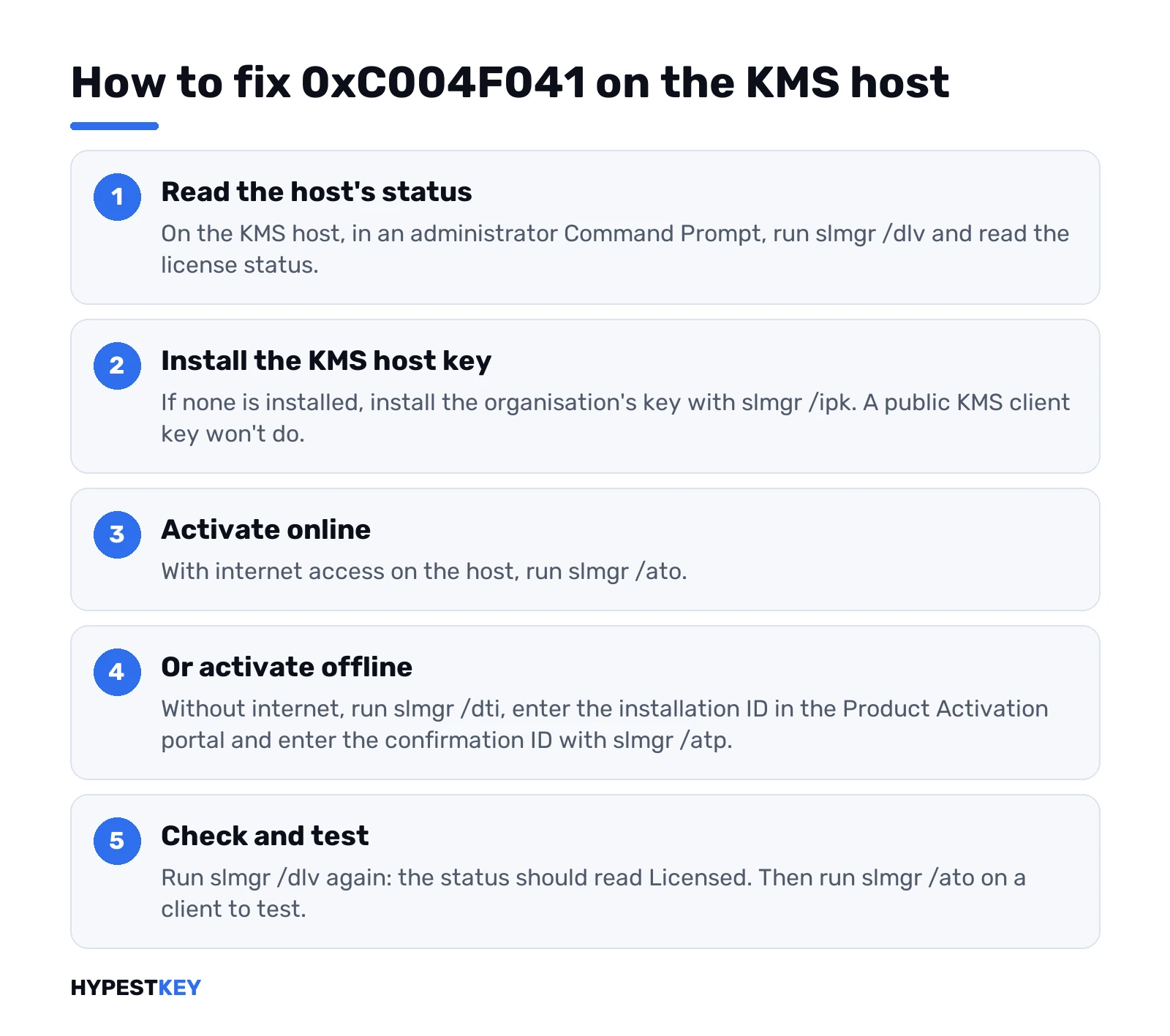
- Run the detailed license line and read the license status of the host.
- If no KMS host key is installed, install the organisation’s key with the install line.
- With internet access on the host, run the activation line.
- Without internet access, show the installation ID. On a phone or another PC, open the Product Activation portal and get the confirmation ID for it.
- Enter the confirmation ID with the confirmation line. The full walk-through is in our offline activation guide.
- Run the detailed license line again; the status should read Licensed.
- On a client, run the activation line to test.
slmgr /dlv
slmgr /ipk XXXXX-XXXXX-XXXXX-XXXXX-XXXXX
slmgr /ato
slmgr /dti
slmgr /atp CONFIRMATION-ID| Line | What it does on the host |
|---|---|
slmgr /dlv |
Shows the license status, the KMS status and the current count |
slmgr /ipk |
Installs the KMS host key |
slmgr /ato |
Activates the host online |
slmgr /dti |
Shows the installation ID for offline activation |
slmgr /atp |
Activates the host with the confirmation ID |
The key for this job is the KMS host key from the organisation’s volume licensing portal. A KMS client key won’t do. That one is public and belongs on the clients.
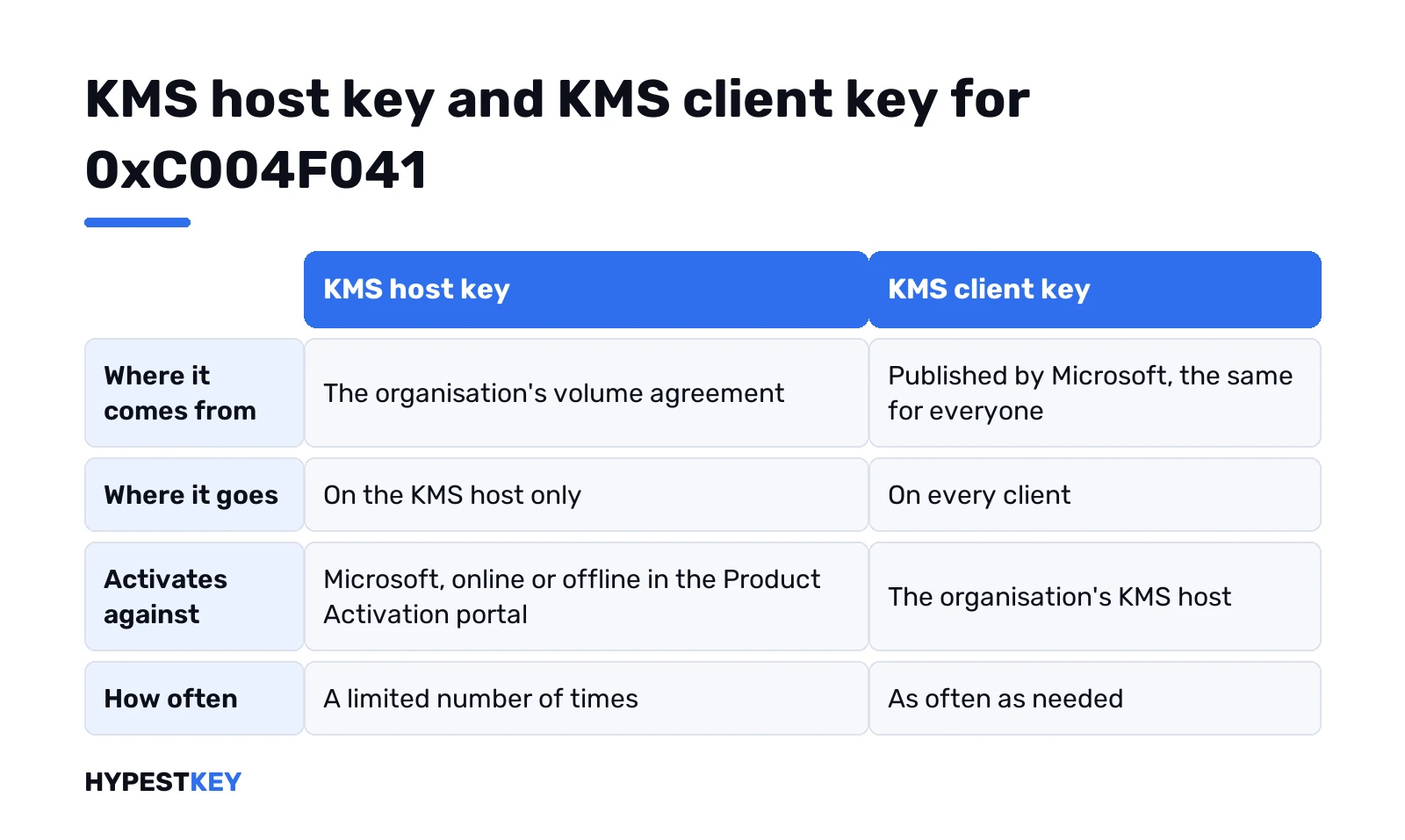
Host key and client key
The two get mixed up more than anything else in volume activation.
| KMS host key | KMS client key | |
|---|---|---|
| Where it comes from | The organisation’s volume agreement | Published by Microsoft, the same for everyone |
| Where it goes | On the KMS host only | On every client |
| Activates against | Microsoft, online or through the Product Activation portal | The organisation’s KMS host |
| How often | A limited number of times | As often as needed |
How limited, exactly? Microsoft’s planning guide gives the numbers. One host key covers the first host plus up to five more. Six in total. Then up to nine reactivations of each host, same key, which we’d keep for rebuilds.
More hosts than that, say one per site? The organisation asks its Microsoft Activation Center for an exception. The Product Activation portal also has a Volume License Key Management option for key-limit requests.
When a host key has used up its activations, Microsoft reports that under 0xC004C008. The request for more goes to the Licensing Activation Centers.
Activating the host with Volume Activation Tools
Prefer windows to command lines? Windows Server has a wizard for the same job. Microsoft’s KMS guide lays it out roughly like this.
- Server Manager. Manage. Add Roles and Features.
- Role-based installation, pick the server, tick Volume Activation Services, finish the wizard.
- Start menu, Windows Administrative Tools, Volume Activation Tools.
- Choose Key Management Service and the computer that acts as host.
- Type the KMS host key under Install your KMS host key, then Commit.
- Leave Activate Product ticked. Online if the server has internet; otherwise the offline option.
- Close, or adjust the KMS options on the last page first.
Same result as the slmgr lines above. Pick one route, not both.
Which machine can be the host
| Host runs | It can activate | Note |
|---|---|---|
| Windows Server | Servers of the same or earlier versions, plus Windows client editions | A client KMS host key can’t be installed here |
| A Windows client edition | Client editions of the same or earlier versions | No servers |
Once configured, the host starts listening for requests at once. Activating clients? Not yet. That’s the next part.
After the host is activated
Clients don’t jump to “activated” at once. Two more things have to be true.
- The host’s count has to reach its floor: 25 Windows clients or 5 servers.
- Each client has to ask again. They retry by themselves, and the activation line speeds it up.
Below the floor, clients get 0xC004F038. That’s progress. The host is answering as it should.
KMS codes on a home PC
You don’t run a KMS host, so this message isn’t about a server of yours. Windows holds a KMS client key. Sometimes a host name too, stored from the PC’s company past.
That host isn’t yours to fix. We wouldn’t wait on it.
slmgr /ckms
slmgr /ipk XXXXX-XXXXX-XXXXX-XXXXX-XXXXX
slmgr /ato
Clear the server name, install a retail or OEM key for the same edition and activate.
Need the key? Ours are genuine and arrive instant to email: Windows 11 Pro and Windows 10 Pro. The steps in Settings are in how to activate Windows 11.
Neighbouring KMS host codes
| Code | What it says |
|---|---|
| 0xC004F041 | The KMS host isn’t activated |
| 0xC004F039 | KMS didn’t respond to the request |
| 0xC004F042 | The host can’t activate this product |
| 0xC004F074 | No KMS host could be contacted |
| 0xC004F038 | The host’s count is too low |
Everything outside KMS is in our list of Windows 11 activation errors.
Where these steps apply
| System | Notes |
|---|---|
| Windows Server as KMS host | All host steps; server key types are in our Windows Server 2022 activation guide |
| Windows 11 and Windows 10 as clients | Only the last step; the fix is on the host |
| Office KMS hosts | Same idea with the Office host key and the Office volume license pack |
Volume, retail and preinstalled licenses are compared in Retail vs OEM vs Volume license.
Common mistakes with the 0xC004F041 activation error
- Installing a KMS client key on the host.
- Installing the host key on clients.
- Forgetting the activation step after the key goes in.
- Trying to fix it from a client.
- Expecting clients to activate before the count is reached.
Related guides
Terms used on this page
| Term | Meaning |
|---|---|
| KMS host | The server that activates the organisation’s PCs |
| KMS host key | The organisation’s key that turns a server into a KMS host |
| KMS client key | A public volume key for the PCs that ask the host |
| Installation ID | The number the host shows for offline activation |
| Confirmation ID | The number Microsoft gives back |
| Product Activation portal | Microsoft’s web page for offline activation, aka.ms/aoh, which replaced the phone line |
| Count | How many different machines contacted the host recently |
FAQ
What does error 0xC004F041 mean?
The KMS host that answered hasn't been activated itself. The message says KMS needs to be activated. Until that's done, every client request to this host fails the same way, each time.
How do I fix 0xC004F041?
On the KMS host, install the KMS host key and activate it. Online, or offline through Microsoft's Product Activation portal. Then we'd run the activation line on a client to test.
Can I fix it from the client PC?
No. The client did its part and reached a host. Only the host's administrator can activate the host. On a work PC, we'd report the code to IT.
Which key activates a KMS host?
The organisation's KMS host key from its volume licensing portal. The public KMS client keys are for clients and won't work here. Mixing the two up is one of the most common mistakes here.
The host is activated now, and clients still fail. Why?
Probably the count. A host needs 25 Windows clients or 5 servers before it activates anyone. Below that, clients get a different code. We'd check the count on the host.
Can a KMS host be activated without internet?
Yes, offline. The host shows an installation ID. Microsoft's Product Activation portal, opened on another device, returns a confirmation ID, and one line enters it. No phone call any more.
Why does my home PC show this error?
Windows holds a KMS client key and still asks a company host that isn't activated. That host isn't yours to fix. We'd clear its name and install a retail or OEM key.
How many times can one KMS host key be activated?
Six hosts, per Microsoft. The first one plus up to five more. Each host can then be reactivated up to nine times with the same key. Need more? The organisation asks its Activation Center.