Short answer: MAK vs KMS comes down to where activation happens. A MAK activates each PC once against Microsoft, online or by phone. Every activation spends one from a fixed pool. KMS activates PCs against a host on your own network. We'd pick it only above 25 Windows clients, 5 servers or 5 Office installs.
MAK vs KMS is a choice between two volume activation methods: a MAK activates each PC once against Microsoft’s servers, while KMS activates PCs against a host on your own network and renews every few days. MAK fits small or offline fleets. KMS fits 25 or more Windows PCs on one network.
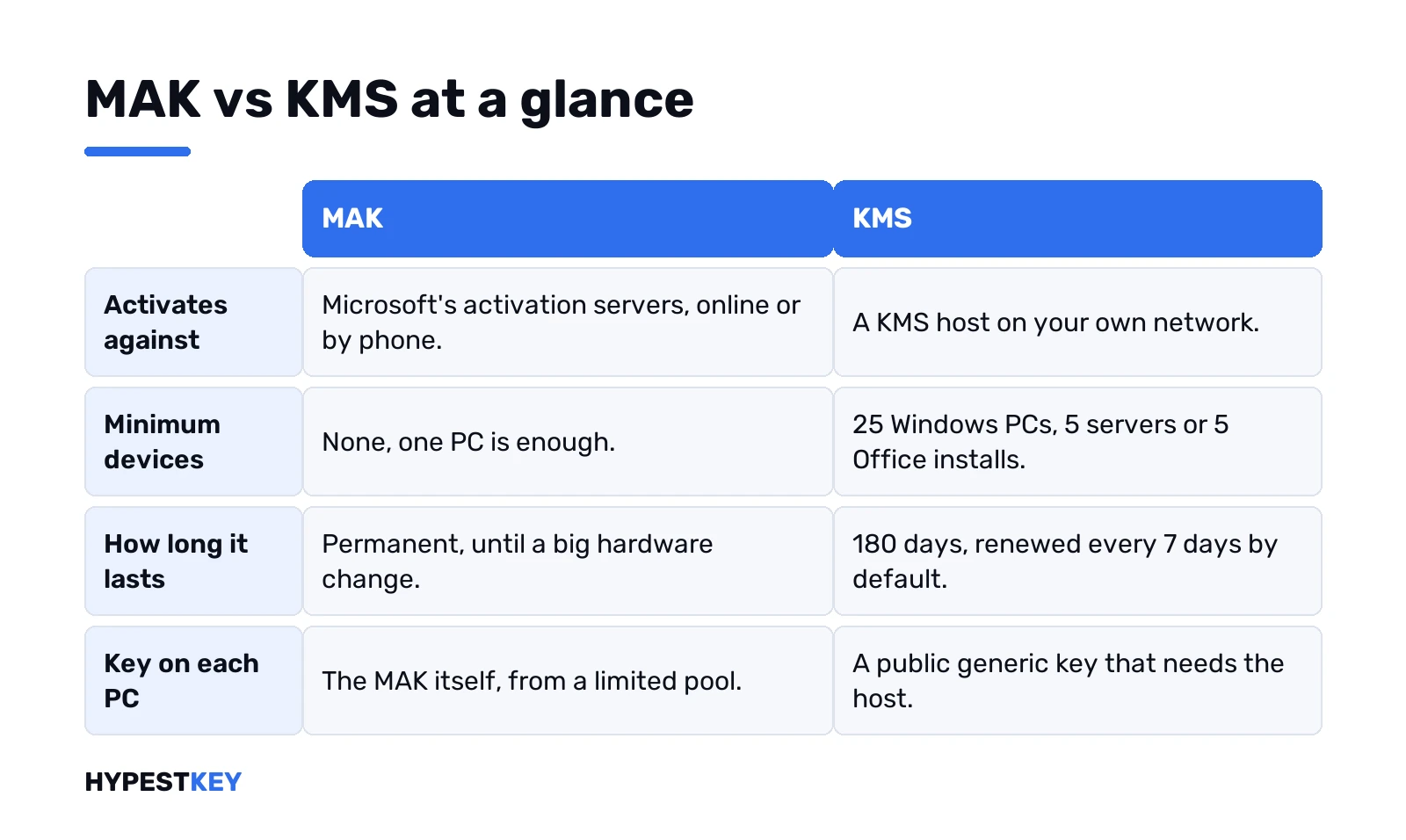
| MAK, Multiple Activation Key | KMS, Key Management Service | |
|---|---|---|
| Activates against | Microsoft’s hosted activation services, online or by phone | A KMS host inside your network |
| Minimum number of devices | None | 25 Windows client PCs, 5 Windows Server machines, 5 Office installs |
| How long activation lasts | Permanent, until the hardware changes a lot | 180 days, renewed automatically every 7 days by default |
| Internet on each PC | Yes, or a phone call, or a proxy through VAMT | No; only the host talks to Microsoft |
| Key on each PC | The MAK itself, typed or pushed by script | A public generic key, the GVLK, often preinstalled |
| Counted against a limit | Yes, every activation uses one from the MAK’s pool | No pool on clients; the host only needs its threshold |
| Typical home | Small offices, laptops that rarely see the office network, isolated sites | Head offices, labs, large networks with DNS |
| Quick check | No expiry date shown | An expiry date shown, pushed forward on each renewal |
MAK vs KMS at a glance
Both come from a volume licensing agreement. Both keys sit in the Volume Licensing Service Center. That’s where the similarity stops.
We think of a MAK as a retail key that works on many PCs. One key, one pool. Each PC spends one activation. KMS turns it around. The PCs carry a public key that does nothing alone, and we’d describe the host as the server that vouches for them. Our retail vs OEM vs volume license guide puts both next to the retail and OEM kinds.
How a MAK activates
Once. That’s the whole appeal.
The PC gets the MAK installed and calls Microsoft’s activation servers over the internet. No internet? Phone it in. Or use VAMT proxy activation. One connected PC sends the requests for the rest. Our phone activation guide walks through the phone route.
- The pool. Each MAK has a preset number of activations, a share of the licenses the organization bought.
- Running out. Microsoft can raise the count by phone. Until then you get the 0xC004C020 activation error.
- After that. No renewals, no host, no DNS records.
- Big hardware changes. Activating again spends another one from the pool.
Microsoft suggests MAK for organizations that don’t meet the KMS requirements, or that just want something simpler. We’d add one more case: laptops that leave the building for months.
How KMS activates
Inside your network. The PCs never talk to Microsoft about activation.
An admin installs a KMS host key on one machine. Microsoft validates it, and the host publishes itself in DNS. Clients with a generic key look up that record. One small packet goes out over TCP port 1688. A count comes back. Count high enough? Activated. Too low, and the client simply tries again later.
- Renewal. Clients check in every 7 days by default.
- Validity. A successful activation is good for 180 days.
- Privacy. Client IDs stay on the host and aren’t sent to Microsoft.
- Hosts. One host can serve an unlimited number of clients. Microsoft still recommends two, for failover.
The host key has a formal name, CSVLK. The client key is the GVLK, published openly by Microsoft. Our KMS activation explainer goes deeper into the host side, and the Windows Server KMS keys list has the generic keys. Those keys install an edition. They don’t activate anything without a host.
The KMS thresholds: 25, 5 and 5
This is where small offices fall off the KMS wagon.
- Windows client PCs. The host needs 25 of them before it activates any.
- Windows Server. 5 machines.
- Office. 5 requests. Office activates on first run once the host has seen at least four earlier ones.
Physical PCs and virtual machines both count. A 10-person office with 10 desktops never reaches 25, so the clients sit there and the 0xC004F038 count error shows up instead. For that office, MAK is the honest answer.
Labs are the other edge. A host remembers requests for 30 days by default. In a lab that rebuilds machines all the time, we’d watch the count closely.
MAK vs KMS for Office
Same two options, slightly different plumbing.
Every volume copy of Office ships with a generic key preinstalled. So KMS needs nothing typed. Office finds the host and activates. With MAK you enter a key on every install. On LTSC 2024 and 2021 we’d put it in configuration.xml for the Office Deployment Tool.
- Internet. Needed for MAK activation of Office LTSC, not for KMS.
- Grace. A KMS copy that misses its 180 days goes out of tolerance for 30 days, with prompts.
- After that. The unlicensed notification state, and a red title bar.
- One host key. A single Office host key covers every volume Office on that host.
A copy that hasn’t activated yet shows its own codes. Our page on 0x4004F00C in Office covers the most common one.
MAK or KMS: which one fits your network
Count the machines, then look at the cables. Microsoft’s own planning table boils down to this:
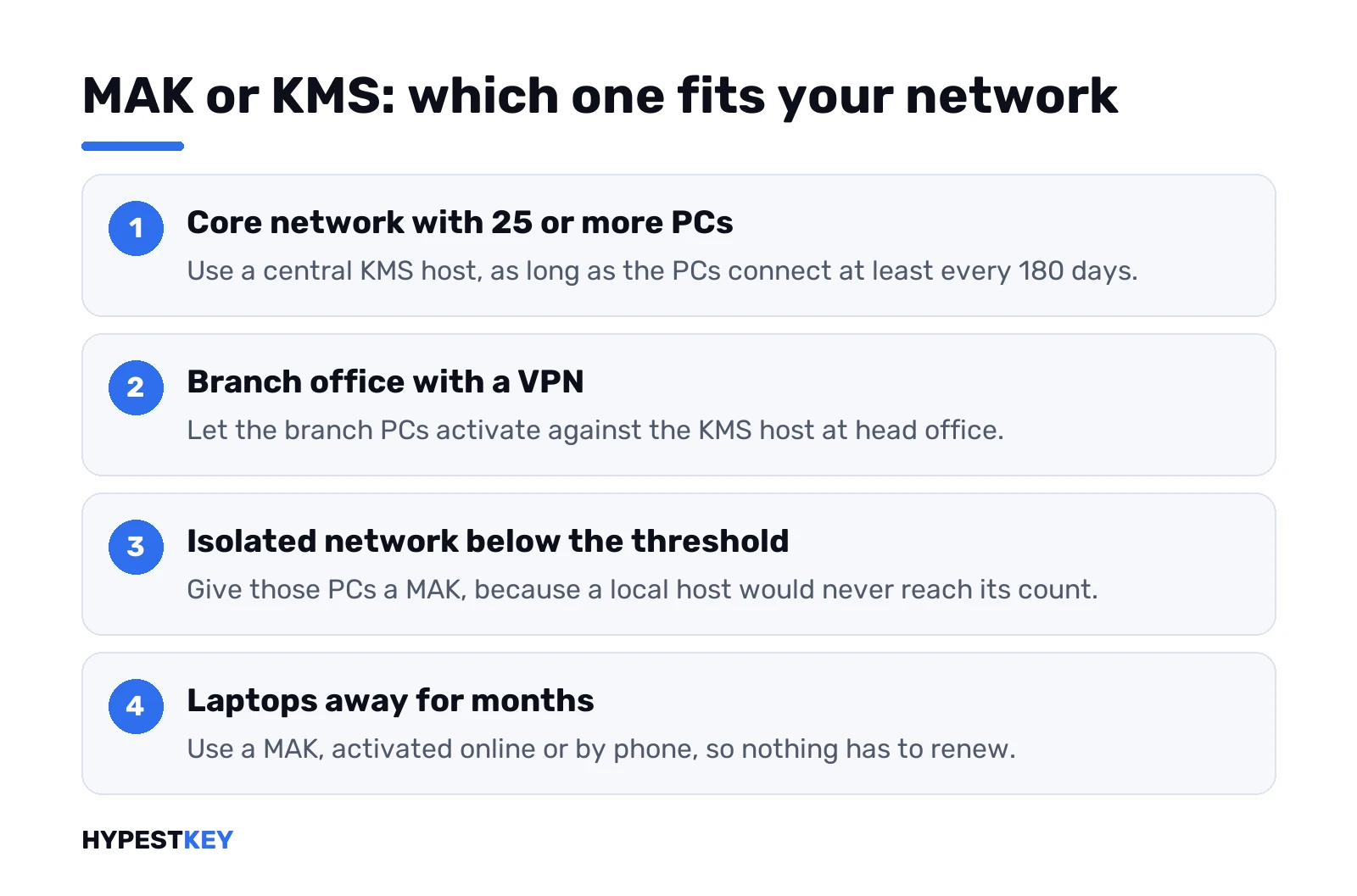
- Core network, 25+ PCs, connecting at least every 180 days. KMS, central.
- Branch office with a VPN to head office. KMS from the core.
- Isolated network that still reaches the threshold. A local KMS host.
- Isolated network below the threshold. MAK.
- PCs that don’t reach the network for 180 days. MAK, online or by phone.
- Fully cut-off machines. MAK independent activation, by phone if needed.
Mixed fleets are normal. Most organizations run both, and that’s fine. You can also give a new laptop a MAK during setup, before it moves to a sealed network.
Our rule of thumb: under 25 Windows PCs, start with MAK. Over that, with working DNS, KMS saves you a lot of key typing.
Where Active Directory-based activation fits
Think KMS without a host to babysit.
Domain-joined machines read an activation object stored in Active Directory and activate from it. A domain controller at least once every 180 days. No threshold. Office reads the same object. Can’t reach the directory? It falls back to KMS. PCs outside the domain still need KMS or a MAK, so we’d keep both running.
How to tell whether a PC uses MAK or KMS
Command Prompt. No admin rights needed for these two.
slmgr /dli
slmgr /xpr
Look at /xpr first. A KMS client shows a date. A MAK or retail install has no expiry, because Microsoft treats those activations as permanent. /dli prints the license details if you want the full picture.
Prefer clicks? Settings, System, Activation. Our page on how to check Windows activation status covers that screen, and the slmgr commands list has the rest of the switches.
Switching a PC from MAK to KMS and back
Both directions take one key change and one activation attempt.
To KMS: install the generic key that matches the edition. To MAK: install the MAK. Then activate.
slmgr /ipk XXXXX-XXXXX-XXXXX-XXXXX-XXXXX
slmgr /ato
With a generic key, /ato starts a KMS attempt. With a MAK, it tries online activation instead. Then a restart of the Software Protection service, or of the PC. Host not found? Point the PC at it by name.
slmgr /skms kms.example.local:1688Office has its own route. File, Account, Change Product Key works for one machine; VAMT or the ospp.vbs script handles many. Lost in DNS? The 0x8007251D DNS error page shows how to find the record.
Common mistakes with volume activation keys
- Typing a GVLK at home. It installs the edition. It never activates without a host.
- Using a MAK everywhere. Every rebuild eats the pool.
- Forgetting the second host. With one KMS host, everything waits when it’s down.
- Blocking port 1688. Branch firewalls do this quietly.
- Waiting on a host that never reaches 25. Switch those PCs to MAK.
- A clock that’s off. Our 0xC004F06C clock error page covers that one.
Volume activation keys on a home PC
Neither, usually.
Both belong to volume licensing agreements, and Microsoft spells out a catch: volume licenses for Windows client cover upgrades only. Each PC still needs a retail or OEM license underneath. A home PC with a “MAK” bought online? Strange fit. A KMS key on a home PC just sits there unactivated.
For one PC, a retail key is the plain route. It activates online once. How that relates to a digital license is on a page of its own. Our Windows 11 Pro key is Retail and comes instant to email.
Words used on this page
| Term | What it stands for here |
|---|---|
| MAK | Multiple Activation Key: one volume key, a fixed pool of activations against Microsoft |
| KMS | Key Management Service: activation against a host on your own network |
| KMS host key, CSVLK | The key that turns a machine into a KMS host |
| GVLK | Generic Volume License Key: the public client key used with KMS and Active Directory |
| VAMT | Volume Activation Management Tool: tracks keys and runs proxy activation |
| Activation threshold | The minimum count a KMS host needs before it activates clients |
Microsoft’s full planning guide is the volume activation plan on Microsoft Learn, with the Office side in its Office volume activation overview.
FAQ
Is MAK or KMS better for a small office?
MAK, in most cases. A KMS host needs 25 Windows client PCs before it activates any, so a small office never gets there and the PCs stay unactivated.
Does a MAK activation expire?
No. A MAK activation is permanent, and it only needs repeating after a reinstall or a large hardware change.
Does KMS need the internet on every PC?
Nope. Only the KMS host contacts Microsoft once to validate its key, and clients talk to that host over the local network on port 1688.
Can one PC switch from MAK to KMS?
Yes. Install the generic key for that edition with slmgr. Then run the activation command. The PC starts looking for a KMS host.
What happens if a KMS client can't reach the host for months?
It stays licensed for 180 days. Office then goes out of tolerance for 30 days with prompts, and after that shows unlicensed notifications.
Can I use a KMS key on my home PC?
It installs the edition but won't activate it, since there is no KMS host at home. A single PC needs a retail key instead.
Where do companies get MAK and KMS keys?
From the Volume Licensing Service Center under their agreement. The MAK activation count can be raised by calling Microsoft.