Short answer: Digital license vs product key: a product key is a 25-character code you type in, and a digital license is activation recorded for your PC with no code to enter. Both are full licenses. I'd check the Activation page to see which one a PC uses, and link a digital license to a Microsoft account.
Digital license vs product key comes down to one difference. A product key is 25 characters you type in. A digital license is activation that Microsoft keeps on record for your PC, with nothing to type.
| Product key | Digital license | |
|---|---|---|
| What it is | A 25-character code in five groups | A method of activation that needs no code |
| Where it lives | In your email, on a card or in the PC’s firmware | On Microsoft’s activation servers, tied to the hardware |
| How you activate | Type it under Change product key | Go online; with a linked account, sign in |
| After a reinstall on the same PC | Type it again, unless a digital license was recorded meanwhile | Activates by itself |
Both are full licenses. One isn’t better than the other. They’re two ways of proving the same right to use Windows.
What Microsoft calls them
Microsoft’s page Activate Windows defines both in a sentence each.
- Product key: a 25-character code used to activate Windows.
- Digital license: a method of activation that doesn’t require you to enter a product key. Windows 11 also calls it a digital entitlement.
The same page says which one you get. It depends on how the copy of Windows reached you.
Which one you got
| How you got Windows | Activation method, per Microsoft |
|---|---|
| Free upgrade from an eligible genuine Windows 10, 8.1 or 7 device | Digital license |
| Pro upgrade bought in the Microsoft Store app | Digital license |
| Genuine Windows bought in the Microsoft Store app | Digital license |
| Windows Insider build on a previously activated device | Digital license |
| A PC that came with Windows | Product key |
| A boxed copy from a retailer | Product key |
| A digital copy from a retailer | Product key |
| A new or refurbished device | Product key |
| Volume Licensing or an MSDN subscription | Product key |
| Bought from the Microsoft Store online | Product key |
There’s a twist that the table doesn’t show. Once a product key has activated a PC, Microsoft records a digital license for that hardware as well. From then on, the same PC reactivates without the key.

How to tell a digital license from a product key
The Activation page says which one is in use, in plain words.
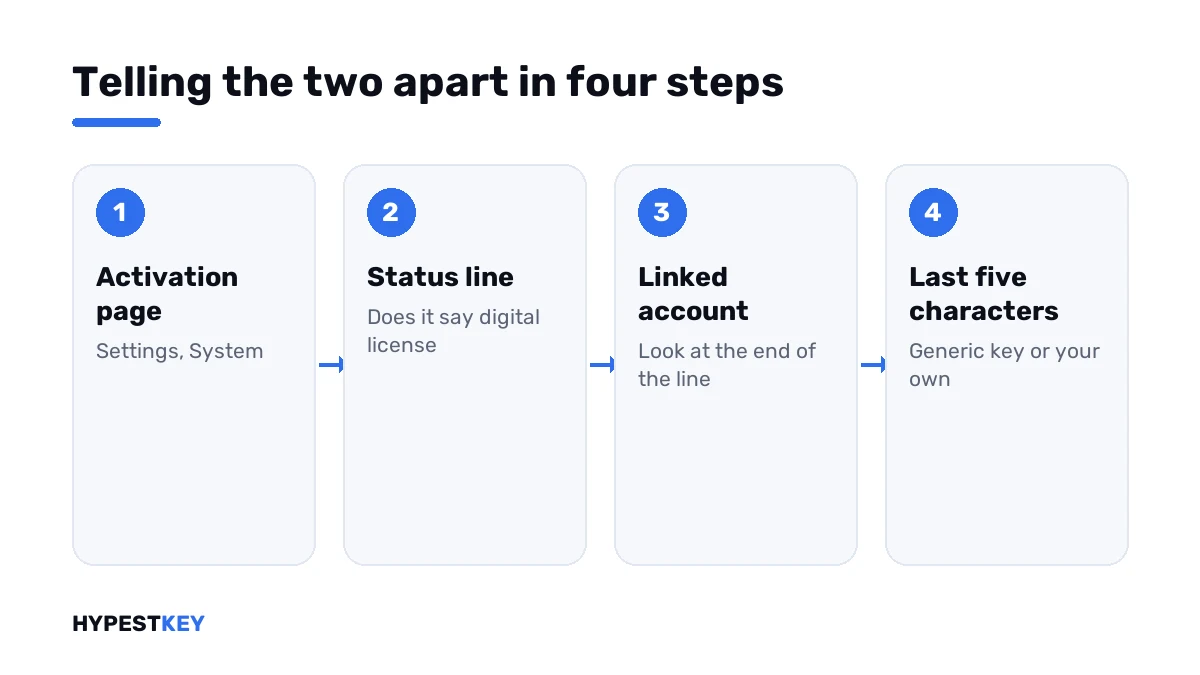
- Open Settings, then System, then Activation; on Windows 10 it’s Update & Security, then Activation.
- Read the line next to Activation state.
- “Activated with a digital license” answers the question directly.
- “Linked to your Microsoft account” at the end shows the license is also attached to your account.
- Plain “Windows is activated” usually goes with a key that was typed in.
- Open Command Prompt and run the license line to see the last five characters of the installed key.
- Compare them with your own key; a key ending in 3V66T or 8HVX7 is generic and goes with a digital license.
slmgr /dli| Status line | What’s behind it |
|---|---|
| Windows is activated | Activated; no Microsoft account linked |
| Windows is activated with a digital license | A digital license; no account linked to it |
| Windows is activated with a digital license linked to your Microsoft account | A digital license, linked |
| Windows is not activated | Neither a working key nor a digital license was found |
All the ways of reading the status are in how to check Windows activation status.
Reinstalling Windows
| You have | What to do during setup | What happens after |
|---|---|---|
| A digital license | Choose the same edition and skip the key page | Windows activates once it’s online |
| A product key, PC already activated with it before | Skip the key page, or type the key | Activates either way on the same hardware |
| A product key, new or wiped PC that never ran this copy | Type the key | Activates, and a digital license is recorded |
The edition has to match. A digital license for Home doesn’t activate a Pro install, and Windows answers with a code such as 0xC004F212.
The setup screens are in our clean install guide.
Changing hardware
This is where the two behave differently.
A digital license belongs to the hardware it was recorded for. Swap the motherboard, and Windows looks like a new device with no license.
Linking helps. Microsoft calls it essential to link your Microsoft account to the license, because the link lets the Activation troubleshooter reactivate Windows after a significant hardware change.
A retail product key is more portable. You can enter it again on the new hardware, as long as it’s active on one PC only.
| After a new motherboard | Route |
|---|---|
| Digital license, linked to your account | Activation troubleshooter, “I changed hardware on this device recently” |
| Digital license, not linked | No route; link it before the next change |
| Retail product key | Type the key again |
| Key that came with a branded PC | Stays with the original board |
The details are under 0xC004F211, the code Windows shows after such a change. For a planned move, I’d read transferring a Windows license to a new PC.
Linking a digital license to your account
- Sign in to Windows as an administrator.
- Open the Activation page and press Add an account.
- Sign in with your Microsoft account.
- Check that the status line now ends with “linked to your Microsoft account”.
It takes a minute and costs nothing. I’d do it on every PC you plan to keep.
Which one to buy
You don’t really choose the method. You choose where to buy, and the method follows.
| Bought as | You receive | Good to know |
|---|---|---|
| A key from a seller | 25 characters by email | You hold something you can keep and enter again |
| An upgrade in the Microsoft Store app | A digital license on your account | Nothing to keep, nothing to lose |
| A PC with Windows on it | A key in the firmware | It stays with that PC |
Prefer a key you can hold on to? Ours are genuine and arrive instant to email: Windows 11 Pro or Windows 11 Home. For the older system we have Windows 10 Pro.
Entering it takes a minute, as shown in how to activate Windows 11. Lost track of an old key? See how to find your Windows product key.
Where this applies
| System | Notes |
|---|---|
| Windows 11 | Everything on this page |
| Windows 10 | The same; the Activation page sits under Update & Security |
| Windows 8.1 and 7 | Product keys only; digital licenses came with Windows 10 |
| Work devices | Volume keys, managed by the organisation; see Retail vs OEM vs Volume license |
Mistakes we see most
- Searching the PC for a key when it runs on a digital license.
- Saving the generic key from a key finder as your own.
- Reinstalling a different edition than the license is for.
- Swapping the motherboard before linking the license.
- Treating a digital license as second-rate.
Terms used on this page
| Term | Meaning |
|---|---|
| Product key | A 25-character code used to activate Windows |
| Digital license | Activation recorded for a device, with no code to enter |
| Digital entitlement | Microsoft’s other name for a digital license |
| Linked license | A digital license attached to a Microsoft account |
| Generic key | A public key that selects an edition and activates nothing |
| Firmware key | A key stored on the motherboard by the PC maker |
FAQ
What is the difference between a digital license and a product key?
With a product key you enter a 25-character code to activate Windows. A digital license activates without any code, because Microsoft has the license on record for that PC. I'd call them two forms of the same thing.
How do I know if I have a digital license or a product key?
Open Settings, System, Activation and read the status line. If it mentions a digital license, that's your answer. The slmgr license line also helps: a generic key ending means a digital license.
Do I get a digital license when I activate with a product key?
Yes. After a key has activated a PC, Microsoft records a digital license for that hardware. The same PC then reactivates without the key. We'd still keep the key for other hardware.
Do I need a product key to reinstall Windows with a digital license?
No. Choose the same edition, skip the key page and go online. Windows activates by itself on the same hardware. I'd note the edition before wiping the PC.
Can I move a digital license to another PC?
Not as such. It belongs to the hardware it was recorded for. A linked license can follow a hardware change through the Activation troubleshooter. For a different PC, we'd use a retail product key.
Is a digital license worse than a product key?
No. It's a full license, and Microsoft uses it for free upgrades and Store purchases. Portability is where they differ. I can enter a retail key on new hardware.
How do I link my digital license to a Microsoft account?
Sign in as an administrator, open the Activation page and press Add an account. Then check the status line. It should end with "linked to your Microsoft account". I'd do it before any hardware change.