Short answer: To find your Office product key, sign in to your Microsoft account and open Services and subscriptions. Expand the product under Products you've purchased. Office itself never shows the full key. We check the order email or the card for a new, unredeemed key.
To find your Office product key, sign in to your Microsoft account and open Services and subscriptions. Expand the product under Products you’ve purchased. Office itself never shows the full key, for security. For Office 2013 and later we reinstall and activate by signing in, as the account replaces the key.
A new key is on the card or in the order email.
- Your Microsoft account: Services and subscriptions, Products you’ve purchased.
- The order email or card: 25 characters in five groups.
- The Microsoft Store: Order History, Install Office, if it isn’t installed yet.
- Office itself: File, Account shows the account it belongs to, not the key.
- A new PC with Office: a digital key in the firmware, tied to the account at activation.
- Volume editions: your organisation’s administrator holds the key.
The answers come from Microsoft’s articles Using product keys with Office and Find your Office product key.
How to find your Office product key in the Microsoft account
- Go to account.microsoft.com and sign in with the account you used for Office.
- Select Services and subscriptions on the top menu.
- Under Products you’ve purchased, find the Office version.
- Expand the section to see the product key or to install the product.
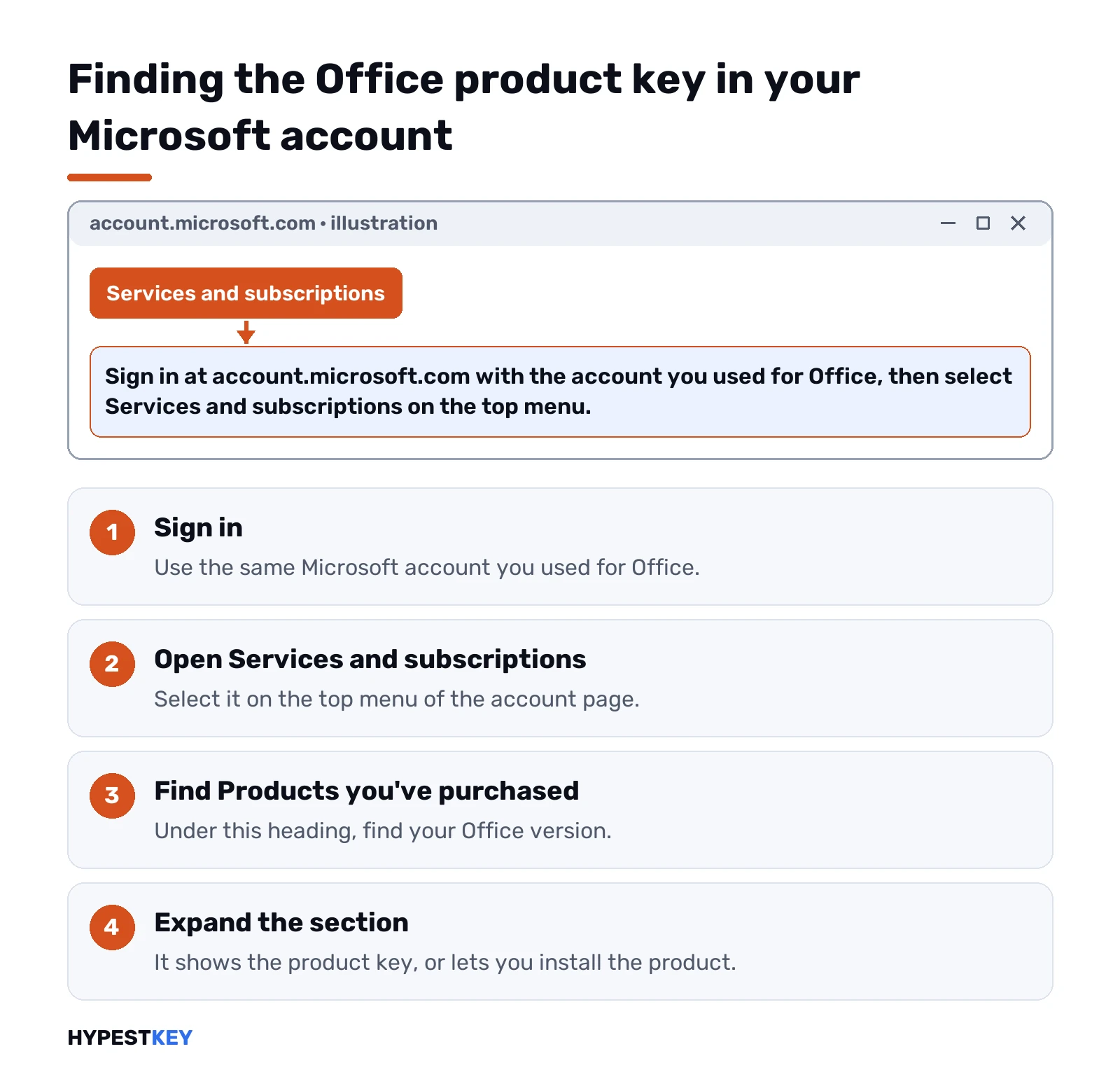
Microsoft’s account article says this works for non-subscription versions of Office and for single apps such as Project and Visio.
You’d quite often find that the key shown there doesn’t match the one on the card or receipt. Microsoft says that’s normal: they’re two different types of key in the same format.
Why Office doesn’t show the key
Microsoft’s answer is short: for security reasons, the full product key isn’t displayed within Office.
| Where you look | What you see |
|---|---|
| File, Account in Word | The product name and the Microsoft account it belongs to |
| The Microsoft account online | The product, and for one-time purchases the key under Products you’ve purchased |
| A command on the PC | At most the last five characters |
For recent versions and Microsoft 365, Microsoft says the account takes the place of the key for reinstalling and activating. We look under File, Account for the email address after “Belongs to”.
Where else to find an Office product key
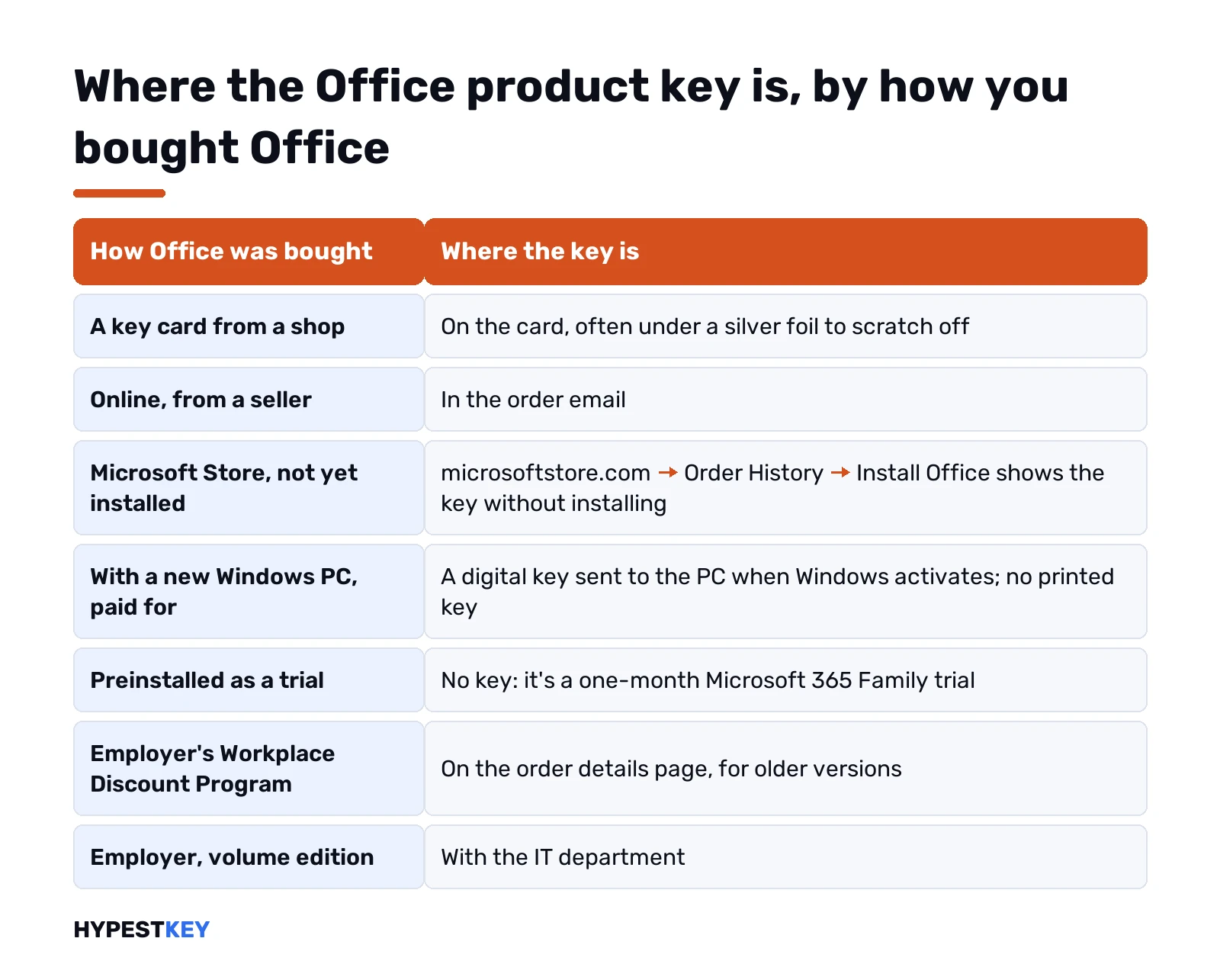
| How Office was bought | Where the key is |
|---|---|
| A key card from a shop | On the card, often under a silver foil to scratch off |
| Online, from a seller | In the order email |
| From the Microsoft Store, not yet installed | microsoftstore.com, Order History, Install Office; it shows the key without installing |
| With a new Windows PC, paid for | A digital key sent to the PC when Windows activates; no printed key |
| Preinstalled as a trial | No key; it’s a one-month Microsoft 365 Family trial |
| Through an employer’s Workplace Discount Program | On the order details page, for older versions |
| Through an employer, volume edition | With the IT department |
Microsoft adds that a key card may carry bar codes and other numbers, but the key is always in the format XXXXX-XXXXX-XXXXX-XXXXX-XXXXX.
Find the last five characters of the Office product key on the PC
For volume and some retail installs of Office for Windows, the Office licensing script shows the last five characters of the installed key. Open Command Prompt as administrator in the Office folder and run:
cscript ospp.vbs /dstatusThe script sits in the Office program folder; on a 64-bit install of current Office the folder is:
C:\Program Files\Microsoft Office\Office16We compare the line “Last 5 characters of installed product key” with a key you have on paper.
Five characters can’t reinstall anything. They only tell you which of your keys is in use.
Key finder tools that try to find an Office product key
Third-party tools read keys from the registry. For Office 2013 and later they usually find nothing useful, because the key isn’t stored on the PC in full.
| Office version | A key finder tends to show |
|---|---|
| Office 2010 and earlier | The full key, in many cases |
| Office 2013 and later, retail | Nothing useful; the account holds the license |
| Volume editions | At most the last characters |
For Windows keys, a tool such as ShowKeyPlus works better; Windows and Office are separate matters.
“Word product key” threads on Reddit
Search for a Word or Office key and forum threads come up, Reddit among them, often with keys posted in the comments. As a rule, you’d find they’re generic volume keys, leaked keys or keys already used by thousands of people.
| What’s posted | What happens |
|---|---|
| Generic volume keys | They install a volume edition but activate only against an organisation’s KMS server |
| Leaked retail keys | Blocked by Microsoft; activation fails |
| “Activator” links | Unlicensed, and a common way to get malware |
Microsoft warns that a key bought separately from the software may have been stolen and blocked. We’d look for your own key in your account or email; if you never had one, the honest choice is to buy a license.
If the key is lost for good
| Situation | What Microsoft says |
|---|---|
| Key damaged, proof of purchase at hand | Microsoft support may replace it or offer options |
| Office already redeemed to an account | No key needed; install from Services and subscriptions |
| Key lost, never redeemed, no proof | A new license is the way |
| The key doesn’t work | Contact the seller; see the redeem-page errors |
The messages of the redeem page are explained in Office.com/setup errors, and two of them have pages of their own: this product key has already been used and this product key isn’t valid.
Changing or removing the key
For Office Home & Business, Professional and single apps, Microsoft lets you change the key under File, Account, Change Product Key. We cover removing an old key from an install in removing an Office product key.
Activation itself is described in how to activate Office 2024 and how to activate Office 2021.
A checklist before you call anyone
Most lost keys turn up in one of a few places. We go through them in this order before writing to a seller or to Microsoft.
| Check | Why it helps |
|---|---|
| Every Microsoft account you own | Office is often redeemed to an old work or school address, or a second personal one |
| The mailbox, searched for “product key” and the seller’s name | Online orders deliver the key by email |
| File, Account in Word | “Belongs to” names the account that holds the license |
| The receipt or invoice | Microsoft support asks for proof of purchase |
| The box, card or a photo of it | The 25 characters are printed there |
Once found, we store the key with the receipt in a password manager or a printed copy. The account keeps the license, but a written key saves time when an old install needs it again.
Related guides
- The Windows side: finding your Windows product key.
- Subscription or key: what is Microsoft 365.
- Paying once: Microsoft Office lifetime license.
- The editions: Office 2024 Professional Plus vs Home and Business.
- How to Find Your Windows 10 Product Key
- Digital License vs Product Key
- How to Remove a Windows Product Key
- Office 2007 product key: finding your own
- How to change your Office product key
Need a license you can find again? Our Office Home and Business 2024 key arrives instant to email; all versions are under Office keys.
Terms used on this page
| Term | Meaning |
|---|---|
| Product key | 25 characters in five groups that license Office |
| Redeem | Adding a key to a Microsoft account once |
| Services and subscriptions | The account page that lists your Office products |
| ospp.vbs | Office’s licensing script for Windows |
| Volume edition | Office for organisations, licensed through volume agreements |
FAQ
How can I find my Office product key?
Sign in to your Microsoft account and open Services and subscriptions. Under Products you've purchased, expand the Office product. A new key is on the card or in the order email.
Can I see my Office product key in Word or Excel?
No. Microsoft says the full key isn't shown in Office for security reasons. File, Account shows the Microsoft account the license belongs to instead.
Why doesn't the key in the account match the key on the card?
Microsoft says that's normal. The key on the card and the one in the account are two different types of key in the same format.
Do I need my product key to reinstall Office?
Not for Office 2013 and later once it's redeemed. Sign in to your account and install from Services and subscriptions. We keep the key anyway, with the receipt.
Can I find my Office key with Command Prompt?
Only the last five characters, through the Office licensing script and its status option. That identifies a key but can't reinstall anything.
Are the Office keys posted on Reddit safe to use?
No. They're generic volume keys, leaked keys or keys used many times, and Microsoft blocks the leaked ones. We'd never use them on a work or home PC.
My new laptop came with Office. Where is the key?
If Office was paid for, a digital key is sent to the PC when Windows activates; there's no printed key. A trial has no key at all.