Short answer: Windows Server KMS keys are the public client keys Microsoft lists for each edition. We use them to install or convert an edition. They don't activate a standalone server. For that, we'd enter a key bought for the server.
Windows Server KMS keys are public. Microsoft prints them in its own documentation, one per edition, and anyone may copy them. We’d call them setup keys: they pick the edition and point the server at a company activation host. They don’t activate a server by themselves.
| Question | Short answer |
|---|---|
| Are these keys genuine? | Yes, taken from Microsoft’s list |
| Do they activate a server? | Only inside an organisation that runs a KMS host or Active Directory-based activation |
| What are they good for otherwise? | Installing an edition, and converting an evaluation copy to a full edition |
| What activates a single server? | A key of its own |
| Do they work on a retail edition? | No, Microsoft says they can’t be used with retail editions |
Every key below was generated from Microsoft’s page by script, not typed by hand, so the characters match the source.
Where the Windows Server KMS keys list comes from
The source is Microsoft Learn, KMS client activation and product keys. Microsoft calls them Generic Volume License Keys.
Volume editions of Windows Server install with such a key already inside. Microsoft’s page says you only need to type one in three cases: converting a server from a KMS host, from a MAK or from a retail edition to a KMS client.
A fourth use is the one most visitors come for. An evaluation copy can be turned into a full edition with one of these keys and a single command. More on that below.
Windows Server 2025
| Edition | Type | Product key | Copy |
|---|---|---|---|
| Windows Server 2025 Standard | KMS client key | TVRH6-WHNXV-R9WG3-9XRFY-MY832 | |
| Windows Server 2025 Datacenter | KMS client key | D764K-2NDRG-47T6Q-P8T8W-YP6DF | |
| Windows Server 2025 Datacenter: Azure Edition | KMS client key | XGN3F-F394H-FD2MY-PP6FD-8MCRC |
Windows Server 2022
| Edition | Type | Product key | Copy |
|---|---|---|---|
| Windows Server 2022 Standard | KMS client key | VDYBN-27WPP-V4HQT-9VMD4-VMK7H | |
| Windows Server 2022 Datacenter | KMS client key | WX4NM-KYWYW-QJJR4-XV3QB-6VM33 | |
| Windows Server 2022 Datacenter: Azure Edition | KMS client key | NTBV8-9K7Q8-V27C6-M2BTV-KHMXV |
Windows Server 2019
| Edition | Type | Product key | Copy |
|---|---|---|---|
| Windows Server 2019 Standard | KMS client key | N69G4-B89J2-4G8F4-WWYCC-J464C | |
| Windows Server 2019 Datacenter | KMS client key | WMDGN-G9PQG-XVVXX-R3X43-63DFG | |
| Windows Server 2019 Essentials | KMS client key | WVDHN-86M7X-466P6-VHXV7-YY726 |
Windows Server 2016
| Edition | Type | Product key | Copy |
|---|---|---|---|
| Windows Server 2016 Standard | KMS client key | WC2BQ-8NRM3-FDDYY-2BFGV-KHKQY | |
| Windows Server 2016 Datacenter | KMS client key | CB7KF-BWN84-R7R2Y-793K2-8XDDG | |
| Windows Server 2016 Essentials | KMS client key | JCKRF-N37P4-C2D82-9YXRT-4M63B |
Windows Server 2012 R2 and 2012
| Edition | Type | Product key | Copy |
|---|---|---|---|
| Windows Server 2012 R2 Standard | KMS client key | D2N9P-3P6X9-2R39C-7RTCD-MDVJX | |
| Windows Server 2012 R2 Datacenter | KMS client key | W3GGN-FT8W3-Y4M27-J84CP-Q3VJ9 | |
| Windows Server 2012 R2 Essentials | KMS client key | KNC87-3J2TX-XB4WP-VCPJV-M4FWM |
| Edition | Type | Product key | Copy |
|---|---|---|---|
| Windows Server 2012 | KMS client key | BN3D2-R7TKB-3YPBD-8DRP2-27GG4 | |
| Windows Server 2012 N | KMS client key | 8N2M2-HWPGY-7PGT9-HGDD8-GVGGY | |
| Windows Server 2012 Single Language | KMS client key | 2WN2H-YGCQR-KFX6K-CD6TF-84YXQ | |
| Windows Server 2012 Country Specific | KMS client key | 4K36P-JN4VD-GDC6V-KDT89-DYFKP | |
| Windows Server 2012 Standard | KMS client key | XC9B7-NBPP2-83J2H-RHMBY-92BT4 | |
| Windows Server 2012 MultiPoint Standard | KMS client key | HM7DN-YVMH3-46JC3-XYTG7-CYQJJ | |
| Windows Server 2012 MultiPoint Premium | KMS client key | XNH6W-2V9GX-RGJ4K-Y8X6F-QGJ2G | |
| Windows Server 2012 Datacenter | KMS client key | 48HP8-DN98B-MYWDG-T2DCC-8W83P | |
| Windows Server 2012 Essentials | KMS client key | HTDQM-NBMMG-KGYDT-2DTKT-J2MPV |
Windows Server 2008 R2 and 2008 KMS keys
Older still. Same Microsoft page, same rules: a KMS host in the organisation, or no activation.
| Edition | Type | Product key | Copy |
|---|---|---|---|
| Windows Server 2008 R2 Web | KMS client key | 6TPJF-RBVHG-WBW2R-86QPH-6RTM4 | |
| Windows Server 2008 R2 HPC edition | KMS client key | TT8MH-CG224-D3D7Q-498W2-9QCTX | |
| Windows Server 2008 R2 Standard | KMS client key | YC6KT-GKW9T-YTKYR-T4X34-R7VHC | |
| Windows Server 2008 R2 Enterprise | KMS client key | 489J6-VHDMP-X63PK-3K798-CPX3Y | |
| Windows Server 2008 R2 Datacenter | KMS client key | 74YFP-3QFB3-KQT8W-PMXWJ-7M648 | |
| Windows Server 2008 R2 for Itanium-based Systems | KMS client key | GT63C-RJFQ3-4GMB6-BRFB9-CB83V |
| Edition | Type | Product key | Copy |
|---|---|---|---|
| Windows Web Server 2008 | KMS client key | WYR28-R7TFJ-3X2YQ-YCY4H-M249D | |
| Windows Server 2008 Standard | KMS client key | TM24T-X9RMF-VWXK6-X8JC9-BFGM2 | |
| Windows Server 2008 Standard without Hyper-V | KMS client key | W7VD6-7JFBR-RX26B-YKQ3Y-6FFFJ | |
| Windows Server 2008 Enterprise | KMS client key | YQGMW-MPWTJ-34KDK-48M3W-X4Q6V | |
| Windows Server 2008 Enterprise without Hyper-V | KMS client key | 39BXF-X8Q23-P2WWT-38T2F-G3FPG | |
| Windows Server 2008 HPC | KMS client key | RCTX3-KWVHP-BR6TB-RB6DM-6X7HP | |
| Windows Server 2008 Datacenter | KMS client key | 7M67G-PC374-GR742-YH8V4-TCBY3 | |
| Windows Server 2008 Datacenter without Hyper-V | KMS client key | 22XQ2-VRXRG-P8D42-K34TD-G3QQC | |
| Windows Server 2008 for Itanium-Based Systems | KMS client key | 4DWFP-JF3DJ-B7DTH-78FJB-PDRHK |
Semi-Annual Channel keys
Windows Server without a year in the name. Versions 1709 to 20H2, Standard and Datacenter only, and the channel has no new releases.
| Version | Edition | Product key | Copy |
|---|---|---|---|
| 20H2, 2004, 1909, 1903, 1809 | Windows Server Standard | N2KJX-J94YW-TQVFB-DG9YT-724CC | |
| 20H2, 2004, 1909, 1903, 1809 | Windows Server Datacenter | 6NMRW-2C8FM-D24W7-TQWMY-CWH2D | |
| 1803 | Windows Server Standard | PTXN8-JFHJM-4WC78-MPCBR-9W4KR | |
| 1803 | Windows Server Datacenter | 2HXDN-KRXHB-GPYC7-YCKFJ-7FVDG | |
| 1709 | Windows Server Standard | DPCNP-XQFKJ-BJF7R-FRC8D-GF6G4 | |
| 1709 | Windows Server Datacenter | 6Y6KB-N82V8-D8CQV-23MJW-BWTG6 |
That’s 45 keys in all, copied from Microsoft Learn. Client keys for Windows 10 and 11 sit on the same Microsoft page, and we keep them on a separate page linked further down.
What Windows Server KMS keys do
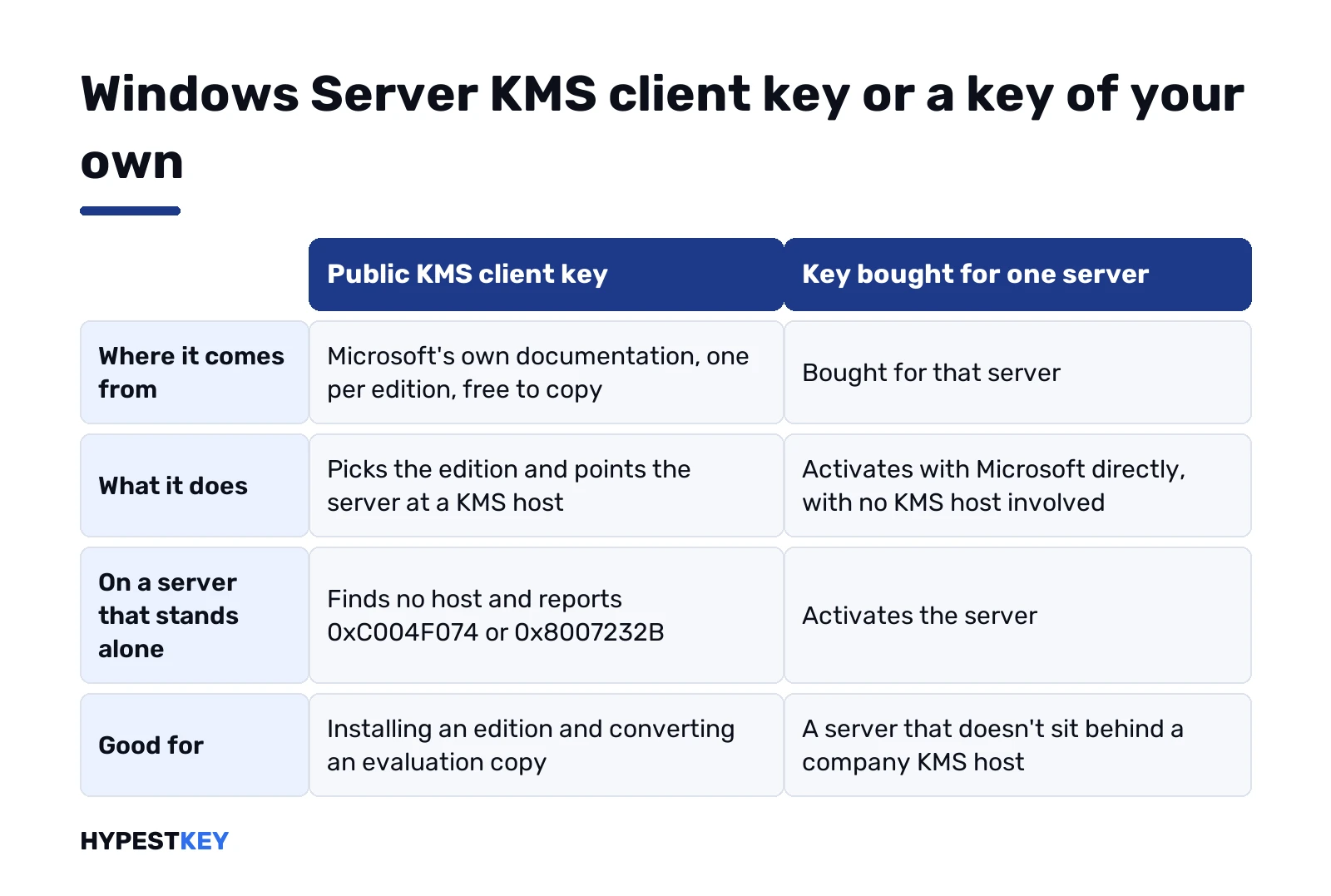
With a KMS client key installed, the server stops asking Microsoft and starts asking the local network. It looks for a KMS host through DNS and requests activation there.
| Where the server runs | What happens |
|---|---|
| In an organisation with a KMS host | It activates for 180 days and renews by itself |
| In a domain with Active Directory-based activation | It activates when it joins the domain |
| Alone, in a small office or a home lab | It finds no host and reports 0xC004F074 or 0x8007232B |
The mechanics, with all the numbers, are in what KMS activation is.
What the KMS host needs before Windows Server KMS keys work
The keys are only half of it. Other half? A KMS host. Some machine inside the organisation, holding a host key from the company’s volume licensing agreement. No such machine, no activation. In a home lab or on a single office server we’d simply not expect one.
| Requirement | Microsoft’s figure |
|---|---|
| Activation threshold for servers | A count of 5 or more machines contacting the host |
| Threshold for Windows 10 and 11 clients | 25 or more |
| Which contacts count | Unique machines from the past 30 days |
| Activation validity | 180 days, renewal attempts every 7 days |
| Network | TCP port 1688, host found through DNS |
| Host key | A CSVLK from the organisation’s volume licensing agreement |
Version matters too. Same version or older, never newer. A Server 2022 host wants cumulative update KB5034765 or a later one before Server 2025 machines get through. Azure Edition? Azure activates it, and it can’t be a host.
Where’s the host key itself? It sits in the Microsoft 365 admin center of an organisation with a volume licensing agreement. Billing, Your products, Volume licensing, then View downloads and keys. It’s installed on the host like any other key. Clients find the host through DNS on their own, or you’d point them at it:
slmgr /skms kms-host.yourdomain.local:1688
slmgr /ato
Source: KMS activation planning for Windows Server.
How to install a key and convert an evaluation copy
Two jobs, both from an administrator Command Prompt.
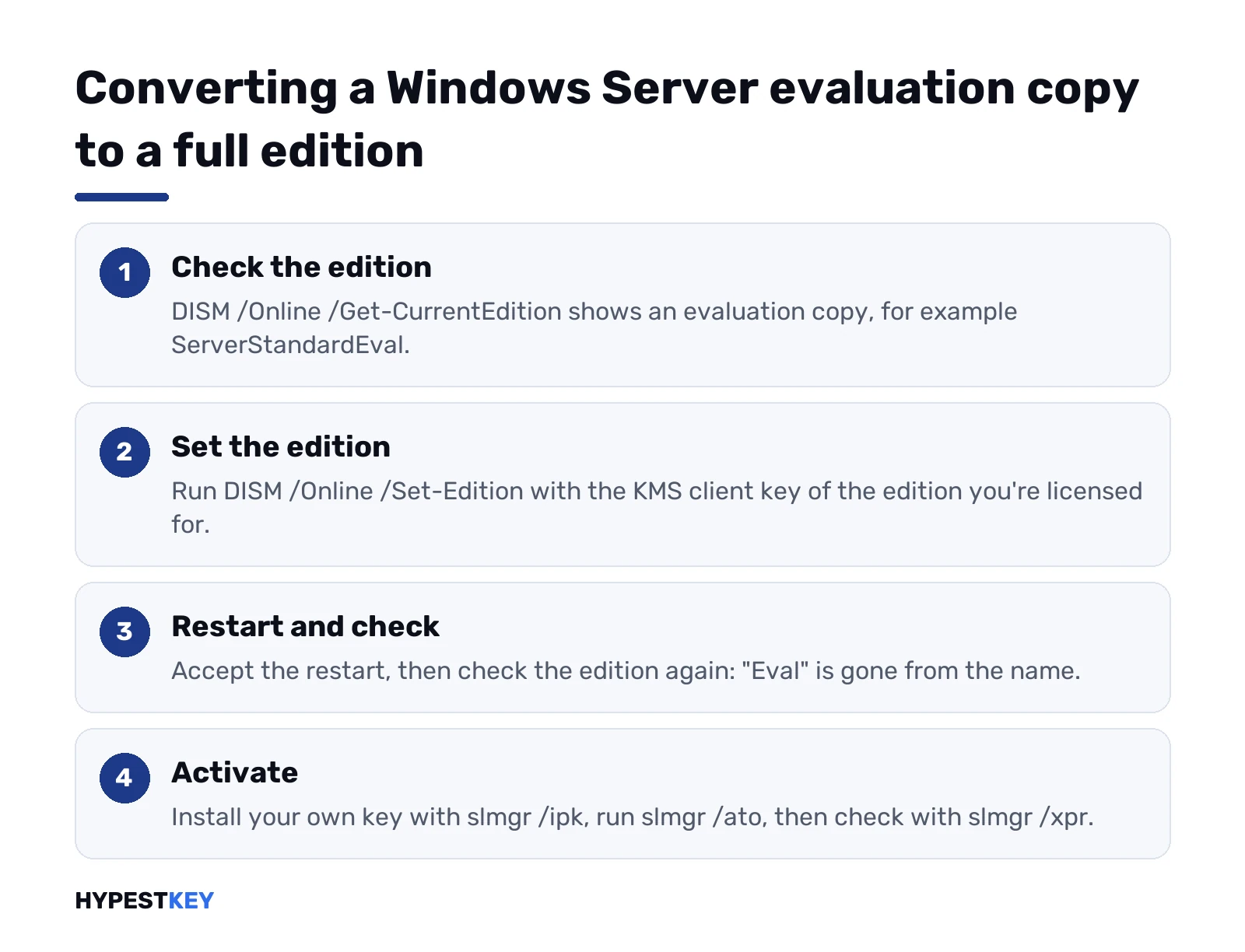
- Check which edition is installed with the edition line.
- On an evaluation copy, list the editions it can become with the target line.
- Run the set-edition line with the KMS client key of the edition you’re licensed for, and accept the restart.
- After the restart, check the edition again; “Eval” is gone from the name.
- On a full edition, install a key with the install line.
- Enter the key that activates: your own, or leave the KMS client key if the organisation runs a host.
- Activate and check the result.
DISM /Online /Get-CurrentEdition
DISM /Online /Get-TargetEditions
DISM /Online /Set-Edition:ServerStandard /ProductKey:XXXXX-XXXXX-XXXXX-XXXXX-XXXXX /AcceptEula
slmgr /ipk XXXXX-XXXXX-XXXXX-XXXXX-XXXXX
slmgr /ato
slmgr /xpr| Line | What it does |
|---|---|
DISM /Online /Get-CurrentEdition |
Shows the installed edition, for example ServerStandardEval |
DISM /Online /Get-TargetEditions |
Lists the editions this install can be changed to |
DISM /Online /Set-Edition with a key |
Converts the install to the named edition |
slmgr /ipk |
Installs the key typed after it |
slmgr /ato |
Asks for activation |
slmgr /xpr |
Shows whether the server is activated |
The conversion is covered step by step in converting Windows Server 2022 Evaluation to Standard and in activating Windows Server via DISM.
Windows Server KMS keys by edition: Standard, Datacenter, Essentials
Each edition has its own key, and a key only fits its edition. A Standard key on a Datacenter install is turned down with 0xC004F069.
| Edition | Meant for |
|---|---|
| Standard | Physical servers and lightly virtualized ones |
| Datacenter | Heavily virtualized hosts |
| Essentials | Small organisations with one server |
| Datacenter: Azure Edition | Virtual machines in Azure |
How Standard and Datacenter differ in virtual machine rights is in virtual machine limits in Windows Server 2022 Standard. Activation by edition is in the Windows Server 2022 activation guide.
Need the server activated
For a server that doesn’t sit behind a company KMS host, activation takes a key bought for it. A Windows Server 2025 Standard license key, say.
User and device access is licensed separately. See managing CAL licenses in Windows Server 2022 and our Windows Server CALs.
Generic key lists for Windows 10, 11 and Office
| For | Page |
|---|---|
| Windows 11 and Windows 10 editions | Generic Windows 10 and 11 keys |
| Office LTSC 2024, 2021, 2019 and 2016 | Default Office keys |
| Every slmgr switch | slmgr commands reference |
Common mistakes with Windows Server KMS keys
- Expecting a KMS client key to activate a standalone server.
- Using a Standard key on a Datacenter install.
- Entering a KMS client key on a retail edition. Microsoft says these keys can’t be used with retail copies and won’t serve as a retail license key.
- Converting an evaluation copy to an edition you hold no license for.
- Typing keys by hand when they can be copied.
Related guides
Terms used on this page
| Term | Meaning |
|---|---|
| KMS client key | A public key that sets the edition and makes the server look for a KMS host |
| Generic Volume License Key | Microsoft’s formal name for the same key |
| KMS host | The organisation’s server that activates volume-licensed machines |
| Evaluation copy | A trial install of Windows Server that can be converted to a full edition |
| DISM | The Windows tool that, among other things, changes the installed edition |
| CAL | A client access license for a user or a device |
FAQ
What are Windows Server KMS keys?
Public keys from Microsoft's documentation, one per edition, formally called Generic Volume License Keys. We'd treat them as setup keys that point the server at a KMS host.
Do KMS client keys activate Windows Server?
Only inside an organisation that runs a KMS host or Active Directory-based activation. A server on its own finds no host and stays unactivated. For that server, we'd use a key of its own.
Can I convert Windows Server Evaluation with a KMS key?
Yes. The set-edition line of DISM takes the KMS client key of the target edition and converts the install after a restart. Then we'd enter the key that activates.
Is it legal to use these keys?
Microsoft publishes them for everyone, so using them to install or convert an edition is fine. They aren't a license. The right to run the server comes from the license you hold.
Why does my server show 0xC004F074 after I entered one?
The key told the server to find a KMS host, and none answered. On a network without such a host that's expected. Replace it with your own key and activate.
Do Standard and Datacenter use the same key?
No. Every edition has its own key, and a key only works on its edition. With the wrong one, we see the install refuse it or report an edition error.
Where is the KMS key for Windows Server 2025?
In the first table on this page, for Standard, Datacenter and Datacenter: Azure Edition. All three come from Microsoft's list. We'd copy them with the button to avoid typos.
Got keys for Server 2008 R2 too?
Yes. Standard, Enterprise, Datacenter, Web, HPC and Itanium, plus the 2008 line, all in their own table above. Same deal as the newer ones: they need the organisation's KMS host.