Short answer: The KB5062557 cluster VM issue hit Windows Server 2019 clusters with BitLocker on Cluster Shared Volumes after the July 8, 2025 update. Microsoft fixed it in KB5063877 on August 12, 2025. We install the latest cumulative update node by node.
The KB5062557 cluster VM issue hit Windows Server 2019 after the July 8, 2025 update. With BitLocker on Cluster Shared Volumes, the Cluster Service could restart in a loop, and we’d expect quarantined nodes and rebooting VMs. Microsoft fixed it in KB5063877 on August 12, 2025; we install the latest cumulative update.
- Check the configuration: only clusters with BitLocker on CSV were affected.
- Check the build: 17763.7678 or later already contains the fix.
- Install the latest cumulative update, one node at a time.
- Bring quarantined nodes back and watch for Event ID 7031.
The details come from Microsoft’s update page for KB5062557, OS Build 17763.7558.
What Microsoft says about the update
| Point | Detail |
|---|---|
| Update | KB5062557, security update for Windows Server 2019 and Windows 10, version 1809 |
| Released | July 8, 2025 |
| OS build | 17763.7558 |
| Servicing stack in the package | KB5062800, version 17763.7557 |
| Prerequisite | The August 10, 2021 servicing stack update, KB5005112 |
| Cluster known issue added | July 23, 2025 |
| Resolution | Updates released on and after August 12, 2025, starting with KB5063877 |
Symptoms of the KB5062557 cluster VM issue
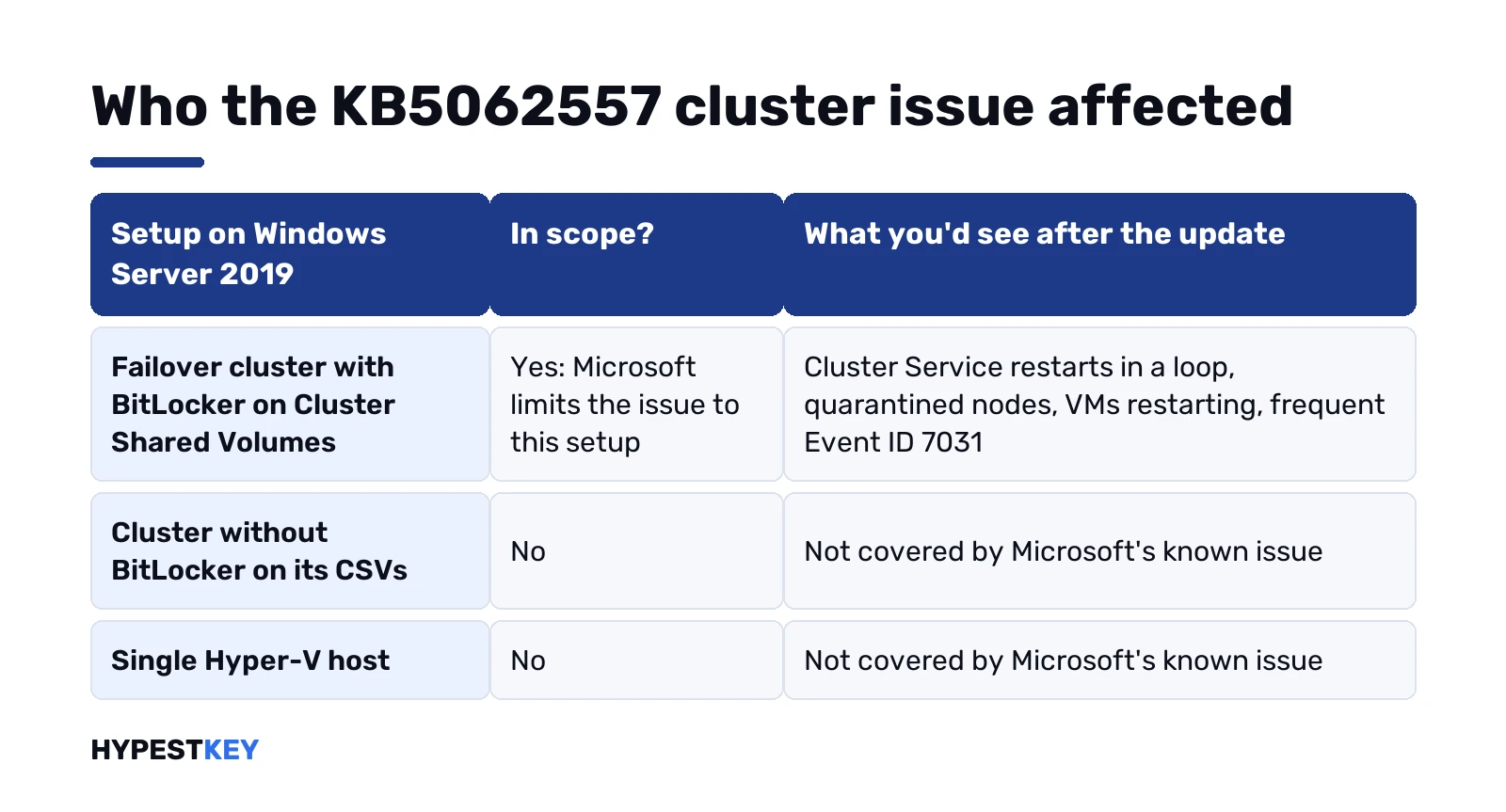
Microsoft’s known-issue entry names four symptoms on Windows Server 2019 after the update:
- The Cluster Service repeatedly stops and restarts.
- Nodes fail to rejoin the cluster or enter a quarantine state.
- Virtual machines restart several times.
- Event ID 7031 shows up often in the event logs.
Microsoft limits the issue to configurations using BitLocker with Cluster Shared Volumes. A cluster without BitLocker on its CSVs, or a single Hyper-V host, wasn’t in scope.
How to fix the KB5062557 cluster VM issue
- Check the build on each node. A build of 17763.7678 or higher already includes the fix.
- Drain the first node so its roles move to the others.
- Install the latest cumulative update for Windows Server 2019 and restart.
- Resume the node, clearing quarantine if it’s set, and let roles fail back.
- Repeat on the next node, then check the System log for Event ID 7031.
In PowerShell on a cluster node, these are the commands we use for those steps:
cmd /c ver
Get-ClusterNode
Suspend-ClusterNode -Name NODE1 -Drain
Start-ClusterNode -Name NODE1 -ClearQuarantine
Resume-ClusterNode -Name NODE1 -Failback Immediate
Get-WinEvent -FilterHashtable @{LogName='System'; Id=7031} -MaxEvents 20
The first line prints the version; the number after 17763 is the build. Replace NODE1 with the node name.
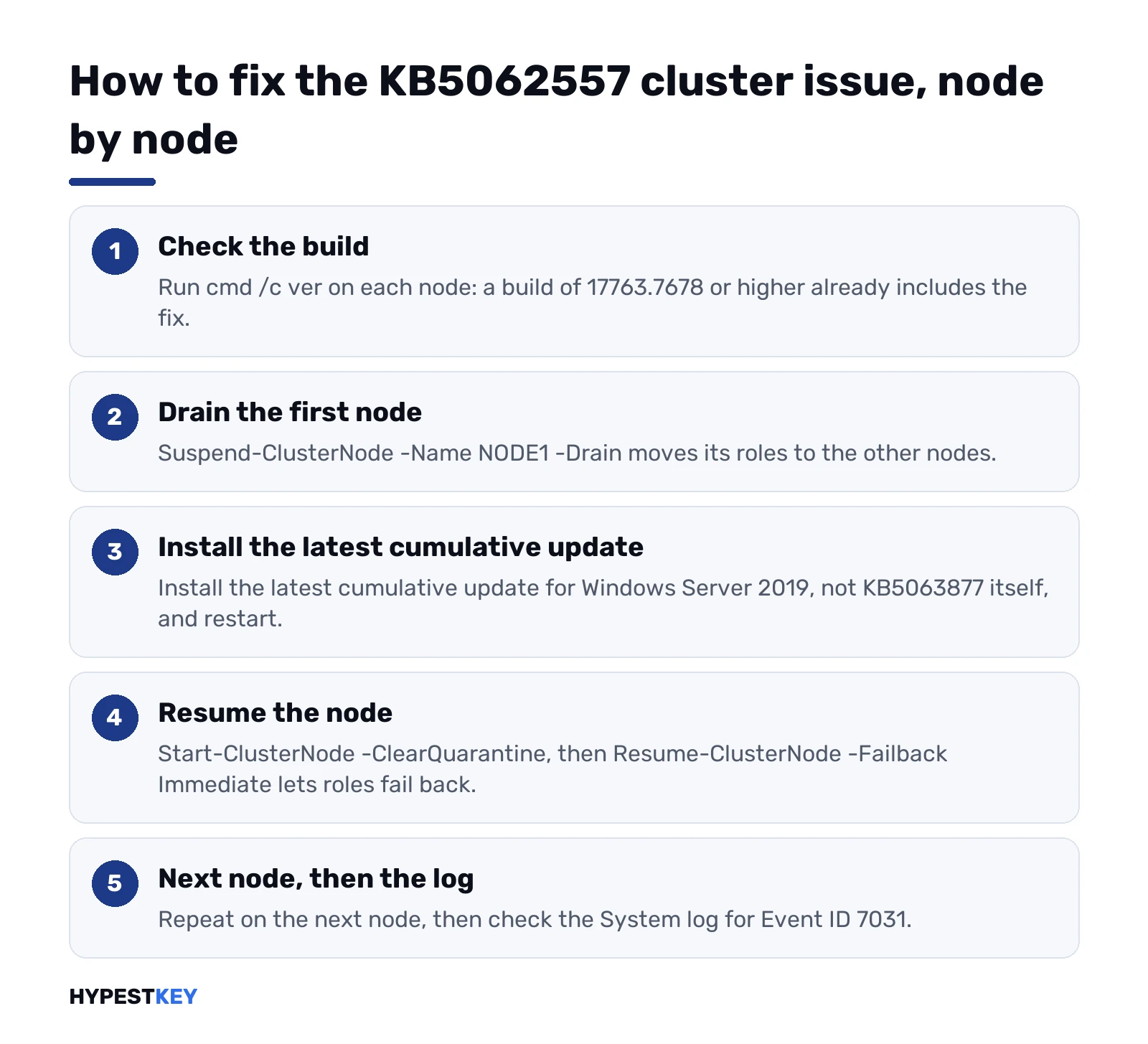
Microsoft recommends installing the latest update rather than KB5063877 itself, since each cumulative update carries the earlier fixes. The update arrives through Windows Update, WSUS and the Microsoft Update Catalog.
Removing KB5062557 instead of fixing the cluster issue
We’d move forward rather than back: KB5062557 is a security update, and the fix is already out. If you still need to remove it, Microsoft’s page sets the rules.
| Method | Works? |
|---|---|
| wusa.exe with /uninstall on the combined package | No, because the package contains the servicing stack |
| DISM /Remove-Package with the LCU package name | Yes, for the cumulative part only |
| Removing the servicing stack update | Not possible after installation |
DISM /online /get-packagesThat line lists the package names to pass to Remove-Package.
Other changes in KB5062557
| Area | Change |
|---|---|
| DHCP Server | Fixed: the service could stop responding and affect IP renewal for clients |
| Netlogon RPC | Hardening: domain controllers no longer let anonymous clients make some RPC requests; Samba and some file and print software can be affected |
| Language packs | Fixed: unused language packs and Features on Demand weren’t removed completely |
| GB18030-2022 | Fixed: incorrect character rendering in CharNextW |
| Changjie IME | Known issue with Traditional Chinese input, also resolved from August 12, 2025 |
The Netlogon change is the one to watch on networks with Samba file servers. Microsoft points to the Samba release notes for those.
Related guides
- Planning ahead: Windows Server 2019 support and upgrade options.
- Moving to a newer release: our comparison of the three current releases.
- The editions: Windows Server Standard vs Datacenter.
- A client-side update from the same summer: KB5063709 for Windows 10.
- Encryption basics: BitLocker in Windows 11.
- A node that won’t come up cleanly: booting Windows Server 2019 in Safe Mode.
- How many VMs one license covers: VM limits in Windows Server 2022 Standard.
- Adding another 2019 node to the same cluster: a Windows Server 2019 Datacenter key.
- Licensing a new host: Windows Server 2025 Standard key, delivered instant to email; all versions under Windows Server keys.
- KB5023706 for Windows 11
Terms used on this page
| Term | Meaning |
|---|---|
| CSV | Cluster Shared Volume: storage that every node of a failover cluster can read and write |
| Quarantine | A state in which the cluster keeps a node out after repeated failures |
| LCU | Latest cumulative update |
| SSU | Servicing stack update, the component that installs updates |
| Event ID 7031 | Service Control Manager entry for a service that ended unexpectedly |
FAQ
What is the KB5062557 cluster VM issue?
After the July 8, 2025 update on Windows Server 2019, the Cluster Service could stop and restart repeatedly. Microsoft also lists quarantined nodes and VMs that rebooted; we'd check for both on clusters using BitLocker with Cluster Shared Volumes.
Has Microsoft fixed KB5062557?
Yes. Microsoft says updates released on and after August 12, 2025, starting with KB5063877, resolve the issue. We'd install the latest cumulative update.
Which servers were affected?
Windows Server 2019 failover clusters that use BitLocker on Cluster Shared Volumes. Other configurations weren't part of the known issue.
Should I uninstall KB5062557?
We'd install the latest cumulative update instead. Removal works only for the cumulative part with DISM; wusa.exe can't remove the combined package.
How do I bring a quarantined node back?
After updating, start the node with the ClearQuarantine option of Start-ClusterNode, then resume it. We check the System log for new Event ID 7031 entries afterwards.
Does KB5062557 affect Samba?
It can. The update hardens Netlogon RPC so domain controllers refuse some anonymous requests, and Microsoft names Samba among the software that can be affected.