Short answer: The WinZip download for Windows 11 comes from winzip.com: run winzip.exe, allow it and follow setup. It's a 21-day free trial, then a paid license. Just ZIP files? We'd skip it, since Windows 11 zips and unzips in File Explorer and 24H2 also opens RAR, 7z and TAR.
The WinZip download for Windows 11 comes from winzip.com: press Try free, run winzip.exe, allow it and follow setup. It’s a 21-day free trial, then WinZip needs a paid license. For plain ZIP files you may not need it at all, since Windows 11 opens them itself.
| Option | Cost | Where from | Good for |
|---|---|---|---|
| WinZip for Windows | 21-day free trial, then a license | winzip.com | Encryption, cloud, many formats, extra tools |
| WinZip Microsoft Store Edition | See the Store listing | Microsoft Store | Store installs and updates |
| File Explorer | Built into Windows | Nothing to download | Zip and unzip, RAR and 7z on Windows 11 24H2 |
| tar in Command Prompt | Built into Windows | Nothing to download | Scripts, .tar.gz, .zip, .7z |
| 7-Zip | Free, open source | 7-zip.org | Encrypted archives, 7z packing |
WinZip download Windows 11 steps, from the official site
One rule before anything else. Download only from winzip.com, never from a mirror. Then:
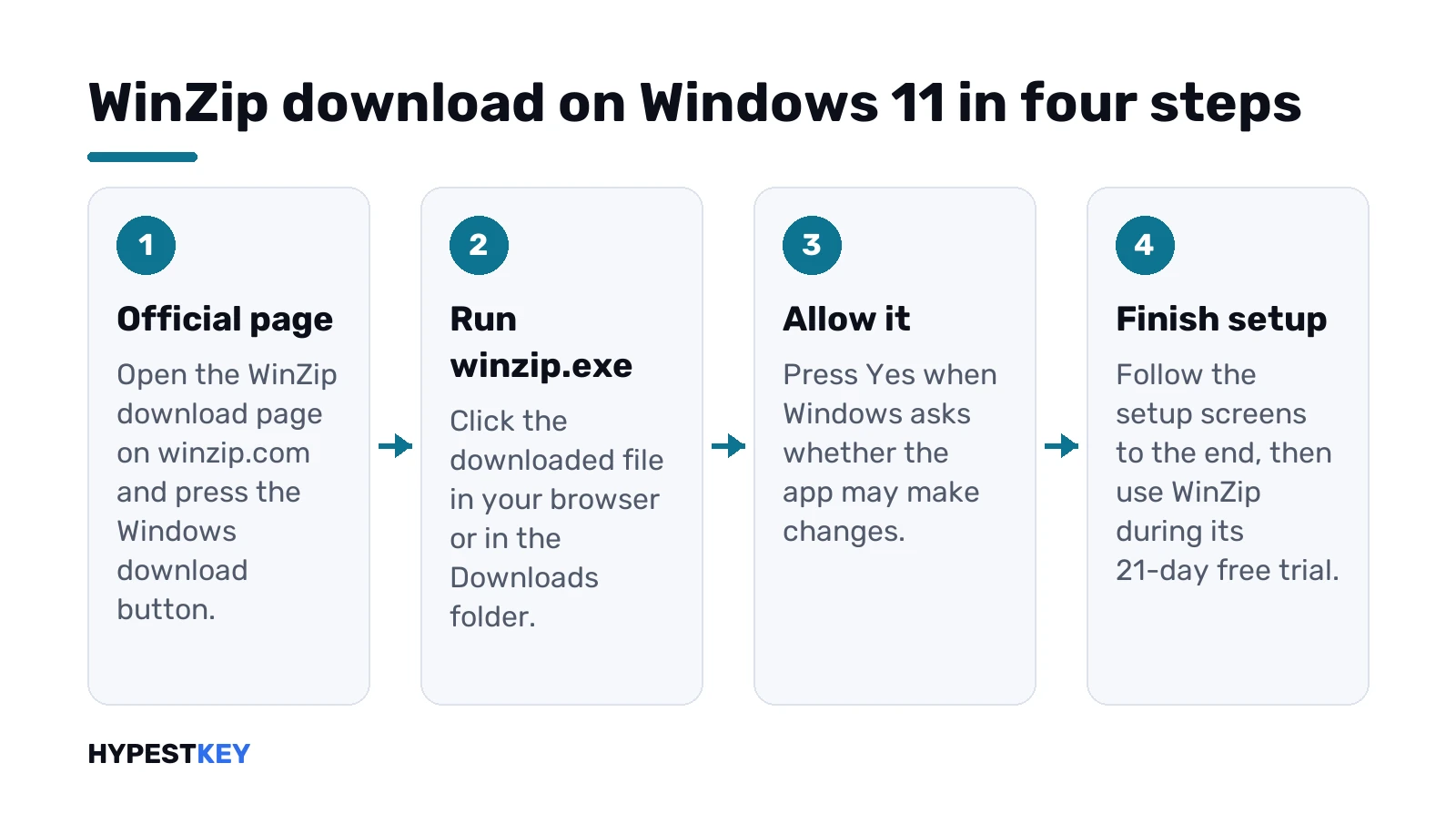
- Open the WinZip download page in your browser.
- Press the download or Try free button for Windows.
- Click the downloaded file, winzip.exe.
- Yes, when Windows asks whether the app may make changes.
- Follow the setup screens to the end.
That’s the whole install. The same page covers Windows 10. We’d check the address bar once more before clicking anything, because copycat sites love this search.
Unsure which Windows you’re on? Our guide to checking your Windows version answers that in a minute, and it matters for the next section.
Is WinZip free? The 21-day trial explained
Short answer: no, not for good. WinZip’s own page says the trial on Windows 11 lasts 21 days. After that, you buy a license to keep using it.
- During the trial: time to evaluate it before you buy.
- After day 21: a license, or uninstall and use something else.
- Single-user licenses need an internet connection, per WinZip.
So “winzip free” really means the trial. Anything promising a free full version forever isn’t coming from WinZip. More on that further down.
Buying after the trial? We’d do it on winzip.com, not through a reseller nobody has heard of. Keep the order email. New PC, reinstall: that’s where the license details live.
Students and companies sometimes get WinZip through school or work. Ask IT before buying a copy yourself; a business license may already cover you.
Need to open one ZIP file today and never again? We’d skip the trial and use what Windows already has. Our step-by-step on how to unzip files on Windows shows every built-in way.
WinZip system requirements on Windows 11
Modest hardware. From the WinZip product page:
| Item | Requirement |
|---|---|
| Windows | Windows 11 or Windows 10, 64-bit |
| Processor | 1 GHz or faster |
| Memory | 2 GB RAM for 64-bit |
| Disk space | 235 MB listed on the product page |
| Other | .NET 4.6, DirectX 9 or later, 800 x 600 display |
Windows 11 is 64-bit only anyway, so there’s no 32-bit question there. Corel’s knowledge base gives bigger disk figures for some editions. Several hundred megabytes, for Enterprise with all languages. Any PC that meets the Windows 11 hardware requirements clears this bar easily.
First launch and everyday use
After setup, WinZip opens from Start like any other app.
- Open an archive and look inside before extracting anything.
- Unzip: choose a destination and extract. One file or the whole lot.
- Zip: add files to a new archive and save it.
- Encrypt: set a password when you create the archive.
Want WinZip to own .zip files instead of File Explorer? Settings, Apps, Default apps. We’d leave File Explorer as default if WinZip is only on trial, so nothing breaks on day 22.
Got a big folder to send? Zip it, then share the archive through OneDrive or another cloud service instead of attaching it. Email services cap attachment sizes, and a link avoids that whole fight. WinZip’s cloud connections do it from inside the app. File Explorer? Drop the zip into your OneDrive folder.
Small tip. Keep the archive and the extracted folder side by side until you’ve checked the files open. Then delete the archive.
Formats it opens and what it adds
Formats first. WinZip lists Zip, Zipx, RAR, 7z, TAR, GZIP, XZ and disk images like ISO, IMG and VHD among what it opens. That’s the main reason people install it.
- Encryption. AES with 128-bit or 256-bit keys, FIPS-197 certified according to WinZip.
- Cloud. Direct access to OneDrive, Google Drive, Dropbox, Box and more.
- Compression methods. BZip2, LZMA, PPMd and Enhanced Deflate on top of the classic Zip method.
- Extras in Pro. Duplicate File Finder, PDF Express, Image Manager and SafeShare.
Disk images? Side note. To open a Windows ISO you don’t need WinZip; Windows mounts it with a double-click, as our guide to ISO files in Windows shows.
Our honest take: for zipping homework or unzipping a download, built-in tools do the job. WinZip earns its price with encryption, cloud shortcuts and heavy daily use.
Zip, Zipx, 7z or RAR: which one to save in
WinZip can write more than plain Zip. Tempting, but think about who opens the file next.
| Format | Opens without extra software on | When we’d pick it |
|---|---|---|
| Zip | Windows File Explorer, macOS Finder | Anything you send to other people |
| Zipx | WinZip and tools that support it | Your own backups, where you control the software |
| 7z | Windows 11 24H2 File Explorer, 7-Zip | Big folders between people who both have 7-Zip |
| TAR, .tar.gz | tar on Windows, Windows 11 24H2 | Developer and server work |
Our default is boring on purpose. Zip, every time, unless we know the other side. A smaller file that nobody can open saves nothing.
Already-compressed files barely shrink, by the way. JPEG photos, most videos, MP3s. Microsoft says the same about zipped folders of JPEGs: about the size of the originals.
Standard, Pro and Enterprise editions
Three editions on winzip.com. The split, as far as their page shows it:
- Standard. Core zip and unzip, encryption, cloud access.
- Pro. Adds the extra apps listed above.
- Enterprise. For organizations, sold as a business product.
Prices change, so we won’t quote any here. Check the WinZip site on the day you buy. Home user who mostly opens attachments? Standard or no WinZip at all, we’d say.
WinZip 22 Pro and other older versions
Got a WinZip 22 Pro registration from years ago? Then skip the trial. WinZip keeps older installers on its own Legacy Download Links page, and version 22 is still there.
- winzip220.exe: WinZip 22.
- winzip225.exe: WinZip 22.5.
That page lists no system requirements for them. Current WinZip names Windows 11 and Windows 10, 64-bit. On a new PC we’d take the current version and its trial instead.
No WinZip 22 code? Then version 22 gives you nothing extra. New buyer? Current release, from the download page above. Standard, Pro or Enterprise. Pro adds four apps on top of zipping: SafeShare, Duplicate File Finder, PDF Express, Image Manager. We’d only pay for that if you’d use them.
Skip “WinZip 22 Pro free download” pages and “pre-activated” builds. Cracked copies, often with something nasty attached. We’d stick to winzip.com and the Microsoft Store listing.
WinZip from the Microsoft Store on Windows 11
There’s also a listing called WinZip Microsoft Store Edition. Open the Microsoft Store, search for WinZip and open that exact listing.
Why bother with the Store? Updates arrive through the Store, and removal is one click in Settings, Apps. Pricing and trial terms? On the listing itself. We’d read them before installing. Either route is official; just don’t mix both on one PC.
Which one would we take? The website version, mostly. Its download page lists the requirements and the trial length right there. The Store? Handy on PCs where everything comes from the Store anyway, like a school laptop that blocks other installers.
WinZip for Mac and the free macOS route
WinZip for Mac? Separate product. Version 10 runs on macOS Sierra and newer, on Intel Macs and Apple M-series chips. It starts with a trial from winzip.com as well.
Plenty of Mac users never need it. Finder does basic zip work on its own:
- Compress: Control-click a file or folder, then Compress.
- Several items at once? The result is called Archive.zip.
- Unzip: double-click the .zip. The contents land in the same folder.
Running Windows on a Mac as well? Our page on a Windows virtual machine on Mac explains the setup; inside the VM, everything on this page applies.
Zip files on iPhone and iPad
Archives arrive by email on phones too. WinZip’s App Store listing, from WinZip Computing, is free to install with in-app purchases; the paid tier is called WinZip iOS Pro.
- Opens and creates zip and other archives.
- Encrypts them.
- Connects to cloud storage.
We’d install it only if archives reach you on the phone often. Encrypted ones especially.
WinZip download Windows 11 problems and reinstalling
Install stuck or refusing? Usually something small.
- No Yes button, just a password prompt? You’re on a standard account. Sign in as an administrator.
- Not enough space? Free a few hundred megabytes on drive C.
- Installer blocked as unknown? You probably didn’t get it from winzip.com. Delete it and download again from the official page.
- Old WinZip still installed? Remove it first.
To uninstall: Settings, Apps, Installed apps, find WinZip, the three dots, Uninstall. Reinstalling later? Download a fresh copy rather than reusing an old installer from Downloads. Keep your license email somewhere safe, because a paid license is what you’ll enter again.
Windows updates misbehaving too? Different problem. Our Windows Update guide and the Windows Update troubleshooter page cover that side.
Free built-in alternatives in Windows 11
Before any WinZip download, try what’s already there. Windows 11, version 24H2, handles ZIP, RAR, 7z and TAR in File Explorer, according to Microsoft.
- Zip: right-click a file or folder, Show more options, Send to, then the zipped folder entry.
- Unzip everything: right-click the archive, Extract All, pick a folder.
- One file only: open the archive and drag that file out.
The catch: Windows 11 24H2 can’t work with encrypted archives. For those Microsoft itself points to third-party tools. Microsoft’s zip and unzip help page has the details.
Prefer typing? Windows ships the tar command too. Command Prompt or PowerShell, then:
tar -xf archive.zipIt reads .tar, .tar.gz, .zip and .7z. Our Quick Access settings guide helps if you keep losing the folders you extract to.
7-Zip and other free tools
Need encrypted archives without paying? 7-Zip is the one we’d look at first. Its own site describes it as free software with open source, no registration, fine for business use too.
- Packs and unpacks 7z, ZIP and a few more.
- Unpacks over thirty formats, RAR and ISO among them.
- Windows only; download it from 7-zip.org and nowhere else.
WinRAR is the other name Microsoft mentions for encrypted archives. Same rule: the vendor’s own site only. For a wider look at what’s worth installing on a fresh PC, see our list of the best apps for Windows 11 and the shorter roundup of productivity tools for Windows.
File Explorer, 7-Zip or the paid tool: side by side
Three tools, three different jobs. From each maker’s own pages:
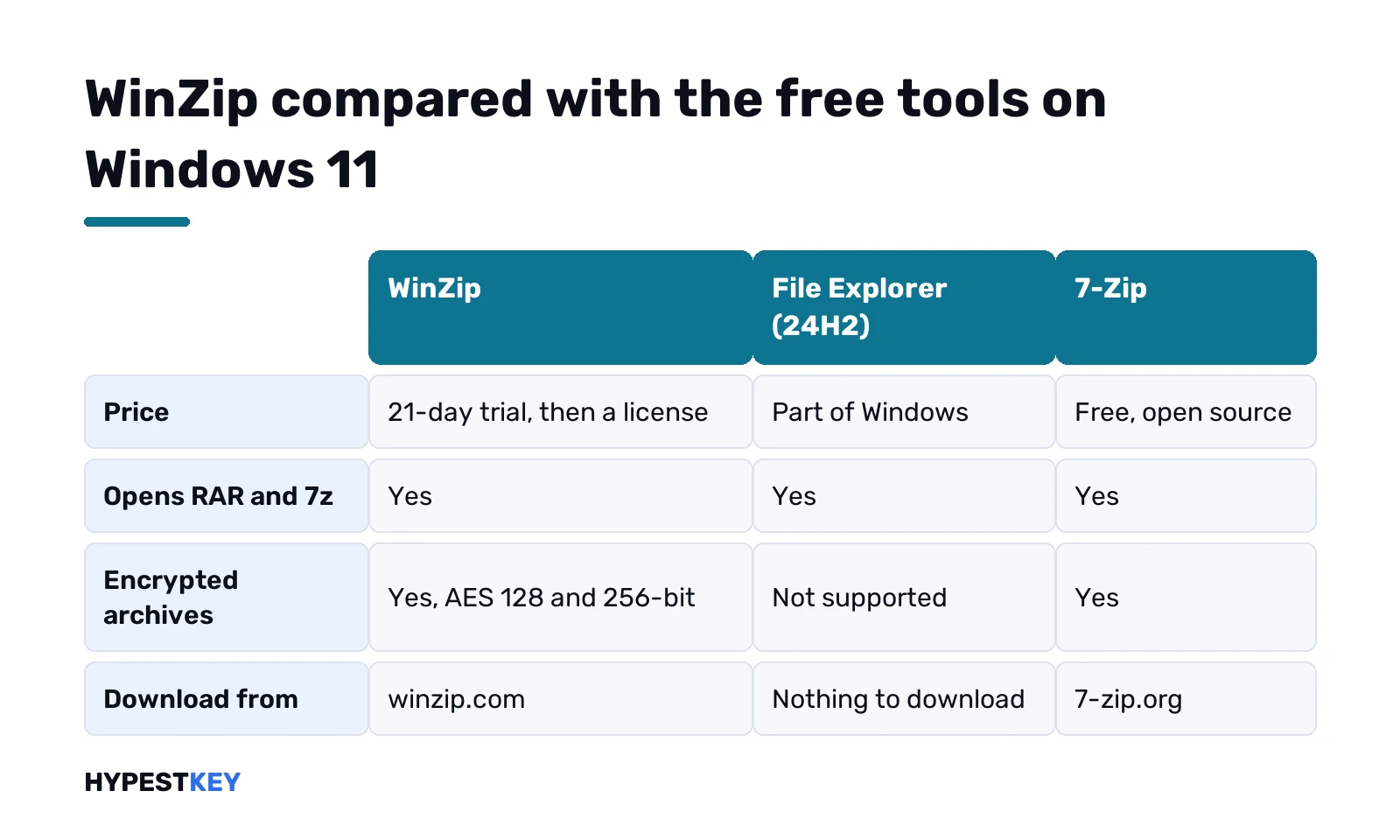
| WinZip | File Explorer on Windows 11 24H2 | 7-Zip | |
|---|---|---|---|
| Price | 21-day trial, then a license | Part of Windows | Free, open source |
| Opens | Zip, Zipx, RAR, 7z, TAR, GZIP, ISO and more | ZIP, RAR, 7z, TAR | 7z, ZIP and over thirty unpack-only formats |
| Encrypted archives | Yes, AES 128-bit and 256-bit | Not supported | Yes |
| Cloud services built in | OneDrive, Google Drive, Dropbox, Box and others | Not part of the zip feature | No |
| Runs on | Windows 11 and 10, 64-bit; Mac version separate | Windows 11 | Windows |
How we’d choose. Opening the odd download? File Explorer. Password-protected archives now and then, no budget? 7-Zip. Archives all day, encryption for clients, cloud folders on hand? That’s where the WinZip trial is worth 21 days of your time.
WinZip on Windows 10
Same download, same installer. WinZip lists Windows 10 next to Windows 11 for its current version, 64-bit.
The difference sits on the Windows side. File Explorer on Windows 10 handles ZIP. RAR and 7z support in File Explorer arrived with Windows 11 24H2, so on Windows 10 a RAR attachment needs a tool. The tar command? Built in, reads .zip and .7z.
Moving up anyway? Our comparison of Windows 11 Home vs Pro helps pick the edition first.
Fake “free full version” downloads: why we skip them
Search for WinZip and the results fill up with “full version”, “pre-activated” and serial-key pages. None from WinZip. We’d treat them as bait. Classic malware bait. A bundled installer, a browser toolbar, or worse.
- The address isn’t winzip.com or the Microsoft Store? Close the tab.
- A ZIP that contains an .exe “crack”? Delete it.
- The site asks you to switch off antivirus? That says everything.
Same logic applies to Windows itself. A cracked tool and a cracked OS share the same risks, and an unactivated PC nags you anyway. Our page on checking Windows activation shows where you stand.
Setting up a new PC and still need Windows? Our Windows 11 Pro key: genuine Retail, instant to email. Home user? The Windows 11 Home key does archives just as well.
Related guides
FAQ
is winzip free on windows 11
Only for 21 days. WinZip's own page says the trial ends after that and you need a license to keep using it.
Where do I download WinZip safely?
From winzip.com or the WinZip Microsoft Store Edition listing. Skip mirror sites and anything called a full version.
Does Windows 11 need WinZip to open zip files?
Nope. File Explorer zips and unzips by itself, and Windows 11 24H2 also opens RAR, 7z and TAR archives.
What happens when the WinZip trial ends?
You buy a license or stop using it. We'd uninstall it and switch back to File Explorer if you don't need extras.
Can Windows open password-protected archives?
Not on Windows 11 24H2. Microsoft points to third-party tools for encrypted archives, such as 7-Zip, WinRAR or WinZip.
Is there a free WinZip alternative?
Yes. File Explorer and the tar command are built in, and 7-Zip is free and open source from 7-zip.org.
Does WinZip work on a Mac?
Yes, WinZip for Mac is a separate product with its own trial. Finder can also compress and unzip basic ZIP files for free.