Short answer: To open RAR files on Windows 11, version 24H2, double-click the .rar in File Explorer or use Extract All. On Windows 10 we'd install free 7-Zip from 7-zip.org. Mac? The Unarchiver, free in the App Store, opens RAR5 too. Password-protected RAR needs 7-Zip or WinRAR.
To open RAR files on Windows 11, version 24H2, double-click the .rar in File Explorer or right-click it and choose Extract All. Windows 10 needs a tool such as 7-Zip, which is free. Mac? The free Unarchiver from the App Store does the job.
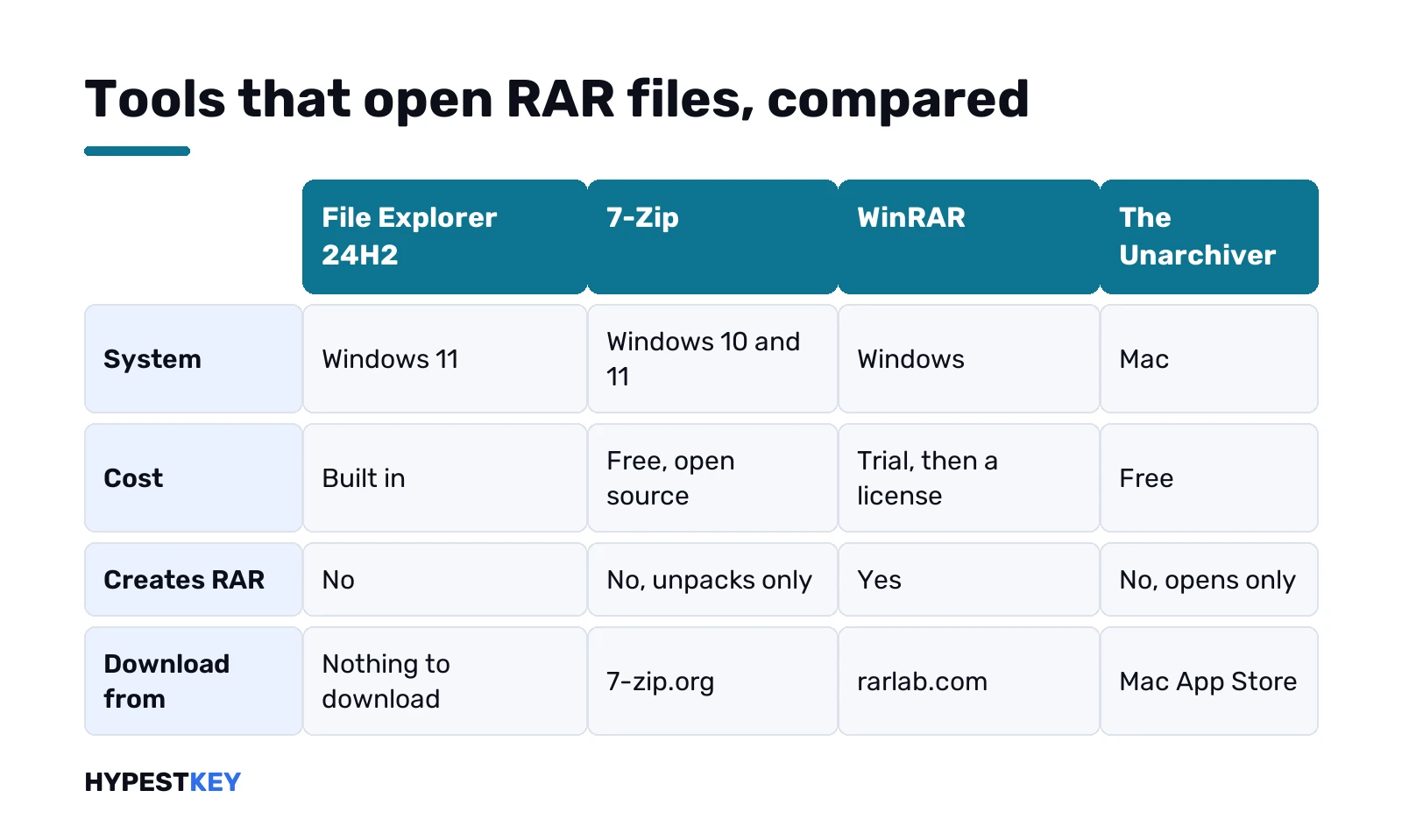
| Your system | Open RAR files with | Cost | Good to know |
|---|---|---|---|
| Windows 11, version 24H2 | File Explorer | Built in | No password-protected archives |
| Windows 10 or older Windows 11 | 7-Zip from 7-zip.org | Free, open source | Unpacks RAR, reads RAR5 |
| Any Windows PC | WinRAR from rarlab.com | Trial, then a license | Creates and unpacks RAR |
| Mac | The Unarchiver, Mac App Store | Free | Opens RAR 5 too, doesn’t create |
| Mac, older RAR 3 files | tar in Terminal | Built in | RAR version 3 only |
| Android | RAR for Android from rarlab.com | Free | From the WinRAR developer |
What a RAR file is, in plain words
A box of files, squeezed. RAR is the native format of WinRAR, according to its developer, and one .rar can hold a single file or whole folders.
People pick RAR over ZIP for a few reasons that RARLAB lists itself:
- Splitting. Big archives come as several volumes, part1, part2 and so on.
- Recovery records. They help repair an archive with damaged data.
- Passwords. Common on shared downloads.
Opening one is free on every system. Creating one is where WinRAR comes in, more on that below.
Open RAR files on Windows 11 with File Explorer
Newer Windows does it alone. Microsoft’s zip and unzip help page says Windows 11, version 24H2, supports ZIP, RAR, 7z and TAR archives. Steps:
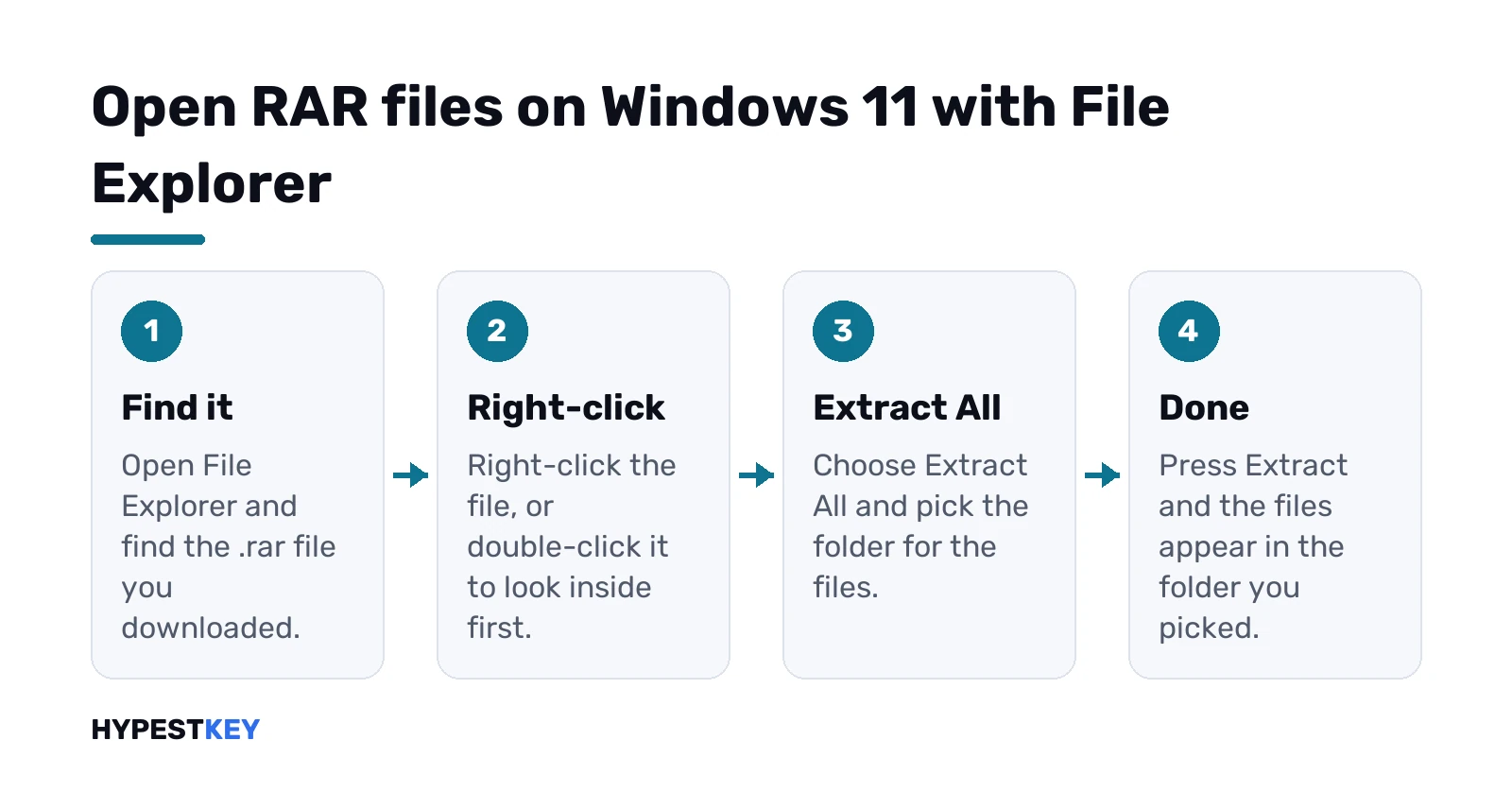
- Find the .rar in File Explorer.
- Double-click to look inside. Or right-click it.
- Extract All, then pick a folder.
- Extract. Done.
Not sure you’re on 24H2? Settings, System, About. Our page on how to check your Windows version walks through it. Missing the update? Our Windows Update guide covers how to get it.
One limit, straight from Microsoft. Windows 11 24H2 doesn’t support operations on encrypted archive files. A RAR with a password won’t open here, and the same page suggests 7-Zip or WinRAR for those.
Same Extract All flow for ZIP. Our guide on how to unzip files on Windows covers it in detail, with PowerShell and tar.
Open RAR files on Windows 10 with 7-Zip
Windows 10’s File Explorer handles ZIP only, and the built-in tar command lists .tar, .zip and .7z but not RAR. So a free tool it is. We’d take 7-Zip.
- Go to 7-zip.org, the official site. Nowhere else.
- Download the 64-bit x64 installer, the .exe one. The 7-Zip page itself recommends .exe over .msi.
- Run it and press Install.
- Right-click the .rar, then the 7-Zip menu, then Extract Here or Extract to a folder.
Short right-click menu? Look under Show more options.
Old 7-Zip on the PC already? Update it. The 7-Zip FAQ notes that version 9.20 supports RAR 2, 3 and 4 only, not RAR5. Current versions read RAR5 fine.
7-Zip lists RAR under unpacking only. It opens RAR. It doesn’t make RAR. More on 7-Zip, and on its own .7z format, in our guide on how to open 7z files.
WinRAR: the tool that also creates RAR
RARLAB, the developer, puts it simply: WinRAR gives complete support for RAR files, so you can create and unpack them. Download only from the RARLAB download page.
- Windows builds: 64-bit and ARM64, with a graphical window and a command line.
- License: a trial version first. You buy a license to keep it.
- Also free from RARLAB: RAR for Android, and themes for the WinRAR window.
We’d install WinRAR only if you make RAR archives yourself. For opening them, File Explorer or 7-Zip cost nothing.
The same thinking goes for WinZip. Paid after its trial, and our page on the WinZip download for Windows 11 explains what you get for it.
How to open RAR files on a Mac
Archive Utility on a Mac handles ZIP. RAR needs help, so here are the two routes.
The easy one: The Unarchiver from the Mac App Store. Free. Its App Store listing says it opens RAR, RAR 5 included, plus 7-Zip, Zip, Tar and Gzip. Needs macOS 10.13 or later.
- Open the App Store and search The Unarchiver.
- Get, then Install.
- Control-click the .rar, Open With, The Unarchiver.
The Terminal route, for older RAR 3 files. macOS ships with tar, built on libarchive. Its manual says it reads RAR version 3 archives:
tar -xf archive.rarNewer RAR5 files aren’t in that manual. The Unarchiver for those.
And WinRAR for Mac? RARLAB offers RAR for macOS as a command-line tool only, a trial, built for Apple silicon. No window, no buttons. We’d skip it unless you need to create RAR archives on the Mac. Our guide to zip files on Mac covers the built-in ZIP side.
Multi-part RAR archives: part1, part2, part3
Big downloads often come split. Names like movie.part1.rar, movie.part2.rar. RARLAB’s rule:
- Put all the volumes in the same folder.
- Start extracting from the first volume.
- The tool then unpacks the whole set.
One part missing? Then the set is incomplete. Download the missing piece, keep the file names as they were, and run it again from part1.
Renamed the files? Undo it, so the part numbers still line up.
Password-protected RAR files
You need the password. There’s no honest way around that.
- File Explorer on Windows 11: won’t open encrypted archives at all.
- 7-Zip or WinRAR: the two tools Microsoft itself suggests for encrypted archives.
No password? Ask whoever sent the file. Sites that promise to “crack” RAR passwords are a gamble with your data, and we don’t recommend them.
Making your own protected archives? 7-Zip encrypts 7z and ZIP with AES-256, per 7-zip.org. Whole drive to protect instead? We’d turn on BitLocker in Windows 11.
When the archive won’t open
A short checklist, in the order we’d go:
- Half a download. Compare the size with the source, download again.
- RAR5 in an old tool. Update 7-Zip, or switch to The Unarchiver on Mac.
- A missing volume. All parts in one folder, start from part1.
- A password. See the section above.
- Older Windows 11. File Explorer reads RAR from 24H2 on; before that, 7-Zip.
Still stuck after all that? The archive is likely damaged. If it has a recovery record, WinRAR can try a repair. Otherwise ask for a fresh copy.
A word on safety too. A RAR can hold anything, programs included. We’d scan it with your antivirus before running any .exe from inside, and skip RAR files from sites you don’t trust.
Convert RAR to ZIP
No converter needed. Open the RAR with any tool above, extract it, then zip the folder.
- Windows: right-click the folder, Show more options, Send to, then the compressed zipped folder option.
- Mac: Control-click the folder, Compress.
Why bother? Everyone can open ZIP without installing anything. We’d do it before sending files to someone less technical.
Open RAR files on other devices
Android first. RARLAB’s own RAR for Android is free, from the same download page as WinRAR.
iPhone and iPad? Apple’s Files help covers ZIP only, so we’d use an App Store app for RAR there.
A RAR full of Windows programs, but you’re on a Mac? Extracting works, running the .exe doesn’t. That needs Windows, for example in a Windows virtual machine on Mac.
Disk images? Different thing again. An .iso opens with a double-click on Windows; our guide to ISO files in Windows 10 explains it. For more free utilities, see our best apps for Windows 11 list.
Setting up a new PC for all this? We sell a Windows 11 Pro key as a genuine Retail license, instant to email.
FAQ
Can Windows 11 open RAR files without WinRAR?
Yes, from version 24H2. File Explorer opens and extracts RAR archives, but not the password-protected ones.
What's the best free program for RAR on Windows 10?
We'd pick 7-Zip. It's free and open source, comes from 7-zip.org, and reads RAR5 in current versions.
Is WinRAR free?
Not for good. RARLAB offers WinRAR as a trial, and you buy a license to keep using it after that.
How do I open a RAR file on my Mac?
Install The Unarchiver from the Mac App Store, then Control-click the .rar and choose Open With, The Unarchiver.
Can 7-Zip create RAR files?
Nope. 7-Zip lists RAR as unpacking only, so making new RAR archives needs WinRAR from rarlab.com.
My RAR file has part1 and part2, how do I open it?
Put every part in the same folder, then start extracting from part1. The tool unpacks the whole set in one go.
The RAR asks for a password I don't have, now what?
Ask the person who sent it. Without the password the files stay locked, and cracking sites are a risk to your data.