Short answer: To open 7z files on Windows 11, version 24H2, use Extract All in File Explorer. On Windows 10 we'd install free 7-Zip from 7-zip.org, or run the built-in tar command. On a Mac, tar in Terminal or The Unarchiver opens 7z. Password-protected 7z needs 7-Zip.
To open 7z files on Windows 11, version 24H2, right-click the .7z and choose Extract All in File Explorer. On Windows 10, install 7-Zip from 7-zip.org, which is free. On a Mac, the built-in tar command or the free Unarchiver opens 7z with nothing to buy.
| System | Open 7z files with | Cost | Good to know |
|---|---|---|---|
| Windows 11, version 24H2 | File Explorer, Extract All | Built in | No password-protected archives |
| Windows 10 and 11 | 7-Zip | Free, open source | Opens and creates 7z, AES-256 |
| Windows 10 and 11 | tar in Command Prompt | Built in | Microsoft lists .7z among its formats |
| Mac | tar in Terminal | Built in | Reads and writes 7z |
| Mac | The Unarchiver | Free, Mac App Store | Opens only, doesn’t create |
| Mac | 7-Zip console version | Free, from 7-zip.org | Command line only |
Open 7z files on Windows 11 with File Explorer
No download on newer Windows. Microsoft’s zip and unzip help page says Windows 11, version 24H2, supports ZIP, RAR, 7z and TAR archives.
- Find the .7z in File Explorer.
- Double-click to look inside, or right-click it.
- Extract All, pick a folder, Extract.
Not on 24H2 yet? Settings, System, About tells you. Our page on how to check your Windows version has the details, and the Windows Update guide covers getting the newer build.
The catch: encrypted archives. Microsoft says 24H2 doesn’t support operations on them and points to 7-Zip or WinRAR instead. A 7z with a password goes to 7-Zip, then.
Open 7z files with 7-Zip on Windows 10 and 11
7z is 7-Zip’s home format. Free, also on work PCs, with no registration, per 7-zip.org.
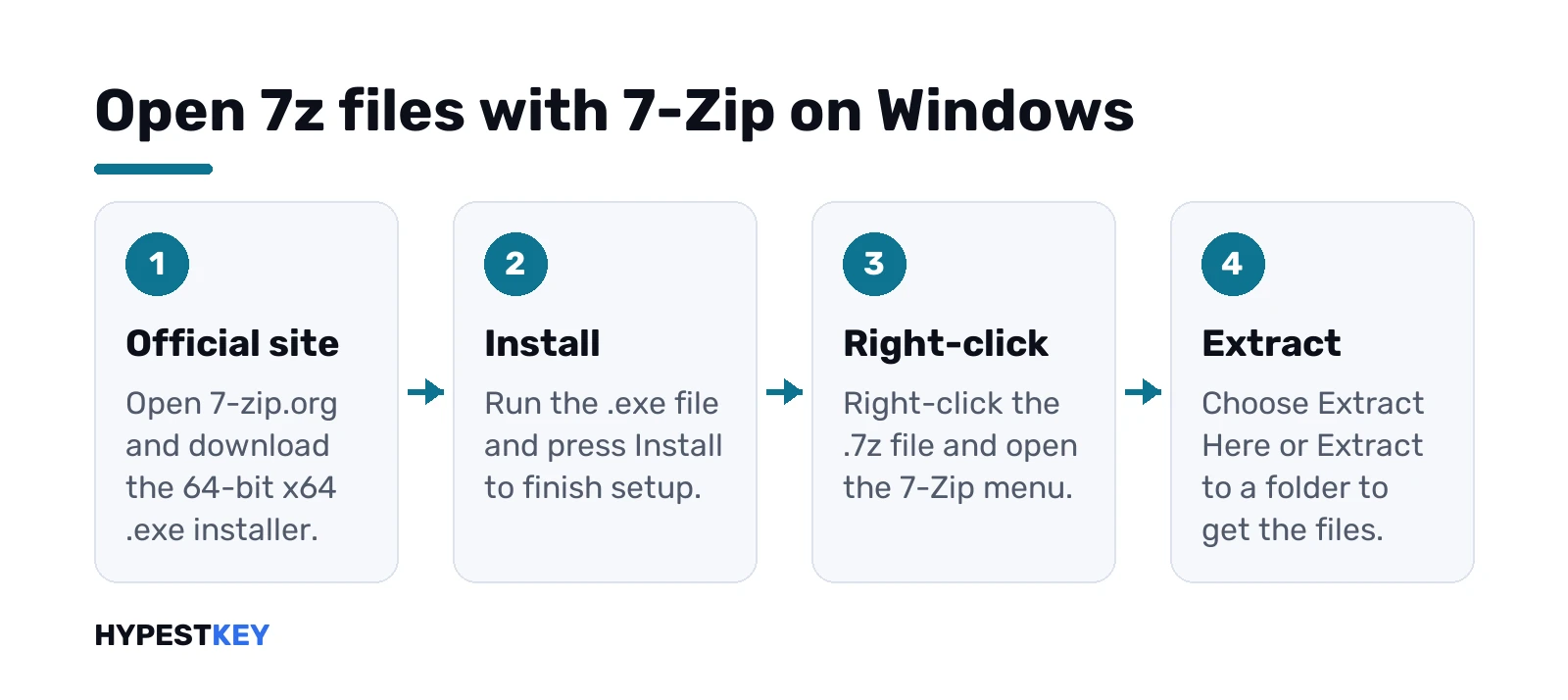
- Open 7-zip.org. Only that address.
- Download the 64-bit x64 installer. ARM64 PC? There’s a build for that too.
- Run the .exe and press Install.
- Right-click the .7z, open the 7-Zip menu, Extract Here or Extract to a folder.
Can’t see the 7-Zip menu? Show more options, at the bottom of the short right-click menu.
Why .exe and not .msi? The 7-Zip download page itself recommends the .exe installer. Simple as that.
Prefer a window? 7-Zip File Manager is in the Start menu after setup. Open the archive there, look inside, then drag out only the files you want.
The tar command: nothing to install
Windows has a hidden helper. Microsoft’s tar page says the built-in tar command creates, lists and extracts archives, .7z included. Command Prompt or PowerShell, in the folder with the file:
tar -xf archive.7zWant to see what’s inside first? This lists the contents without extracting:
tar -tf archive.7zHandy on Windows 10, where File Explorer won’t open 7z. We’d still install 7-Zip for anything with a password, though.
What 7-Zip opens and what it packs
A long list, from 7-zip.org itself:
- Packs and unpacks: 7z, ZIP, TAR, GZIP, BZIP2, XZ and WIM.
- Unpacks only: RAR, ISO, DMG, CAB, VHD and dozens more.
- Encrypts with AES-256 in 7z and ZIP.
RAR is in the unpack-only group. So 7-Zip opens RAR, but making RAR is WinRAR’s job; our guide on how to open RAR files covers both.
On ZIP and GZIP, 7-zip.org claims a ratio 2 to 10% better than PKZip and WinZip. Weighing WinZip anyway? Our WinZip download for Windows 11 page explains its trial.
Runs on Windows 11 and 10, and older ones too. Even 32-bit Windows gets its own installer.
How to open 7z files on a Mac
Two free routes, no 7-Zip window needed.
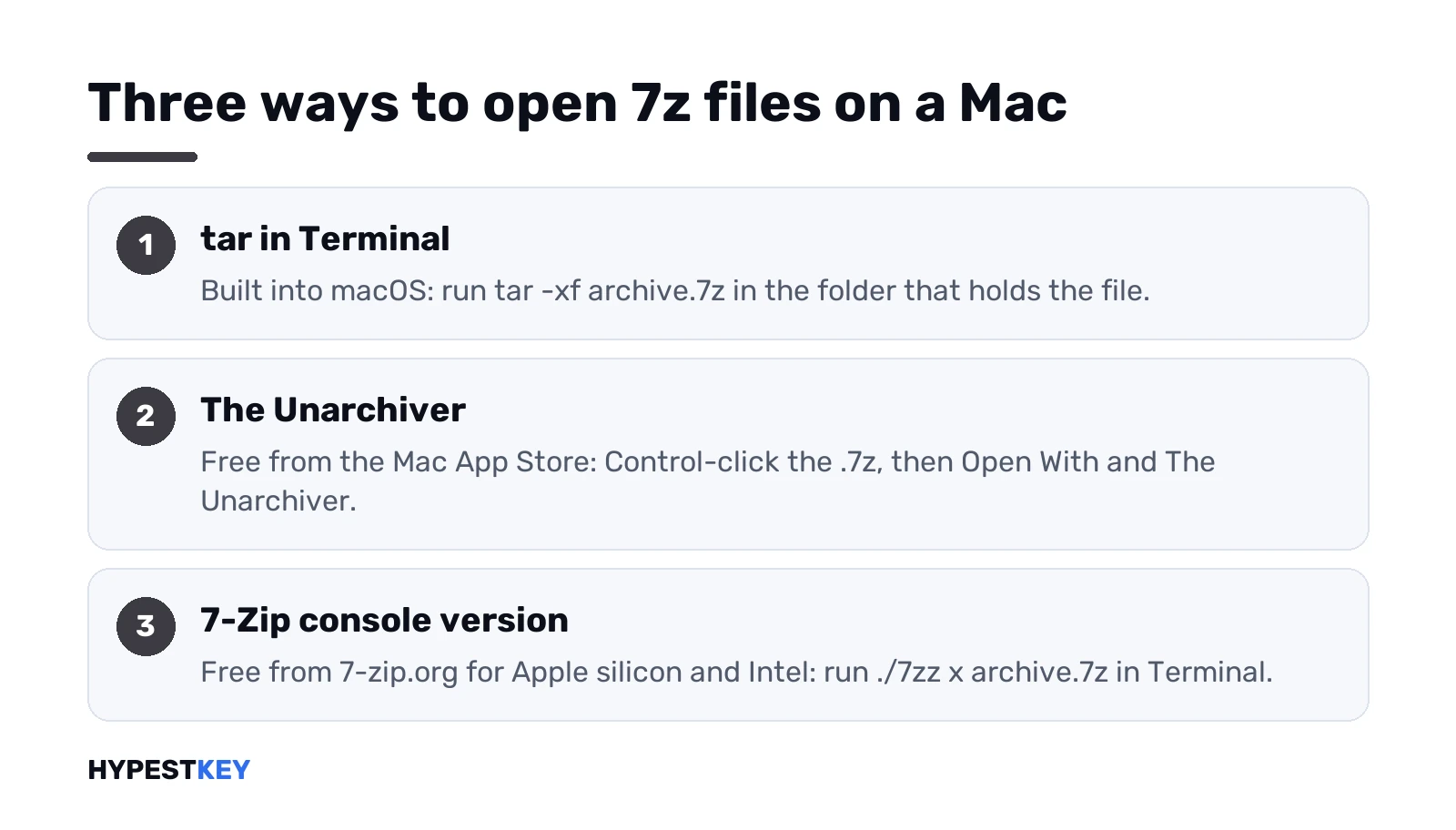
Terminal first. macOS ships with tar, built on libarchive, and its manual says libarchive reads and writes 7-Zip archives. In the folder with the file:
tar -xf archive.7zRather click than type? The Unarchiver, free from the Mac App Store. Its listing names 7-Zip among the formats it opens, next to RAR and Zip. Control-click the .7z, Open With, The Unarchiver. Needs macOS 10.13 or later, per the listing.
Plain ZIP files on a Mac need neither; Finder handles them, as our guide to zip files on Mac shows.
7-Zip for Mac: the console version
There’s no 7-Zip window for macOS. What 7-zip.org does offer is a console version for Apple silicon and Intel Macs, a .tar.xz download.
- Inside: 7zz, the standalone console 7-Zip, plus a manual in HTML.
- Its readme says 7zz supports all formats.
- The older p7zip port is outdated, the same readme says.
Extract a 7z with it, from the folder where you unpacked 7zz:
./7zz x archive.7zHonestly, for opening the odd archive we’d stick with tar or The Unarchiver. 7zz earns its place when you script things or need 7-Zip’s own switches on the Mac.
Password-protected archives and hidden file names
Here 7-Zip is the tool. File Explorer on Windows 11 doesn’t do encrypted archives at all, as Microsoft says.
Opening one: 7-Zip asks for the password, then extracts. No password? Ask the sender. Sites that promise to crack 7z passwords are a risk to your data, and we stay away from them.
Making one, a detail from the 7-Zip manual. With a password, 7-Zip encrypts the file data, but file names stay readable unless header encryption is on too. On the command line that’s the -mhe switch. The console tool is 7z on Windows and 7zz on a Mac:
7z a -p -mhe secret.7z MyFolderWith -p and no password after it, 7-Zip prompts for one. ZIP can’t hide file names at all, per the same manual, so 7z is the better pick for private files.
7z vs ZIP vs RAR: which one to use
| 7z | ZIP | RAR | |
|---|---|---|---|
| Opens without extra apps | Windows 11 24H2, Mac tar | Windows and Mac | Windows 11 24H2 |
| Create it for free | Yes, 7-Zip | Yes, built in | No, WinRAR is a trial |
| Encryption | AES-256, names too | AES-256 in 7-Zip, names visible | In WinRAR |
| Best for | Small archives, private files | Sending to anyone | Files already in RAR |
Our rule of thumb. ZIP for anything going to other people, since every computer opens it. 7z when size or privacy matters and you know the other side has 7-Zip or a recent Windows 11.
Moving files to a new PC? Archives help with folders, and our guide to moving Office to a new computer covers the license side.
Create a 7z archive
Three ways, depending on the system:
- 7-Zip on Windows: right-click, 7-Zip, Add to archive, choose 7z as the format.
- Windows 11 24H2: Microsoft says it supports compression of 7-Zip too, but its help page only walks through ZIP.
- Mac Terminal: the built-in tar writes 7z with one switch.
The Mac command:
tar --format 7zip -cf archive.7z MyFolderSplitting a huge archive into parts? 7-Zip’s -v switch makes volumes of a size you pick. The manual warns not to use or copy the volumes before archiving finishes, because 7-Zip can still change any of them at the end.
When the archive won’t open
- Older Windows build. File Explorer reads 7z from 24H2 on. Before that, tar or 7-Zip.
- A password. File Explorer can’t; 7-Zip can.
- Half a download. Compare the size with the source and download it again.
- Missing volumes. All parts in one folder, start from the first.
- A very old p7zip on a Mac or Linux box. Switch to tar or the current 7zz.
Archive full of .exe files? Scan it with your antivirus first. And on a Mac, those programs won’t run without Windows, for example in a Windows virtual machine on Mac.
We keep more free utilities in our best apps for Windows 11 list and our productivity tools for Windows picks. For plain ZIP, our guide to unzip files on Windows covers every built-in way.
New PC without Windows yet? We sell a Windows 11 Pro key as a genuine Retail license, instant to email.
Related guides
FAQ
Can Windows 11 open 7z files without 7-Zip?
Yes, from version 24H2. File Explorer extracts 7z archives, but not ones protected with a password.
Is 7-Zip really free?
Yes. 7-zip.org says it's free and open source, and you can use it on any computer, including at work.
Where do I download 7-Zip safely?
Only from 7-zip.org. Pick the 64-bit x64 .exe for most PCs, which is the installer the site recommends.
Is there a 7-Zip for Mac?
Only a console version from 7-zip.org, without a window. Most people are better off with tar or The Unarchiver.
How do I open a 7z file on my Mac without installing anything?
Open Terminal in that folder and run tar -xf with the file name. The macOS tar reads 7z archives.
Can 7-Zip hide the file names in an archive?
In 7z, yes. Turn on header encryption along with the password, since ZIP archives always show the names.
Why won't my 7z file open in File Explorer?
Usually an older Windows build or a password. Check you're on 24H2, otherwise open it with 7-Zip instead.