Short answer: Boot Camp vs Parallels depends on your Mac. Boot Camp works only on Intel Macs. It runs Windows 10 natively after a restart. Parallels puts Windows in a window next to macOS, on Apple silicon and Intel, for a yearly fee. We'd pick Boot Camp for games on Intel, Parallels for everything else.
Boot Camp vs Parallels comes down to your Mac’s chip and how you use Windows: Boot Camp installs Windows on its own partition and needs a restart, while Parallels runs it in a window next to macOS. Apple silicon Macs have no Boot Camp, so Parallels wins there by default.
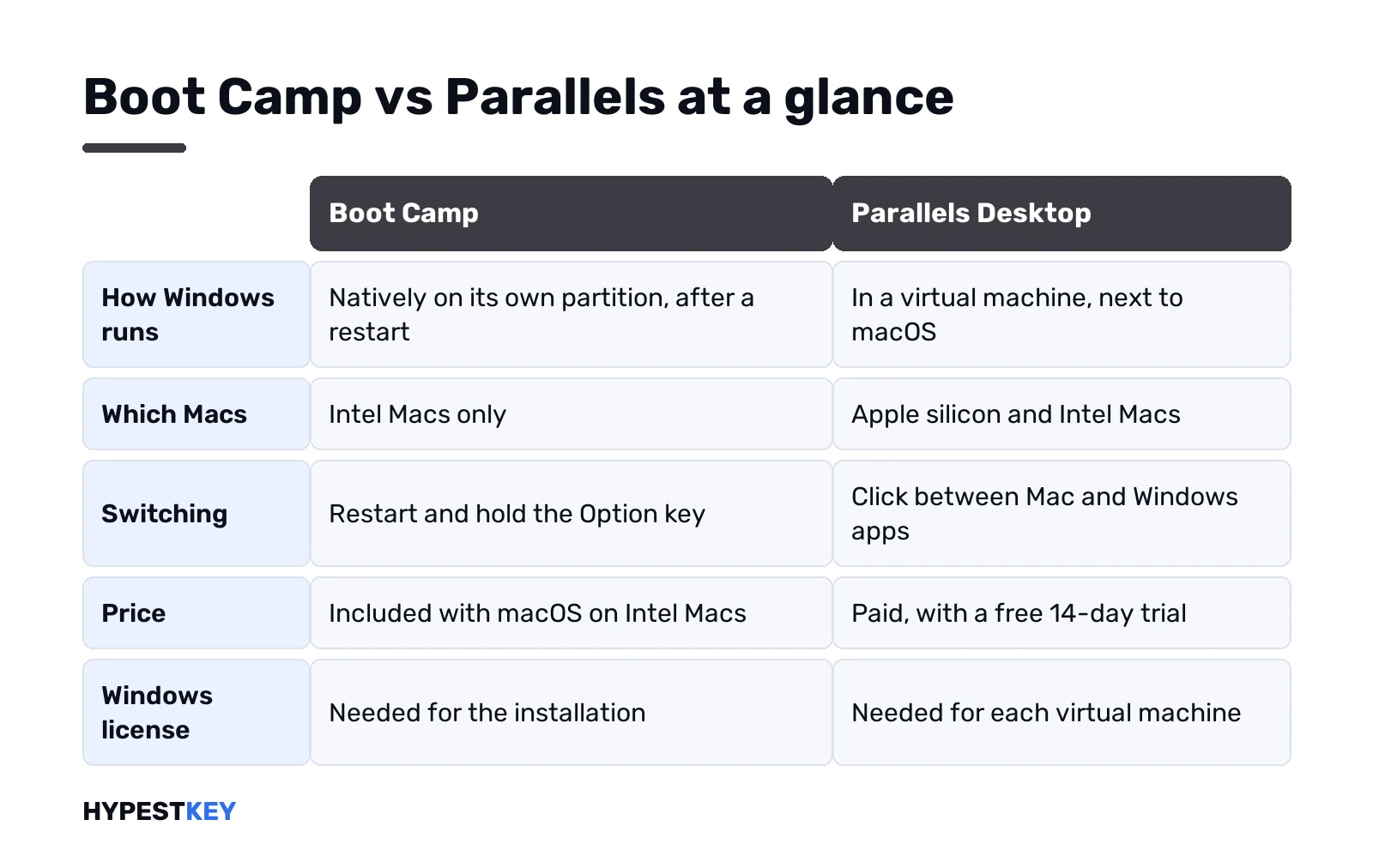
| Boot Camp | Parallels Desktop | |
|---|---|---|
| How Windows runs | Natively, after a restart | In a virtual machine, beside macOS |
| Macs | Intel only | Apple silicon (version 27) and Intel (version 26) |
| Windows version | Windows 10 Home or Pro, 64-bit | Windows 11 for Arm on M-series; Windows 11 or 10 on Intel |
| Price | Included with macOS on Intel Macs | From $99.99 a year at the time of writing |
| Switching | Restart, hold Option | Click between windows |
| Windows license | Needed | Needed |
Boot Camp vs Parallels at a glance
Two different ideas. Boot Camp splits the drive, and the Mac becomes a PC until you restart. Parallels keeps macOS running and puts Windows inside an app.
So the real question is what matters to you more. Full hardware for one system at a time? Or both systems at once, with a little less speed in Windows? For most people we talk to, Mac apps plus one or two Windows programs, the second option is the one they want.
And the chip settles a lot before you even get there. M1 through M5 Macs have no Boot Camp. Full stop.
How Boot Camp works
Boot Camp Assistant lives in the Utilities folder on Intel Macs. It carves out a Windows partition, starts the Windows installer, then adds Apple’s drivers once Windows is up.
What Apple asks for, per its page on how to install Windows 10 on your Mac with Boot Camp Assistant:
- 64-bit Windows 10 Home or Pro, a full version, not an upgrade;
- the Windows 10 ISO or other install media;
- at least 64 GB free on the startup disk, 128 GB recommended;
- a 16 GB USB stick on older models that need one.
One warning on that page deserves attention. The partition size can’t be changed later. We’d give Windows more room than feels necessary. Our Boot Camp guide for Windows 10 on Mac has each step.
How Parallels Desktop works
An app on macOS. Inside it, a virtual machine: a PC made of software, with its own virtual disk stored as a file.
Windows runs in a window, full screen, or in Coherence mode, where Windows apps sit in the Dock next to Mac ones. Files drag between Finder and File Explorer. Copy and paste works both ways. No restart, ever.
The cost is memory. macOS and Windows share the same RAM, so Parallels lists 8 GB as the minimum on Apple silicon and 16 GB or more for best performance. Sizing details? We cover them in our overview of a Windows virtual machine on Mac.
Which Macs can use each one
Check first: Apple menu, About This Mac.
- Chip shows an Apple M name. Boot Camp isn’t there. Parallels Desktop 27 runs, with Arm versions of Windows 11.
- Processor shows Intel. Both work. Parallels Desktop 26 covers Intel, since version 27 is Apple silicon only.
Apple’s Boot Camp list stops at Intel models:
- MacBook Air and MacBook Pro up to 2020, minus the M1 versions;
- iMac up to 2020, and every iMac Pro;
- Mac mini up to 2018;
- Mac Pro up to 2019.
Newer Macs simply don’t have the option.
Boot Camp vs Parallels for speed and games
Boot Camp wins on raw speed. Windows owns the processor, memory and graphics, nothing runs beside it. For demanding games on an Intel Mac that’s the honest pick.
Parallels is fast enough for office work, browsers, accounting software and most development tools. Games are the weak spot. Game support goes up to DirectX 11. Newer DirectX 12 titles? Often they won’t start. Anti-cheat drivers are another common blocker.
On Apple silicon there’s a twist. Windows for Arm runs x64 apps through emulation. A few things are off the table: WSL, Windows Sandbox, some DirectX 12 apps. We’d test the one program you care about during the 14-day Parallels trial.
Convenience: switching, files and apps
Here Parallels pulls far ahead. With Boot Camp you close everything, restart and hold the Option key to pick a system. Every time.
With Parallels you click from a Mac app to a Windows app and back. We’d suspend the VM in the evening. It resumes in seconds, documents still open. Snapshots roll back a broken update, which Boot Camp can’t.
Storage behaves differently too. A Boot Camp partition is fixed in size. A Parallels virtual disk lives in a file. Move it, back it up or delete it like any other.
Cost and the Windows license
Boot Camp costs nothing extra. Parallels is paid, and at the time of writing the cost comparison on parallels.com listed these prices in US dollars:
- Standard Edition: $99.99 per year.
- Pro Edition: $119.99 per year.
- Standard Edition, one-time purchase: $219.99, current version only.
Prices change, so we’d check the Parallels Desktop product page before buying. A free 14-day trial comes first anyway.
Windows is extra either way. Neither option includes a license. Microsoft wants one per Windows instance, hardware or VM. A Windows 11 Pro key works for both x64 and Arm builds. Our pages on activating Windows 11 and retail vs OEM vs volume licenses cover the rest.
Windows 11 and Windows 10 on each
Apple’s Boot Camp instructions are written for Windows 10 Home or Pro. Windows 11 isn’t on that page, so we wouldn’t count on Apple’s drivers or help there. Our guide to installing Windows 11 on a Mac goes through the routes that do work.
Parallels is simpler. New Windows 11 virtual machines get a virtual TPM chip automatically, and on Apple silicon the app downloads Windows 11 for Arm from Microsoft during setup. Windows 10 stays possible on Intel Macs, 64-bit only.
Still undecided between the two Windows versions? Our Windows 11 vs Windows 10 comparison lists the practical differences.
Run your Boot Camp partition in Parallels
Good news for Intel owners: you don’t have to choose. Parallels can use an existing Boot Camp installation.
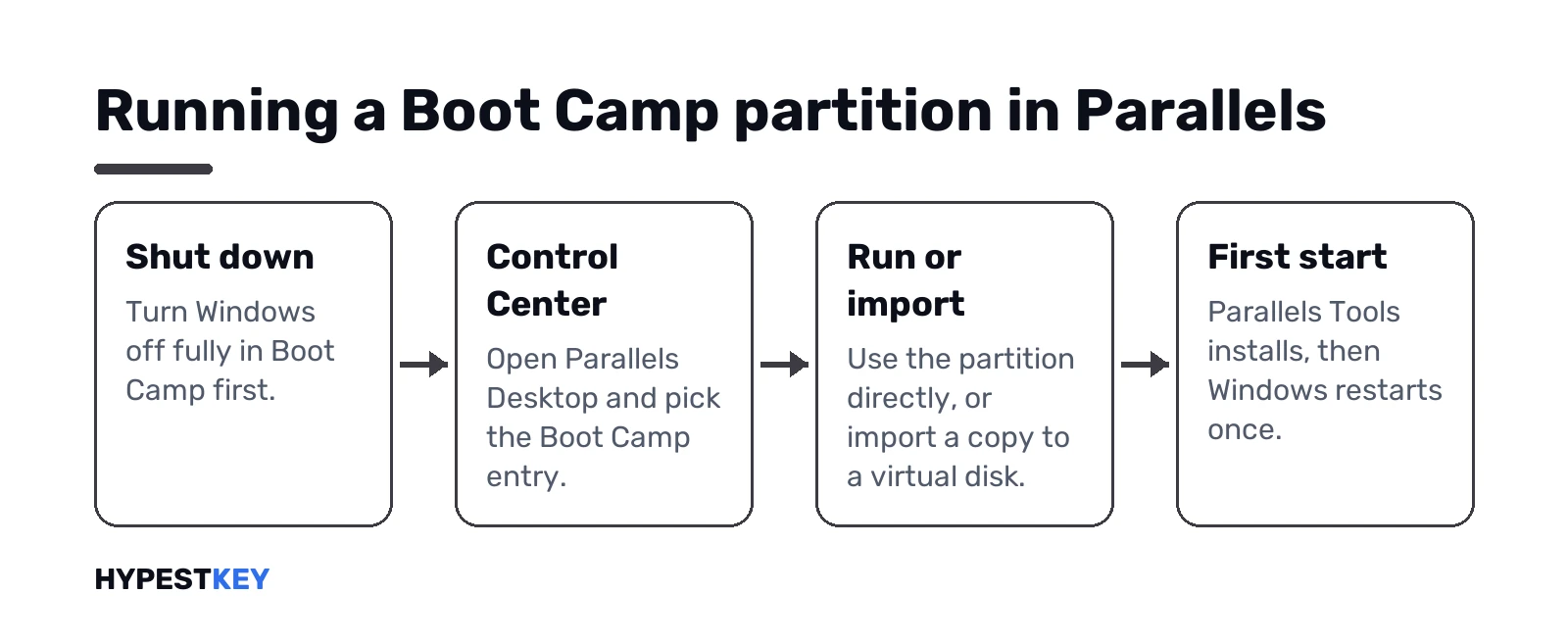
- Shut Windows down fully in Boot Camp.
- Open Parallels Desktop, then Control Center.
- Pick the Boot Camp entry. Run it directly, or choose Import Boot Camp.
- Let Parallels Tools install on the first start, then restart Windows.
Running directly has limits: no pause, no snapshots, no Safe Mode, no compression. An import copies Windows to a virtual disk without those limits. Two separate installs after that. We’d also check the partition: only Boot Camp Assistant ones on the main disk qualify, as the Parallels article on running a Boot Camp partition with Parallels Desktop explains.
Windows may ask to activate again inside the VM. New virtual hardware, that’s why. Our page on how to check Windows activation status helps you confirm it.
Parallels alternatives: VMware Fusion, UTM and more
Not sold on paying yearly? A few other routes:
- VMware Fusion. Free for every kind of use, home or business, says Broadcom. On Apple silicon it runs Arm versions of Windows 11.
- UTM. Free and open source. Near native speed for Arm guests, slow emulation for x86 Windows on Apple silicon.
- Wine-based tools like CrossOver. Some Windows apps run with no Windows install at all, others don’t.
- Windows 365. A Cloud PC streamed to the Mac, sold per user per month to organizations.
Our list of free Windows emulators for Mac compares them in more detail. Looking for the opposite, macOS on a PC? That’s covered in our page on a Mac emulator for Windows.
Which one to pick: Boot Camp or Parallels
Our short version:
- Apple silicon Mac: Parallels or another VM. Boot Camp isn’t an option.
- Intel Mac, mostly gaming: Boot Camp.
- Intel Mac, office apps and quick switching: Parallels.
- Intel Mac, both needs: Boot Camp, then run that same partition in Parallels.
- No budget: VMware Fusion or UTM.
Whatever you choose, Windows needs a key. Our Windows 11 Pro key comes as a Retail license, sent instantly to your email. For Boot Camp, the Windows 10 Pro key.
Related guides
FAQ
Can I use Boot Camp on an M1 or M2 Mac?
No. Boot Camp works on Intel Macs only. Apple silicon Macs run Windows through Parallels or another virtual machine.
Is Boot Camp faster than Parallels?
Yes, for heavy work and games. Windows gets the whole Mac in Boot Camp, while Parallels shares it with macOS.
Is Boot Camp free?
Yes. Boot Camp Assistant comes with macOS on Intel Macs. You still need a Windows license, same as with Parallels.
Can Parallels use my existing Boot Camp partition?
Yes, on Intel Macs. You can run the partition directly or import it into a separate virtual disk.
Does Boot Camp support Windows 11?
Apple's Boot Camp instructions cover Windows 10 Home or Pro, 64-bit. For Windows 11 on a Mac, a virtual machine is the easier path.
What's a free alternative to Parallels?
VMware Fusion and UTM. Broadcom offers Fusion free for all uses, and UTM is free and open source.
Do I need a Windows license for Parallels?
Yes. Parallels doesn't include one, and Microsoft wants a separate license for each Windows instance, including virtual machines.