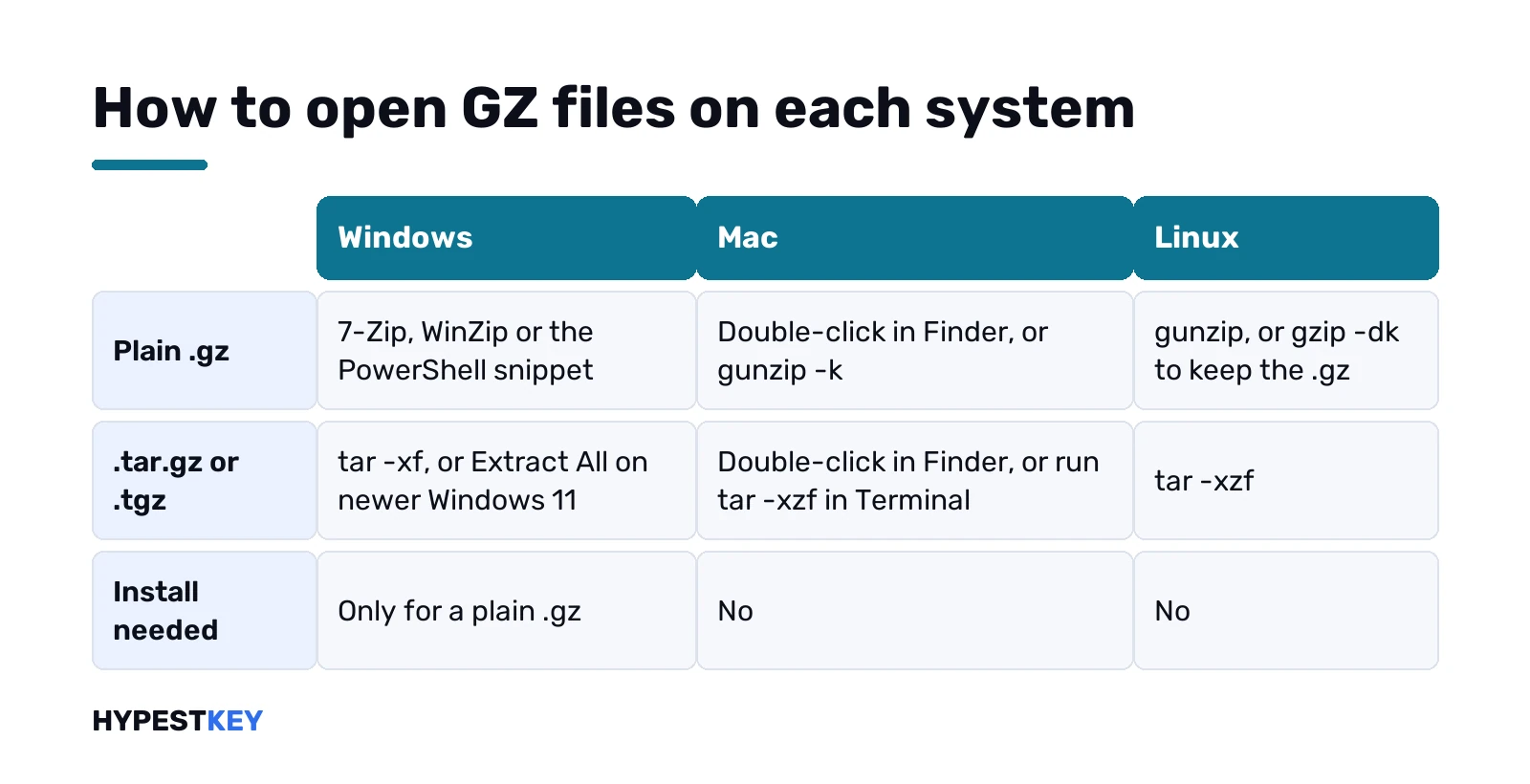
Short answer: To open GZ files on a Mac, double-click them in Finder or run gunzip -k file.gz in Terminal. On Linux, use gunzip or gzip -d. On Windows, install 7-Zip or WinZip, or use PowerShell. A .tar.gz opens with the built-in tar command on all three systems.
To open GZ files, decompress them: on a Mac double-click the file in Finder, on Linux run gunzip, and on Windows use 7-Zip or WinZip. A .tar.gz? The tar command, built into all three. Inside a plain .gz you’d usually find one file, often a log or a CSV.
| Where | Plain .gz | .tar.gz or .tgz |
|---|---|---|
| Windows 11 | 7-Zip, WinZip, PowerShell | File Explorer on newer builds, tar |
| Windows 10 | 7-Zip, WinZip, PowerShell | tar in Command Prompt |
| Mac | Double-click, or gunzip in Terminal | Double-click, or tar in Terminal |
| Linux | gunzip or gzip -d | tar -xzf |
What’s inside a .gz file
One file, compressed. Gzip works file by file: it replaces report.csv with report.csv.gz and keeps the original’s date and permissions.
Several files in one package? Then someone used tar first, and you get .tar.gz or .tgz. Our page on TGZ files covers that format in detail.
- access.log.gz: a single server log.
- data.csv.gz: a spreadsheet export, opens in Excel after unpacking.
- project.tar.gz: a whole folder.
The double extension tells you what you’ll get. Strip the .gz and that’s the file waiting inside.
Open GZ files on Windows 11 and 10
Here Windows is the awkward one. File Explorer reads .tar.gz and .tgz on newer Windows 11 builds, per Microsoft’s update notes. A lone .gz with no tar inside isn’t on that list.
So we’d install one well-known tool:
- 7-Zip from 7-zip.org. Free, open source, handles GZIP.
- Right-click the .gz, then 7-Zip, Extract Here.
- The original file appears next to the archive.
WinZip does the same job, paid after its trial. Our WinZip download for Windows 11 guide shows where to get it safely. WinRAR? Only from rarlab.com.
Not sure which build you run? Our guide to checking your Windows version shows it in a minute.
A .tar.gz on Windows: File Explorer or tar
Easier, because tar is built in. On Windows 11 try right-click and Extract All first, same as in our page on how to unzip files on Windows.
Nothing there? Command Prompt in that folder, then:
tar -xf project.tar.gzMicrosoft’s tar on Windows page lists the other common switches. Windows 10 has the same command.
PowerShell for a single .gz
No install allowed on a work PC? PowerShell can do it through .NET’s GZipStream class. Open PowerShell in the folder with the file and paste this, with your own file names:
$in = [IO.File]::OpenRead("$PWD\data.csv.gz")
$out = [IO.File]::Create("$PWD\data.csv")
$gz = New-Object IO.Compression.GZipStream($in, [IO.Compression.CompressionMode]::Decompress)
$gz.CopyTo($out); $gz.Dispose(); $out.Dispose(); $in.Dispose()
Clunky, yes. It works without admin rights, though, and leaves the .gz untouched. We’d keep a copy of the archive anyway, just in case.
Unzip GZ on Mac: Finder and Archive Utility
The quick route. Double-click the .gz in Finder. Archive Utility, which ships with macOS, unpacks it next to the original.
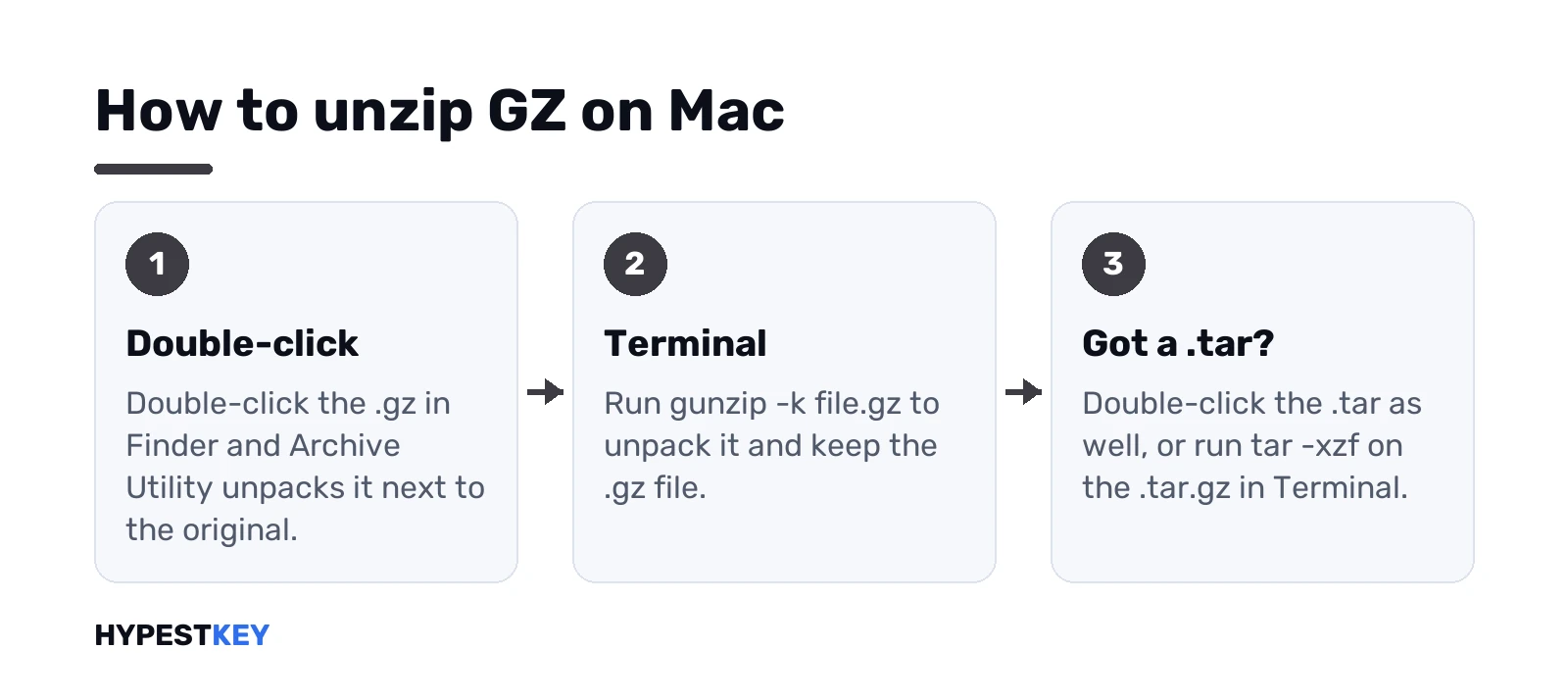
A .tar.gz sometimes comes out as a .tar first. Double-click again. Two layers, two clicks, and the folder appears.
Nothing happens, or an error about the archive? Check free space first. Apple’s help for zip files gives the same advice, and it holds for .gz too. Then ask the sender for a fresh copy.
Unzip GZ on Mac with Terminal
Handy for big logs, or when Finder won’t cooperate. Applications, Utilities, Terminal. Go to the folder, then:
gunzip -k data.csv.gzThe -k keeps the .gz. Without it gunzip deletes the archive once it’s done, which surprises people. For a .tar.gz:
tar -xzf project.tar.gzWant to see the file name and sizes first? gzip has a list switch:
gzip -l data.csv.gzRunning Windows on the same Mac? Our guide to a Windows virtual machine on Mac covers that setup; the Windows steps above work inside it.
Open GZ files on Linux
Nothing to install. Every distribution ships gzip.
gunzip access.log.gz
gzip -dk access.log.gz
First line unpacks and removes the .gz. Second unpacks and keeps it. A whole folder of them? gzip -dr walks through subfolders too. On a desktop, the file manager’s right-click Extract does it as well.
Servers full of these? Our guides on Windows Server editions and FTP servers in Windows 11 help on the Windows side of a mixed setup.
Read a .gz without unpacking it
A 2 GB log, and you only need the end? Don’t unpack it. On Mac and Linux, gzip -dc prints the contents straight to the screen:
gzip -dc access.log.gz | tail -n 50Is the file intact? gzip can test it without writing anything:
gzip -t access.log.gzNo output? It’s fine. That’s the check we’d run before blaming the program.
Make a .gz yourself
The reverse trip. On Mac or Linux, one word does it:
gzip -k report.csvYou get report.csv.gz next to the original. Leave out -k and gzip swaps the file for the archive. Default level is 6; -9 squeezes harder and takes longer, -1 goes fastest.
Several files or a folder? Gzip alone won’t bundle them. Pack them with tar first:
tar -czf project.tar.gz projectOn Windows the same tar line works in Command Prompt. 7-Zip’s Add to archive window also offers gzip as a format, if you’d rather click.
A csv.gz headed for Excel
Common one. Exports from analytics tools, banks and web servers often arrive as .csv.gz to save bandwidth.
- Unpack it with any method above.
- Open Excel, then File, Open, and pick the .csv.
- Check the delimiter and the date columns before saving as .xlsx.
Huge file? A big log may hold more rows than a sheet takes. Then we’d look at it in a text editor or with the gzip -dc trick above instead.
When you can’t open GZ files
- “Not in gzip format”. The file isn’t really gzip, or the download stopped halfway. Download again.
- Unknown file after unpacking. Look at the name without .gz and open it with the matching app.
- A .tar and no folder. Extract the .tar too.
- gunzip refuses because the file exists. Rename the old one, or add -f to overwrite.
- Disk full. Unpacked text can take several times the archive’s size.
Disk images are their own thing. An .iso mounts as a drive; see how to mount ISO files in Windows.
Online GZ openers and safe tools
Browser-based openers exist. They mean uploading your file to someone else’s server, though, and logs or database dumps often hold private data. We’d stick to local tools.
Gzip’s own GNU manual lists every switch. For a program with a window, our picks of the best apps for Windows 11 and productivity tools for Windows stick to makers’ own downloads.
That CSV is headed for Excel? Office Home and Business 2024 from us works on one PC or one Mac, instant to email.
What TGZ files are: tar plus gzip
Two layers, one file. First tar glues a folder into a single archive. Then gzip compresses that archive.
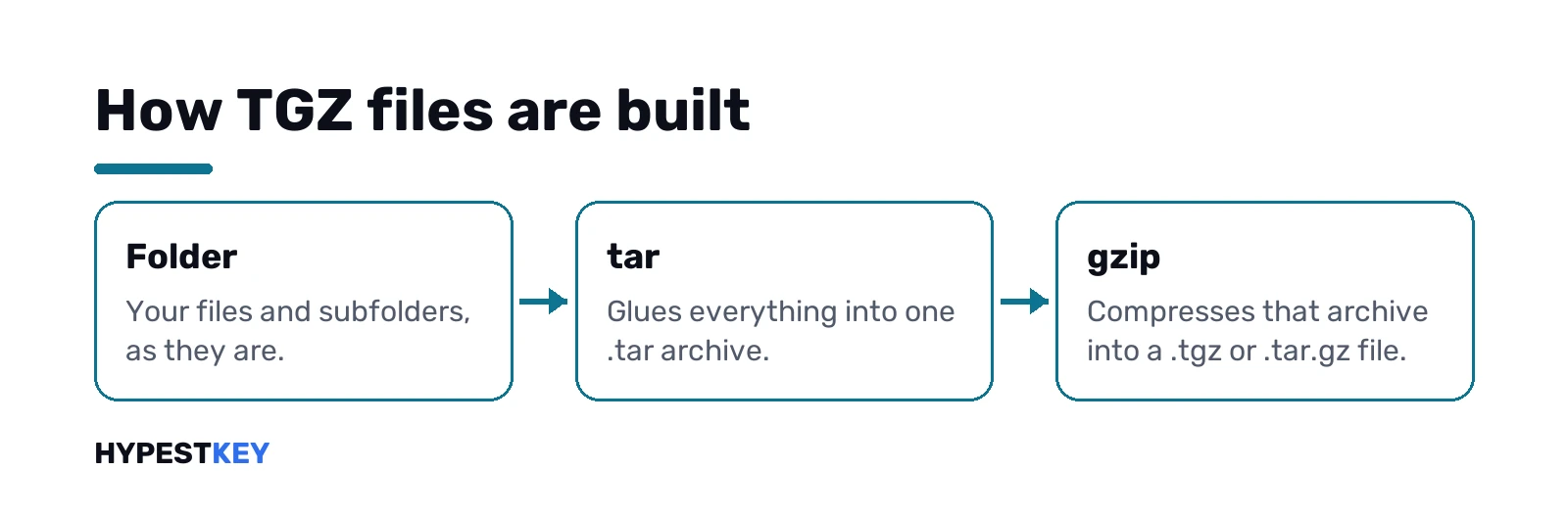
The name comes from old file systems that disliked double extensions. GNU’s own gzip manual says gunzip treats .tgz as shorthand for .tar.gz, so the two are interchangeable. Rename one to the other and nothing breaks.
- .tar: an archive, not compressed.
- .gz: one compressed file, often a single log or CSV.
- .tgz or .tar.gz: a whole folder, archived and compressed.
Where do you meet them? Source code downloads, Linux software, server backups, database dumps. We see them most from developers and hosting panels, rarely from friends sending photos.
Create a TGZ archive yourself
Sending a folder to a Linux server or a developer? A .tgz keeps file names and folder layout intact. On Windows, macOS or Linux:
tar -czf backup.tgz my-folderc creates, z compresses with gzip. On Windows the -a switch also works: it picks the format from the extension you type.
tar -caf backup.tgz my-folderGzip’s default level is 6, a middle ground between speed and size. Text and source code shrink a lot. Photos and videos barely move, since they’re compressed already.
Moving archives to a server over FTP? Our page on FTP servers in Windows 11 shows the setup.
TGZ vs TAR.GZ vs ZIP
| .tgz / .tar.gz | .zip | |
|---|---|---|
| Made of | tar archive, then gzip | One format, each file compressed on its own |
| Typical home | Linux, servers, source code | Windows, email, everyday sharing |
| Open one file without unpacking all | Slow, the whole stream is read | Fast |
| Built-in on Windows 11 | File Explorer on newer builds, tar | File Explorer |
| Built-in on Mac | Archive Utility, tar | Archive Utility, Finder Compress |
Our take: ZIP for people, TGZ for machines. Sending to a Windows user who isn’t technical? Zip it.
npm packages and other .tgz you’ll meet
Developers see .tgz all the time. npm packs every package as one. So do plenty of open source releases. Usually a tool unpacks them for you, so you’d never touch the file.
Opening one by hand? Same tar line. npm names them after the package and its version, by the way. Some database and hosting tools hand out .tgz backups as well. On Windows, our SQL Server Management Studio guide covers the database side.
FAQ
Can Windows open a .gz without extra software?
A .tar.gz, yes, with tar or File Explorer on newer Windows 11. A plain .gz needs 7-Zip, WinZip or the PowerShell snippet.
How do I unzip a gz on Mac?
Double-click it in Finder and Archive Utility unpacks it. In Terminal, gunzip -k file.gz does the same and keeps the original.
gunzip deleted my .gz, is that normal?
Yes. That's its default behaviour. Add -k next time and the archive stays next to the unpacked file.
What's the difference between .gz and .tar.gz?
A .gz holds one compressed file. A .tar.gz holds a whole tar archive of many files, compressed with gzip.
Is it safe to open a .gz file?
Unpacking itself is harmless. Scan what comes out before running it, especially from senders you don't know.
How do I open a csv.gz in Excel?
Unpack it first with 7-Zip, Finder or gunzip. Then open the resulting .csv in Excel as usual.
Do online gz openers work?
Most do, but they upload your file to a server. For logs or exports with private data we'd use a local tool.
tgz and tar.gz, same thing?
Yes. Same tar archive compressed with gzip inside, and gunzip treats .tgz as short for .tar.gz.