Short answer: Parallels Desktop for Mac runs Windows 11, Linux and macOS in virtual machines next to your Mac apps. Version 27 wants Apple silicon. Intel Macs use version 26. Get it from parallels.com, free for 14 days. After that, plans start at $99.99 a year at the time of writing, and we'd budget for a separate Windows license.
Parallels Desktop for Mac is a paid app that runs Windows, Linux and macOS in virtual machines right next to your Mac apps, with a free 14-day trial. Version 27 needs Apple silicon. Intel Macs stay on version 26. Windows needs its own license.
- Check the chip: Apple menu, then About This Mac.
- Download the installer from parallels.com and open it.
- Sign in or create a Parallels account to start the trial.
- Let the setup fetch Windows 11 from Microsoft, or point it at an image file.
- Activate Windows inside the VM with your own key.
What Parallels Desktop for Mac does
One app, a whole PC inside it. Parallels creates a virtual machine, a computer made of software, and Windows boots in that window while macOS keeps running around it. No restart. No second partition.
Three ways to look at it. A plain window you can resize. Full screen, so the Mac nearly disappears. Or Coherence mode, where the Windows desktop hides and single Windows apps sit in the Dock like Mac apps. We’d start in a window and only switch once things work.
Guests it can run:
- Windows 11, the usual reason people buy it;
- Linux distributions, handy for developers;
- macOS itself, for testing on a clean system.
Thinking about other routes first? We compare Parallels with VMware Fusion and UTM in our overview of a Windows virtual machine on Mac. Full install steps: our guide to installing Windows 11 on a Mac.
Which Macs it runs on: Apple silicon and Intel
Chip decides everything here. Apple menu, About This Mac. A line that says Chip with an M in it means Apple silicon. A line that says Processor with Intel means the older generation.
| Item | Parallels Desktop 27, from the Parallels system requirements page |
|---|---|
| Processor | Any Apple silicon chip, M-series or A18 Pro |
| Memory | 8 GB minimum, 16 GB or more for best performance |
| App size | 600 MB, plus at least 16 GB for Windows |
| macOS | Sonoma 14.7 or newer, Sequoia 15.5 or newer, Tahoe 26.0 or newer |
| Graphics | Full hardware acceleration from Apple M3 and newer |
| Guest systems | Arm versions only |
| Internet | Needed for activation, updates and some features |
Intel owners aren’t left out. Per a footnote on the Parallels Desktop system requirements page, Intel Macs stay on version 26. x86 guests there. So regular 64-bit Windows 10 and 11 work, and we’d call that a fair deal. Boot Camp? Also Intel only. Our Boot Camp guide for Windows 10 on Mac has it.
About memory. 8 GB boots Windows. With 16 GB we’d feel far less squeezed, because macOS and Windows share that pool the whole time.
Standard, Pro and Business editions compared
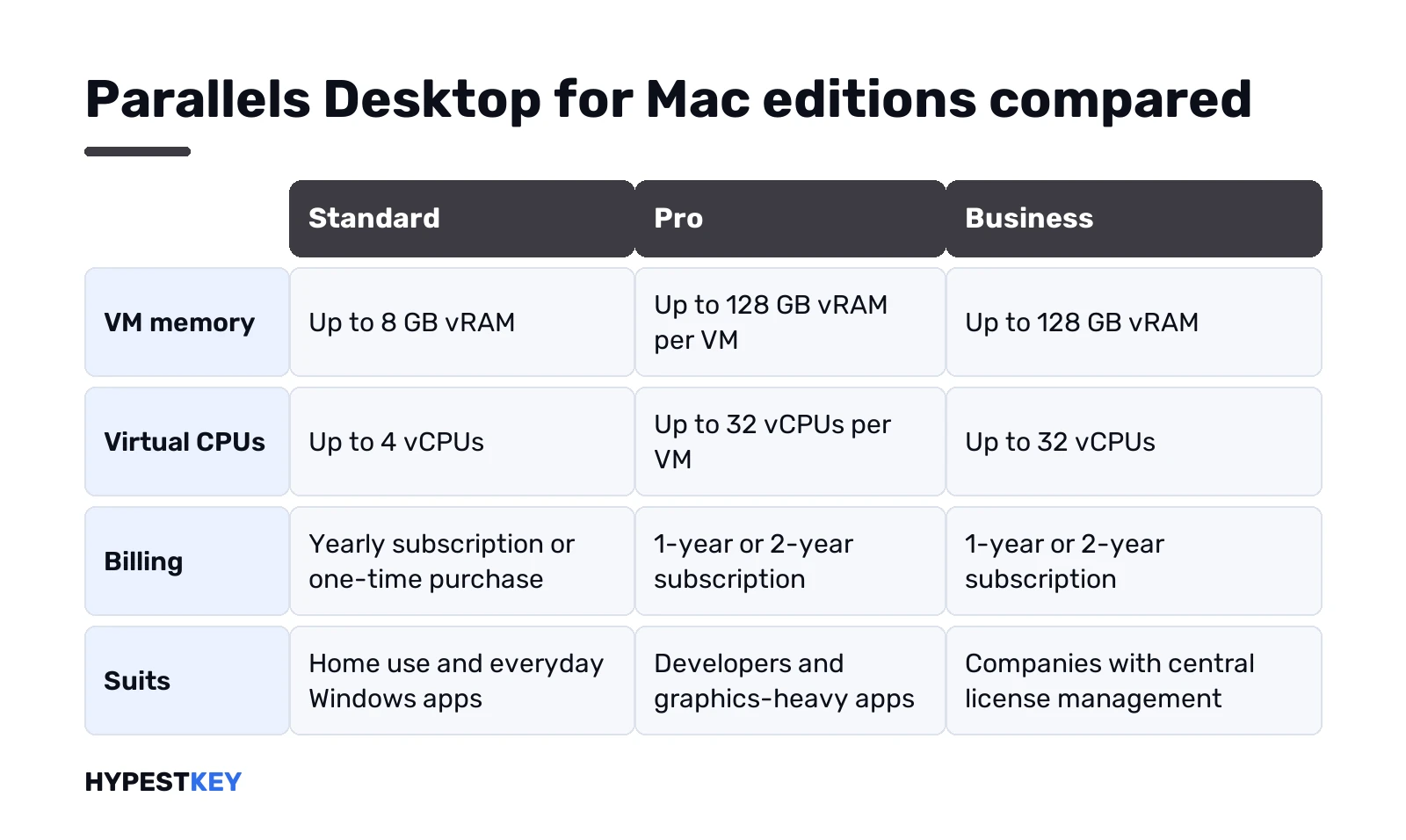
Three paid editions, plus Enterprise for large fleets. The split is mostly about how big a virtual machine may get and who manages the licenses.
| Edition | VM limits | Billing | Who it suits |
|---|---|---|---|
| Standard | 8 GB vRAM, 4 vCPUs | Yearly subscription or one-time purchase | Home use, Office, everyday Windows apps |
| Pro | 128 GB vRAM, 32 vCPUs per VM | 1-year or 2-year subscription | Developers, heavy graphics apps, several VMs at once |
| Business | 128 GB vRAM, 32 vCPUs | 1-year or 2-year subscription | Companies: central admin, volume licensing |
| Enterprise | 128 GB vRAM, 32 vCPUs | Contact sales | Large fleets with SSO, golden images, encrypted VMs |
For one Mac running Word and a tax program, Standard is plenty. Pro adds a command line tool, bigger VMs and an AI agent integration for developers. Each license covers one Mac.
The one-time Standard license has a catch worth reading twice. It covers the current version only. Moving to the next major release later costs a paid upgrade, and phone and email support lasts 30 days instead of the whole subscription.
Parallels Desktop for Mac prices at the time of writing
Prices come straight from parallels.com, checked on the day we wrote this. The buy page loads its numbers in the browser. So we took them from Parallels’ own cost comparison on its blog, in US dollars:
- Standard Edition: $99.99 per year.
- Pro Edition: $119.99 per year.
- Standard Edition, one-time purchase: $219.99.
- Business and Enterprise: shown on request or on the buy page.
Prices move with sales, regions and taxes. We’d open the Parallels Desktop buy page right before paying and compare the yearly and one-time options there. Students get their own yearly price for Standard and Pro.
And the Windows license on top? Not included in any edition. We get to that two sections down.
Download Parallels Desktop and the free trial
One source only: parallels.com. Sites that offer a cracked build or a serial for Parallels show up in search all the time. Skip them, since the real installer is free to download anyway.
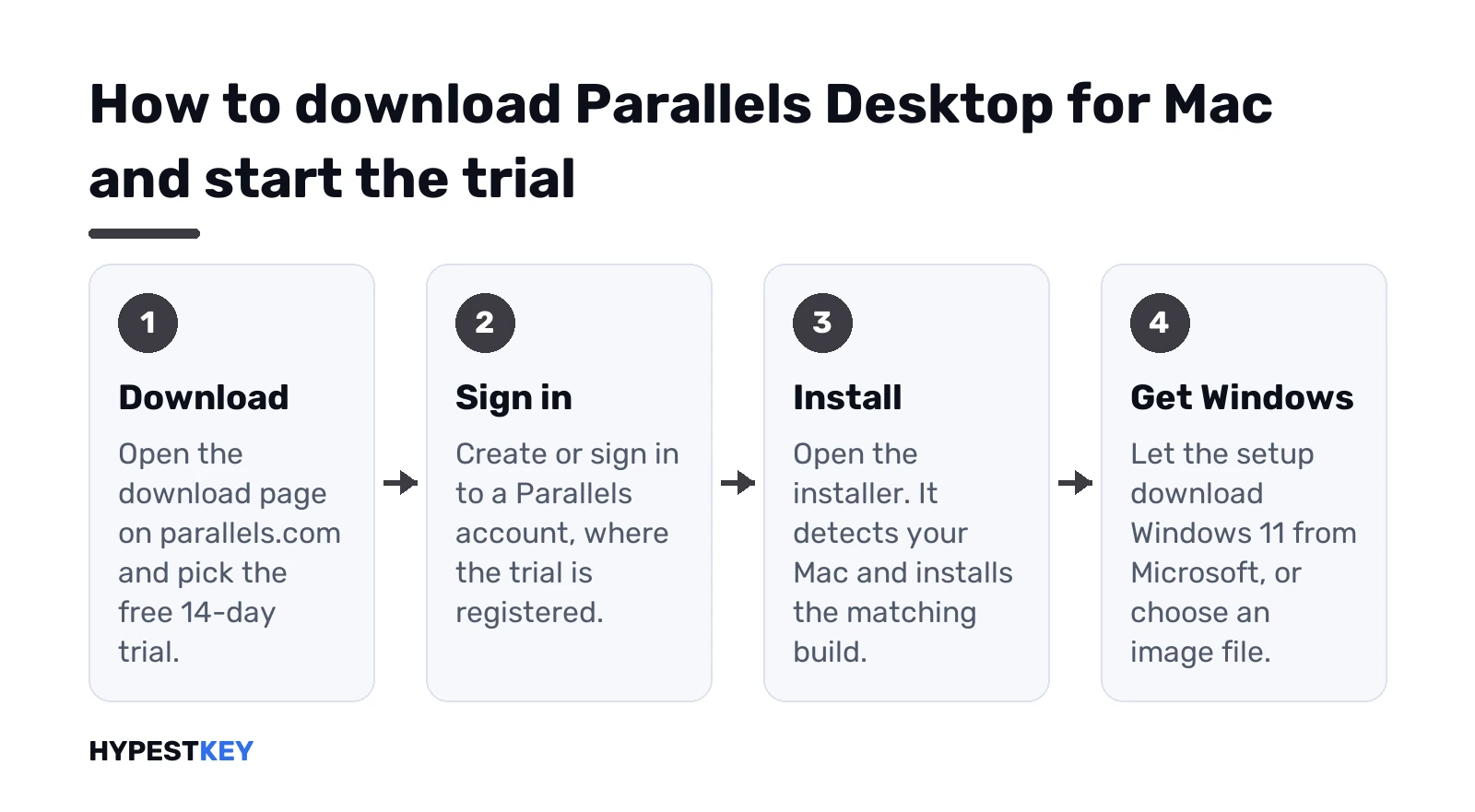
- Go to the Parallels Desktop download page and pick the trial.
- Create or sign in to a Parallels account. The 14-day trial is registered there.
- Open the downloaded installer. It detects your Mac and installs the matching build.
- Allow the permissions macOS asks for.
Already paid? Sign in at my.parallels.com, then My Products. Downloads and license wait there. Got a key for version 19 or 20? We’d grab the legacy installer from the download page.
Trial ended and you liked it? Buy a license and enter it in the same app. The virtual machine you built during the trial stays.
Installing Windows 11 in the virtual machine
Shortest path on Apple silicon. Parallels pulls Windows 11 for Arm from Microsoft by itself:
- First launch with no VMs: click Install Windows and follow the prompts.
- Already have VMs? Parallels icon in the menu bar, Control Center, plus button.
- Get Windows 11 from Microsoft, Continue, Install Windows.
- Wait for the download and setup. An Installation Complete prompt appears.
- Read and accept the Microsoft license terms.
Prefer your own image? We’d use Microsoft’s Windows 11 Arm64 ISO, made for exactly this: a VM on an Arm device. Point the Parallels assistant at that file. Intel Mac? Same plus button, a regular Windows 11 ISO. Parallels adds a virtual TPM chip to new Windows 11 VMs by itself, so we’d skip any TPM workaround.
Parallels Tools, the driver package for Windows, usually installs during setup. Mouse lag or a tiny screen after install? Actions menu, Install Parallels Tools, reboot.
The Windows license is separate
Parallels sells the virtual machine, not Windows. Microsoft says it plainly. A separate Windows 11 Pro license. One license per instance, on hardware or in a VM.
Two details people miss:
- Windows 11 Pro product keys work for both x64 and Arm, so a regular Pro key fits a Windows on Arm VM.
- Enterprise starts from a Pro license and an upgrade through volume licensing.
Activation feels exactly like a PC. Settings, System, Activation. Change product key, type the 25 characters, done. Our steps for activating Windows 11 cover the error messages too, and you can confirm the result with our page on how to check Windows activation status.
Which edition, though? Home vs Pro decides BitLocker and Remote Desktop hosting, among other things. Our Windows 11 Home vs Pro comparison lists the rest. Why Retail? We explain it in retail, OEM and volume licenses: that key moves with you.
What Windows on Arm can’t do in a VM
Most apps just run. Native Arm apps run best, and Windows translates x64 and x86 apps on the fly. Still, a few things break on Apple silicon:
- Windows Subsystem for Linux, since it needs nested virtualization;
- Windows Sandbox, same reason;
- virtualization-based security;
- 32-bit Arm apps from the Store;
- some apps that depend on DirectX 12.
The full list lives on Microsoft’s page about Windows 11 on Macs with Apple chips. Need WSL or Sandbox for work? We’d look at Windows 365. It streams a Cloud PC, and nested virtualization works there.
Drivers are the other weak spot. Printer or VPN software with only x64 drivers may refuse to install on Windows on Arm. We’d test the one app that matters during the 14-day trial, before paying anything.
Coherence mode, games and everyday use
Day to day it feels lighter than you’d expect. Files drag between Finder and File Explorer. Copy and paste crosses over. The Mac camera, trackpad and USB devices show up in Windows.
Office is the classic case. Parallels itself pitches Windows-only Excel features as a reason to install it. Only need Word and Excel without Windows-only extras? Office runs natively on macOS, and our Office Home and Business 2024 key installs on either a PC or a Mac.
Games are hit and miss. 3D acceleration covers DirectX and OpenGL, with game support up to DirectX 11. DirectX 12 titles? Anti-cheat drivers? We’d expect those to fail.
One habit we’d recommend: suspend the VM instead of shutting Windows down every evening. It resumes in seconds and keeps your open documents where they were.
Parallels Toolbox, the bonus in the box
Small extra, easy to miss. Eligible Parallels Desktop subscriptions include Parallels Toolbox, a set of more than 50 one-click utilities. Each one does a single job with a single click.
Counts differ per platform: 56 tools on Mac, 48 on Windows. Nice to have. We wouldn’t buy a subscription for it alone, but it’s worth a look once Windows runs. The one-time Standard license isn’t a subscription, so check the buy page before counting on Toolbox there.
When Parallels Desktop for Mac is the wrong tool
Paying yearly for one small app makes little sense. A few cases where we’d look elsewhere:
- Budget zero. VMware Fusion and UTM cost nothing, see our list of free Windows emulators for Mac.
- Only one Windows program. CrossOver or Wine-based tools may run it with no Windows license at all.
- Running macOS on a PC, the reverse direction. That’s a different story with legal limits, covered in our page on a Mac emulator for Windows.
- Heavy gaming on an Intel Mac. Boot Camp gives Windows the whole machine.
For everything in between, we’d pick Parallels on Apple silicon. Microsoft names it as a supported way to run Windows 11 on those Macs. Moving an older PC’s Windows into it? Read transferring a Windows license to a new PC first.
Fresh VM, no license yet? Our Windows 11 Pro key comes as a Retail license, sent instantly to your email.
Related guides
FAQ
Is Parallels Desktop free?
Nope. There's a free 14-day trial, then a paid Standard, Pro or Business license. Standard is the cheapest option.
Does Parallels come with a Windows license?
No. Parallels can download Windows 11 from Microsoft for you, but activating it takes a separate Windows license for each virtual machine.
Does Parallels Desktop 27 work on Intel Macs?
No. Version 27 lists Apple silicon only. Intel Macs keep running Parallels Desktop 26, which still installs x86 Windows.
Can I use Windows 11 Home in Parallels on an M-series Mac?
We'd go with Pro. Microsoft and Parallels both name the Arm versions of Windows 11 Pro and Enterprise for Apple silicon Macs.
Is the one-time purchase better than the subscription?
Depends. The one-time Standard license covers the current version only, upgrades cost extra and support lasts 30 days.
Where do I download Parallels safely?
From parallels.com only. Existing customers find their downloads at my.parallels.com under My Products, together with the license.
Can I play Windows games in Parallels?
Some. Game support goes up to DirectX 11, so newer DirectX 12 titles and games with anti-cheat drivers often refuse to run.