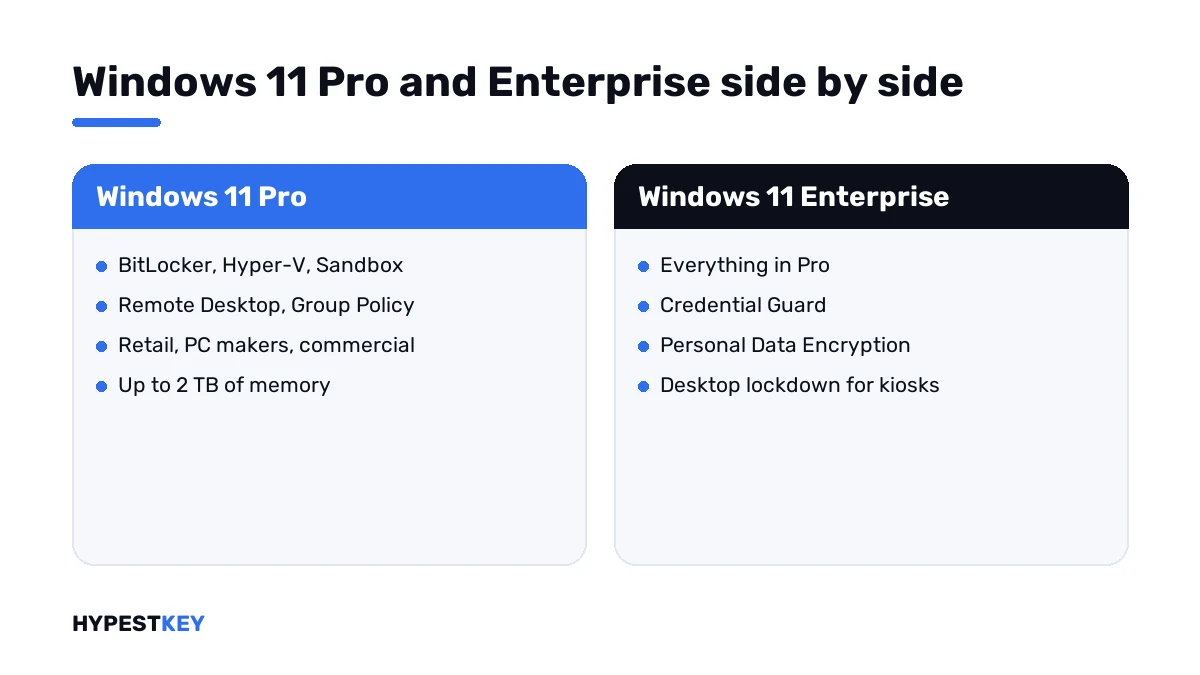
Short answer: Windows 11 Enterprise vs Pro: Enterprise has everything in Pro and adds Credential Guard, Personal Data Encryption, desktop lockdown and organizational messages. BitLocker, Hyper-V and Group Policy are in both. I'd stay on Pro unless one of those four is needed.
Windows 11 Enterprise vs Pro is closer than the names suggest. Enterprise has everything in Pro, plus four features for security and lockdown. The bigger gap is in how Microsoft sells the two. We’d start with the short list of what only Enterprise has.
| Point | Windows 11 Pro | Windows 11 Enterprise |
|---|---|---|
| Credential Guard | No | Yes |
| Personal Data Encryption | No | Yes |
| Windows experience customization: lockdown, Shell Launcher | No | Yes |
| Organizational messages | No | Yes |
| BitLocker, Hyper-V, Windows Sandbox | Yes | Yes |
| Remote Desktop host, Group Policy, domain join | Yes | Yes |
| AppLocker | Yes | Yes |
| Maximum memory | 2 TB | 6 TB |
| Sold through | Retail, PC makers, commercial licensing | Commercial licensing |
The edition rows follow Microsoft’s Windows commercial licensing overview.
What only Enterprise has
Microsoft’s overview names the features that need the Enterprise edition on the PC. There are four.
| Feature | What it does |
|---|---|
| Credential Guard | Protects against credential harvesting, pass-the-hash and pass-the-token attacks |
| Personal Data Encryption | Encrypts a person’s content and links the keys to Windows Hello for Business |
| Windows experience customization | Locks down corporate desktops; Shell Launcher with Unified Write Filter for frontline devices and public kiosks |
| Organizational messages | Places messages from the organisation on Windows surfaces |
BitLocker protects a disk while the PC is off. Personal Data Encryption adds a layer per person, and we’d turn it on for shared laptops first.
The lockdown settings are for PCs that should do one job. Think of a reception screen or a kiosk in a shop.
Credential Guard in detail
Credential Guard is the reason most teams move to Enterprise. It protects NTLM password hashes, Kerberos tickets and stored domain credentials.
Those secrets move into an environment isolated by virtualization-based security. Malware with administrator rights can’t extract them from there.
| Point | What Microsoft says |
|---|---|
| Editions | Enterprise and Education yes; Pro and Pro Education no |
| Required | Virtualization-based security and Secure Boot |
| Recommended | A TPM, version 1.2 or 2.0, and UEFI lock |
| Default state | On by default from Windows 11 version 22H2 where license and hardware allow |
| Virtual machines | Generation 2 Hyper-V machines only |
| Not covered | The Active Directory database and the local SAM |
It can break old software. Microsoft lists four things that stop working: Kerberos DES encryption, unconstrained delegation, TGT extraction and NTLMv1. I’d test legacy apps before a rollout.
Everyday Kerberos traffic isn’t touched. File shares and Remote Desktop keep working, in Microsoft’s words.
Two places where Microsoft advises against it: domain controllers gain nothing from it, and Exchange Server doesn’t support it.
The source is Microsoft’s Credential Guard overview.
What Pro already includes
Some lists online still file these under Enterprise. They run on Pro.
| Feature | On Windows 11 Pro |
|---|---|
| BitLocker and BitLocker To Go | Yes |
| Hyper-V and Windows Sandbox | Yes |
| Remote Desktop host | Yes |
| Group Policy and domain join | Yes |
| AppLocker | Yes |
AppLocker is the one older articles get wrong. Microsoft’s AppLocker page says it’s included with all editions of Windows, except Windows 10 version 1809 or earlier.
Don’t pay for Enterprise for these. Our comparison of Windows 11 Home vs Pro lists what Pro adds over Home.
Edition, subscription and use rights
Most confusion starts here. Microsoft uses the word Enterprise for an edition and for a subscription.
| Layer | What it is | Examples |
|---|---|---|
| The edition | The software on the PC | Credential Guard, Personal Data Encryption, lockdown |
| The E3 or E5 subscription | Cloud services licensed per user | Windows Autopatch, Universal Print, Microsoft Connected Cache |
| Use rights | What the subscription permits | Five Windows instances per user; Azure Virtual Desktop and Windows 365 Enterprise access; Windows LTSC Enterprise |
E5 is E3 with Microsoft Defender for Endpoint Plan 2 added.
A product key gives you the first layer. The other two come with Microsoft’s subscriptions only, and we’d rather say so before you order.
A Pro PC under an Enterprise subscription
Microsoft’s overview covers one more case. Someone with an Enterprise E3 subscription works on a PC that still runs Pro. We copied below which features then work.
| Feature | PC on Pro | PC on Enterprise |
|---|---|---|
| Credential Guard | No | Yes |
| Personal Data Encryption | No | Yes |
| Windows experience customization | No | Yes |
| Organizational messages | No | Yes |
| Modern BitLocker management | Yes | Yes |
| DirectAccess | Yes | Yes |
| Always On VPN | Yes | Yes |
| Windows subscription activation | Yes | Yes |
| Windows Autopatch | Yes | Yes |
| Universal Print | Yes | Yes |
| Microsoft Connected Cache | Yes | Yes |
Four rows say no for Pro. Those four are the real edition gap.
Subscription activation, and PCs that stay on Pro
Subscription activation steps a Pro PC up to Enterprise when a licensed user signs in. Microsoft’s point: no keys to manage and no Enterprise images to deploy.
It works in reverse too. When the subscription ends, the device goes back to its original edition after a grace period.
Microsoft also lists cases where a PC stays on Pro although its user holds a subscription.
| Case | Why it stays on Pro |
|---|---|
| A device that wasn’t provisioned properly | It doesn’t step up by itself |
| A device bought outside the IT department | Nobody enrolled it |
| A vendor’s device, in for one project | It joins the network for a while only |
| A developer’s test PC | The app has to be tested and certified on Pro |
| A device preconfigured for one purpose | It’s certified on Pro only |
The subscription doesn’t block any of these. Five Windows instances per licensed user are part of the use rights, so one person’s laptop and cloud PC are both covered.
How each edition is sold
| Channel | Editions in Microsoft’s table |
|---|---|
| Retail, as a full packaged product | Windows 11 Home, Windows 11 Pro |
| Preinstalled by the PC maker | Windows 11 Home, Windows 11 Pro |
| Commercial licensing | Windows 11 Pro, Windows 11 Enterprise, Windows 11 Enterprise LTSC |
Microsoft sells Enterprise E3 and E5 per user, through commercial licensing and the Cloud Solution Provider program. Both need Windows Pro underneath as the qualifying system.
That’s why an Enterprise PC nearly always starts life on Pro.
We sell single keys instead. Our Windows 11 Enterprise key activates the Enterprise edition on one 64-bit PC, with no subscription and no expiry. The Windows 11 Pro key does the same for Pro. Both arrive instant to email.
The license types have their own page: retail vs OEM vs volume license.
Hardware limits
| Edition | Maximum memory on x64 |
|---|---|
| Windows 11 Home | 128 GB |
| Windows 11 Pro | 2 TB |
| Windows 11 Pro for Workstations | 6 TB |
| Windows 11 Enterprise | 6 TB |
The figures are from Microsoft’s memory limits page. No office PC comes near either number.
What a PC needs to run Windows 11 at all is in our Windows 11 requirements guide.
Buying for heavy workstation hardware? Look at the Windows 11 Pro for Workstations key before Enterprise.
That choice has its own page: Windows 11 Pro for Workstations vs Pro.
How to choose: Windows 11 Enterprise vs Pro
Three questions about risk, one about hardware, then the decision.
- Ask whether you have to answer for stolen domain credentials; if so, Credential Guard points to Enterprise.
- Look for shared or often-lost laptops where encryption per person would help.
- List the kiosks, reception PCs and frontline devices that need a locked-down desktop.
- Check that those PCs support virtualization-based security and Secure Boot.
- If none of the first three apply, stay on Pro.
- If one applies, move those PCs to Enterprise and leave the rest on Pro.
| Who | Edition |
|---|---|
| A small office with no audit pressure | Pro |
| A developer’s PC with Hyper-V | Pro |
| Finance, healthcare, legal work, public contracts | Enterprise on the PCs that hold credentials and data |
| A reception or kiosk PC | Enterprise |
| A fleet under an E3 or E5 agreement | Enterprise, through subscription activation |
A mixed fleet is normal. Nothing forces one edition on every desk.
Switching a Pro PC to Enterprise
No reinstall is needed. Microsoft’s Windows edition upgrade page marks Pro to Enterprise as supported, with no reboot required.
- Right-click Start and select Run.
- Enter
ms-settings:activationand select OK. - Select Change product key.
- Enter the Enterprise key.
- Follow the instructions on screen.
The same page gives a command for the job:
changepk.exe /ProductKey XXXXX-XXXXX-XXXXX-XXXXX-XXXXX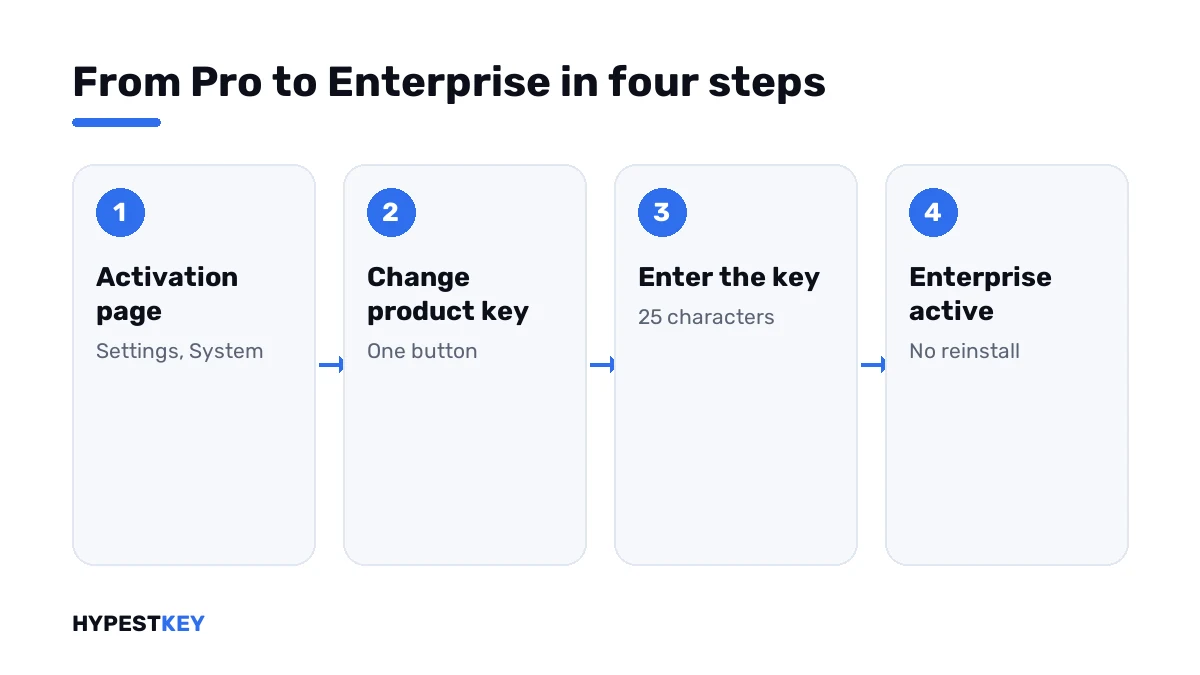
| Path | In Microsoft’s tables |
|---|---|
| Pro to Enterprise | Supported, no reboot |
| Pro for Workstations to Enterprise | Supported, no reboot |
| Home to Enterprise | Not listed; Home goes to Pro first |
| Enterprise back to Pro | A supported downgrade path |
Coming from Home? Our guides to upgrading Windows 10 Home to Pro and upgrading to Windows 11 Pro cover the first hop.
Afterwards I’d check the Windows activation status. If it stalls, start at how to activate Windows 11.
Enterprise and Enterprise LTSC
These are two products. Regular Enterprise takes the yearly feature updates, like Pro. LTSC is meant for specialised devices that must change as little as possible.
Microsoft lists Windows 11 Enterprise LTSC under commercial licensing only. From the earlier generation we keep a Windows 10 Enterprise LTSC 2019 key. A regular Windows 10 Enterprise key is there too.
Keys and activation
Each edition has its own keys. A Pro key doesn’t activate Enterprise, and an Enterprise key doesn’t activate Pro.
Companies with volume agreements often activate Enterprise through their own server: see what KMS activation is. A single key from us activates online with Microsoft, once.
More background is in digital license vs product key and finding your Windows product key. Every edition we carry is under Windows 11 keys.
Mistakes we see most
- Buying Enterprise for BitLocker, which Pro already has.
- Expecting Windows Autopatch or Universal Print from a product key.
- Typing an Enterprise key into Home.
- Turning on Credential Guard without testing old line-of-business apps.
- Mixing up Enterprise and Enterprise LTSC.
- Reinstalling Windows to change edition when a key change is enough.
Terms used on this page
| Term | Meaning |
|---|---|
| Edition | The variant of Windows installed on the PC: Home, Pro, Enterprise |
| E3 and E5 | Microsoft’s per-user Enterprise subscriptions |
| Subscription activation | Stepping a Pro PC up to Enterprise through the user’s subscription, without a key |
| Qualifying operating system | The edition a PC must already have for an upgrade license; here, Pro |
| Virtualization-based security | Hardware isolation Windows uses to protect secrets |
| Shell Launcher | Replaces the desktop shell with one app |
| LTSC | Long-Term Servicing Channel, a separate Enterprise product for specialised devices |
FAQ
What is the difference between Windows 11 Enterprise and Pro?
Enterprise has everything in Pro. On top come Credential Guard, Personal Data Encryption, experience customization and organizational messages. We'd add the way it's sold: Microsoft offers Enterprise through commercial licensing.
Is Windows 11 Enterprise better than Pro?
Only if you need what it adds. For BitLocker, Hyper-V, Remote Desktop and Group Policy, Pro is enough. I'd choose Enterprise for credential protection or locked-down desktops.
Is Windows 11 Enterprise faster than Pro?
No. The two editions share one core system. I know of no Microsoft page that claims a speed difference. Maximum memory differs: 2 TB on Pro, 6 TB on Enterprise.
Can I upgrade Windows 11 Pro to Enterprise without reinstalling?
Yes. Microsoft lists Pro to Enterprise as a supported edition upgrade with no reboot. We enter the Enterprise key under Settings, System, Activation, Change product key.
Can I upgrade Windows 11 Home to Enterprise?
Not directly, going by Microsoft's upgrade table. It has Home to Pro and Pro to Enterprise. I'd upgrade to Pro first and then enter the Enterprise key.
Does a Windows 11 Enterprise key include Windows Autopatch?
No. Autopatch, Universal Print and similar cloud services belong to Microsoft's E3 and E5 subscriptions. A key activates the Enterprise edition itself, and I'd plan cloud services separately.
Does Windows 11 Pro have BitLocker and Hyper-V?
Yes, both. Windows Sandbox, Remote Desktop host, Group Policy and domain join are in Pro too. We wouldn't move to Enterprise for any of these.
Is Enterprise LTSC the same as Enterprise?
No, they're separate products. LTSC targets specialised devices that should change rarely. Regular Enterprise receives the yearly feature updates, and I'd pick it for ordinary office PCs.