Short answer: Windows 11 LTSC is Windows 11 Enterprise on the Long-Term Servicing Channel. It gets monthly security fixes but no feature updates, and Windows 10 LTSC works the same way. It's built for kiosks, medical and industrial devices. Microsoft's routes are volume licensing, IoT devices and a 90-day evaluation.
Windows 11 LTSC is Windows 11 Enterprise on the Long-Term Servicing Channel: it gets monthly security and quality updates but no feature updates. Windows 10 LTSC works the same way. Both are meant for special-purpose devices such as kiosks and medical or factory machines. You get them through volume licensing, IoT devices or Microsoft’s evaluation.
| Windows 11 Pro or Enterprise | Windows 11 LTSC | |
|---|---|---|
| Feature updates | Yes, through Windows Update | No. New features only come with the next LTSC release |
| Security and quality updates | Monthly | Monthly |
| In-box apps and Microsoft Store | Included | Support might be limited |
| Meant for | Everyday PCs | Special-purpose devices |
| How you get it | Retail, OEM or volume licensing | Volume licensing, IoT devices, evaluation |
What Windows 11 LTSC actually is
A servicing model, not a separate product. LTSC stands for Long-Term Servicing Channel, and older releases still carry the old name, LTSB, for Long-Term Servicing Branch. Same idea. Microsoft simply renamed it.
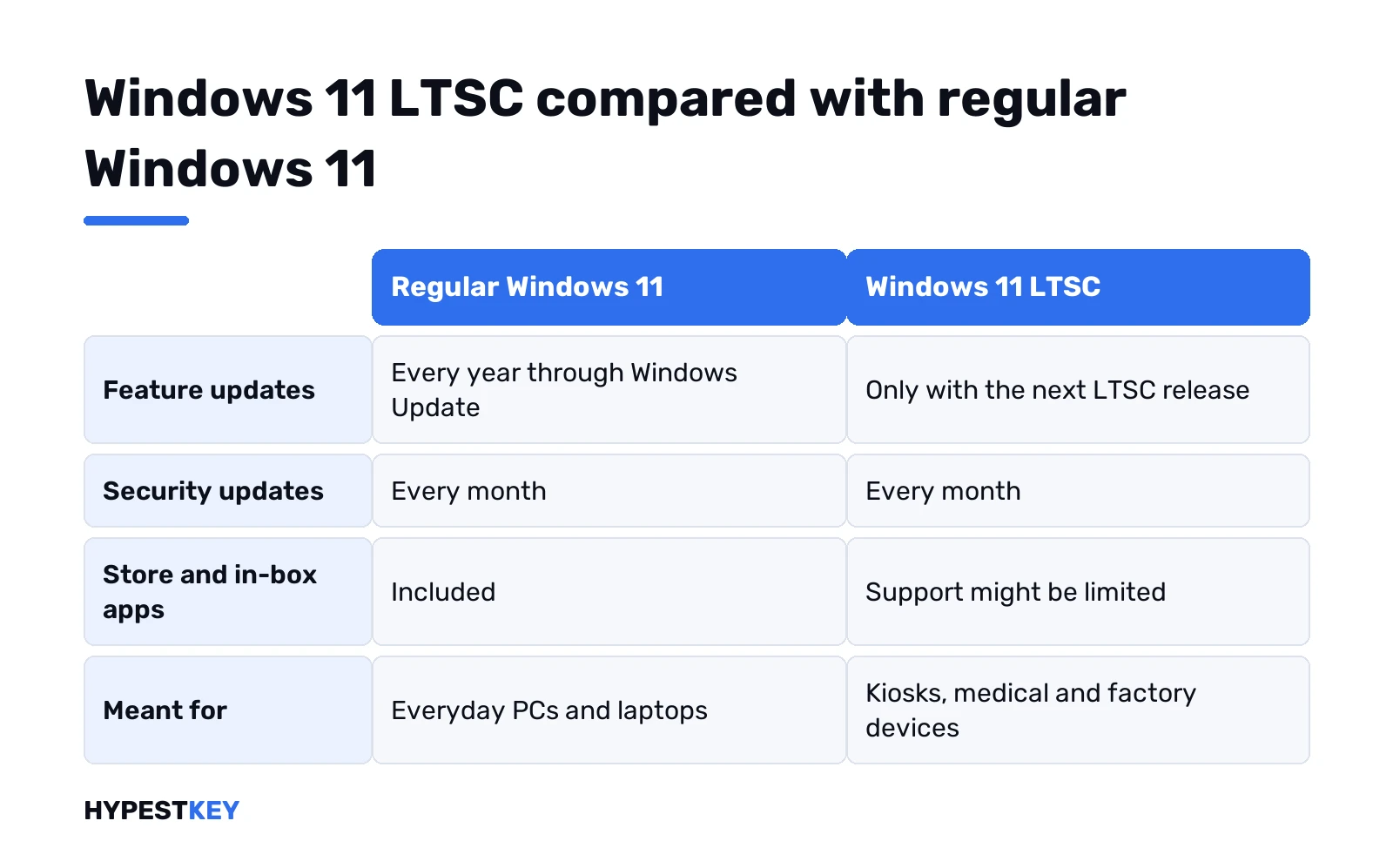
Regular Windows 11 gets a feature update every year. LTSC doesn’t. It freezes the feature set on the day of release and then only receives fixes. New features arrive every several years, packed into the next LTSC release. You can install that as an in-place upgrade, or skip it entirely.
The current release is Windows 11 Enterprise LTSC 2024. Its features match Windows 11 version 24H2. Everything from 21H2 onward is in. So we get sudo for Windows, File Explorer tabs, Wi-Fi 7 and Windows LAPS. WordPad? Gone, like on every edition from 24H2.
Each LTSC release has its own fixed servicing period, and the IoT Enterprise variant gets a longer one than the regular Enterprise release. We’d check Microsoft’s product pages for the exact numbers on the release you plan to use.
What’s new in Windows 11 Enterprise LTSC 2024
Microsoft compares it with Windows 10 Enterprise LTSC 2021. Everything from Windows 11 versions 21H2 through 24H2 is rolled in at once, so the jump is big.
| Area | In LTSC 2024 |
|---|---|
| Browser | Microsoft Edge is the default; Internet Explorer is gone, IE mode in Edge stays |
| Kiosks | Restricted User Experience, formerly multi-app kiosk mode |
| Admin tools | Sudo for Windows, Windows LAPS with automatic account management |
| Credentials | Credential Guard enabled by default, passkeys, Windows Hello for Business |
| File sharing | SMB signing required by default for all connections |
| Apps | Smart App Control, App Control for Business |
| Updates | Checkpoint cumulative updates, smaller monthly packages |
| Removed | WordPad and Microsoft’s AllJoyn implementation |
The SMB row bites first in small networks. An old NAS without signing support may stop opening shares, so we’d test file access before rolling LTSC 2024 out. The full list is Microsoft’s What’s new in Windows 11 Enterprise LTSC 2024.
Windows 10 LTSC and the older releases
Windows 10 had several LTSC releases before Windows 11 got its own. Each one matches a normal Windows release frozen in time:
| LTSC release | Same features as |
|---|---|
| Windows 11 Enterprise LTSC 2024 | Windows 11, version 24H2 |
| Windows 10 Enterprise LTSC 2021 | Windows 10, version 21H2 |
| Windows 10 Enterprise LTSC 2019 | Windows 10, version 1809 |
| Windows 10 Enterprise LTSB 2016 | Windows 10, version 1607 |
| Windows 10 Enterprise LTSB 2015 | Windows 10, version 1507 |
The year in the name is the release year. Most searches for Windows 10 LTSC mean one of the two newest releases. Those still show up on working machines. Moving up to Windows 11 LTSC changes the whole OS, so we’d check the Windows 11 hardware rules first. Our Windows 11 vs Windows 10 comparison lists what changes beyond servicing.
What gets left out, and what stays
Stability is the whole point. So the parts of Windows that change often get trimmed. Microsoft says support by in-box apps and the Store might be limited on LTSC. Over time, some outside tools may drop an old LTSC build too, since we’re talking about a feature set that never moves.
What stays is everything a business needs for management and security:
- Group Policy and Microsoft Intune management.
- Windows Security, Defender Antivirus and Smart App Control.
- Credential Guard and Windows Hello for Business.
- Restricted User Experience, the successor to multi-app kiosk mode.
- Monthly cumulative updates, same cadence as everyone else.
People like LTSC for the quiet desktop. We get that. But no Store, no Store apps. Some programs simply won’t install, and we’d test yours first.
Who it’s meant for
Microsoft is blunt about this. LTSC isn’t intended for most or all of the PCs in an organization. Special-purpose devices only. One important job, no need for new features every year.
Typical examples:
- ATMs and point-of-sale terminals.
- Medical devices that need regulatory sign-off.
- Industrial control and factory floor PCs.
- Kiosks, digital signage and thin clients.
Office desks, laptops and gaming PCs aren’t on that list. For those, Microsoft expects the general availability channel, the normal Windows 11 that updates every year.
Who can get Windows 11 LTSC, and how
Three routes from Microsoft, and none of them goes through a regular shop shelf:
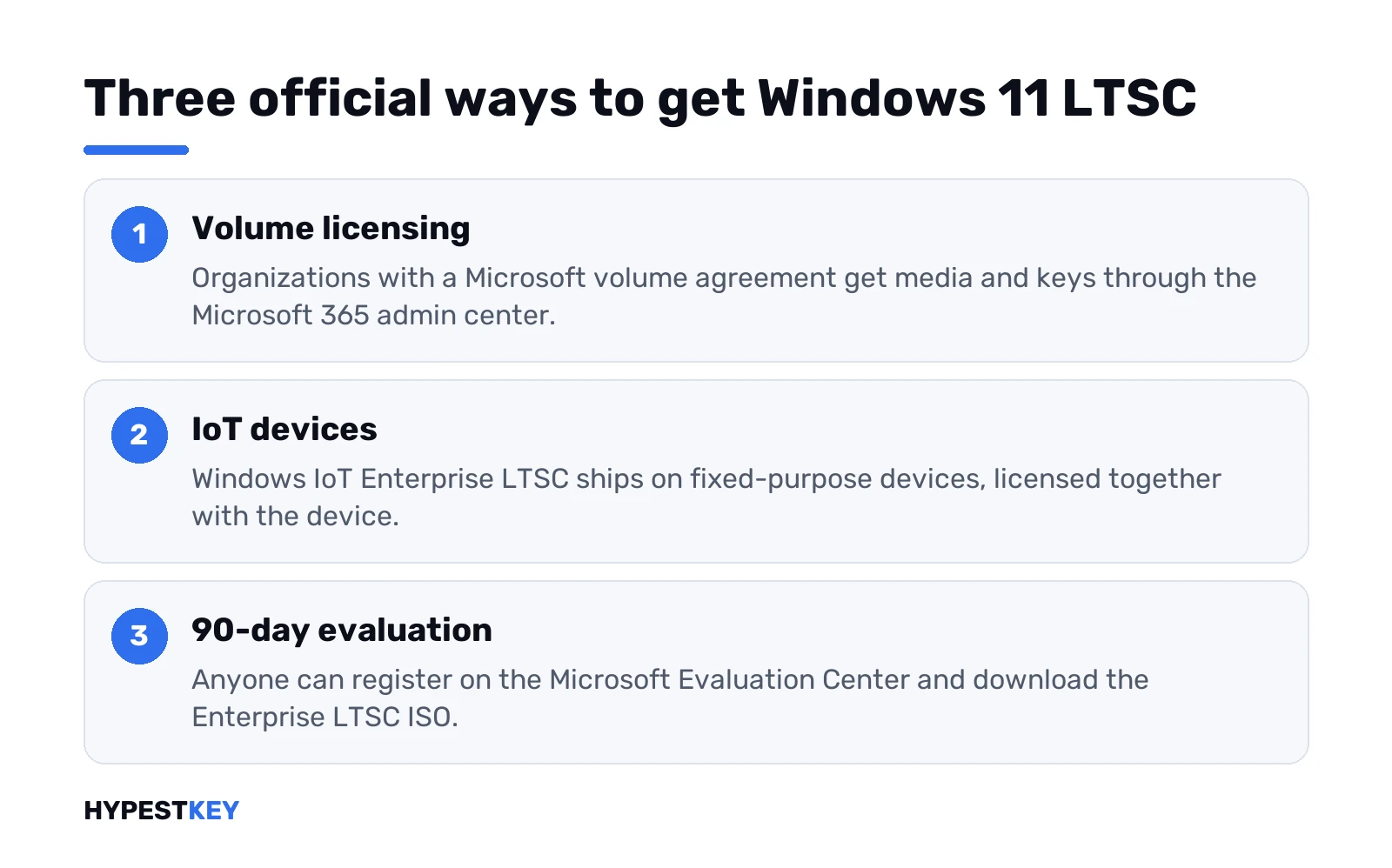
- Volume licensing. Organizations with a Microsoft volume agreement get Enterprise LTSC media and keys through the Microsoft 365 admin center.
- IoT devices. Windows IoT Enterprise LTSC comes preinstalled on fixed-purpose devices from device makers, under its own license terms.
- Evaluation. Anyone can try Enterprise LTSC free for 90 days from the Microsoft Evaluation Center.
The normal Windows 11 download page doesn’t offer LTSC at all. It points enterprise customers to the Microsoft 365 admin center. Our guide to Windows 11 editions shows where Enterprise and Education fit next to Home and Pro.
Already own a license for an older LTSC release? Then you’re covered for that release. Moving to the next LTSC release on IoT devices needs a new license, according to Microsoft’s IoT docs.
IoT Enterprise: same bits, different license
Here’s the twist. Windows IoT Enterprise is binary equivalent to Windows Enterprise. Same tools, same drivers. The difference is licensing and distribution. IoT versions are licensed for fixed-purpose devices, and we’d read the agreement for its allowances and limits.
IoT Enterprise LTSC releases come roughly every three years. Microsoft doesn’t push feature updates to them through Windows Update. And the IoT branch gets the longer servicing period of the two LTSC variants, the main reason device makers choose it.
For you as a buyer, that means a kiosk or a cash register often already runs IoT Enterprise LTSC. Nothing to install. The license came with the device.
Windows 11 LTSC hardware requirements
Enterprise LTSC uses the normal Windows 11 requirements. That includes TPM 2.0 and Secure Boot. IoT Enterprise LTSC is looser. For a specialized appliance, device makers may build to an optional minimum:
| Part | IoT LTSC preferred minimum | IoT LTSC optional minimum |
|---|---|---|
| Processor | 1 GHz, 2 cores | 1 GHz, 2 cores |
| Memory | 4 GB | 2 GB |
| Storage | 64 GB SSD | 16 GB, SSD, HDD or flash |
| Firmware | UEFI | BIOS |
| TPM | TPM 2.0 | Optional |
| Secure Boot | Enabled | Optional |
That optional column is why older PCs come up in LTSC threads. Keep in mind who it’s for, though. Microsoft wrote those minimums for device makers building appliances, not for upgrading an old home laptop.
Trying it: the 90-day evaluation
The legal way to see Windows 11 LTSC on your own hardware. The Windows 11 Enterprise page on the Microsoft Evaluation Center offers two ISOs. One is Enterprise, the other Enterprise LTSC. Register, pick the LTSC ISO and your language, done.
Two warnings from that page. Once installed, the evaluation can’t be uninstalled. You also can’t use the recovery partition to go back to your previous Windows. So we’d run it in a virtual machine or on a spare disk, never over a system you still need.
The ISO goes on a USB stick like any other Windows image. Our guide to installing Windows 11 from USB covers that part. Building the stick on a Mac works too.
Generic KMS keys: an edition, not an activation
Microsoft publishes generic volume license keys for LTSC. They install the matching edition. They don’t activate it. Activation needs a KMS host on the local network, run by an organization with its own host key.
| Edition | KMS client key | Copy |
|---|---|---|
| Windows 11 Enterprise LTSC 2024, Windows 10 Enterprise LTSC 2021 and 2019 | M7XTQ-FN8P6-TTKYV-9D4CC-J462D | |
| Same releases, N editions | 92NFX-8DJQP-P6BBQ-THF9C-7CG2H | |
| Windows IoT Enterprise LTSC 2024 and 2021 | KBN8V-HFGQ4-MGXVD-347P6-PDQGT | |
| Windows 10 Enterprise LTSB 2016 | DCPHK-NFMTC-H88MJ-PFHPY-QJ4BJ |
Typed on a home PC, these keys leave Windows unactivated. Microsoft’s KMS client key list says plainly that they won’t work as retail keys. We explain the host side in our page on how KMS activation works.
A frozen build or a normal edition for your PC?
For a single PC at home or in a small office, we’d stay on a normal edition. You keep the Store, the in-box apps and every new feature. The difference between the two business editions is in our Windows 11 Enterprise vs Pro comparison. Want Enterprise with regular feature updates? The Windows 11 Enterprise key page lists that edition’s details.
A machine that must never change? Then LTSC makes sense. We sell a Retail Windows 10 Enterprise LTSC 2019 key for version 1809, instant to email.
FAQ
Can I install Windows 11 LTSC on my home PC?
Technically yes, through the 90-day evaluation. Microsoft aims LTSC at special-purpose devices, not everyday PCs.
Does Windows 11 LTSC get security updates?
Yes. Monthly security and quality updates arrive as usual. Only the yearly feature updates are missing.
Is there a Microsoft Store in LTSC?
Limited at best. Microsoft says support by in-box apps and the Store might be limited on LTSC.
What's the difference between LTSC and IoT Enterprise LTSC?
Mostly the license. The bits are equivalent, but IoT is licensed for fixed-purpose devices and serviced longer.
Which Windows 10 LTSC versions exist?
Four so far. Two LTSB releases came first, then the two LTSC ones from 2019 and 2021.
Will a KMS client key activate LTSC?
Not by itself. It installs the edition, and activation needs a KMS host on the same network.
Can I upgrade from Windows 10 LTSC to Windows 11 LTSC?
Microsoft says new LTSC releases can be installed as in-place upgrades. The PC still has to meet Windows 11 requirements.
Can I buy a Windows 11 LTSC key from you?
No. Windows 11 Enterprise LTSC 2024 comes through volume licensing, and IoT Enterprise LTSC comes with devices. For a frozen build on one PC, we sell a retail Windows 10 Enterprise LTSC 2019 key, instant to email.