Short answer: Windows 10 Education is the school edition of Windows 10. It matches Enterprise in features, while Pro Education matches Pro. Schools license it through volume licensing or an A3 or A5 subscription. Students get it only through the school. No retail box exists, so for a home PC we'd pick Pro.
Windows 10 Education is the school edition of Windows 10, licensed to institutions and not sold in shops. Microsoft puts it in the same slot as Enterprise, while Pro Education matches Pro. Students get it through their school. A home PC? That one runs Home or Pro, and we’d pick Pro.
We don’t sell Windows 10 Education keys: the school or university that licenses the edition hands them out to its students and staff.
The three editions side by side:
| Edition | Closest to | How you get it |
|---|---|---|
| Windows 10 Pro Education | Windows 10 Pro | Education licensing; the base edition for a school’s subscription step-up |
| Windows 10 Education | Windows 10 Enterprise | Education volume licensing, or a step-up with a Windows Enterprise, A3 or A5 license |
| Windows 10 Pro | The retail business edition | A retail key, or preinstalled on a new PC |
What Windows 10 Education is and who it’s for
Think of it as Enterprise with a school badge. Microsoft’s subscription activation docs say it in one line: Pro Education is analogous to Pro, Education is analogous to Enterprise. Same step up, different customer.
So the feature list follows Enterprise, not Home. Device management through Intune, policies, deployment tools. The things an IT department needs for a few hundred classroom laptops.
For a single student at home, most of it does nothing. No school tenant behind the PC? Then the management side sits idle, and Pro covers the rest. Our guide to the Windows 11 editions has the same family on the newer system, Education included.
Windows 10 Education vs Pro and Pro Education
Pro is the edition you can buy. Pro Education is the school copy of it. Education is the school copy of Enterprise.
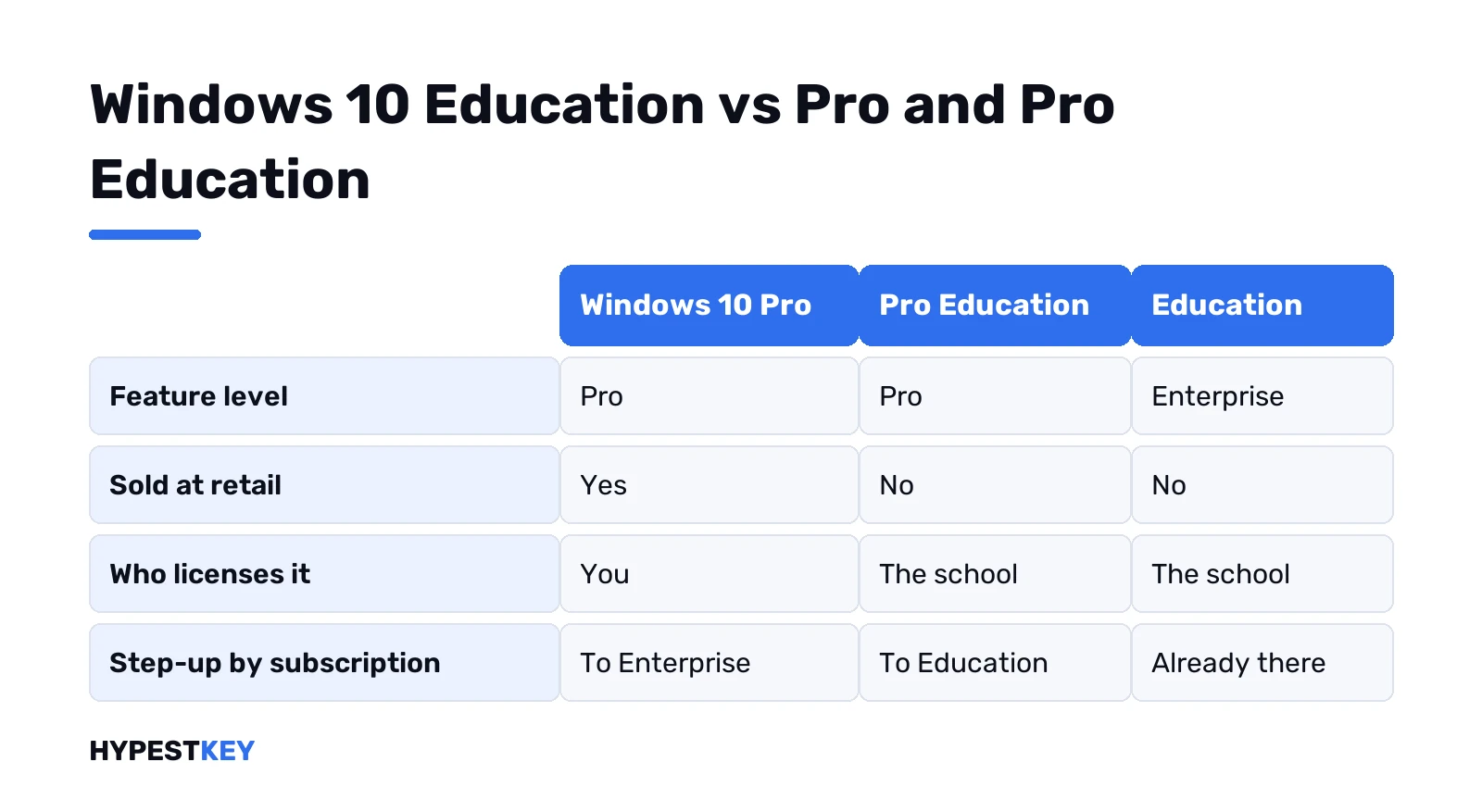
| Windows 10 Pro | Pro Education | Education | |
|---|---|---|---|
| Feature level | Pro | Pro | Enterprise |
| Sold at retail | Yes | No | No |
| Who licenses it | You | The school | The school |
| Upgrade from Home with a key | Yes | Yes | Yes |
| Step-up by subscription | To Enterprise | To Education | Already there |
What does Education add over Pro? Roughly what Enterprise adds. Our Enterprise vs Pro comparison lists those extras one by one. For the Home and Pro split itself, see Windows 10 Home vs Pro.
There’s also an N version. Windows 10 Education N follows the same rules, minus the media features that every N edition leaves out.
Who can get it, and who can’t
Schools, colleges and their students. Through the institution, every time.
The school holds the subscription. Windows A3, say, or A5. Admins pick up the keys in the Volume Licensing Service Center or the Microsoft 365 admin center. The student never sees one. We like how blunt Microsoft is here: the key never goes to students, by email or in documents.
Someone online offers you a cheap “Windows 10 Education key”. That’s a school’s key that leaked. We’d leave it alone. It can stop activating once the school notices. Never yours anyway.
Not a student? Then the edition isn’t for you at all. The keys you can buy are Home and Pro. Why Education sits on the volume side is in our retail, OEM and volume license guide.
Why schools put Windows 10 Education on student laptops
Mostly for management. Home can’t take every setting a school’s device management sends.
Microsoft names two gaps that hurt onboarding the most:
- Desktop app installs. The EnterpriseDesktopAppManagement setting, which pushes Win32 and Windows Installer apps, isn’t there on Home.
- Delivery Optimization control. Handy when two hundred laptops pull the same update over one school connection.
Certificates and Wi-Fi profiles come next. Same story. The school’s key here? A MAK, short for multiple activation key. It comes from the Volume Licensing Service Center, with a fixed number of activations. Runs out? The school’s licensing contact asks Microsoft for more.
Your own laptop and you’d rather the school stopped managing it? Settings, Accounts, Access work or school. Pick the school account, Disconnect. Microsoft says students can do that to stop further actions on a personal device. Education itself stays on, though.
How a school moves a PC to Windows 10 Education
Two common routes. Both run from the school’s side.
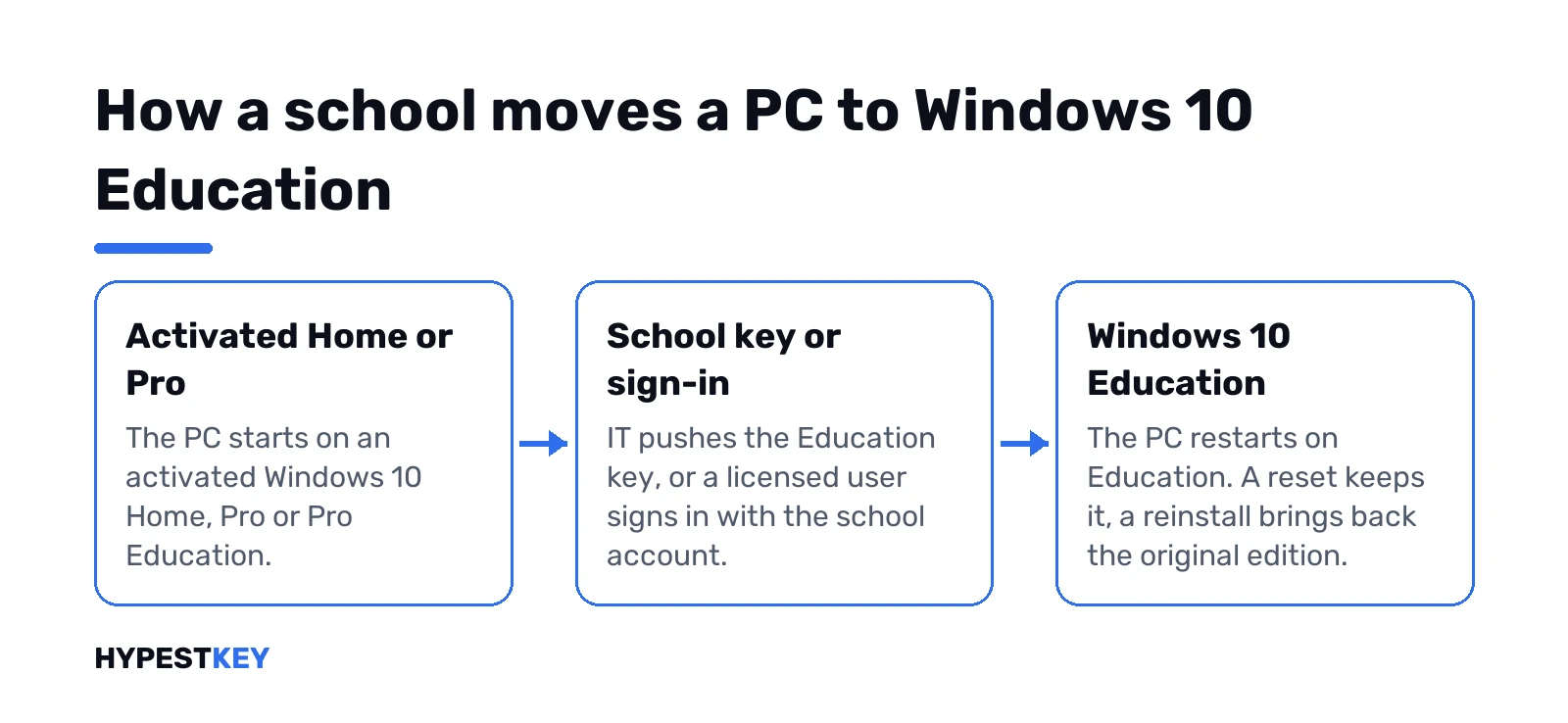
- Student-owned laptop on Home. The school pushes its Education key through device management, or a provisioning package applied by staff. The PC needs an activated Windows 10 Home first.
- School-owned PC on Pro or Pro Education. Subscription activation. A licensed student or teacher signs in with the school account, and the PC steps up to Education.
Microsoft’s Home to Education page for student-owned devices spells out the first route. One detail we’d flag: no notification reaches the student when device management does the upgrade. The school is supposed to tell them.
The subscription route has its own conditions. The device has to be joined to the school’s Microsoft Entra ID. It needs a Pro Education digital license underneath. When the subscription ends, the PC drops back to Pro Education by itself.
Coming from plain Pro? Pro to Education takes a restart, Pro to Pro Education doesn’t. Both paths sit in Microsoft’s edition upgrade article. Doing the home version of the move? Then our steps to upgrade Windows 10 Home to Pro apply.
Reset, reinstall and graduation
This part matters once school is over.
- Reset the PC. Education stays.
- Reinstall Windows. Education does not come back. Install the original edition, and the original or firmware key activates it.
- Back to Home. Only with a reinstall.
- Sell the laptop. The license stays on the device, under the same rules.
Not sure the laptop has a key in its firmware? PowerShell as administrator:
(Get-CimInstance -query 'select * from SoftwareLicensingService').OA3xOriginalProductKeyKey in the output? The maker stored one. Empty line? No firmware key, so the original sticker or order email is the one to keep.
We’d plan the reinstall case before it happens. Keep a note of the edition the laptop shipped with. A clean install of that edition, with our Windows 10 clean install guide, brings back a working, activated PC.
Generic keys for Windows 10 Education
Microsoft publishes a KMS client key for each volume edition, Education included. These keys install the edition. They don’t activate it.
| Edition | KMS client setup key | Copy |
|---|---|---|
| Windows 10 Education | NW6C2-QMPVW-D7KKK-3GKT6-VCFB2 | |
| Windows 10 Education N | 2WH4N-8QGBV-H22JP-CT43Q-MDWWJ | |
| Windows 10 Pro Education | 6TP4R-GNPTD-KYYHQ-7B7DP-J447Y | |
| Windows 10 Pro Education N | YVWGF-BXNMC-HTQYQ-CPQ99-66QFC |
The source is Microsoft’s KMS client key list. Activation needs a KMS host on the school network. At home there isn’t one, so the PC stays unactivated. Microsoft adds that these keys won’t serve as a retail license.
Want the background? Our page on how KMS activation works covers hosts and clients. The generic keys for Home and Pro sit in our list of free Windows 10 and Windows 11 keys, with the same warning.
Checking which edition you have
Settings first. Update and Security, then Activation. The edition name sits at the top, with the activation state under it.
Prefer a command? Terminal as administrator:
DISM /Online /Get-CurrentEditionThe output names the edition in one line. More on reading the activation line in our guide to checking Windows activation status.
Moving to Windows 11 from the school edition
A version upgrade keeps the edition. A school PC on Windows 10 Education moves to Windows 11 Education, if the hardware passes. That’s the school’s job to roll out, through its own update tools.
Your own laptop with Education on it? Check the Windows 11 requirements first. If you’re weighing the move at all, our Windows 11 vs Windows 10 comparison helps.
A home PC: the edition we’d pick instead
Pro. BitLocker, Remote Desktop and domain join are all there. Nothing in it depends on a school tenant. Home is fine for a family PC that only browses and streams.
For a home PC we’d go with our Windows 10 Pro key, a retail license sent instant to email.
FAQ
windows 10 education vs pro, which one is better?
For a school with IT staff, Education. For your own PC, Pro, since Education needs a school license behind it.
Can I buy a Windows 10 Education key?
No. Microsoft doesn't sell it at retail, and the school's key must never be handed to students.
is windows 10 education free for students?
Often, yes, through the school. The institution licenses it and upgrades the student's device itself.
What happens to Windows 10 Education after I graduate?
A reset keeps it. A reinstall brings back the original edition, activated with the original key.
Can I use the generic Windows 10 Education key at home?
It installs Education but won't activate it. Activation needs a KMS host on a school network.
How do I check if I have Windows 10 Education?
Open Settings, Update and Security, Activation. The edition name is shown at the top of the page.
Does Windows 10 Education upgrade to Windows 11?
Yes, to Windows 11 Education, on hardware that meets the Windows 11 requirements.
Can I take the school's management off my own laptop?
Yes. Settings, Accounts, Access work or school, then Disconnect on the school account. Education stays installed, the school just stops sending settings.