Short answer: Microsoft 365 E3 is the core enterprise bundle. Desktop Office apps, mail and cloud storage, plus Windows Enterprise and the device security we'd expect in a company. Windows steps up from Pro on up to five devices per user. Price at the time of writing? We see $39.00 per user per month in the US, paid yearly.
Microsoft 365 E3 is Microsoft’s core enterprise subscription: Microsoft 365 Apps for enterprise, Exchange email, OneDrive, SharePoint and Teams, plus Windows 11 Enterprise, Intune, Entra ID P1 and Defender for Endpoint, licensed per user. At the time of writing it costs $39.00 per user per month in the US, paid yearly.
| Part of Microsoft 365 E3 | What it covers |
|---|---|
| Microsoft 365 Apps for enterprise | Desktop Office apps on PC and Mac, five installs per user |
| Online services | Exchange email, OneDrive, SharePoint, Teams meetings and chat |
| Windows 11 Enterprise | Step-up from Windows Pro on up to five devices per user |
| Microsoft Intune Plan 1 | Device and mobile app management, endpoint analytics |
| Microsoft Entra ID P1 | Single sign-on, multifactor authentication, Conditional Access |
| Microsoft Defender for Endpoint | Endpoint security and threat protection on the devices |
| Mail protection | Antispam and antimalware for email content |
| Price at the time of writing, US | $39.00 user/month paid yearly, $30.45 without Teams |
What Microsoft 365 E3 includes
Three blocks, if we follow Microsoft’s own Microsoft 365 for enterprise overview. Apps and cloud services. Windows 11 Enterprise. Device management and security. E3 gets all three at the core level, and E5 stacks more on top.
The apps part is Microsoft 365 Apps for enterprise. Word, Excel and the rest, installed locally and updated by Microsoft. Then the services: mail, file storage, team sites, meetings.
Windows and security are what turn it from “Office for big companies” into a full workplace bundle. That’s also the reason it costs more than the Office-only plans.
Built for large organisations. Small ones too, though. Microsoft says smaller businesses can use the enterprise plans too, when they need those capabilities.
Microsoft 365 E3 price at the time of writing
From Microsoft’s US enterprise plans pricing page, each as an annual subscription that auto-renews:
| Plan | Per user per month, paid yearly |
|---|---|
| Microsoft 365 E3 | $39.00 |
| Microsoft 365 E3, no Teams | $30.45 |
| Microsoft 365 E5 | $60.00 |
Microsoft adds a note under each price. Prices may vary with your Microsoft agreement, and sales can give a custom quote. We’d treat the list price as the starting point for that talk.
The no-Teams version lists the same highlights on that page, minus Teams. We’d only pick it when chat and meetings already run on something else.
Windows 11 Enterprise through subscription activation
No key to type. Microsoft calls it subscription activation, and it works like this:
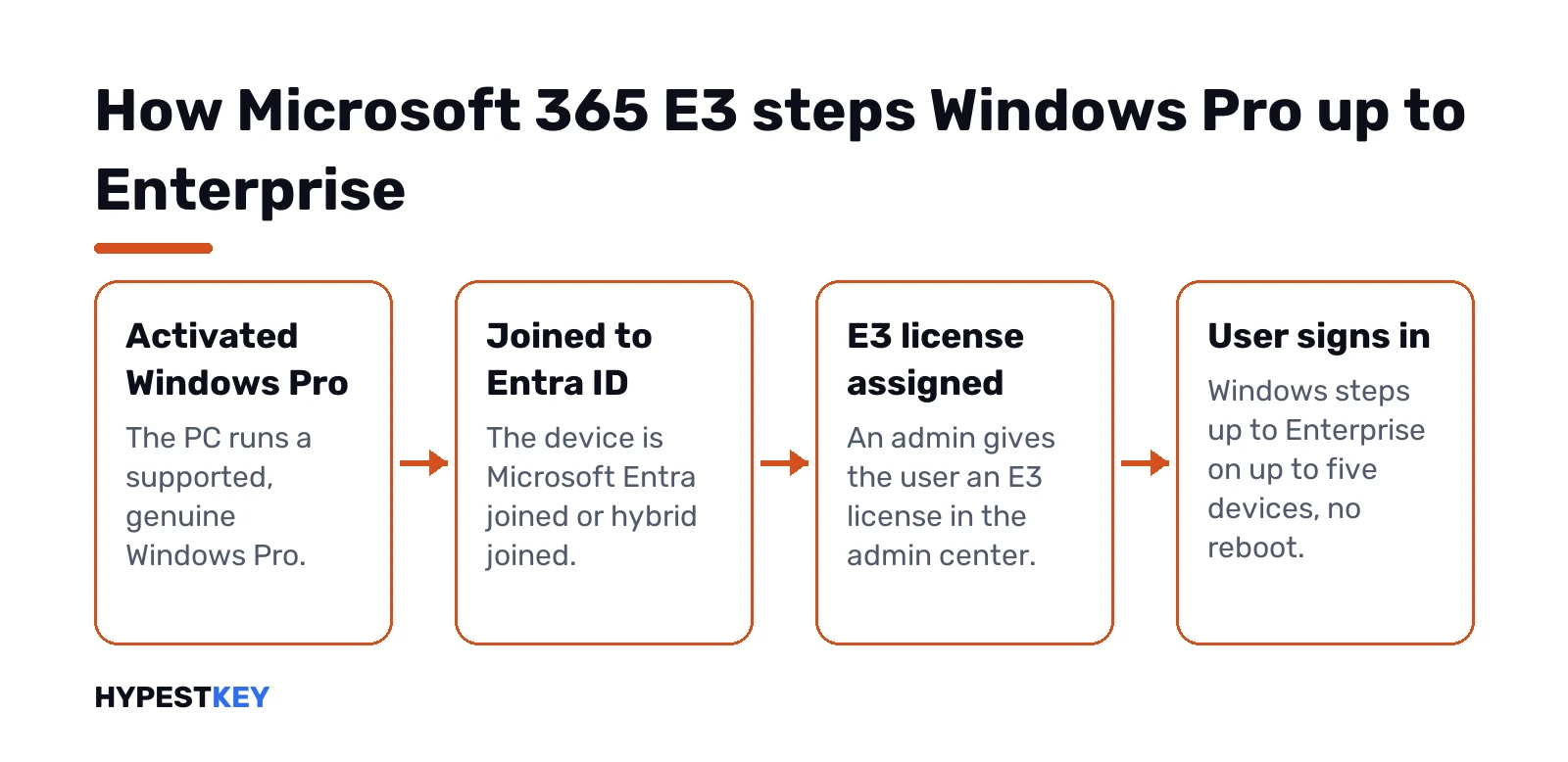
- The PC runs a supported, activated Windows Pro.
- It’s joined to Microsoft Entra ID, or hybrid joined.
- An admin assigns the E3 license to the user.
- The user signs in with the work account. Windows steps up from Pro to Enterprise, no reboot needed.
Limits worth knowing. Five devices per user. Sign in on a sixth and the PC idle the longest drops back to Pro. Check-ins? About every 30 days. We’d keep laptops online now and then, since one that stays offline past its license period falls back to Pro until it reconnects.
Subscription over, or moved to someone else? The PC goes back to Pro. So the base license matters. The underlying Windows still has to be activated, so Pro must be genuine first. What Enterprise adds on top is in our Windows 11 Enterprise vs Pro comparison, and we explain how that base activation is stored in digital license vs product key.
Two smaller points. It covers the general availability channel only, so no LTSC. And it can’t move a PC to a newer Windows version. Hyper-V virtual machines can inherit the host’s activation, though.
Security and identity tools
Microsoft’s pricing page groups E3 security like this:
- Antivirus and antimalware.
- Shadow IT discovery, meaning unsanctioned cloud apps.
- Identity and access management, through Entra ID P1.
- Endpoint security, through Defender for Endpoint.
- Unified endpoint management, through Intune.
- Data security and compliance.
Entra ID P1 is the piece admins mention first. Conditional Access, MFA, single sign-on, self-service for staff. Microsoft’s Entra pricing FAQ confirms it’s part of E3.
Labels work by hand in E3. Automatic sensitivity labeling in the Office apps needs E5 or a compliance add-on, per the Office apps service description.
Mailbox, OneDrive and app installs
| Item | Microsoft 365 E3 |
|---|---|
| User mailbox | 100 GB |
| Archive mailbox | 100 GB, auto-expanding to 1.5 TB |
| OneDrive | 1 TB per user, can be increased to 5 TB |
| Office installs | 5 PCs or Macs per user, plus mobile |
| Office on Remote Desktop | Shared computer activation |
| Windows Enterprise step-up | Up to 5 devices per user |
Sources: Microsoft’s service descriptions for Exchange Online, OneDrive and the Office apps. The archive starts at 100 GB and grows only when auto-expanding archiving is on. We’d switch that on early for anyone who keeps every mail.
Installing the apps works the same as on any plan. Sign in, download, done, as in our Microsoft 365 installation guide.
Microsoft 365 E3 vs E5
E5 is E3 plus the advanced layer. Microsoft lists three areas:
- Security. The Defender Suite across mail, endpoints, identity and SaaS apps, plus SIEM.
- Compliance. The Purview Suite, with automatic labeling among other things.
- Voice and analytics. Voice tools and data analysis tools on top of the E3 set.
Microsoft also says Security Copilot will come with E5. At the time of writing, the gap is $21.00 per user per month in the US list prices.
A middle path exists too. Stay on E3 and buy the Defender Suite or the Purview Suite as add-ons. We’d price that against E5 before deciding, since two add-ons can get close.
Microsoft 365 E3 vs Office 365 E3 and Business Premium
Names this close cause a lot of mix-ups. A short map:
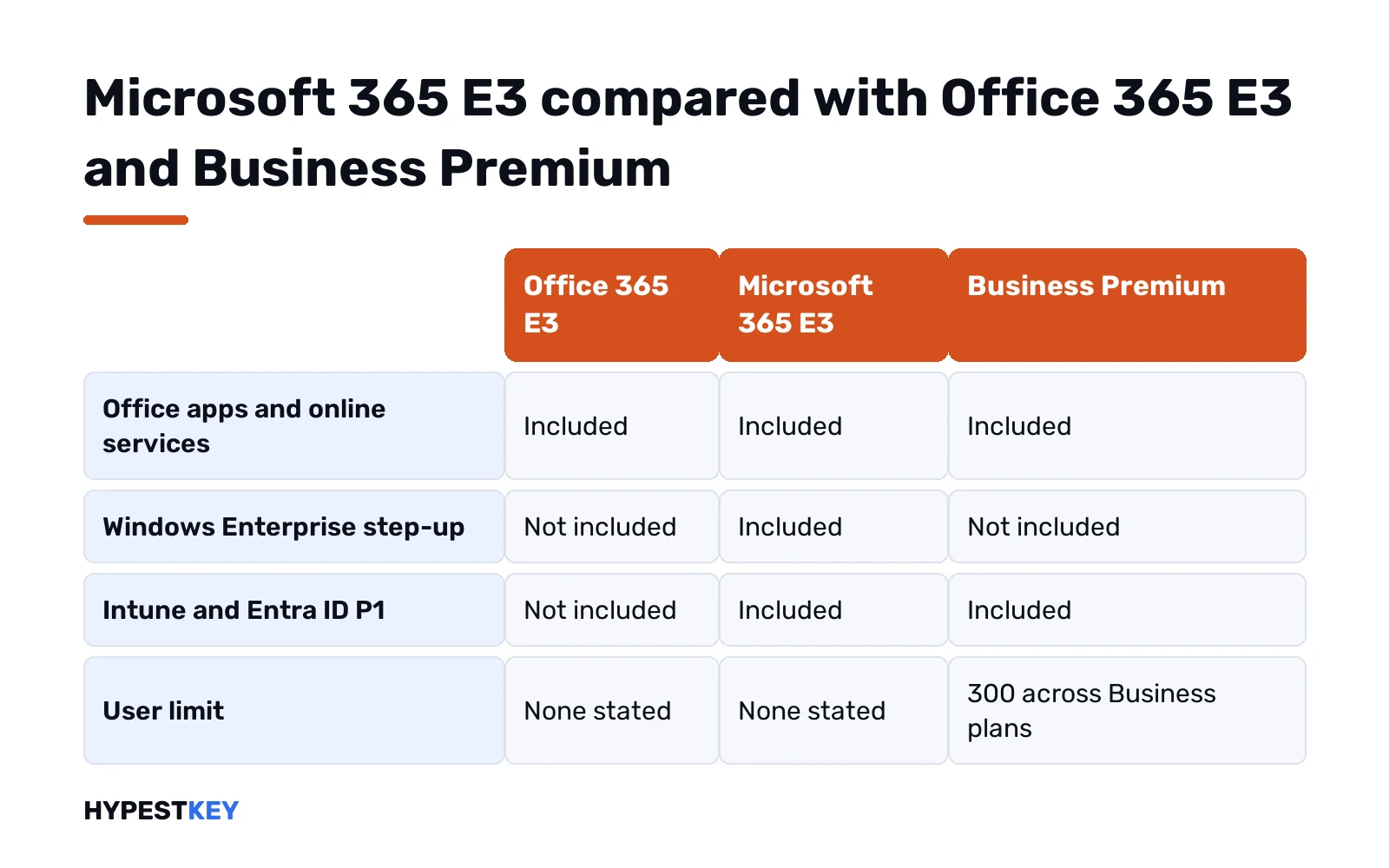
| Office 365 E3 | Microsoft 365 E3 | Business Premium | |
|---|---|---|---|
| Office apps and online services | Yes | Yes | Yes |
| Windows Enterprise step-up | No | Yes | No |
| Intune and Entra ID P1 | No | Yes | Yes |
| User limit | None stated | None stated | 300 across Business plans |
| US price at the time of writing | See Microsoft’s page | $39.00 | $22.00 |
Office 365 E3 is the apps and services part alone. Microsoft 365 E3 adds Windows and the device layer.
Business Premium is the small-business cousin. Similar security, no Windows Enterprise, and a 300-seat ceiling. Under that ceiling we’d compare it with E3 first. Our page on Microsoft 365 Business Standard shows where the Business family starts, and what Microsoft 365 is lays out every plan.
New Intune features from July 2026
Microsoft’s Intune pricing page says advanced endpoint management features are rolling into E3 from July 2026. What we see listed for E3:
- Remote Help.
- Advanced Analytics.
- Tunnel for mobile app management, from Intune Plan 2.
- Firmware over the air and specialty devices, also from Plan 2.
A few stay E5 only. Endpoint Privilege Management, Cloud PKI and Enterprise App Management. Tenants get a 30-day Message Center notice before anything switches on, so admins can plan.
Who it suits, and when one license is enough
E3 fits an organisation that wants Office, mail, Windows Enterprise and device management in one per-user bill. Many PCs, an admin team, Entra ID already in place.
A single PC doesn’t need any of that. Windows can be licensed once. Our comparison of Windows 11 editions explains the choice, and we cover how each license type is sold in retail vs OEM vs volume licenses. Office without a subscription? See Microsoft 365 vs Office 2024. Or our Office LTSC Professional Plus 2024 key, one PC, paid once.
Need the genuine Pro base that E3 steps up from? We sell a Retail Windows 11 Pro key for one PC, sent instant to email.
Related guides
FAQ
How much does Microsoft 365 E3 cost?
At the time of writing, $39.00 per user per month in the US, paid yearly. Without Teams it's $30.45.
Does E3 include a Windows license?
Sort of. It includes Windows Enterprise as a step-up from an activated Windows Pro, on up to five devices per user.
What happens to Windows when E3 ends?
The PC goes back to Windows Pro. Microsoft says this happens once the current subscription period runs out.
Is E3 the same as Office 365 E3?
No. Office 365 E3 is the apps and services only, while Microsoft 365 E3 adds Windows Enterprise and device management.
What does E5 add over E3?
The advanced layer. The Defender Suite, the Purview Suite, voice and analytics tools, and Security Copilot later on.
How big is the mailbox in E3?
100 GB for the main mailbox. The archive starts at 100 GB and auto-expands up to 1.5 TB when turned on.
Can a small business buy E3?
Yes. Microsoft designs it for large organisations but says smaller businesses can use it when they need those features.