Short answer: Microsoft 365 Business Standard is the middle business plan. We get desktop Office apps, Exchange email, OneDrive, SharePoint and Teams for up to 300 users. It adds desktop apps to Business Basic. Intune and the advanced security of Business Premium aren't in it.
Microsoft 365 Business Standard is the middle business plan. We get the desktop Office apps plus Exchange email, OneDrive, SharePoint and Teams, for up to 300 users. It adds installable apps to Business Basic. Premium’s security and device management stay out. Before April 2020 it was called Office 365 Business Premium.
- Apps: desktop, web and mobile versions of the Office apps.
- Email: Exchange Online with your own domain.
- Files: OneDrive per user and SharePoint for teams.
- Meetings and chat: Teams.
- Limit: up to 300 users across the Business plans.
The plan contents and limits follow Microsoft Learn’s Microsoft 365 and Office 365 plan options.
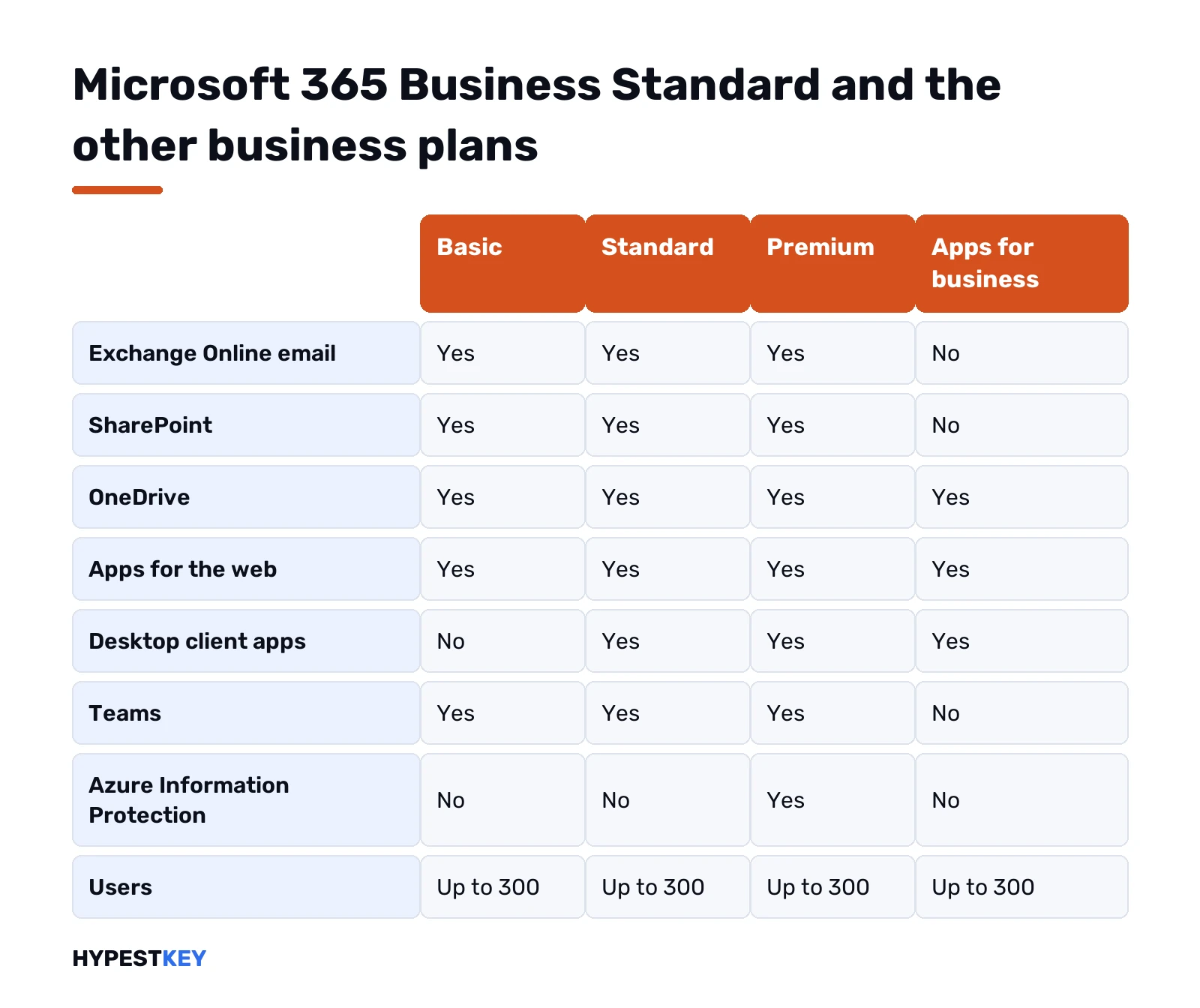
Microsoft 365 Business Standard against the other business plans
| Service | Business Basic | Business Standard | Business Premium | Apps for business |
|---|---|---|---|---|
| Exchange Online email | Yes | Yes | Yes | No |
| SharePoint | Yes | Yes | Yes | No |
| OneDrive | Yes | Yes | Yes | Yes |
| Apps for the web | Yes | Yes | Yes | Yes |
| Desktop client apps | No | Yes | Yes | Yes |
| Teams | Yes | Yes | Yes | No |
| Azure Information Protection | No | No | Yes | No |
| Users | Up to 300 | Up to 300 | Up to 300 | Up to 300 |
Microsoft notes that the 300 seats are shared across the Business family. An organisation with 250 Premium seats can add only 50 more Business seats in total.
What’s included, service by service
| Service | What it does in Business Standard |
|---|---|
| Word, Excel, PowerPoint, Outlook, OneNote | Installed on PCs and Macs, plus web and mobile versions |
| Access and Publisher | Windows only |
| Exchange Online, Plan 1 | Business email, calendar and contacts on your domain |
| OneDrive | Personal cloud storage for each user |
| SharePoint | Team sites and shared document libraries |
| Teams | Chat, meetings and calls |
| Viva Engage | Core features of the company social network |
Microsoft’s footnotes on the same page say Business Standard includes Exchange Online Plan 1 and Viva Engage core functionality.
Microsoft 365 Business Standard: devices per user
Microsoft Learn’s training material gives the allowance for the plans with desktop apps: up to five PCs or Macs per user, plus the mobile apps on up to five tablets and five phones.
| Device type | Per user |
|---|---|
| PCs or Macs | 5 |
| Tablets | 5 |
| Phones | 5 |
For a sixth computer, we sign out of one of the five. The installs are managed from the user’s account page.
What Business Standard leaves out
| Missing | Where it is |
|---|---|
| Device management with Intune | Business Premium |
| Advanced threat protection | Business Premium |
| Azure Information Protection | Business Premium, or as an add-on |
| Project and Visio desktop apps | Separate subscriptions or one-time licenses |
| Power BI | Separate, or in E5 |
| Windows licenses | Not included; Windows is licensed separately |
Visio and Project keys are under Project and Visio on our site.
Who Microsoft 365 Business Standard fits, and who needs another plan
| Organisation | Plan we’d look at |
|---|---|
| Staff who work only in the browser and need email | Business Basic |
| An office that needs desktop Office, email and Teams | Business Standard |
| A company that must manage laptops and protect data | Business Premium |
| Desktop Office without email, with mail elsewhere | Apps for business |
| A business with one or two PCs and no shared email | Office Home & Business 2024, bought once |
| More than 300 users | The Enterprise plans |
Price of Business Standard: where to check it
Microsoft sets the price per user per month, with annual and monthly commitment options, and it varies by country, tax and commitment. Resellers quote different figures, so we don’t repeat any here. Microsoft’s own product page shows the current price for your region.
Budget it per person, not per device. Five PCs for one employee cost one license; five employees sharing one PC cost five.
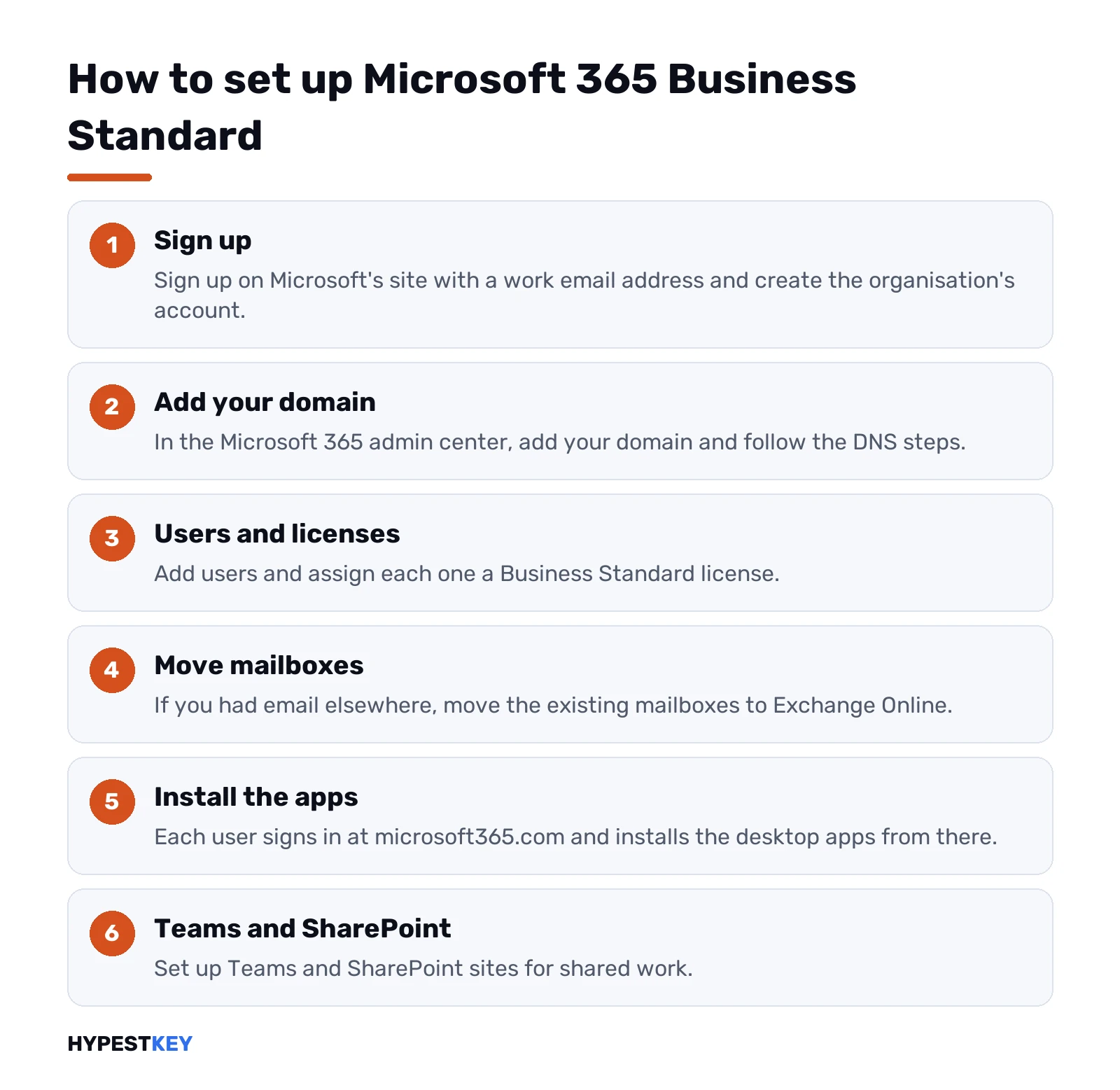
How to set up the plan
- Sign up on Microsoft’s site with a work email address and create the organisation’s account.
- In the Microsoft 365 admin center, add your domain and follow the DNS steps.
- Add users and assign each one a Business Standard license.
- Move existing mailboxes to Exchange Online, if you had email elsewhere.
- Each user signs in at microsoft365.com and installs the desktop apps from there.
- Set up Teams and SharePoint sites for shared work.
Business Standard keys can also be entered on their own setup page; Microsoft’s redeem page for home products, Office.com/setup, turns them away. That message is explained in Office.com/setup errors.
Business Standard or Office 2024 for a small office
| Point | Business Standard | Office Home & Business 2024 |
|---|---|---|
| Payment | Per user, every month or year | Once per computer |
| Business email | Included | Bring your own |
| Devices | Five PCs or Macs per user | One PC or Mac |
| Teams and SharePoint | Included | Not included |
| New features | Keep arriving | None after purchase |
| Commercial use | Yes | Yes |
A two-person shop with mail on its web host often does well with the one-time route. With shared mailboxes, Teams meetings or several devices per person, we’d pick the subscription. Our wider comparison is Microsoft 365 vs Office 2024.
Mixing plans in one organisation
Licenses are assigned per user, so one company can hold several plans at once. A common pattern:
| Group | Plan |
|---|---|
| Office staff at desks | Business Standard |
| Warehouse or field staff who only read mail | Business Basic |
| Managers with company laptops that must be managed | Business Premium |
All of them count toward the same 300-seat cap. The admin center shows how many seats of each plan are assigned.
Checklist before buying Microsoft 365 Business Standard
| Question | Why it matters |
|---|---|
| Do people need the desktop apps, or is the browser enough? | Decides between Basic and Standard |
| Must laptops be wiped remotely if lost? | Points to Premium |
| Where is email hosted today? | Moving mailboxes takes planning |
| Who owns the domain’s DNS? | Needed to connect the domain |
| Will the team grow past 300? | Enterprise plans then |
| Are Project or Visio needed? | They aren’t in Business Standard |
Ending or changing the plan
Microsoft lets administrators switch users between Business plans in the admin center. Data in mailboxes and OneDrive stays with the user when the plan changes.
Cancelling is different. We’d export mailboxes and OneDrive content before the subscription ends, because the data is removed after Microsoft’s retention period.
Related guides
- The whole family of plans: what is Microsoft 365.
- Installing the apps: installing Microsoft 365.
- Paying once instead: Microsoft Office lifetime license.
- The perpetual editions: Office 2024 Professional Plus vs Home and Business.
- Windows for the same PCs: Windows 11 editions.
- Servers in the office: our comparison of the current server releases.
- Microsoft 365 vs Office 2019
- Microsoft Office Subscription vs Purchase
- Microsoft Planner Guide
- Microsoft 365 Business Standard vs Premium
- Microsoft 365 E3 explained
For offices that prefer paying once, our Office Home and Business 2024 key arrives instant to email; all versions are under Office keys.
Terms used on this page
| Term | Meaning |
|---|---|
| Business family | Basic, Standard, Premium and Apps for business, together capped at 300 users |
| Exchange Online Plan 1 | The hosted email level included in Business Standard |
| Admin center | The web console where licenses and users are managed |
| Intune | Microsoft’s device management service, in Business Premium |
| Seat | One user license |
FAQ
What is Microsoft 365 Business Standard?
A business subscription with the desktop Office apps, Exchange email, OneDrive, SharePoint and Teams. Microsoft designs it for organisations of up to 300 users. It used to be called Office 365 Business Premium.
What is the difference between Business Basic and Business Standard?
Business Standard adds the installable desktop apps. Business Basic has the web and mobile apps only. Email, storage and Teams are in both.
What is the difference between Business Standard and Business Premium?
Premium adds device management with Intune, advanced threat protection and Azure Information Protection. The apps, email and Teams are the same. We'd choose Premium when laptops must be managed centrally.
How many users can Business Standard have?
Up to 300, shared across all the Business plans of one organisation. Larger organisations move to the Enterprise plans.
On how many devices can I install the apps?
Microsoft's training material gives five PCs or Macs per user, plus five tablets and five phones. Signing out on one computer frees a slot.
Does Business Standard include Windows?
No. Windows is licensed separately. The Microsoft 365 E3 and E5 enterprise plans are the ones that add Windows Enterprise rights.
Can I redeem a Business Standard key at Office.com/setup?
No. Microsoft's article sends Business Standard keys to their own setup page. The redeem page typically rejects them with a "can't set up your account" message.