Cart0

Office · install · 11 min read

Office ISO Download: Direct Links for Office 2024, 2021 and 2019

Updated

Office ISO Download: Direct Links for Office 2024, 2021 and 2019

Short answer: Office ISO download files come as IMG disk images that Microsoft hosts on officecdn.microsoft.com. Pick the file that matches your key, for example HomeBusiness2024Retail.img. Open it and run Setup64.exe. Then we'd activate Office with the product key.

A slow connection, three PCs to set up, and one USB stick: that’s when an Office ISO download earns its place over the online installer. In practice, it comes as an IMG disk image. That’s the full offline installer, and Microsoft stores it on its own content delivery network, officecdn.microsoft.com.

This page lists direct links for three releases, in many languages. Download the file, open it, run setup, and activate Office with your product key.

Point What to know
Where the links point Every one goes to a file on Microsoft’s own server, officecdn.microsoft.com; we checked each in November 2026
Cost The installer is free; a valid product key is what activates Office
Which file The one that matches your key: Home & Business 2024 needs HomeBusiness2024Retail.img, and so on
Releases covered Office 2024, Office 2021 and Office 2019
Volume licenses Office LTSC 2024 installs with Microsoft’s Office Deployment Tool

Why the Office ISO download is an IMG file

The image holds every file needed to install Office with no live internet connection during setup. Microsoft publishes these images as .img files, not .iso. Windows treats them the same way.

Double click the file, and it opens as a virtual DVD drive with the setup files inside.

Why bother with an offline image at all?

  • Slow or unstable connections.
  • PCs that will be set up later, with no internet.
  • A technician who wants one copy on a USB stick for several machines.

In most cases the normal online installer from your Microsoft account is quicker. The image is handy to keep, though.

They are. Every link on this page points to officecdn.microsoft.com, the content delivery network Microsoft uses for Office installers. We checked all of them for a valid response in November 2026.

The files are the original Microsoft installers. Downloading them is free and legal. Using Office still requires a genuine license key.

Avoid copies of Office from file sharing sites, cracked “pre activated” builds and unknown mirrors. Typically those are modified installers. That’s the easiest way to get malware onto a PC.

If a link doesn’t end in officecdn.microsoft.com, we’d not use it.

Microsoft’s own route for home users is the offline installer option in your Microsoft account. It’s described on Microsoft’s page Use the Office offline installer. It downloads the same kind of .img file.

How to install Office from the IMG file

  1. Download the image that matches your key and language from the tables below.
  2. Double click the .img file. If Windows asks, choose Open. A new drive appears in File Explorer, under the next free letter.
  3. Open the Office folder on that drive.
  4. Run Setup64.exe for 64 bit Office, or Setup32.exe for 32 bit.
  5. When setup finishes, open Word or Excel, enter your 25 character product key and activate Office.
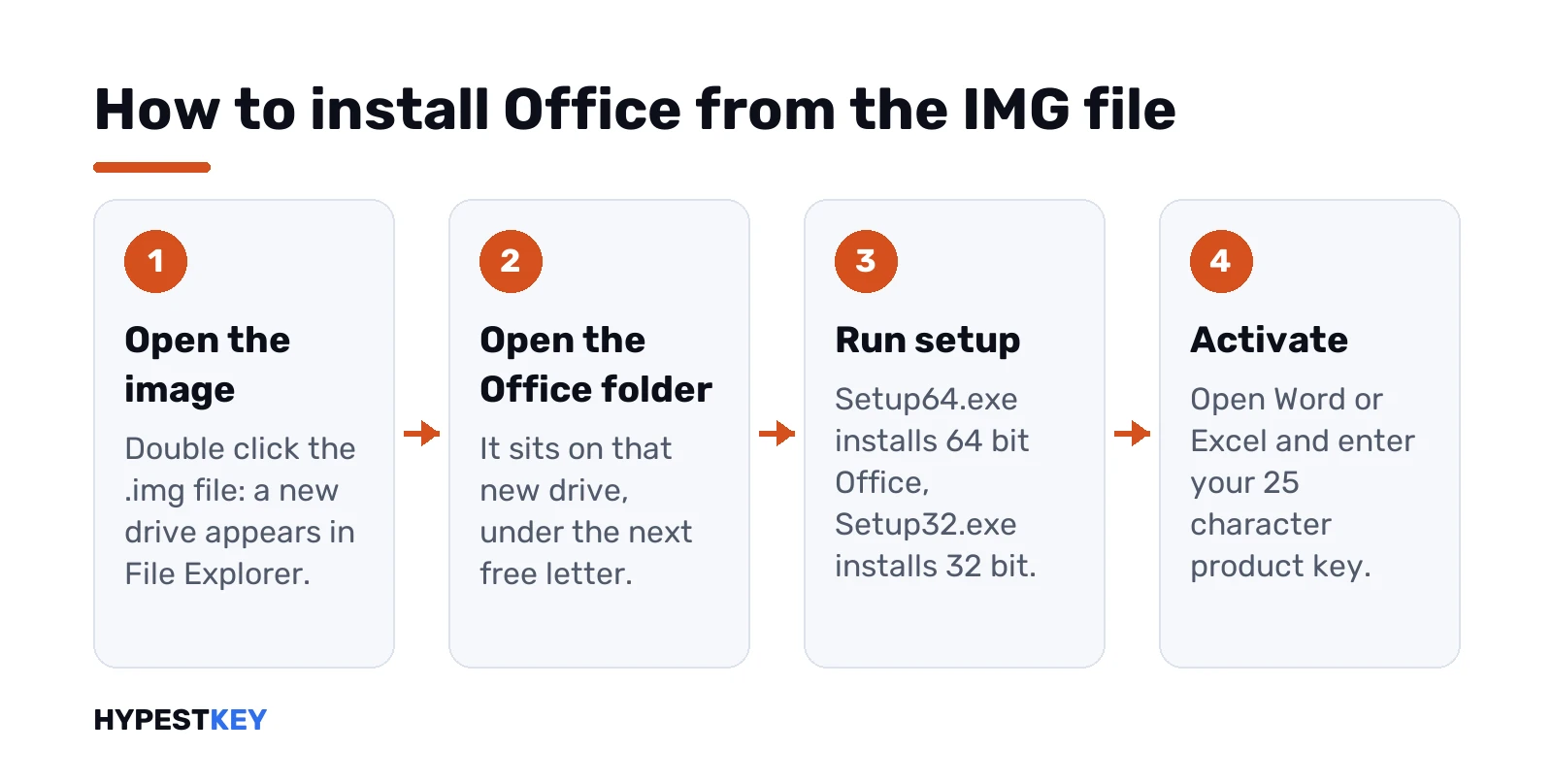
After the Office ISO download, open the IMG file, open the Office folder, run Setup64.exe or Setup32.exe and enter the product key.
Illustration: the Office image opens as a new drive, and setup runs from its Office folder before you activate with your key.

The 64 bit version is the usual choice on PCs with 4 GB of RAM or more.

After activation, go to File, Account, Update Options, Update Now. That installs the latest fixes.

Another version of Office already on the PC? As a rule, remove it first. Two different Office versions on one machine often clash.

Our guide to the Microsoft Office uninstall tool covers every method that still works in 2026.

The Office 2024 installation guide walks through setup and activation, with screenshots of each stage.

Where these steps apply

Item Covered
Images The retail Office 2024, Office 2021 and Office 2019 images
Windows Windows 11 (24H2 and 25H2) and Windows 10 22H2, which open .img files natively from File Explorer
Older Windows Office 2024 and Office 2021 don’t install on Windows 7 or 8.1
Mac These images are for Windows only; use the Mac installer from your Microsoft account

Before you download: a short checklist

  • You know the exact edition on your key or in your order email.
  • You’ve picked the language you’d like to work in.
  • The PC has a few gigabytes free for the image and for the install.
  • Older Office versions and trials are removed.
  • The address of the link ends in officecdn.microsoft.com.

Which Office download matches your key

Pick the image whose product matches your key. A key activates only its own edition. The language of the file can differ from the key.

Your key File to download
Office Home 2024 Home2024Retail.img
Office Home & Business 2024 HomeBusiness2024Retail.img
Office Professional Plus 2024 (retail) ProPlus2024Retail.img
Office LTSC Professional Plus 2024 (volume) Office Deployment Tool, product ID ProPlus2024Volume
Office 2021 Home & Student, Home & Business, Professional, Professional Plus HomeStudent2021Retail.img, HomeBusiness2021Retail.img, Professional2021Retail.img, ProPlus2021Retail.img
Office 2019 editions HomeStudent2019Retail.img, HomeBusiness2019Retail.img, Professional2019Retail.img, ProPlus2019Retail.img
Microsoft 365 Personal or Family O365HomePremRetail.img

A standalone app key needs that app’s own file. A Project key, for example, needs the Project image.

Office 2021 and 2019 still install and work. What changed between them is in Office 2021 vs 2024. For a new purchase, Office 2024 is generally the sensible pick: a one time license.

The images below cover the three 2024 suites and the standalone 2024 apps, Project and Visio included. All files sit on officecdn.microsoft.com. They’re offered here in English, German, French and Spanish.

Need a different language? Swap the language code in the link. The codes here are en-US, de-DE, fr-FR and es-ES.

Take another code from the Office 2019 tables below, such as it-IT or pl-PL. Microsoft’s server usually serves the same product in that language.

These images cover the four 2021 suites and the standalone 2021 apps. The languages are English, Estonian, Finnish and French.

Office 2021 still installs and activates. We’d use it only with a 2021 key you already own.

Product English (USA) Estonian (Estonia) Finnish (Finland) French (France)
Office 2021 Home and Student HomeStudent2021Retail.img HomeStudent2021Retail.img HomeStudent2021Retail.img HomeStudent2021Retail.img
Office 2021 Home and Business HomeBusiness2021Retail.img HomeBusiness2021Retail.img HomeBusiness2021Retail.img HomeBusiness2021Retail.img
Office 2021 Professional Professional2021Retail.img Professional2021Retail.img Professional2021Retail.img Professional2021Retail.img
Office 2021 Professional Plus ProPlus2021Retail.img ProPlus2021Retail.img ProPlus2021Retail.img ProPlus2021Retail.img
Word 2021 Word2021Retail.img Word2021Retail.img Word2021Retail.img Word2021Retail.img
Excel 2021 Excel2021Retail.img Excel2021Retail.img Excel2021Retail.img Excel2021Retail.img
PowerPoint 2021 PowerPoint2021Retail.img PowerPoint2021Retail.img PowerPoint2021Retail.img PowerPoint2021Retail.img
Outlook 2021 Outlook2021Retail.img Outlook2021Retail.img Outlook2021Retail.img Outlook2021Retail.img
Publisher 2021 Publisher2021Retail.img Publisher2021Retail.img Publisher2021Retail.img Publisher2021Retail.img
Access 2021 Access2021Retail.img Access2021Retail.img Access2021Retail.img Access2021Retail.img
Project 2021 Standard ProjectStd2021Retail.img Not available ProjectStd2021Retail.img ProjectStd2021Retail.img
Project 2021 Professional ProjectPro2021Retail.img Not available ProjectPro2021Retail.img ProjectPro2021Retail.img
Visio 2021 Standard VisioStd2021Retail.img Not available VisioStd2021Retail.img VisioStd2021Retail.img
Visio 2021 Professional VisioPro2021Retail.img Not available VisioPro2021Retail.img VisioPro2021Retail.img
Microsoft 365 Personal or Family O365HomePremRetail.img O365HomePremRetail.img O365HomePremRetail.img O365HomePremRetail.img
Microsoft 365 Apps for business O365BusinessRetail.img O365BusinessRetail.img O365BusinessRetail.img O365BusinessRetail.img
Microsoft 365 Apps for enterprise O365ProPlusRetail.img O365ProPlusRetail.img O365ProPlusRetail.img O365ProPlusRetail.img

The Office 2019 images are listed in more than 40 languages, four languages per table. The suites, standalone apps and Microsoft 365 installers are all there.

Install Office 2019 only if you already have a 2019 key.

English, Estonian, Finnish and French

Product English (USA) Estonian (Estonia) Finnish (Finland) French (France)
Office 2019 Home and Student HomeStudent2019Retail.img HomeStudent2019Retail.img HomeStudent2019Retail.img HomeStudent2019Retail.img
Office 2019 Home and Business HomeBusiness2019Retail.img HomeBusiness2019Retail.img HomeBusiness2019Retail.img HomeBusiness2019Retail.img
Office 2019 Professional Plus ProPlus2019Retail.img ProPlus2019Retail.img ProPlus2019Retail.img ProPlus2019Retail.img
Word 2019 Word2019Retail.img Word2019Retail.img Word2019Retail.img Word2019Retail.img
Excel 2019 Excel2019Retail.img Excel2019Retail.img Excel2019Retail.img Excel2019Retail.img
PowerPoint 2019 PowerPoint2019Retail.img PowerPoint2019Retail.img PowerPoint2019Retail.img PowerPoint2019Retail.img
Outlook 2019 Outlook2019Retail.img Outlook2019Retail.img Outlook2019Retail.img Outlook2019Retail.img
Publisher 2019 Publisher2019Retail.img Publisher2019Retail.img Publisher2019Retail.img Publisher2019Retail.img
Access 2019 Access2019Retail.img Access2019Retail.img Access2019Retail.img Access2019Retail.img
Project 2019 Standard ProjectStd2019Retail.img Not available ProjectStd2019Retail.img ProjectStd2019Retail.img
Project 2019 Professional ProjectPro2019Retail.img Not available ProjectPro2019Retail.img ProjectPro2019Retail.img
Visio 2019 Standard VisioStd2019Retail.img Not available VisioStd2019Retail.img VisioStd2019Retail.img
Visio 2019 Professional VisioPro2019Retail.img Not available VisioPro2019Retail.img VisioPro2019Retail.img
Microsoft 365 Personal or Family O365HomePremRetail.img O365HomePremRetail.img O365HomePremRetail.img O365HomePremRetail.img
Microsoft 365 Apps for business O365BusinessRetail.img O365BusinessRetail.img O365BusinessRetail.img O365BusinessRetail.img
Microsoft 365 Apps for enterprise O365ProPlusRetail.img O365ProPlusRetail.img O365ProPlusRetail.img O365ProPlusRetail.img

Arabic, Bulgarian, Chinese, simplified and Chinese, traditional

Product Arabic (Saudi-Arabia) Bulgarian (Bulgaria) Chinese, simplified (PR China) Chinese, traditional (Taiwan)
Office 2019 Home and Student HomeStudent2019Retail.img HomeStudent2019Retail.img HomeStudent2019Retail.img HomeStudent2019Retail.img
Office 2019 Home and Business HomeBusiness2019Retail.img HomeBusiness2019Retail.img HomeBusiness2019Retail.img HomeBusiness2019Retail.img
Office 2019 Professional Professional2019Retail.img Professional2019Retail.img Professional2019Retail.img Professional2019Retail.img
Office 2019 Professional Plus ProPlus2019Retail.img ProPlus2019Retail.img ProPlus2019Retail.img ProPlus2019Retail.img
Word 2019 Word2019Retail.img Word2019Retail.img Word2019Retail.img Word2019Retail.img
Excel 2019 Excel2019Retail.img Excel2019Retail.img Excel2019Retail.img Excel2019Retail.img
PowerPoint 2019 PowerPoint2019Retail.img PowerPoint2019Retail.img PowerPoint2019Retail.img PowerPoint2019Retail.img
Outlook 2019 Outlook2019Retail.img Outlook2019Retail.img Outlook2019Retail.img Outlook2019Retail.img
Publisher 2019 Publisher2019Retail.img Publisher2019Retail.img Publisher2019Retail.img Publisher2019Retail.img
Access 2019 Access2019Retail.img Access2019Retail.img Access2019Retail.img Access2019Retail.img
Project 2019 Standard ProjectStd2019Retail.img Not available ProjectStd2019Retail.img ProjectStd2019Retail.img
Project 2019 Professional ProjectPro2019Retail.img Not available ProjectPro2019Retail.img ProjectPro2019Retail.img
Visio 2019 Standard VisioStd2019Retail.img Not available VisioStd2019Retail.img VisioStd2019Retail.img
Visio 2019 Professional VisioPro2019Retail.img Not available VisioPro2019Retail.img VisioPro2019Retail.img
Microsoft 365 Personal or Family O365HomePremRetail.img O365HomePremRetail.img O365HomePremRetail.img O365HomePremRetail.img
Microsoft 365 Apps for business O365BusinessRetail.img O365BusinessRetail.img O365BusinessRetail.img O365BusinessRetail.img
Microsoft 365 Apps for enterprise O365ProPlusRetail.img O365ProPlusRetail.img O365ProPlusRetail.img O365ProPlusRetail.img

Croatian, Czech, Danish and Dutch

Product Croatian (Croatia) Czech (Czech Republic) Danish (Denmark) Dutch (Netherlands)
Office 2019 Home and Student HomeStudent2019Retail.img HomeStudent2019Retail.img HomeStudent2019Retail.img HomeStudent2019Retail.img
Office 2019 Home and Business HomeBusiness2019Retail.img HomeBusiness2019Retail.img HomeBusiness2019Retail.img HomeBusiness2019Retail.img
Office 2019 Professional Professional2019Retail.img Professional2019Retail.img Professional2019Retail.img Professional2019Retail.img
Office 2019 Professional Plus ProPlus2019Retail.img ProPlus2019Retail.img ProPlus2019Retail.img ProPlus2019Retail.img
Word 2019 Word2019Retail.img Word2019Retail.img Word2019Retail.img Word2019Retail.img
Excel 2019 Excel2019Retail.img Excel2019Retail.img Excel2019Retail.img Excel2019Retail.img
PowerPoint 2019 PowerPoint2019Retail.img PowerPoint2019Retail.img PowerPoint2019Retail.img PowerPoint2019Retail.img
Outlook 2019 Outlook2019Retail.img Outlook2019Retail.img Outlook2019Retail.img Outlook2019Retail.img
Publisher 2019 Publisher2019Retail.img Publisher2019Retail.img Publisher2019Retail.img Publisher2019Retail.img
Access 2019 Access2019Retail.img Access2019Retail.img Access2019Retail.img Access2019Retail.img
Project 2019 Standard Not available ProjectStd2019Retail.img ProjectStd2019Retail.img ProjectStd2019Retail.img
Project 2019 Professional Not available ProjectPro2019Retail.img ProjectPro2019Retail.img ProjectPro2019Retail.img
Visio 2019 Standard Not available VisioStd2019Retail.img VisioStd2019Retail.img VisioStd2019Retail.img
Visio 2019 Professional Not available VisioPro2019Retail.img VisioPro2019Retail.img VisioPro2019Retail.img
Microsoft 365 Personal or Family O365HomePremRetail.img O365HomePremRetail.img O365HomePremRetail.img O365HomePremRetail.img
Microsoft 365 Apps for business O365BusinessRetail.img O365BusinessRetail.img O365BusinessRetail.img O365BusinessRetail.img
Microsoft 365 Apps for enterprise O365ProPlusRetail.img O365ProPlusRetail.img O365ProPlusRetail.img O365ProPlusRetail.img

German, Greek, Hebrew and Hindi

Product German (Germany) Greek (Greece) Hebrew (Israel) Hindi (India)
Office 2019 Home and Student HomeStudent2019Retail.img HomeStudent2019Retail.img HomeStudent2019Retail.img HomeStudent2019Retail.img
Office 2019 Home and Business HomeBusiness2019Retail.img HomeBusiness2019Retail.img HomeBusiness2019Retail.img HomeBusiness2019Retail.img
Office 2019 Professional Professional2019Retail.img Professional2019Retail.img Professional2019Retail.img Professional2019Retail.img
Office 2019 Professional Plus ProPlus2019Retail.img ProPlus2019Retail.img ProPlus2019Retail.img ProPlus2019Retail.img
Word 2019 Word2019Retail.img Word2019Retail.img Word2019Retail.img Word2019Retail.img
Excel 2019 Excel2019Retail.img Excel2019Retail.img Excel2019Retail.img Excel2019Retail.img
PowerPoint 2019 PowerPoint2019Retail.img PowerPoint2019Retail.img PowerPoint2019Retail.img PowerPoint2019Retail.img
Outlook 2019 Outlook2019Retail.img Outlook2019Retail.img Outlook2019Retail.img Outlook2019Retail.img
Publisher 2019 Publisher2019Retail.img Publisher2019Retail.img Publisher2019Retail.img Not available
Access 2019 Access2019Retail.img Access2019Retail.img Access2019Retail.img Not available
Project 2019 Standard ProjectStd2019Retail.img ProjectStd2019Retail.img ProjectStd2019Retail.img Not available
Project 2019 Professional ProjectPro2019Retail.img ProjectPro2019Retail.img ProjectPro2019Retail.img Not available
Visio 2019 Standard VisioStd2019Retail.img VisioStd2019Retail.img VisioStd2019Retail.img Not available
Visio 2019 Professional VisioPro2019Retail.img VisioPro2019Retail.img VisioPro2019Retail.img Not available
Microsoft 365 Personal or Family O365HomePremRetail.img O365HomePremRetail.img O365HomePremRetail.img O365HomePremRetail.img
Microsoft 365 Apps for business O365BusinessRetail.img O365BusinessRetail.img O365BusinessRetail.img O365BusinessRetail.img
Microsoft 365 Apps for enterprise O365ProPlusRetail.img O365ProPlusRetail.img O365ProPlusRetail.img O365ProPlusRetail.img

Hungarian, Indonesian, Italian and Japanese

Product Hungarian (Hungary) Indonesian (Indonesia) Italian (Italy) Japanese (Japan)
Office 2019 Home and Student HomeStudent2019Retail.img HomeStudent2019Retail.img HomeStudent2019Retail.img Not available
Office 2019 Personal Not available Not available Not available Personal2019Retail.img
Office 2019 Home and Business HomeBusiness2019Retail.img HomeBusiness2019Retail.img HomeBusiness2019Retail.img HomeBusiness2019Retail.img
Office 2019 Professional Professional2019Retail.img Professional2019Retail.img Professional2019Retail.img Professional2019Retail.img
Office 2019 Professional Plus ProPlus2019Retail.img ProPlus2019Retail.img ProPlus2019Retail.img ProPlus2019Retail.img
Word 2019 Word2019Retail.img Word2019Retail.img Word2019Retail.img Word2019Retail.img
Excel 2019 Excel2019Retail.img Excel2019Retail.img Excel2019Retail.img Excel2019Retail.img
PowerPoint 2019 PowerPoint2019Retail.img PowerPoint2019Retail.img PowerPoint2019Retail.img PowerPoint2019Retail.img
Outlook 2019 Outlook2019Retail.img Outlook2019Retail.img Outlook2019Retail.img Outlook2019Retail.img
Publisher 2019 Publisher2019Retail.img Publisher2019Retail.img Publisher2019Retail.img Publisher2019Retail.img
Access 2019 Access2019Retail.img Access2019Retail.img Access2019Retail.img Access2019Retail.img
Project 2019 Standard ProjectStd2019Retail.img Not available ProjectStd2019Retail.img ProjectStd2019Retail.img
Project 2019 Professional ProjectPro2019Retail.img Not available ProjectPro2019Retail.img ProjectPro2019Retail.img
Visio 2019 Standard VisioStd2019Retail.img Not available VisioStd2019Retail.img VisioStd2019Retail.img
Visio 2019 Professional VisioPro2019Retail.img Not available VisioPro2019Retail.img VisioPro2019Retail.img
Microsoft 365 Personal or Family O365HomePremRetail.img O365HomePremRetail.img O365HomePremRetail.img O365HomePremRetail.img
Microsoft 365 Apps for business O365BusinessRetail.img O365BusinessRetail.img O365BusinessRetail.img O365BusinessRetail.img
Microsoft 365 Apps for enterprise O365ProPlusRetail.img O365ProPlusRetail.img O365ProPlusRetail.img O365ProPlusRetail.img

Kazakh, Korean, Latvian and Lithuanian

Product Kazakh (Kazakhstan) Korean (Republic of Korea) Latvian (Latvia) Lithuanian (Lithuania)
Office 2019 Home and Student HomeStudent2019Retail.img HomeStudent2019Retail.img HomeStudent2019Retail.img HomeStudent2019Retail.img
Office 2019 Home and Business HomeBusiness2019Retail.img HomeBusiness2019Retail.img HomeBusiness2019Retail.img HomeBusiness2019Retail.img
Office 2019 Professional Professional2019Retail.img Professional2019Retail.img Professional2019Retail.img Professional2019Retail.img
Office 2019 Professional Plus ProPlus2019Retail.img ProPlus2019Retail.img ProPlus2019Retail.img ProPlus2019Retail.img
Word 2019 Word2019Retail.img Word2019Retail.img Word2019Retail.img Word2019Retail.img
Excel 2019 Excel2019Retail.img Excel2019Retail.img Excel2019Retail.img Excel2019Retail.img
PowerPoint 2019 PowerPoint2019Retail.img PowerPoint2019Retail.img PowerPoint2019Retail.img PowerPoint2019Retail.img
Outlook 2019 Outlook2019Retail.img Outlook2019Retail.img Outlook2019Retail.img Outlook2019Retail.img
Publisher 2019 Not available Publisher2019Retail.img Publisher2019Retail.img Publisher2019Retail.img
Access 2019 Not available Access2019Retail.img Access2019Retail.img Access2019Retail.img
Project 2019 Standard Not available ProjectStd2019Retail.img Not available Not available
Project 2019 Professional Not available ProjectPro2019Retail.img Not available Not available
Visio 2019 Standard Not available VisioStd2019Retail.img Not available Not available
Visio 2019 Professional Not available VisioPro2019Retail.img Not available Not available
Microsoft 365 Personal or Family O365HomePremRetail.img O365HomePremRetail.img O365HomePremRetail.img O365HomePremRetail.img
Microsoft 365 Apps for business O365BusinessRetail.img O365BusinessRetail.img O365BusinessRetail.img O365BusinessRetail.img
Microsoft 365 Apps for enterprise O365ProPlusRetail.img O365ProPlusRetail.img O365ProPlusRetail.img O365ProPlusRetail.img

Malay, Norwegian, Bokmål, Polish and Portuguese

Product Malay (Malaysia) Norwegian, Bokmål (Norway) Polish (Poland) Portuguese (Brazil)
Office 2019 Home and Student HomeStudent2019Retail.img HomeStudent2019Retail.img HomeStudent2019Retail.img HomeStudent2019Retail.img
Office 2019 Home and Business HomeBusiness2019Retail.img HomeBusiness2019Retail.img HomeBusiness2019Retail.img HomeBusiness2019Retail.img
Office 2019 Professional Professional2019Retail.img Professional2019Retail.img Professional2019Retail.img Professional2019Retail.img
Office 2019 Professional Plus ProPlus2019Retail.img ProPlus2019Retail.img ProPlus2019Retail.img ProPlus2019Retail.img
Word 2019 Word2019Retail.img Word2019Retail.img Word2019Retail.img Word2019Retail.img
Excel 2019 Excel2019Retail.img Excel2019Retail.img Excel2019Retail.img Excel2019Retail.img
PowerPoint 2019 PowerPoint2019Retail.img PowerPoint2019Retail.img PowerPoint2019Retail.img PowerPoint2019Retail.img
Outlook 2019 Outlook2019Retail.img Outlook2019Retail.img Outlook2019Retail.img Outlook2019Retail.img
Publisher 2019 Not available Publisher2019Retail.img Publisher2019Retail.img Publisher2019Retail.img
Access 2019 Not available Access2019Retail.img Access2019Retail.img Access2019Retail.img
Project 2019 Standard Not available ProjectStd2019Retail.img ProjectStd2019Retail.img ProjectStd2019Retail.img
Project 2019 Professional Not available ProjectPro2019Retail.img ProjectPro2019Retail.img ProjectPro2019Retail.img
Visio 2019 Standard Not available VisioStd2019Retail.img VisioStd2019Retail.img VisioStd2019Retail.img
Visio 2019 Professional Not available VisioPro2019Retail.img VisioPro2019Retail.img VisioPro2019Retail.img
Microsoft 365 Personal or Family O365HomePremRetail.img O365HomePremRetail.img O365HomePremRetail.img O365HomePremRetail.img
Microsoft 365 Apps for business O365BusinessRetail.img O365BusinessRetail.img O365BusinessRetail.img O365BusinessRetail.img
Microsoft 365 Apps for enterprise O365ProPlusRetail.img O365ProPlusRetail.img O365ProPlusRetail.img O365ProPlusRetail.img

Portuguese, Romanian, Russian and Serbian, Latin

Product Portuguese (Portugal) Romanian (Romaina) Russian (Russian Federation) Serbian, Latin (Serbia / Montenegro)
Office 2019 Home and Student HomeStudent2019Retail.img HomeStudent2019Retail.img HomeStudent2019Retail.img HomeStudent2019Retail.img
Office 2019 Home and Business HomeBusiness2019Retail.img HomeBusiness2019Retail.img HomeBusiness2019Retail.img HomeBusiness2019Retail.img
Office 2019 Professional Professional2019Retail.img Professional2019Retail.img Professional2019Retail.img Professional2019Retail.img
Office 2019 Professional Plus ProPlus2019Retail.img ProPlus2019Retail.img ProPlus2019Retail.img ProPlus2019Retail.img
Word 2019 Word2019Retail.img Word2019Retail.img Word2019Retail.img Word2019Retail.img
Excel 2019 Excel2019Retail.img Excel2019Retail.img Excel2019Retail.img Excel2019Retail.img
PowerPoint 2019 PowerPoint2019Retail.img PowerPoint2019Retail.img PowerPoint2019Retail.img PowerPoint2019Retail.img
Outlook 2019 Outlook2019Retail.img Outlook2019Retail.img Outlook2019Retail.img Outlook2019Retail.img
Publisher 2019 Publisher2019Retail.img Publisher2019Retail.img Publisher2019Retail.img Publisher2019Retail.img
Access 2019 Access2019Retail.img Access2019Retail.img Access2019Retail.img Access2019Retail.img
Project 2019 Standard ProjectStd2019Retail.img ProjectStd2019Retail.img ProjectStd2019Retail.img Not available
Project 2019 Professional ProjectPro2019Retail.img ProjectPro2019Retail.img ProjectPro2019Retail.img Not available
Visio 2019 Standard VisioStd2019Retail.img VisioStd2019Retail.img VisioStd2019Retail.img Not available
Visio 2019 Professional VisioPro2019Retail.img VisioPro2019Retail.img VisioPro2019Retail.img Not available
Microsoft 365 Personal or Family O365HomePremRetail.img O365HomePremRetail.img O365HomePremRetail.img O365HomePremRetail.img
Microsoft 365 Apps for business O365BusinessRetail.img O365BusinessRetail.img O365BusinessRetail.img O365BusinessRetail.img
Microsoft 365 Apps for enterprise O365ProPlusRetail.img O365ProPlusRetail.img O365ProPlusRetail.img O365ProPlusRetail.img

Slovak, Slovenian, Spanish and Swedish

Product Slovak (Slovakia) Slovenian (Slovenia) Spanish (Spain) Swedish (Sweden)
Office 2019 Home and Student HomeStudent2019Retail.img HomeStudent2019Retail.img HomeStudent2019Retail.img HomeStudent2019Retail.img
Office 2019 Home and Business HomeBusiness2019Retail.img HomeBusiness2019Retail.img HomeBusiness2019Retail.img HomeBusiness2019Retail.img
Office 2019 Professional Professional2019Retail.img Professional2019Retail.img Professional2019Retail.img Professional2019Retail.img
Office 2019 Professional Plus ProPlus2019Retail.img ProPlus2019Retail.img ProPlus2019Retail.img ProPlus2019Retail.img
Word 2019 Word2019Retail.img Word2019Retail.img Word2019Retail.img Word2019Retail.img
Excel 2019 Excel2019Retail.img Excel2019Retail.img Excel2019Retail.img Excel2019Retail.img
PowerPoint 2019 PowerPoint2019Retail.img PowerPoint2019Retail.img PowerPoint2019Retail.img PowerPoint2019Retail.img
Outlook 2019 Outlook2019Retail.img Outlook2019Retail.img Outlook2019Retail.img Outlook2019Retail.img
Publisher 2019 Publisher2019Retail.img Publisher2019Retail.img Publisher2019Retail.img Publisher2019Retail.img
Access 2019 Access2019Retail.img Access2019Retail.img Access2019Retail.img Access2019Retail.img
Project 2019 Standard ProjectStd2019Retail.img ProjectStd2019Retail.img ProjectStd2019Retail.img ProjectStd2019Retail.img
Project 2019 Professional ProjectPro2019Retail.img ProjectPro2019Retail.img ProjectPro2019Retail.img ProjectPro2019Retail.img
Visio 2019 Standard VisioStd2019Retail.img VisioStd2019Retail.img VisioStd2019Retail.img VisioStd2019Retail.img
Visio 2019 Professional VisioPro2019Retail.img VisioPro2019Retail.img VisioPro2019Retail.img VisioPro2019Retail.img
Microsoft 365 Personal or Family O365HomePremRetail.img O365HomePremRetail.img O365HomePremRetail.img O365HomePremRetail.img
Microsoft 365 Apps for business O365BusinessRetail.img O365BusinessRetail.img O365BusinessRetail.img O365BusinessRetail.img
Microsoft 365 Apps for enterprise O365ProPlusRetail.img O365ProPlusRetail.img O365ProPlusRetail.img O365ProPlusRetail.img

Thai, Turkish, Ukrainian and Vietnamese

Product Thai (Thailand) Turkish (Turkey) Ukrainian (Ukraine) Vietnamese (Vietnam)
Office 2019 Home and Student HomeStudent2019Retail.img HomeStudent2019Retail.img HomeStudent2019Retail.img HomeStudent2019Retail.img
Office 2019 Home and Business HomeBusiness2019Retail.img HomeBusiness2019Retail.img HomeBusiness2019Retail.img HomeBusiness2019Retail.img
Office 2019 Professional Professional2019Retail.img Professional2019Retail.img Professional2019Retail.img Professional2019Retail.img
Office 2019 Professional Plus ProPlus2019Retail.img ProPlus2019Retail.img ProPlus2019Retail.img ProPlus2019Retail.img
Word 2019 Word2019Retail.img Word2019Retail.img Word2019Retail.img Word2019Retail.img
Excel 2019 Excel2019Retail.img Excel2019Retail.img Excel2019Retail.img Excel2019Retail.img
PowerPoint 2019 PowerPoint2019Retail.img PowerPoint2019Retail.img PowerPoint2019Retail.img PowerPoint2019Retail.img
Outlook 2019 Outlook2019Retail.img Outlook2019Retail.img Outlook2019Retail.img Outlook2019Retail.img
Publisher 2019 Publisher2019Retail.img Publisher2019Retail.img Publisher2019Retail.img Publisher2019Retail.img
Access 2019 Access2019Retail.img Access2019Retail.img Access2019Retail.img Access2019Retail.img
Project 2019 Standard Not available ProjectStd2019Retail.img ProjectStd2019Retail.img Not available
Project 2019 Professional Not available ProjectPro2019Retail.img ProjectPro2019Retail.img Not available
Visio 2019 Standard Not available VisioStd2019Retail.img VisioStd2019Retail.img Not available
Visio 2019 Professional Not available VisioPro2019Retail.img VisioPro2019Retail.img Not available
Microsoft 365 Personal or Family O365HomePremRetail.img O365HomePremRetail.img O365HomePremRetail.img O365HomePremRetail.img
Microsoft 365 Apps for business O365BusinessRetail.img O365BusinessRetail.img O365BusinessRetail.img O365BusinessRetail.img
Microsoft 365 Apps for enterprise O365ProPlusRetail.img O365ProPlusRetail.img O365ProPlusRetail.img O365ProPlusRetail.img

“Not available” tells you Microsoft doesn’t publish that product in that language. Some languages have no Project or Visio images, for example. In that case, we’d install the English file and add a language pack later.

Office LTSC 2024 and other volume licenses

Office LTSC Professional Plus 2024 and other volume licensed editions don’t use the IMG files above. Microsoft installs them with the free Office Deployment Tool.

  1. Download the Office Deployment Tool from the Microsoft Download Center. Extract it to a folder of its own, for example one named ODT on drive C.
  2. Create configuration.xml with the product ID, the language and the 32 or 64 bit edition.
  3. Run the download line if you’d like a local copy. Then run the configure line to install.
setup /download configuration.xml
setup /configure configuration.xml
Setting Value
Product ID ProPlus2024Volume
Channel PerpetualVL2024
Where to run setup An elevated Command Prompt
Tool that builds the file for you Microsoft’s web based Office Customization Tool at config.office.com

Microsoft documents every setting on its page Deploy Office LTSC 2024.

With an Office LTSC key from HypestKey, the order email includes the installation instructions for that product.

Office 2016 and Office 2013

For a reinstall with an old key, use the download in your Microsoft account. Not an unofficial copy.

For Office 2013 Home and Business in English, Microsoft’s own redirect still points to the installer: HomeBusinessRetail.img for Office 2013.

Earlier versions of this page also linked an Office 2013 Professional Plus ISO on archive.org, and a shortened link. We removed both, because they aren’t Microsoft sources.

Where Windows ISO files come from

From a different Microsoft page, microsoft.com/software-download/windows11. Three things are published there.

  • The Windows 11 ISO.
  • The Media Creation Tool.
  • The Installation Assistant.

Choose the edition and the language there and download the ISO. Write it to a USB stick or mount it. After setup, activate Windows with your product key.

Our guide to installing Windows 11 from USB shows how to turn the ISO into a bootable drive, and what to do at each setup screen.

Typical Office ISO download mistakes

The image for the wrong edition

Someone downloads the Professional Plus image and enters a Home & Business key. Setup installs, and the key is refused. With the HomeBusiness image, the same key activates.

The mirror that wasn’t Microsoft

A search result offers a “pre activated” Office from a file sharing site. The address has nothing to do with officecdn.microsoft.com. The download gets cancelled. The image from this page takes its place.

Two Office versions on one PC

An older Office is still installed when the new image runs. The apps start clashing over file types and updates. With the old version removed first, the install is clean.

The language that wasn’t in the table

The table has no Italian link for Office 2024. The language code in the English link gets swapped for it-IT. The server delivers the Italian image.

The volume key and the IMG file

An LTSC key is tried on a retail image and doesn’t activate. Volume editions come through the Office Deployment Tool. Installed that way, the key works.

Need a key? Our Office Home and Business 2024 key comes as a genuine license. Delivery is instant to email.

HypestKey has sold genuine Microsoft license keys online since 2018, with instant email delivery. The catalog covers Windows and Office. Windows Server too.

Office offline installer for Microsoft 365 home plans

Personal and Family subscribers have the easy path. No tools, no command line.
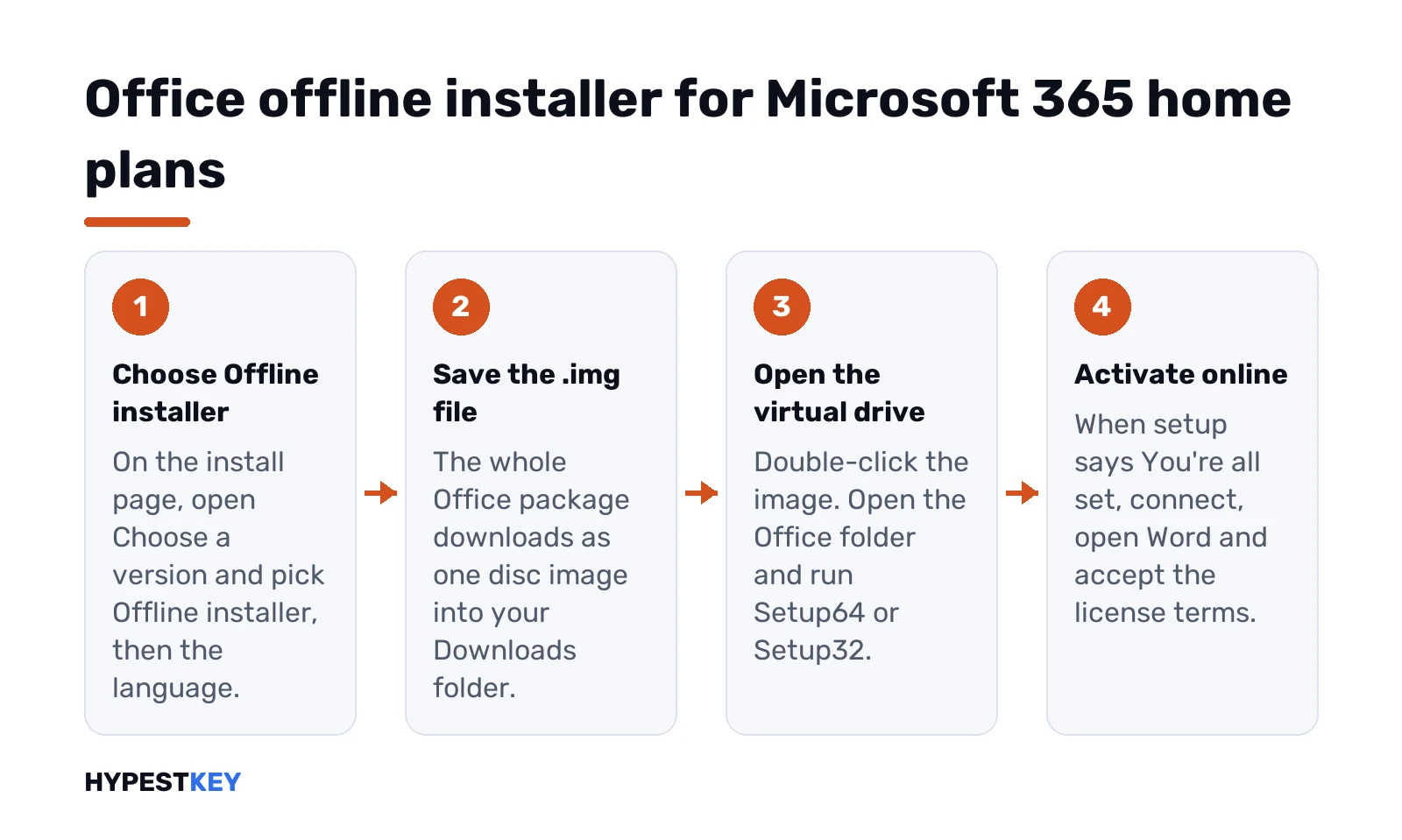
Office offline installer steps for Microsoft 365 home plans: choose Offline installer, save the .img file, run Setup64 or Setup32 from the virtual drive, then activate online
Illustration: four steps to install Microsoft 365 with the offline installer.
  1. Microsoft’s support page “Use the Office offline installer”. Press Download.
  2. Signed in with a work or school account? Stop here and use the business section below.
  3. In the Install window, open “Choose a version”. Offline installer.
  4. Pick the language. Install.
  5. Save the file when the browser asks. Edge says Save, Firefox says Save File.

The file is big and the download can take a while on a slow line. We’d let it finish on a stable connection and keep the PC awake until it does.

New to the subscription itself? Our page what Microsoft 365 includes covers the plans, and installing Microsoft 365 the usual way covers the online route.

32-bit or 64-bit, and which language

Language is fixed when you download. Pick the one you actually work in, since a second language means a second image or a language pack later.

Bit version is picked at setup, not at download. We’d run Setup64, the default for current Office, unless a 32-bit COM add-in has no 64-bit version. One rule matters. Office already on the PC? Stay with its bit version, or remove it first with the Microsoft Office uninstall tool.

Check the hardware too. The Office 2024 system requirements apply to the offline build exactly as they apply online.

Offline install for Microsoft 365 business plans

Work accounts don’t get the .img button. Here the Office Deployment Tool does the job, and it runs from the command line. Built for IT, but fine for one PC.

First, which product ID. Business Standard and Microsoft 365 Apps for business use the business version. Every other plan uses the enterprise one.

Plan Product ID in the XML
Microsoft 365 Business Standard, Apps for business O365BusinessRetail
Other business and enterprise plans O365ProPlusRetail

Make a folder called ODT on drive C, download the tool from the Microsoft Download Center and extract it there. Then a configuration file in Notepad, saved into the same folder. A 64-bit English example:

<Configuration>
  <Add OfficeClientEdition="64">
    <Product ID="O365BusinessRetail">
      <Language ID="en-us" />
    </Product>
  </Add>
</Configuration>

Download step, while you still have internet. Start, Run:

c:odtsetup.exe /download installOfficeBusRet64.xml

The window closes by itself when it’s done, and an Office folder appears inside ODT. Copy the ODT folder to the offline PC if needed, then:

c:odtsetup.exe /configure installOfficeBusRet64.xml

Change the language ID for another language. Our full Office Deployment Tool guide covers channels, excluded apps and shared network folders.

Activating Office after an offline install

Setup can run offline. Activation can’t.

Connect the PC, open Word or Excel and accept the license terms. A subscription activates with the account you signed in with. A one-time license activates against the key on your Microsoft account. Volume copies use their own key or the company’s activation server. Our guide on activating Office 2024 walks through the screens, and Office Home and Business 2024 shows what a retail license includes.

Keeping an offline copy up to date

Here’s the catch with an old image. It installs the build from the day you downloaded it.

Updates are cumulative and come from the Office content network on the internet by default. Small delta updates? Only when the installed build is recent. A copy from many months ago gets a full-size catch-up download instead. So we’d download a fresh image before every reuse and update straight after setup:

  1. Open any Office app.
  2. File, Account.
  3. Update Options, Update Now.

Update Now did nothing? Close the app and repeat. One-time Office 2024 licenses also pull their updates soon after installation.

Office offline installer problems and fixes

  • No virtual drive after the double-click. Look in File Explorer under This PC, or mount the image by hand.
  • Setup stops near the end. Usually leftovers of an older Office. Our page on Office error 30015-11 covers that.
  • Setup won’t start at all. Restart the PC first. An earlier attempt may still be holding the installer.
  • The download itself keeps failing. A wired connection is usually faster than Wi-Fi. Try one.
  • Wrong language. Download a new image in the right one.
  • Office asks for a sign-in every time. It’s waiting for activation. Go online once and sign in.

Our page on downloading Microsoft Office safely covers where the genuine files come from.

What’s in Office 2021 Professional Plus

Professional Plus is the biggest 2021 suite for Windows. According to Microsoft’s IT docs, the volume edition includes these apps:

  • Word and Excel.
  • PowerPoint and OneNote.
  • Outlook for mail and calendar.
  • Access, the database app.
  • Publisher, for flyers and print layouts.
  • Skype for Business, optional during setup.

Windows only. Access and Publisher don’t exist on macOS, so there’s no Mac version of Pro Plus. It runs on Windows 10 or Windows 11, in 32-bit or 64-bit. Microsoft recommends 64-bit on PCs with 4 GB of memory or more, and so would we.

Excel got the big upgrades in 2021: XLOOKUP, dynamic arrays, LET and XMATCH. We list the rest in the Office 2019 vs 2021 comparison, and Home and Business vs Professional shows what the smaller 2021 suites leave out.

Installing from the Microsoft image

The image is an .img file, a disk image like an ISO. Windows 10 and 11 open it without extra software. The rough order:
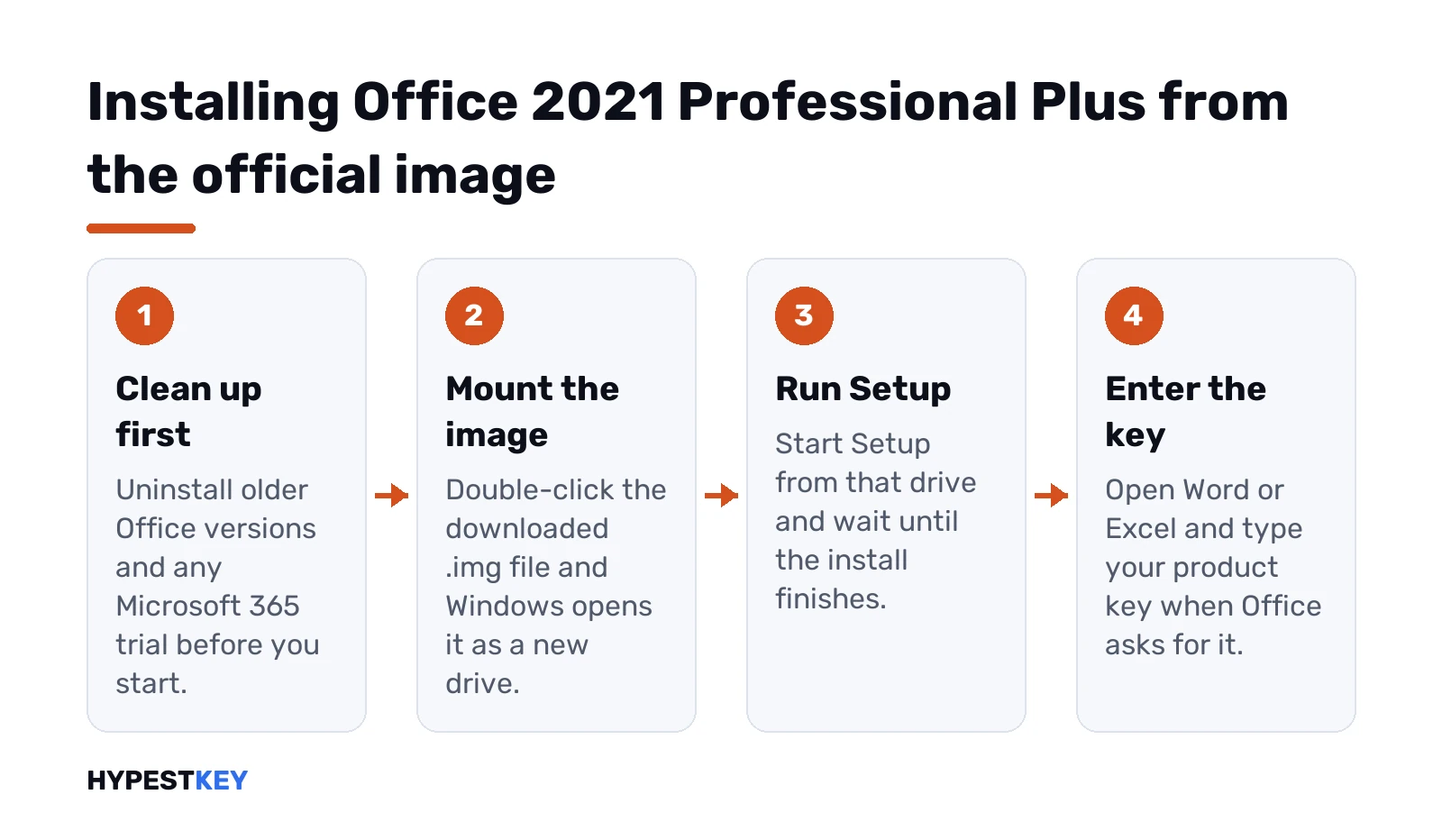
Four steps after the Office 2021 Professional Plus free download: remove old Office, mount the image, run Setup and enter the product key
Illustration: remove older Office and trials, mount the image, run Setup, then enter your product key in Word or Excel.
  1. Uninstall older Office versions and any Microsoft 365 trial first.
  2. Double-click the downloaded image. Windows mounts it as a new drive.
  3. Run Setup from that drive and wait for the install to finish.
  4. Open Word or Excel and enter your product key when asked.

Leftover trials break things. Our Office uninstall tool guide clears them out. The full walk-through is in how to install Office 2021, and activation itself in how to activate Office 2021.

Volume editions: the Office Deployment Tool

Companies with a volume agreement get Office LTSC Professional Plus 2021. Microsoft doesn’t ship it as an image. Admins use the free Office Deployment Tool and a small configuration file.

The product ID that matters is ProPlus2021Volume, on the PerpetualVL2021 channel. A minimal file:

<Configuration>
  <Add OfficeClientEdition="64" Channel="PerpetualVL2021">
    <Product ID="ProPlus2021Volume">
      <Language ID="en-us" />
    </Product>
  </Add>
</Configuration>

Then, from an elevated Command Prompt in the same folder:

setup /configure configuration.xml

Files come straight from Microsoft’s servers. Every option is in Microsoft’s LTSC 2021 deployment guide, and our Office Deployment Tool guide explains the XML in plain words.

The generic KMS key: installs, doesn’t activate

Microsoft publishes a generic volume license key for Office LTSC Professional Plus 2021:

FXYTK-NJJ8C-GB6DW-3DYQT-6F7TH

It installs the volume edition. It does not activate it. That key only looks for a company’s KMS host, and a home PC doesn’t have one. These keys can’t activate a personal copy of Office. Microsoft says so itself.

So the install works, then Office counts down and asks for activation. We wrote about that exact state in the 0x4004F00C error.

FAQ

Is it legal to download Office from these links?

Yes. The files are Microsoft's own installers on officecdn.microsoft.com, and they're free to download. You still need a genuine product key to activate Office.

How do I open an .img file on Windows 11?

Double click it. Windows opens it as a virtual drive in File Explorer. Open the Office folder and run the 64-bit or the 32-bit setup file.

Can I install Office 2024 from the image and activate it with my key?

Yes, if the image matches your edition. A Home & Business 2024 key needs the HomeBusiness2024Retail file, and Home 2024 needs Home2024Retail. We'd enter the key in any Office app after setup.

Should I pick 32 bit or 64 bit Office?

Microsoft recommends 64 bit on PCs with 4 GB of RAM or more. We'd choose 32 bit only if an old add-in needs it. All Office apps on one PC must use the same bitness.

Does the language of the installer have to match my key?

Nope. A key activates its edition in any language. So you can install the language you prefer, and we'd add more with language packs later.

How do I install Office LTSC Professional Plus 2024?

Use Microsoft's Office Deployment Tool with the product ID ProPlus2024Volume, as described on Microsoft Learn. The IMG files on this page are for retail editions. We'd not try them with a volume key.

Is there still an offline installer for Office?

Yes. Home plans get an .img file from Microsoft's offline installer page, and business plans download the full package with the Office Deployment Tool.

Do I need internet to use the offline installer?

For the download and activation, yes. The install itself runs from the file, so the PC can be offline during setup.