Short answer: Office Standard vs Professional comes down to Access and the sales channel. Standard is the base volume suite with four classic apps in 2024. Professional Plus adds Access. The retail suite called Office Professional covers one PC and also carries Publisher. We'd pick Standard only for a company fleet without Access users.
Office Standard vs Professional comes down to Access and how you buy it: Office Standard is the smaller volume licensing suite, while Professional Plus adds Access and other extras, and Office Professional is the retail one-time purchase for one PC. In the 2024 release, Standard is the four core apps, with Outlook among them.
| Office LTSC Standard 2024 | Office LTSC Professional Plus 2024 | Office Professional 2021 | |
|---|---|---|---|
| Word, Excel, PowerPoint, Outlook | Yes | Yes | Yes |
| OneNote desktop app | Ships with Office LTSC 2024 | Yes | Yes |
| Access | No | Yes, Windows only | Yes |
| Publisher | No | No | Yes |
| Skype for Business | Not listed | Optional at setup | Not listed |
| Teams | Separate download | Separate download | Separate download |
| How it’s sold | Commercial volume licensing, per device | Commercial volume licensing, per device | Retail, one-time purchase |
| Devices | 1 licensed device each | 1 licensed device each | 1 PC |
| Activation | KMS or MAK | KMS or MAK | Retail key and a Microsoft account |
| Mac edition | Office LTSC Standard for Mac 2024 | No Access or Publisher on macOS | PC only |
Office Standard vs Professional at a glance
Short answer: Access. That’s the one app Standard never gets.
Everything else on the table follows from who the suite is for. Standard and Professional Plus come through commercial licensing to organizations, so they activate the volume way. Office Professional sits on the shop shelf next to Home and Business. We’d start by checking which of the three the offer in front of you actually names.
Three names, three different products
This is where most of the confusion starts. Searches say “Professional”; offers usually mean Professional Plus.
- Office Standard. The base volume suite. Today’s name is Office LTSC Standard.
- Office Professional Plus. The bigger volume suite. Today’s name is Office LTSC Professional Plus.
- Office Professional. A retail suite for one PC. The 2021 one carries Publisher and Access on top of the usual apps.
So “Standard vs Professional” can mean two volume suites, or a volume suite against a retail box. Both comparisons are on this page.
Apps in Office Standard vs Professional Plus 2024
Microsoft’s volume comparison lists four classic apps for Standard 2024: the writing, spreadsheet, slides and mail ones. Professional Plus 2024 adds Access on top.
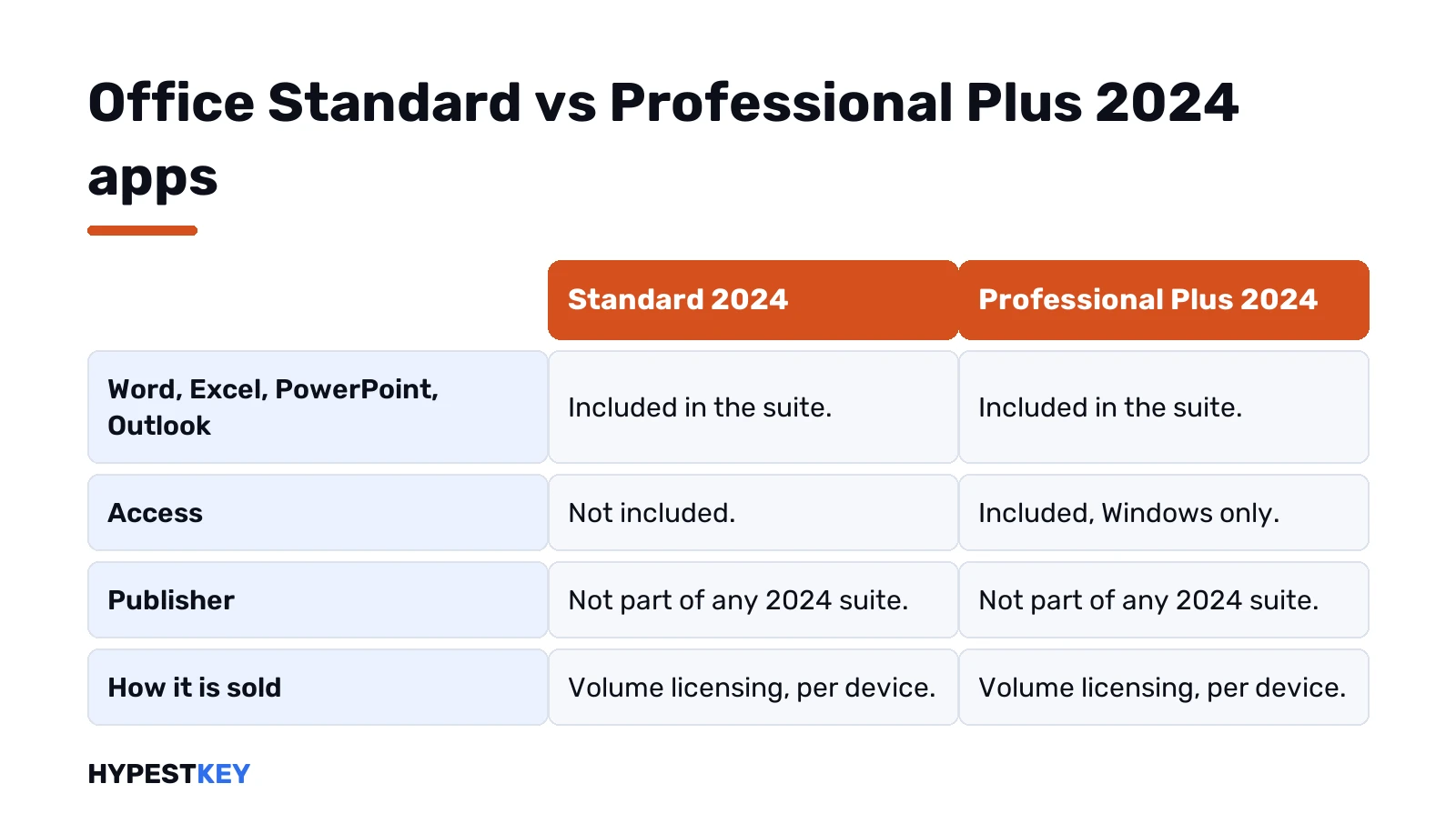
| App | Standard 2024 | Professional Plus 2024 |
|---|---|---|
| Word | Yes | Yes |
| Excel | Yes | Yes |
| PowerPoint | Yes | Yes |
| Outlook | Yes | Yes |
| OneNote desktop | Included with Office LTSC 2024 | Yes |
| Access | No | Yes |
| Skype for Business | Not listed | Optional install |
Two things are gone from both. Publisher isn’t part of the 2024 suites at all. Teams isn’t preinstalled either; organizations download it separately from Microsoft.
The shared apps don’t shrink. Excel in Standard is the Excel of Professional Plus, version 16.0 in both. Nothing in Word turns “lite” because the suite is smaller.
Professional Plus by year: 2021, 2019, 2016 and 2013
Older Professional Plus suites carried more apps. Each year’s box, per Microsoft and our product pages:
| Professional Plus | Apps |
|---|---|
| LTSC 2024 | Word, Excel, PowerPoint, Outlook, OneNote, Access; Skype for Business optional |
| LTSC 2021 | Word, Excel, PowerPoint, Outlook, OneNote, Access, Publisher, Skype for Business, Teams |
| 2019 | Word, Excel, PowerPoint, Outlook, OneNote, Access, Publisher, Skype for Business |
| 2016 | Word, Excel, PowerPoint, Outlook, OneNote, Access, Publisher, Skype for Business |
| 2013 | Word, Excel, PowerPoint, Outlook, OneNote, Access, Publisher, InfoPath, Lync |
Microsoft has since removed the Teams client from Office LTSC 2021 installs. Existing installs keep it. The 2013 suite also brought the Telemetry Dashboard, which Microsoft installed with Professional Plus 2013 for IT teams.
Standard in those years was the smaller suite, and its exact extras moved around from release to release. When an old Standard offer matters, we’d check that year’s suite list rather than guess. Our guide to Microsoft Office versions lines the releases up.
Office Standard vs Professional Plus 2021 and 2019
Same pairing, older years. Microsoft sells both suites through volume licensing in each release, for Windows, and a Standard edition for Mac alongside.
| Office LTSC 2021 | Office 2019 | |
|---|---|---|
| Windows suites | LTSC Standard 2021, LTSC Professional Plus 2021 | Standard 2019, Professional Plus 2019 |
| Mac suite for volume customers | Office LTSC Standard for Mac 2021 | Office Standard 2019 for Mac |
| Product IDs for the deployment tool | Standard2021Volume, ProPlus2021Volume | Standard2019Volume, ProPlus2019Volume |
| Install technology | Click-to-Run | Click-to-Run, replacing the MSI installer of 2016 |
| Version number | 16.0 | 16.0 |
| 32-bit and 64-bit | Both | Both |
| Internet for activation | Needed for MAK, not for KMS | Not needed after download |
One gap here. Microsoft Learn spells out the Professional Plus app list for each year, yet it gives no matching list for Standard. Access? Missing from Standard, both years. Shopping for an older Standard suite? We’d read that product’s own app list before paying.
Teams changed after release. Fresh Professional Plus 2021 setups now come without the Teams client. Older installs keep theirs. The 2019 suite never had Teams; Skype for Business sat there instead.
Sources: Office LTSC 2021 overview and Office 2019 overview on Microsoft Learn. The product pages: Office 2021 Professional Plus key and Office 2019 Professional Plus key.
Office Professional, the retail one
Different shelf, different rules.
Microsoft’s FAQ describes Office Professional 2021 as a suite for families and small businesses, installed on one PC, for home or work. The five classic apps are in. So is Publisher. So is Access. Setup is the retail kind, with a Microsoft account.
Against Standard, two extra apps. The database one and the desktop publishing one. Against Professional Plus 2021 the lists are close. We’d say the licensing is what differs. Our comparison of Office 2021 Home and Business vs Professional covers that retail pair in detail.
How Office Standard and Professional Plus are licensed
Per device. Not per user.
- Desktop application licenses. Usually perpetual, sold through commercial licensing programs.
- One licensed device. Any user may run the suite on it, including in virtual machines on that device.
- Downgrade rights stay in the edition. Standard 2024 can go back to Office Standard 2019. It can’t become Professional Plus 2019.
- Open Value. Microsoft’s footnote says Professional Plus there is licensed as an enterprise product, organization-wide.
That last point surprises small companies. Standard can be the easier fit on paper, even when Access isn’t needed by anyone.
Activation: MAK or KMS on both editions
Identical for both. Standard and Professional Plus are volume products, so they use the same two methods.
- KMS. A host on the company network. Office ships with a generic key and finds the host by itself.
- MAK. A key entered per install, activated once against Microsoft. Internet needed for that step.
- Active Directory. Domain-joined PCs can activate from an object in the directory.
The differences between the two methods are in our MAK vs KMS comparison, and the host side is in the KMS activation explainer. Edition? Picked at install. Two product IDs, one per suite:
<Product ID="Standard2024Volume">
<Product ID="ProPlus2024Volume">
Want Professional Plus without Access on some PCs? The same tool can exclude apps at install. Our Office Deployment Tool guide shows the configuration file.
Standard vs Professional on a Mac
Mac users see a narrower choice.
Microsoft offers Office LTSC Standard for Mac to volume customers. Access isn’t available for macOS. Neither is Publisher. So the main extra of Professional Plus has no Mac version. One Mac, no volume agreement? We’d go with a one-time suite like Office Home and Business 2024 for PC or Mac. Older releases have their own shelf in the Office 2016 for Mac category.
Office Standard or Professional: which one to choose
Ask one question first. Does anyone open Access databases?
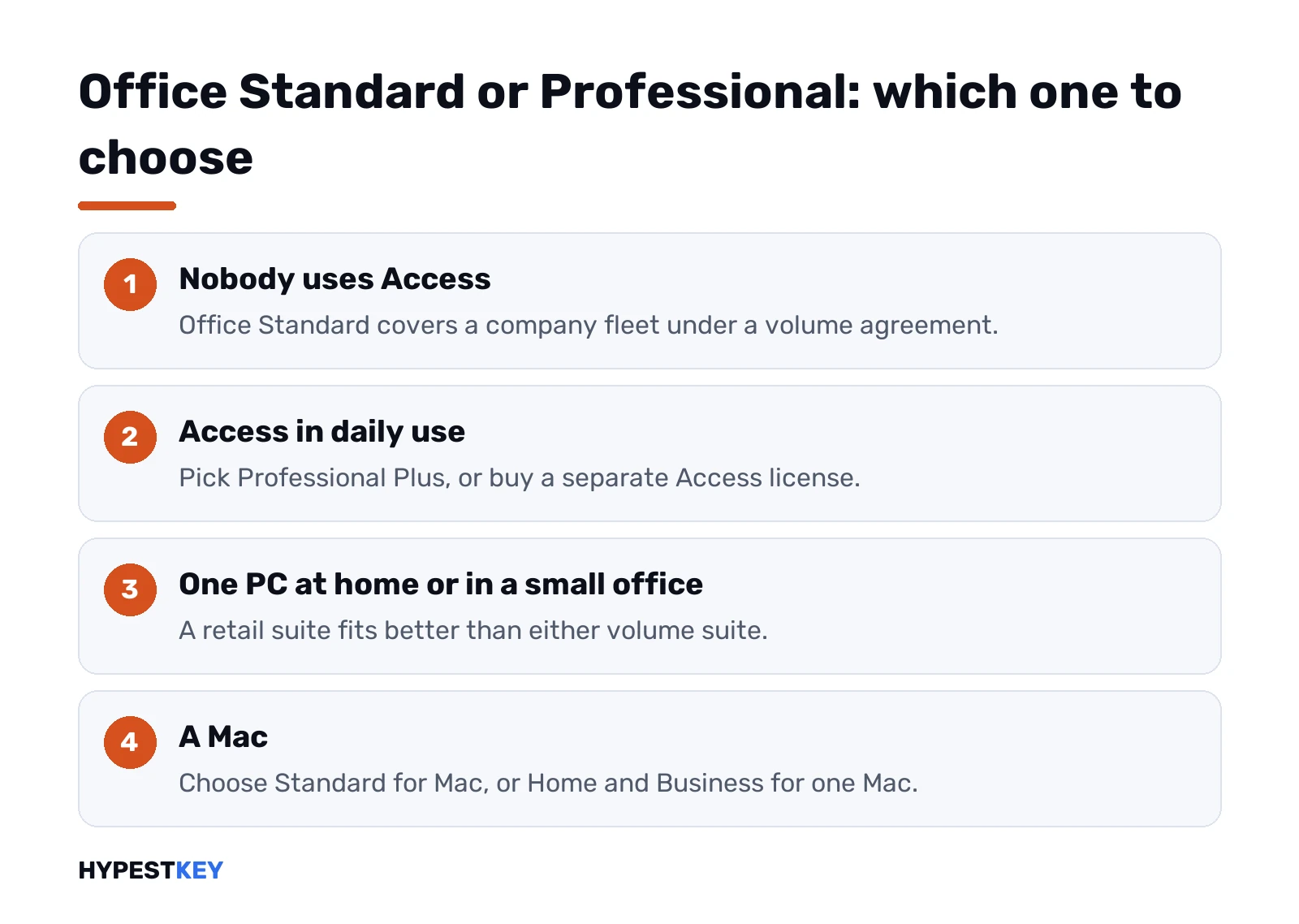
- No Access, company fleet, volume agreement. Standard covers it.
- Access in daily use. Professional Plus, or a separate Access license.
- Older Publisher files on a company PC. A 2021 or earlier Professional Plus suite still has Publisher.
- One PC at home or in a small office. Neither volume suite. A retail suite fits better.
- Mac. Standard for Mac, or Home and Business.
One buyer, one PC? Then it’s usually Professional Plus against Home and Business. Our page on Office 2024 Professional Plus vs Home and Business handles that pair. Subscription instead? See Microsoft 365 vs Office 2024.
Standard and Professional in Project and Visio
Same naming, different apps.
Project comes in Standard and Professional. So does Visio. Both sit outside the Office suites, so we’d budget for them on top. Our Project Professional 2024 key and Visio Professional 2024 key pages describe the Professional editions.
Common mistakes when comparing Office editions
- Treating Professional and Professional Plus as one product. One is retail, one is volume.
- Expecting Publisher in a 2024 suite. It isn’t there.
- Looking for Access on a Mac. Not available on macOS.
- Assuming Standard has older apps. Same version as Professional Plus.
- Typing a generic volume key at home. It installs, but there’s no KMS host to activate it.
- Downgrading across editions. Standard 2024 rights point to Standard 2019, not Professional Plus.
Already installed and not sure which one you have? File, Account in any Office app shows the product name under Product Information.
Need the bigger suite on one PC? Our Office LTSC Professional Plus 2024 key includes Access and comes instant to email.
Words used on this page
| Term | What it stands for here |
|---|---|
| Office Standard | The base volume suite, now Office LTSC Standard |
| Office Professional Plus | The larger volume suite with Access, now Office LTSC Professional Plus |
| Office Professional | A retail one-time purchase suite for one PC |
| LTSC | Long Term Servicing Channel: volume Office without feature updates |
| Volume licensing | Commercial licensing for organizations, per device |
| KMS, MAK | The two main ways volume Office activates |
Microsoft’s own description of the current volume suites is in the LTSC 2024 overview. The retail side is in its FAQ for the 2021 release.
Related guides
FAQ
What's the main difference between Office Standard and Professional Plus?
Access. Professional Plus includes the Access database app and Standard doesn't, while the shared apps are the same version.
Is Office Professional the same as Professional Plus?
No. The plain Professional suite is retail, for one PC. Professional Plus goes through volume licensing to organizations.
Does Office Standard 2024 include Publisher?
Nope. Publisher isn't part of any 2024 suite, Standard or Professional Plus, so older suites are the only place it still comes bundled.
Can I buy Office Standard for one home PC?
Not really. It's sold through commercial volume licensing, so a single home PC is better served by a retail suite like Home and Business.
Do Standard and Professional Plus activate the same way?
Yes. Both are volume products and activate with KMS, MAK or Active Directory, never with a personal Microsoft account.
Is there a Professional Plus for Mac?
Microsoft offers Standard for Mac to volume customers. Access and Publisher aren't available on macOS, so the Professional Plus extras don't exist there.
How do I see which edition is installed?
Open any Office app and go to File, then Account. The product name under Product Information shows Standard or Professional Plus.
what product ID do I put in the config for Standard 2021?
Standard2021Volume. Professional Plus 2021 is ProPlus2021Volume, and the 2019 pair swaps 2021 for 2019 in the name.