
 Microsoft Windows
 Microsoft Office
 Office for Mac
 Windows Server
Trying to pick between the current microsoft office versions in 2026? Here’s where I’d start. Office 2024 is the newest one-time buy, Microsoft 365 handles the subscription side, and yeah, the old 2016 and 2019 releases are basically legacy at this point, their support wrapped up October 14, 2025. Office 2021 still ticks along but only until October 2026, which honestly isn’t long enough to justify paying retail for it.
So there’s your 90-percent answer covering most buyers of microsoft office versions. The trade-offs do get messier when you zoom in though, and they lean hard on what you’re actually doing in Word, Excel, Outlook every day. I’ve been moving between these microsoft office versions across different machines for years at this point, three laptops, one mini-PC, plus whatever Mac I’m borrowing from my wife, and this is basically the write-up I wish someone had just handed me when I was stuck between paying $150 once versus coughing up $70 every single year, forever.
TL;DR: Fast Answer for Buyers
Fast decision tree covering all microsoft office versions currently on sale:
- Need one version, pay-once setup? Grab Office 2024. Retail $149-$250, or $65.99 at HypestKey. Runs you until October 2029.
- Want the AI stuff plus cloud and multi-device? Microsoft 365 Personal at $69.99/year. Always current, nothing to maintain.
- Still running 2016 or 2019? Time to plan an upgrade, support wrapped up October 2025.
- Got Office 2021 already? You’re good until October 2026. After that, upgrade.
- Found 2021 cheap? Solid as a short-term bridge buy, but you’ll be upgrading inside of a year anyway.
Quick Reference: Every Active Version at a Glance
Okay, fast version below. Every release that’s still worth talking about in 2026, and the date Microsoft shuts off security patches for it. Worth skimming even if you know what you want already, because the support end dates are easy to miss.
| Version | Released | License | End of Support | Status in 2026 |
|---|---|---|---|---|
| Office 2016 | September 2015 | One-time | October 14, 2025 | EOL, no updates |
| Office 2019 | September 2018 | One-time | October 14, 2025 | EOL, no updates |
| Office 2021 | October 2021 | One-time | October 13, 2026 | Active (briefly) |
| Office 2024 | October 1, 2024 | One-time | October 9, 2029 | Current |
| Microsoft 365 | Rolling | Subscription | No end date | Always current |
| Office LTSC 2024 | October 1, 2024 | Volume licensing | October 9, 2029 | Enterprise only |
Here’s something most write-ups skip over. Microsoft quietly sliced the support window down. Releases through 2016 got the full 10 years of updates (which, honestly, felt generous). Office 2019 got 7. Now 2021 and 2024? Both stuck at 5. Doesn’t sound dramatic until you realize that when you own a perpetual license, that support cutoff is basically your software’s expiration date, and 5 years goes by a lot faster than 10 when you’re juggling everything else.
Office 2024: The Current Release
Looking at what’s actually on sale right now, this is the one I’d reach for as a perpetual license. Shipped on October 1, 2024, so it’s been out a bit over a year as I’m writing this. Mostly built for Windows 11, but it’ll still happily install on Windows 10 if that’s what you’ve got (with some caveats). Macs on recent OS versions? No issues there either.
The thing nobody really talks about with the jump from 2021 to 2024, it isn’t a feature at all, it’s just speed. Excel handles chunky workbooks way better now. I’ve got this 50MB financial model, 20 tabs, stuffed with cross-references… on 2021 it’d lock up for 4 or 5 seconds every time I hit F9. Annoying doesn’t even cover it. Same file on 2024, basically instant. PowerPoint boots up quicker too. And Outlook search? It actually gives you results now instead of just sitting there spinning for what felt like a full minute. If you’re coming from 2019 or 2016, you’ll feel the difference within the first hour of using it. Trust me on that one.
Beyond speed, the features that matter most in this latest of the microsoft office versions:
- Excel got improved dynamic arrays, better calculation stability with multiple workbooks open, and new IMAGE and TRANSLATE functions
- PowerPoint includes Cameo (live webcam feed inside a slide) and an upgraded recording studio
- Word has a refreshed Editor with clarity and inclusive-language suggestions
- Outlook gets better search, improved Focused Inbox, and tighter OneDrive sync
- ODF 1.4 support across the suite, which matters if you exchange files with LibreOffice or Google Docs users
- Accessibility ribbon consolidated into one place in every app
Copilot AI in Office 2024 is limited. You get some basic smart suggestions in Word and Excel, but the real Copilot, the one with chat, agents, and document-aware answers, requires a Microsoft 365 subscription plus a Copilot add-on. So if AI tooling is a priority, Office 2024 alone will not cut it.
Pricing-wise, going direct from Microsoft you’re looking at $149.99 for Office Home 2024 or $249.99 for Home and Business. At HypestKey, we list Home and Business for $160.99, and our Office 2024 LTSC Professional Plus starts at just $65.99, which is a pretty significant gap. Main difference between the two consumer editions? Home and Business throws in Outlook plus commercial-use rights, and that commercial license actually matters if you’re invoicing clients using Word or Excel files you’ve made. Pro Plus is traditionally a volume-license product, so it doesn’t really show up in retail channels much.
Support officially goes until October 9, 2029. So call it about four years and change from today. There’s no upgrade discount waiting for you either, whenever Office 2027 (or whatever it’ll be called) rolls around, you pay sticker price again. That’s just how the perpetual model works.
For a side-by-side with the previous release, the Office 2021 vs 2024 deep dive covers what actually changed app by app.
Microsoft 365: The Subscription Path
Okay so the perpetual microsoft office versions give you a frozen-in-time snapshot of features. Microsoft 365, which, fun fact, Microsoft rebranded from Office 365 back in April 2020, works the opposite way. You pay yearly or go month-to-month, and whatever build is newest, that’s what you’re running. Major new version drops? It just lands on your machine. No extra fee, no reinstall nonsense.
Current pricing in 2026 across all the main Microsoft 365 plans:
| Plan | Price | Users | Devices | OneDrive | Copilot |
|---|---|---|---|---|---|
| Microsoft 365 Personal | $69.99/yr or $6.99/mo | 1 | 5 at a time | 1TB | Add-on ($20/mo) |
| Microsoft 365 Family | $99.99/yr | Up to 6 | 5 per user | 1TB each | Add-on ($20/mo) |
| M365 Apps for Business | $8.25/user/mo | Up to 300 | 5 per user | 1TB per user | Add-on ($30/mo) |
| M365 Business Standard | $12.50/user/mo | Up to 300 | 5 per user | 1TB per user | Add-on ($30/mo) |
| M365 Business Premium | $22/user/mo | Up to 300 | 5 per user | 1TB per user | Add-on ($30/mo) |
Here’s what the subscription actually throws in that Office 2024 straight-up doesn’t have:
- Full Copilot integration across Word, Excel, PowerPoint, and Outlook (with Copilot Pro add-on)
- 1TB of OneDrive cloud storage per user
- Install on 5 devices at once instead of 1
- Continuous feature rollouts (new Excel functions, new PowerPoint designers, new Outlook features)
- Microsoft Defender, Clipchamp video editor, Microsoft Editor grammar tool
- Microsoft Teams (in business plans)
Quick heads up on something that doesn’t get mentioned much when people compare Microsoft 365 to the one-time microsoft office versions. If a payment misses (credit card expired, whatever), after roughly 30 days the desktop apps flip into read-only mode. Files still open, you just can’t edit or save anything. So. If you’re ever thinking about letting your sub lapse, grab anything important out of there first. One more thing worth knowing: Microsoft’s been pushing prices up globally over the last couple years, and often they’re bundling Copilot into plans that were cheaper before the bundle existed. Not great.
Office 2021: Should You Still Buy It in 2026?
Right. About where 2021 sits in the microsoft office versions picture today. Straight answer? Probably not a great pick as a brand new buy. Support officially ends on October 13, 2026. So depending on when you’re reading this, you’ve maybe got six months worth of security patches left before it slides over to the same legacy bucket as Office 2019. Now, we do have Office 2021 Pro Plus listed at $65.99 over at HypestKey, and honestly that’s pretty fair pricing if you’re using it as a short-term bridge. Just don’t go into it thinking it’s a long-term solution, because it isn’t.
Already have Office 2021? Eh, no real urgency to jump ship yet, everything still runs fine. XLOOKUP works. Real-time co-authoring is decent enough. Full Outlook experience. None of that stopped working just because the calendar flipped over. But paying retail price for one of the microsoft office versions whose support expires this year makes almost no sense when Office 2024 exists at similar price points.
The one exception: if you find a legitimate key at a steep discount, maybe 60-70% off the current 2024 price, then Office 2021 can work as a bridge purchase. You will still need to upgrade within the year, but the total cost can come out lower than going straight to 2024 at full retail. For context on what changed between these older releases, see the Office 2019 vs 2021 comparison.
Office 2016 and 2019: What Actually Happens Now
Both of these microsoft office versions hit end-of-life on October 14, 2025. But here’s the thing, the apps still open. Word still loads your files. Excel still runs calculations. Nothing exploded the day after EOL, contrary to what some articles suggest. The actual problem? Microsoft shut off the tap on security patches, and that’s what you should care about.
Where this bites in practice:
- Outlook: email is the single most common malware delivery vector, and running an unpatched Outlook in 2026 is not a theoretical risk
- Word and Excel: any time you open a file from a third party (attachment, download, shared drive), embedded content can exploit unpatched vulnerabilities
- Cloud services: Microsoft cut off these older microsoft office versions from OneDrive and SharePoint sync back in October 2023. If you counted on that, it’s already gone
- Macros and VBA: older Office builds miss the newer macro-blocking defaults, which exposes you to a whole class of attacks mitigated in 2021 and later
My practical take? On anything that handles email attachments or files coming in from outside, running these older builds in 2026 isn’t ideal security-wise. Not a disaster, but not great. On the flip side, if you’ve got an isolated workstation that only ever touches local documents, say, a writing rig that’s basically offline, they’ll keep doing their job just fine.
What Changed Between Each Version
If you are trying to decide whether an upgrade between microsoft office versions is actually worth it, this is the matrix that answers the question. Here is what shipped new in each major release of Microsoft Office, app by app.
| Feature | Office 2016 | Office 2019 | Office 2021 | Office 2024 |
|---|---|---|---|---|
| Dynamic arrays (Excel) | No | No | Yes | Yes, improved |
| XLOOKUP function | No | No | Yes | Yes |
| LET function | No | No | Yes | Yes |
| IMAGE function | No | No | No | Yes |
| Real-time co-authoring | Basic | Basic | Improved | Yes |
| PowerPoint Cameo (webcam in slide) | No | No | No | Yes |
| PowerPoint Recording Studio | No | Basic | Yes | Improved |
| Focused Inbox (Outlook) | Yes | Yes | Yes, improved | Yes, faster |
| Modern comments with @mentions | No | Basic | Yes | Yes, threaded |
| Dark mode | Partial | Yes | Yes | Yes, refined |
| Accessibility ribbon | No | No | Partial | Yes |
| ODF 1.4 format support | No | No | No | Yes |
| Windows 11 support | Limited | Limited | Yes | Native |
| Basic Copilot features | No | No | No | Partial |
| Current build number | 16.0.5495+ | 16.0.10412+ | 16.0.14334+ | 16.0.17830+ |
My honest read on hopping between microsoft office versions? If you’re on 2016 or 2019, the jump up to 2021 or 2024 is genuinely worth your money. XLOOKUP by itself saves hours every week once you stop wrestling with VLOOKUP nested in IFERROR wrappers. Co-authoring actually works now, instead of being the half-baked thing it used to be. The gap between the two newest microsoft office versions? Smaller. Mostly just faster performance plus a handful of PowerPoint additions and the Copilot hooks.
System Requirements for Each Version
Before dropping cash, double-check your machine actually handles the version you’re after. Recent microsoft office versions aren’t demanding hardware-wise, they really aren’t, but the OS requirements can trip people up. Here’s Microsoft’s official spec sheet:
| Requirement | Office 2021 | Office 2024 | Microsoft 365 |
|---|---|---|---|
| OS (Windows) | Win 10 or Win 11 | Win 11 (Win 10 ended) | Win 10 22H2+ or Win 11 |
| OS (Mac) | 3 latest macOS | 3 latest macOS | 3 latest macOS |
| Processor | 1.6 GHz dual-core | 1.6 GHz dual-core | 1.6 GHz dual-core |
| RAM | 4 GB (64-bit) | 4 GB (64-bit) | 4 GB (64-bit) |
| Disk space | 4 GB | 4 GB | 4 GB |
| Display | 1280 × 768 | 1280 × 768 | 1280 × 768 |
| Graphics | DirectX 10 | DirectX 10 | DirectX 10 |
| Internet (for install) | Required | Required | Required |
| Internet (for use) | Not required | Required periodically | Required monthly minimum |
Realistically though, pretty much any machine built in the last 5-6 years is going to run these microsoft office versions without breaking a sweat. The real gotcha isn’t hardware, it’s the operating system side of things. Office 2024 officially wants Windows 11, it’ll sometimes install on Win 10, sure, but Microsoft isn’t backing that scenario. And if you happen to still be on Windows 10 (reminder, support ended October 14, 2025), you probably want to think about doing both upgrades together. Saves headaches down the road.

Editions Explained: Home and Student vs Pro Plus
Here’s where buyers of microsoft office versions tend to get genuinely confused. The year part of the name (2024, 2021, whatever) isn’t the same thing as the edition part (Home and Student, Professional, and so on). Year = which release you’re buying. Edition = which apps come bundled with it. They’re two separate dimensions.
Editions span every release. Across these main microsoft office versions on Windows, the edition tiers break down like this, and the same tiers apply to earlier microsoft office versions too:
| App | Home & Student | Home & Business | Professional | Pro Plus |
|---|---|---|---|---|
| Word | Yes | Yes | Yes | Yes |
| Excel | Yes | Yes | Yes | Yes |
| PowerPoint | Yes | Yes | Yes | Yes |
| OneNote | Yes | Yes | Yes | Yes |
| Outlook | No | Yes | Yes | Yes |
| Publisher | No | No | Yes | Yes |
| Access | No | No | Yes | Yes |
| Teams | No | No | No | Yes |
A couple of things worth knowing about edition tiers across microsoft office versions. The Mac lineup gets Home and Student plus Home and Business only. Access and Publisher are Windows-exclusive and always have been. Publisher is being retired. Support in Microsoft 365 ends October 2026, and Microsoft is not replacing it. If your workflow depends on Publisher, that is worth planning around now. Professional Plus is not sold at retail, only through volume licensing. Consumer-facing “Pro Plus” keys on third-party marketplaces are mostly gray-market or worse.
For the Home vs Home and Business decision in the latest release, the Office 2024 Home vs Home and Business comparison walks through what the extra $100 actually gets you.
Office LTSC 2024: The Enterprise Edition
This is the enterprise tier in the microsoft office versions lineup. LTSC stands for Long-Term Servicing Channel. Office LTSC 2024 is the volume-licensed counterpart to the retail Office 2024, aimed at organizations that need stable, locked-down deployments without cloud hooks.
Same apps, same support window (October 2029), but different plumbing. LTSC uses KMS or MAK activation instead of Microsoft accounts. It has fewer automatic OneDrive integration prompts. It is designed for air-gapped systems, regulated environments, and shared-device scenarios like terminal servers.
If you are an IT admin managing hundreds of seats, this is probably what you want. If you are a home user or freelancer, this is not what you want, and in most cases you cannot buy it anyway without a volume licensing agreement.
Microsoft Office for Mac: What’s Different
Good news, Mac users, the lineup of microsoft office versions on macOS is pretty close to what Windows gets. Office 2024 for Mac is there, Microsoft 365 for Mac is there, and since the file formats don’t change between platforms, you can lob .docx, .xlsx, and .pptx files back and forth without any conversion weirdness.
What is missing on Mac:
- No Access: the database app has never existed on Mac
- No Publisher: also Windows-only, and being discontinued anyway
- Fewer enterprise controls: Group Policy and some admin templates are Windows-only
- Slightly slower update cadence: Mac builds sometimes lag Windows by a few weeks on new features
Everything else in the Mac microsoft office versions works fine and looks native on macOS: Word, Excel, PowerPoint, Outlook, OneNote. Performance on Apple Silicon machines is excellent, genuinely faster than the Intel-Mac era.
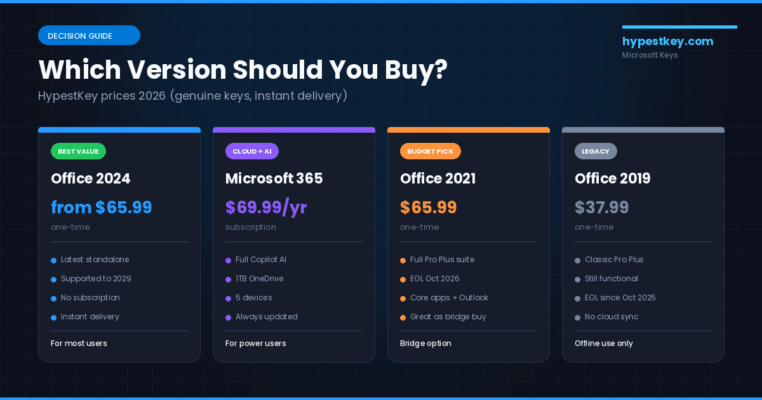
Which Version Should You Actually Buy in 2026?
Okay. With all these microsoft office versions floating around, here’s how the decision typically shakes out for regular buyers. I’ll skip the whole “well, it depends on your needs” cop-out you get in most buying guides, it’s lazy and it doesn’t actually help anyone.
Buy Office 2024 if:
- You use one primary machine (home PC or work laptop)
- You want to pay once and forget about it for 5+ years
- You do not need 1TB of cloud storage
- You are fine without Copilot AI
- $149 to $250 upfront is more comfortable than $70/year forever
Get Microsoft 365 if:
- You work across multiple devices (laptop, desktop, phone, tablet)
- You share access with family members (Family plan covers 6 people)
- You genuinely use OneDrive as primary storage
- You want Copilot AI or the newest features as they ship
- Predictable monthly costs fit your budget better than a lump sum
Consider Office 2021 only if: you find a legitimate key at 60%+ off the 2024 retail price and you understand support ends October 2026. This is a short-term bridge play, not a long-term buy.
Running Office 2016 or 2019? Look, these are legacy at this point. Security patches ended October 2025, and cloud connectivity to Microsoft 365 services was already yanked back in 2023. They still run fine day-to-day, no question. But at some point an upgrade does make sense, particularly on machines that deal with email or random external files.
For the full feature breakdown of what you get day to day with the latest release, the Office 2024 review is more detailed than this buying guide.
This video walks through the Office 2024 release and what actually changed from previous versions. Good visual reference if you want to see the interface before committing to a purchase.
The Real Cost Math: Office 2024 vs Microsoft 365
Alright, this is the math that genuinely matters when you’re weighing up microsoft office versions. I want to run through the numbers properly, because marketing materials from both camps, Microsoft itself and the subscription pushers, tend to muddy the real picture with these microsoft office versions.

Going retail, Office Home 2024 runs $149.99 once. Microsoft 365 Personal is $69.99 a year, or $83.88 a year if you do the month-to-month thing at $6.99 (do people actually do that?). Over at HypestKey, our Office 2024 LTSC Pro Plus is listed at $65.99. That completely changes the math, by the way. But for a fair apples-to-apples comparison, let’s stick with the Microsoft retail number:
- Year 1: Office 2024 = $149.99 total. Microsoft 365 = $69.99 total. M365 wins
- Year 2: Office 2024 still $149.99. M365 = $139.98 total. M365 still cheaper by $10
- Year 2.1: M365 crosses $149.99 and never catches up again
- Year 5: Office 2024 still $149.99 total. M365 = $349.95. Office 2024 saves $200 on retail, more than $280 at our discounted price
- Year 8: Office 2024 still $149.99 (but out of support after year 5). M365 = $559.92
Hang on to any of these microsoft office versions past the 26-month mark? The one-time buy pulls ahead on pure price. And realistically, most people don’t swap out versions every year, typical usage is 4 to 6 years per install, sometimes longer. The savings pile up over that stretch.
Thing is, that math doesn’t count what the subscription actually bundles in. Standalone OneDrive, 1TB of it, runs around $120 a year on its own. If you need that storage regardless, then you’re basically getting Office for nothing on top. Toss in Copilot at $20/month (that’s another $240/year) and the subscription actually works out cheaper than buying each piece separately. The only way the one-time buy really wins is if you genuinely don’t use those extras or wouldn’t pay for them separately anyway.
For the full lineup of license options across all microsoft office versions, see all Microsoft Office products at HypestKey, which lists current pricing across Office 2024, 2021, and other SKUs.
If you’re still sitting on the fence after all that, Microsoft’s own comparison of the different microsoft office versions is worth a quick read. Their official comparison page covers edge cases like offline behavior and device activation limits.
How to Check Which Version You Already Have
This one comes up all the time. You’re ready to upgrade, but can you actually remember which version is on your machine? Probably not. Anyway, 30-second check:
- Open any Office app (Word, Excel, PowerPoint, whatever)
- Click File in the top-left
- Select Account from the left sidebar
- Look under Product Information
You will see the product name (like “Microsoft 365 Apps for business” or “Office Home and Student 2024”) and a version number. This is the easiest way to distinguish between microsoft office versions on the same machine. On Mac, go to the app menu and pick “About [App]” instead.
One thing that trips people up: all recent microsoft office versions share the internal version number 16.x. Office 2016, 2019, 2021, and 2024 are all version 16-point-something. The distinguishing factor is the build number and the product name in the Account panel. If you see “Office 2024” explicitly, you are on the latest. If you see just “Microsoft 365” with no year, you are on the subscription.
Frequently Asked Questions
The questions I see pop up over and over from people trying to choose between microsoft office versions:
What are the current Microsoft Office versions available in 2026?
The main versions available in 2026 are Office 2024, Office 2021, and Microsoft 365. Office 2016 and 2019 reached end of support in October 2025 and no longer receive security updates.
What is the difference between Microsoft Office 2024 and Microsoft 365?
Microsoft Office 2024 is a one-time purchase that installs on one device with no monthly fees. Microsoft 365 is a subscription costing around $70 to $100 per year that includes continuous updates, 1TB of OneDrive storage, and Copilot AI features.
Is Microsoft Office 2021 still supported in 2026?
Yes, but only until October 13, 2026. After that date, Office 2021 will no longer receive security patches. If you are using Office 2021, plan to upgrade before that deadline.
Which Microsoft Office edition includes Access and Publisher?
Access and Publisher are only included in Professional and Professional Plus editions on Windows. They are not available in Home and Student or Home and Business editions, and they are not available on Mac at all.
Can I still use Office 2016 or 2019 after end of support?
The apps will still open and run, but Microsoft stopped issuing security updates for Office 2016 and 2019 on October 14, 2025. Running them creates security risk, especially for Outlook and any Office app that handles external files or emails.
How do I check which Microsoft Office version I have installed?
Open any Office app like Word or Excel, then go to File and select Account. Under Product Information you will see the product name, version number, and whether it is a one-time purchase or subscription.
Does Microsoft Office 2024 include Copilot AI features?
Office 2024 includes some basic Copilot-style improvements in Word and Excel, but full Microsoft 365 Copilot with AI agents requires an active Microsoft 365 subscription. The standalone Office 2024 does not include the full Copilot feature set.
Last updated: April 2026.
