Short answer: Office 2013 vs 2016 is mostly an Excel story. The newer suite keeps the old layout but builds Get and Transform into the spreadsheet app, adds new chart types and brings the Tell Me box. It moves to version 16.0, shared with every newer Office. Office 2013 stays at 15.0 and is the last suite with InfoPath. We'd pick 2016 for most people.
Office 2013 vs 2016 is a close pair: Office 2016 keeps the 2013 layout and adds Power Query built into Excel, new chart types, the Tell Me box and better shared editing. The bigger split is technical. Office 2013 is version 15.0, while 2016 is 16.0, the same number newer Office uses.
| Office 2013 | Office 2016 | |
|---|---|---|
| Version number | 15.0 | 16.0, shared with 2019, 2021, 2024 and Microsoft 365 |
| Power Query in Excel | Free add-in, on its own ribbon tab | Built in as Get & Transform on the Data tab |
| Waterfall, treemap, sunburst, histogram, Pareto, box and whisker charts | Not available | Built into Excel 2016 |
| Tell Me box with Smart Lookup | No | Yes |
| Editing a shared Word file at the same time | Needs SharePoint Foundation 2013 or OneDrive with a Microsoft account | Supported; real-time typing view is for Microsoft 365 subscribers |
| Professional Plus extras | InfoPath, Lync | Skype for Business |
| Windows | Windows 7 and later | Windows 7 SP1 and later |
| Mac edition | None; a Windows suite | Office 2016 for Mac |
| Install types | Click-to-Run and MSI | Click-to-Run and MSI |
Office 2013 vs 2016 at a glance
Open both side by side and you’d struggle to spot the difference at first. Same ribbon idea. Same core apps.
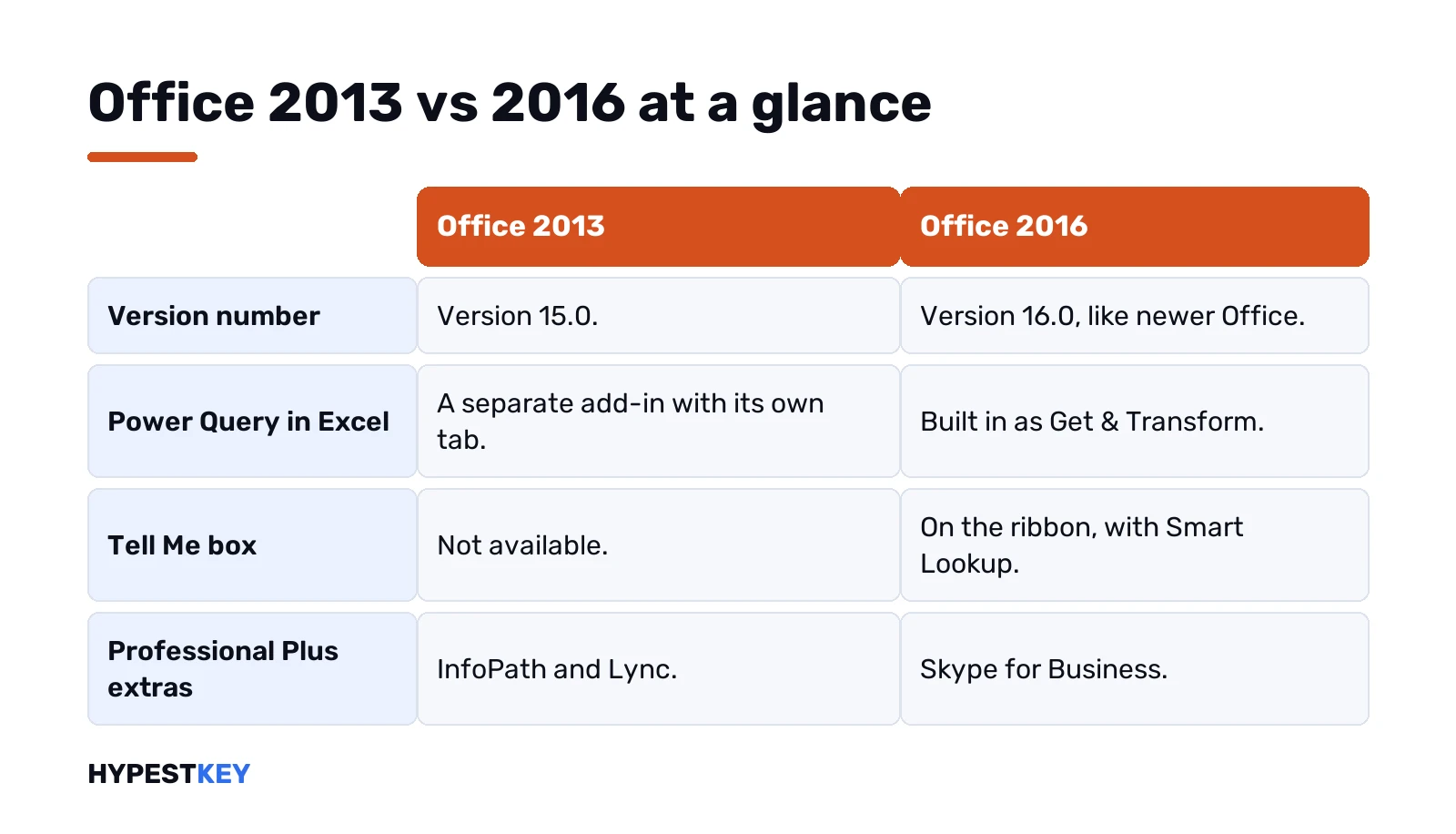
The gaps show up in Excel, in the Tell Me box and under the hood. We’d put it this way: 2016 is the 2013 suite with a newer engine number and a stronger Excel. If your work lives in spreadsheets, that matters. If you write letters, it barely does.
Version numbers: 15.0 and 16.0
Small detail, big consequences.
Office 2013 carries version 15.0. Office 2016 moved to 16.0, and Microsoft kept that number for every perpetual release since, plus Microsoft 365. You can see it under File, Account, About in Word.
- Group Policy. Settings saved under the 16.0 registry path keep working on newer releases.
- Add-ins. Microsoft says add-ins that work with 2016 are likely to work with 2019 too, with minimal testing.
- Side by side. The version number decides which installs can share a PC. More on that below.
For an IT team, that 16.0 line is often the real reason to prefer 2016 over 2013.
What Office 2016 added in Excel
This is where the upgrade earns its name.
- Get & Transform. Power Query technology, built in, on the Data tab. Excel 2013 needed a separate add-in with its own tab.
- Waterfall charts. Running totals, good for cash flow.
- Treemap and sunburst. Hierarchies at a glance.
- Histogram and Pareto. Distributions, without building bins by hand.
- Box and whisker. Spread and outliers.
Microsoft has deprecated the Power Query add-in for Excel 2013, though it still lets people use it as a courtesy. On 2016 nothing extra is needed. Funnel charts? Microsoft’s Ignite session counts them among the 2016 additions too.
Spreadsheet-heavy users will feel these more than anything else on this page. Our guide to calculating variance in Excel works on both versions.
Tell Me, Smart Lookup and the ribbon
A text box on the ribbon. You type what you want to do, and Office jumps to the command.
That’s Tell Me, new in the 2016 apps and absent from 2013. Microsoft may label it Search on newer builds; it works the same. Smart Lookup sits in the same place and looks up a selected word or phrase. Handy when you can’t remember which tab hides a command, and we’d call it the most visible 2016 change for casual users.
Working together on documents
Both versions let several people edit a Word file. The setup differs.
Word 2013 co-authoring needs SharePoint Foundation 2013, or OneDrive with a Microsoft account. Word 2016 supports editing at the same time as others too. The live view? Subscribers only. On a one-time 2016 license you’d save now and then to see the others’ changes.
Teams that work in shared files all day might look past both, toward Microsoft 365 or Office 2024.
Apps in the Professional Plus boxes: Office 2013 vs 2016
Close, with two swaps. From our product pages:
| App | Professional Plus 2013 | Professional Plus 2016 |
|---|---|---|
| Word, Excel, PowerPoint | Yes | Yes |
| Outlook, OneNote | Yes | Yes |
| Access, Publisher | Yes | Yes |
| InfoPath | Yes | No new version |
| Lync | Yes | No |
| Skype for Business | No | Yes |
InfoPath stopped at 2013. Microsoft confirms that 2013 was the last version, so forms built in it are a reason some offices keep the older suite. The 2013 box also installed the Telemetry Dashboard for IT teams.
The details for each box are on the Office Professional Plus 2013 key and Office 2016 Professional Plus key pages. Home users? We’d point them to Office 2016 Home and Business instead.
Office 2013 vs 2016 system requirements
Modest on both. Any PC from the last decade clears them.
| Office 2013 | Office 2016 | |
|---|---|---|
| Windows | Windows 7, 8, 8.1, 10; Server 2008 R2, 2012, 2012 R2 | Windows 7 SP1, 8, 8.1, 10, 11 |
| 32-bit or 64-bit | Both; 32-bit recommended by Microsoft | Both |
| Mixing 32-bit and 64-bit Office | Not supported | Not supported |
| Mac | No | Yes, Office 2016 for Mac |
The 2013 hardware baseline, from Microsoft’s own requirements page:
- Processor. 1 GHz or faster, x86 or x64, with SSE2.
- Memory. 1 GB for 32-bit, 2 GB for 64-bit.
- Disk. 3 GB free.
- Display. 1024 x 576, plus a DirectX 10 card for graphics acceleration.
- .NET. 3.5, 4.0 or 4.5.
Microsoft’s current pages fold 2016 into one list with the newer releases, and Windows 7 SP1 is the floor there. Our 2016 Professional Plus page says the same, Windows 11 included.
Click-to-Run, MSI and running both on one PC
Both versions came in two install types. Click-to-Run arrived with Office 2013; MSI is the classic Windows Installer.
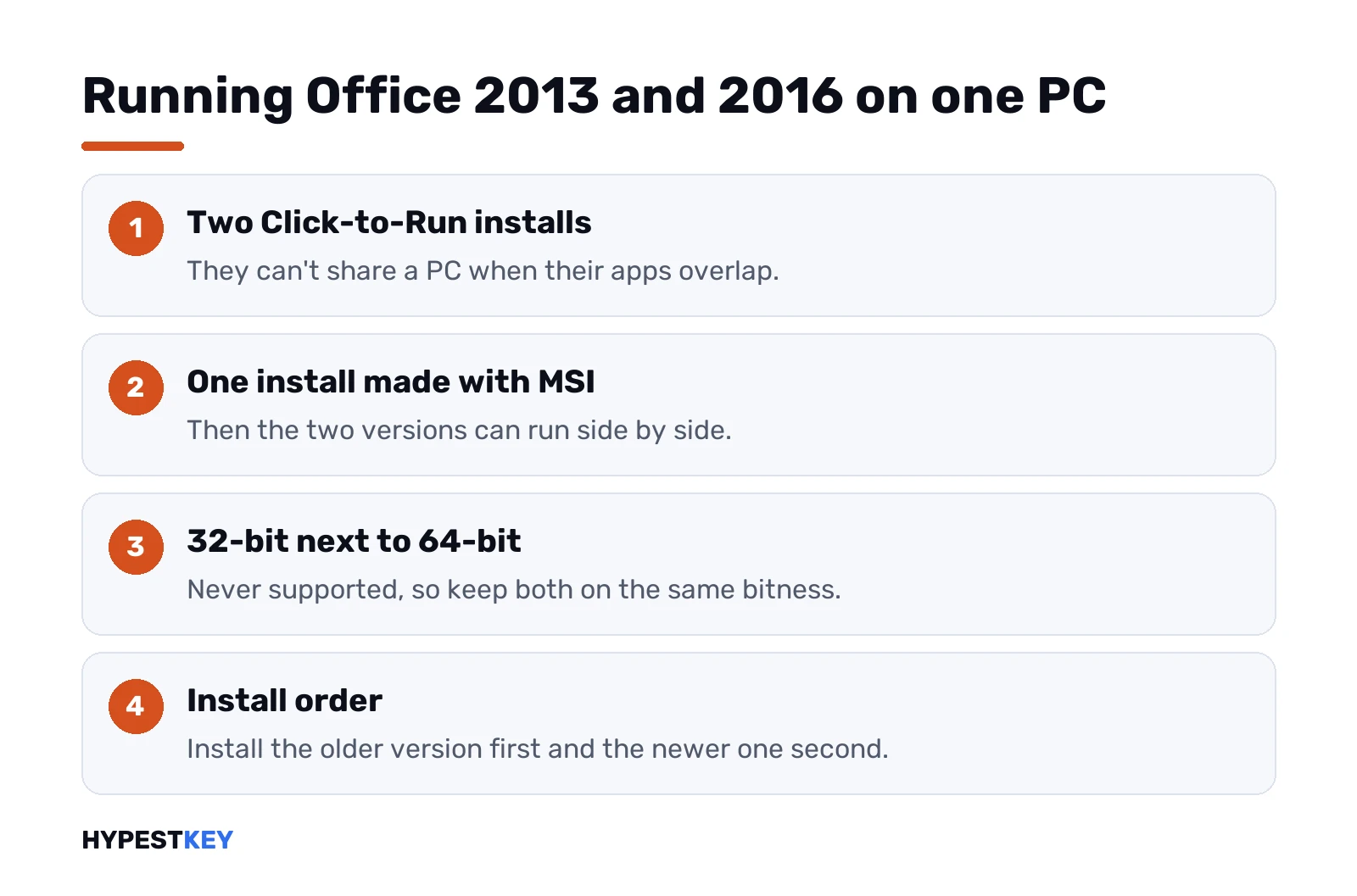
Microsoft’s rules for sharing one PC are short:
- Two Click-to-Run installs of different versions. Not if their apps overlap.
- One of them installed with MSI. Side by side can work.
- 32-bit next to 64-bit. Never.
- Install order. Older first, newer second.
Volume copies of Office 2016 use MSI. That’s the type that can share a PC with another version. To check yours, look under File, Account. See an Update Options button? Then it’s Click-to-Run. More background is in our page on Microsoft Office Click-to-Run.
Office 2016 on a Mac
Only one of the two exists there. The 2013 requirements list nothing but Windows.
The 2016 release has a Mac edition. Our Office Home and Business 2016 for Mac key covers one Mac and is redeemed at setup.office.com with a Microsoft account. The whole range is in the Office 2016 for Mac category.
Office 2013 or 2016: which one to pick
For most people, 2016. The reasons line up quickly:
- Heavy Excel work. 2016, for Get & Transform and the new charts.
- InfoPath forms in daily use. 2013, since InfoPath didn’t continue.
- A Mac. 2016, the only one of the two with a Mac edition.
- Lync-based setups. 2013 ships Lync; 2016 ships Skype for Business.
- Policies shared with newer Office. 2016, thanks to the 16.0 version line.
- Same letters, same slides, nothing fancy. Either. Pick by price.
Both are perpetual one-time licenses. No subscription, and they don’t expire. Neither fits? Our Microsoft Office versions guide compares the newer releases. Office 2021 vs 2024 picks up where this page ends.
Moving from either to a newer Office
Uninstall first. Microsoft recommends removing older Office before installing a newer volume release.
The Office Deployment Tool can remove MSI installs of Office 2016 and Office 2013 as part of a new install. Our Office Deployment Tool guide shows the setting. For a home PC, the Office uninstall tool clears leftovers. Moving a license to a new computer? See our guide to transferring Office.
Common mistakes when comparing Office 2013 and 2016
- Expecting a new look. The layout barely changed.
- Looking for Get & Transform in 2013. It’s the separate Power Query add-in there.
- Installing two Click-to-Run versions with the same apps. Not supported.
- Mixing 32-bit and 64-bit. Also not supported.
- Searching for InfoPath 2016. There isn’t one.
- Using one key for the other version. A 2013 key activates 2013; a 2016 key activates 2016.
Need a key for either? The Office 2013 product key and Office 2016 product key categories have both, sent instant to email.
Words used on this page
| Term | What it stands for here |
|---|---|
| Click-to-Run | Microsoft’s streaming install technology for Office |
| MSI | Windows Installer, the classic install type used by volume Office 2016 |
| Get & Transform | Power Query built into the Excel 2016 Data tab |
| Tell Me | The ribbon box that finds commands by name |
| Professional Plus | The largest Office suite of each year |
| Version 15.0, 16.0 | Internal numbers of Office 2013 and Office 2016 |
Microsoft’s own rules for mixing versions are on its supported install scenarios page, and the 2013 baseline is in the Office 2013 system requirements.
Related guides
FAQ
Is Office 2016 much different from 2013?
Not on the surface. The layout is almost the same, and the differences sit in Excel, the Tell Me box and the 16.0 version number.
Can I install both on one PC?
Sometimes. Two Click-to-Run installs with overlapping apps won't work together. One MSI install next to the other can, as long as both share the same bitness.
Does Excel 2013 have Power Query?
As a separate add-in, yes. Excel 2016 has the same technology built in as Get and Transform on the Data tab.
Which one still has InfoPath?
The 2013 suite. Microsoft made 2013 the last InfoPath version, so the 2016 suite has no new one.
Will a 2013 key activate the 2016 suite?
No. Each key belongs to its own version, so a 2013 key activates 2013 and a 2016 key activates 2016.
Is there a Mac version of either?
Only of 2016. Office 2013 was built for Windows, while the 2016 release has a Home and Business edition for Mac.
Which version runs on Windows 11?
The 2016 suite. Our Professional Plus 2016 page lists Windows 11 among the supported systems, so we'd pick that one.