Short answer: The 0x80070103 error shows up when Windows Update tries to install a driver that's already on the PC or less compatible than yours. Nothing is broken. We'd restart and run the troubleshooter. Still there? We'd get the driver from the hardware maker, reset the update cache, or skip that driver in optional updates.
The 0x80070103 error is a Windows Update driver failure: Windows tries to install a driver that is already on the PC, or one less compatible than the driver you already have, and setup refuses. Your PC keeps working. We’d restart, run the troubleshooter, then hide or replace that driver update.
| Cause | What you see | What to do |
|---|---|---|
| Same driver already installed | Install error 0x80070103 next to a driver name, every day | Leave it or hide it, the device already works |
| Offered driver less compatible than yours | Graphics, audio or network driver fails, older date | Get the driver from the hardware maker instead |
| Corrupt update cache | Driver and other updates keep retrying | Troubleshooter, then reset the update cache |
| Driver offered again and again | Error returns after every check for updates | Skip it in optional updates or exclude drivers by policy |
What the 0x80070103 error tells you
The code comes from Windows’ own list of system errors. Number 259 there, ERROR_NO_MORE_ITEMS, with the text “No more data is available.” Not very helpful on its own.
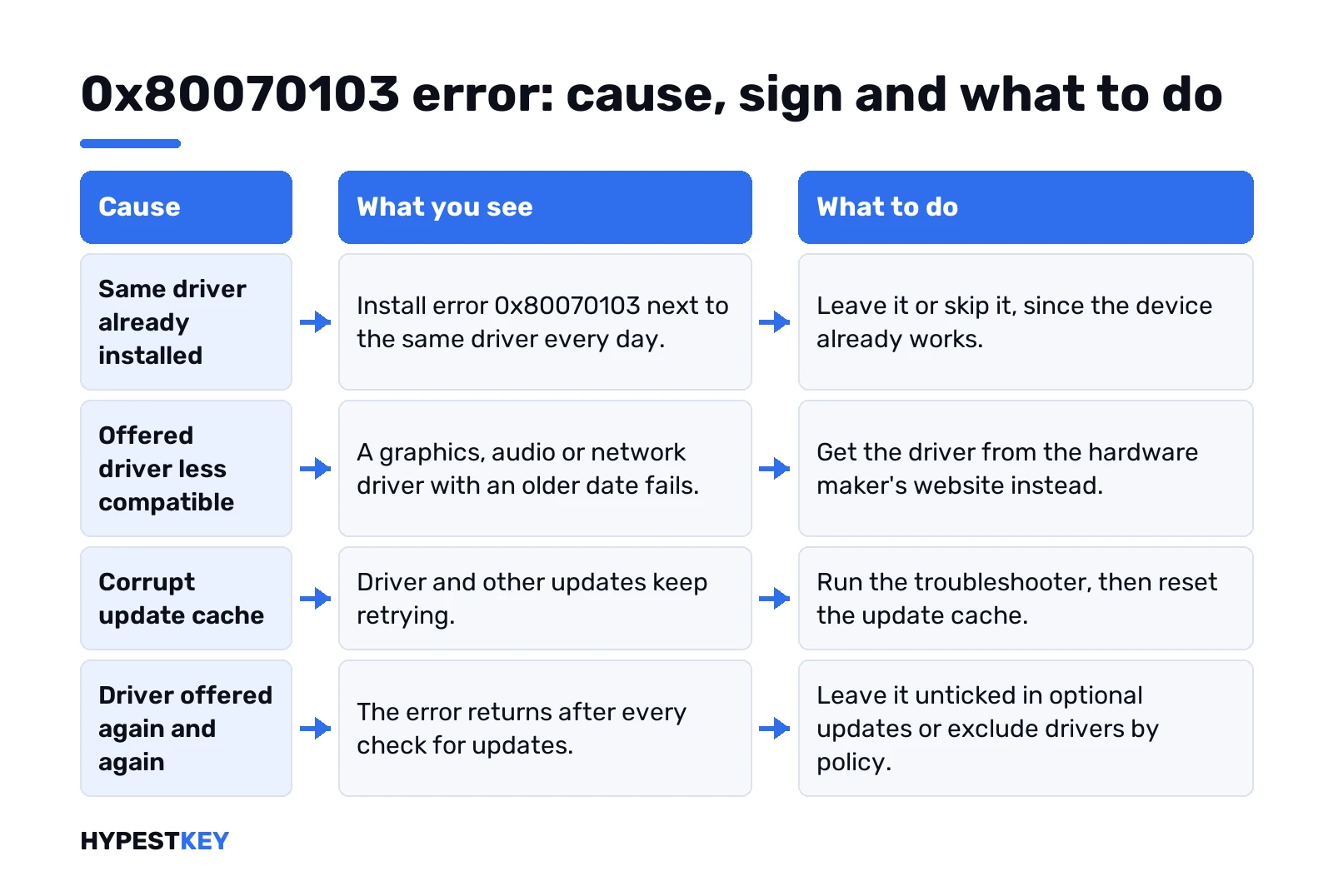
In Windows Update it nearly always sits next to a driver. Microsoft’s explanation: you’re trying to install a driver already installed on the computer, or one less compatible than the current driver. So Windows says no, and that’s the right call.
Nothing to do with activation either. Your license stays exactly as it was.
Signs: a driver that fails again and again
Settings, Windows Update. The list shows a driver with a long vendor name, then “Install error – 0x80070103”. Common ones:
- Graphics drivers from the chip makers.
- Audio, Realtek for example.
- Network and Bluetooth adapters.
- Chipset or system devices with names nobody recognises.
Other updates often install fine around it. Monthly patches go through, only the driver keeps failing. That pattern points straight at this code’s usual cause.
Open Update history to see the full name and the date. Write both down.
When you can ignore 0x80070103
Device works? Sound plays, Wi-Fi connects, the screen looks right. Then the driver you need is already there, and the failed one adds nothing.
Leaving it alone is fine. Annoying in the list, harmless to the system. The fixes below are for two cases: you want the list clean, or the device actually misbehaves.
Something really broken, like no sound at all? Then it’s a driver problem, and the code is only a side note. Go to Fix 2.
Compare the offered driver with the one you have
A quick check tells you which cause you’re dealing with.
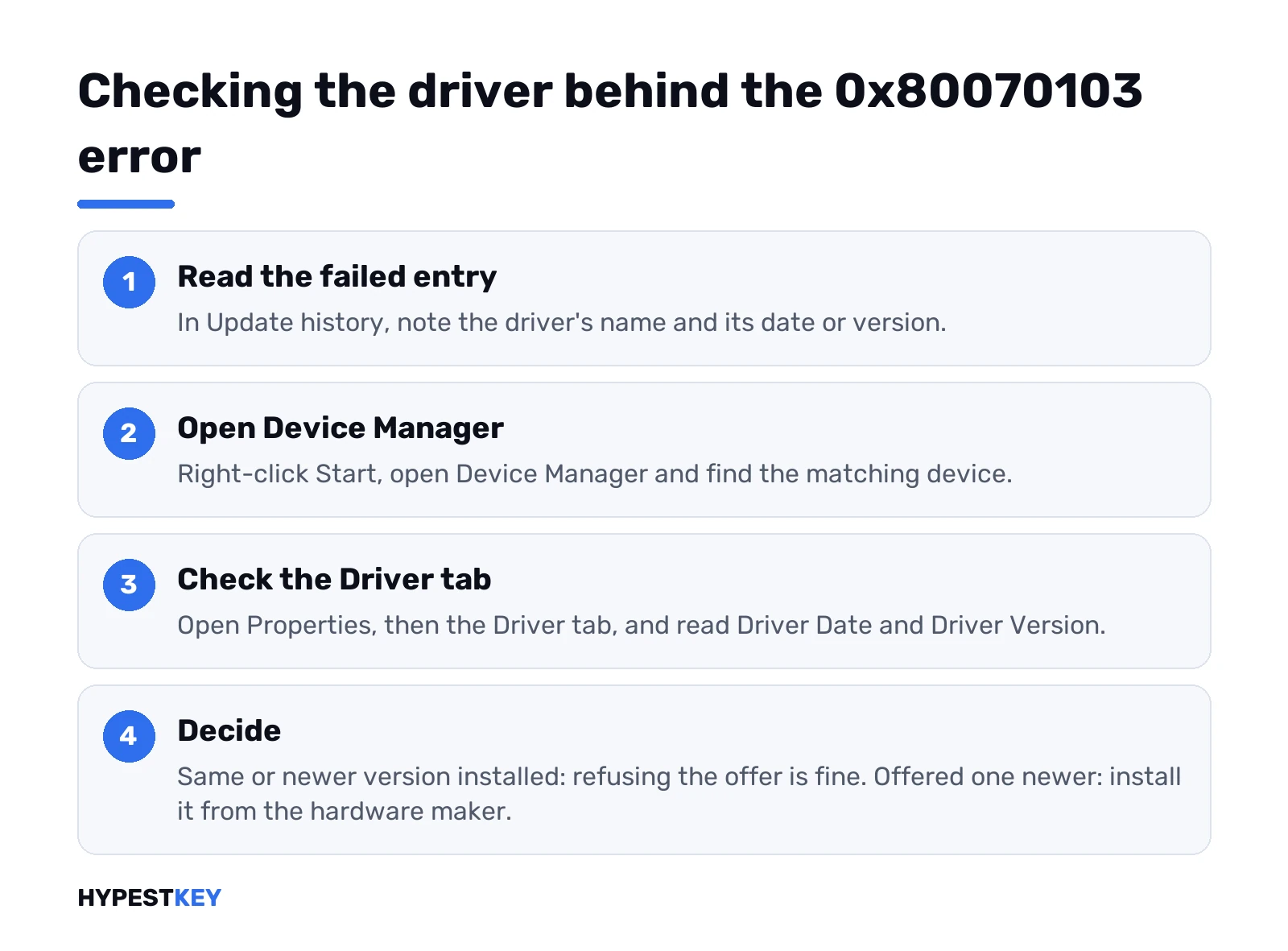
- Update history. Note the driver’s name and its date or version from the failed entry.
- Right-click Start, Device Manager.
- Find the matching device, right-click, Properties.
- Driver tab. Read Driver Date and Driver Version.
Same version on both? The driver is already in, and the failed offer is a duplicate. Your installed one is newer? Windows is offering a step back, and refusing it is fine.
Offered one is newer and still fails? Then we’d get that version from the hardware maker’s site and install it by hand. That’s Fix 2 below.
Fix 1: restart and run the Windows Update troubleshooter
Restart first. Free, and sometimes enough.
Then Settings, System, Troubleshoot, Other troubleshooters. Run next to Windows Update. Our Windows Update troubleshooter guide covers the Windows 10 path too and what the results mean.
Check for updates again after it finishes. Sometimes the offer simply goes away.
Fix 2: update or reinstall the driver yourself
Microsoft’s general advice for failed updates includes third-party drivers. Get them from the hardware maker’s website. For a laptop, that’s the laptop maker’s support page with your model.
Want Windows to look by itself? Device Manager does that:
- Right-click Start, Device Manager.
- Expand the category and right-click the device.
- Update driver, then Search automatically for drivers.
A clean reinstall is the stronger move. Save your work first.
- Device Manager, right-click the device, Uninstall device.
- Confirm with Uninstall.
- Restart. Windows reinstalls a driver for the device on its own.
Newer driver broke something? Device properties, Driver tab, Roll Back Driver. The button stays grey when no older version is kept.
Fix 3: reset the update cache
A Microsoft support specialist on Q&A suggests this for 0x80070103 when other updates misbehave too. It clears the downloaded update files and the catalog folder. Elevated Command Prompt, one line at a time:
net stop wuauserv
net stop cryptSvc
net stop bits
net stop msiserver
ren C:\Windows\SoftwareDistribution SoftwareDistribution.old
ren C:\Windows\System32\catroot2 catroot2.old
net start wuauserv
net start cryptSvc
net start bits
net start msiserver
Restart and check for updates. Downloads start from scratch, so give it time. Your personal files aren’t touched.
Low on space? Updates need room to unpack. Microsoft asks for 16 GB free on 32-bit Windows and 20 GB on 64-bit before an upgrade.
Stop Windows Update offering the same driver
Driver offered every day, every day it fails. Two ways to make it stop.
The gentle one. On Windows 11, many driver updates sit under optional updates, and those only install when you tick them.
- Settings, Windows Update, Advanced options.
- Optional updates, then Driver updates.
- Leave the failing driver unticked.
The firm one blocks all drivers from Windows Update. Microsoft documents it as the policy ExcludeWUDriversInQualityUpdate. In the Group Policy Editor:
Computer Configuration > Administrative Templates > Windows Components > Windows Update > Manage updates offered from Windows Update > Do not include drivers with Windows UpdatesSet it to Enabled. From then on, every driver comes from the hardware maker, by hand. We’d only do this on a PC where drivers keep causing trouble.
The Group Policy Editor comes with Pro, not Home. Our comparison of Windows 11 Home vs Pro lists the other differences. Upgrading Home to Pro takes a key, not a reinstall.
What Microsoft changed for 0x80070103
We’d look at the KB5067036 preview update for Windows 11 here. Its release notes say it “made underlying changes to help reduce users seeing drivers fail to install with error 0x80070103.”
Reduce, not remove. Rarer on an up to date PC, still possible. We’d keep Windows current anyway, and our note on Windows 11 update time explains why some updates take a while.
Windows 10 gets its fixes the same way, through monthly packages. KB5063709 for Windows 10 is one example of what such a package contains.
0x80070103 error vs other update codes
Different code, different job. A few that get mixed up with it:
- 0x80070005. Access denied, often during activation; see our 0x80070005 activation error page.
- 0x80072EE2. Connection timed out; covered in 0x80072EE2 activation error.
- 0x800f0922. Too little disk space or a component problem, listed in the troubleshooter guide.
Before a big driver change we’d make a restore point in Windows 11. If a new driver stops the PC from starting, Windows 11 Safe Mode lets you roll it back.
Moving to a new PC with fresh drivers anyway? Our Windows 11 Pro key is Retail, instant to email. After setup we’d check the activation status once.
Related guides
FAQ
is 0x80070103 dangerous
Nope. Windows refuses a driver it doesn't need, and the device keeps using the driver it already has.
why does the same driver fail every day
Windows Update keeps offering it. Skip it in optional updates, or block drivers from Windows Update by policy.
should i uninstall the driver it complains about
Only if the device misbehaves. Then uninstall it in Device Manager, restart, and let Windows reinstall a driver.
does the cache reset delete my files
No. It only renames the update download and catalog folders, and Windows builds fresh ones after a restart.
can i block driver updates on windows home
The Group Policy Editor isn't there on Home, so we'd skip the driver in optional updates instead.
does this error affect activation
Not at all. It is about drivers, so your license and activation state stay exactly as they were.