Short answer: The 0x803FA071 activation error appears when a product key is used on more devices than its license allows. I'd count the PCs that share the key and keep it on one. Then I'd remove it from the others with slmgr and give each of them a key of its own.
The 0x803FA071 activation error appears when one product key sits on more PCs than its license allows. Microsoft counts, and the count comes out one too many.
| Your case | Way out |
|---|---|
| Two of your own PCs share one key | Decide which PC keeps it; the other needs its own |
| You moved the key and the old PC still holds it | Remove it from the old PC, then activate again |
| The key came from an office or a list | It has run out of activations; use a different key |
Nothing is wrong with the installation. The question is only who’s allowed to use the key.
What 0x803FA071 stands for
On Microsoft’s activation errors page the code shares one entry with two others. The explanation has two halves.
- The product key has already been used on another device.
- It’s being used on more devices than the Microsoft Software License Terms allow.
The second half is the one that fits this number in everyday use. The remedy follows from it: a key for each device.
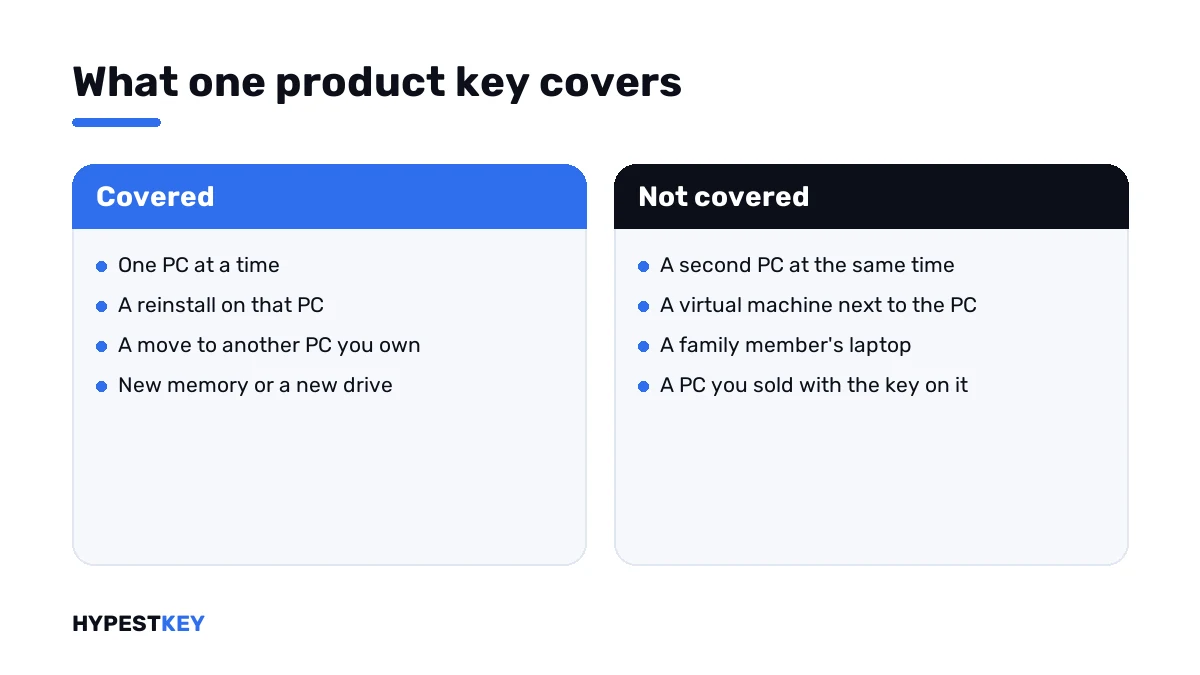
How many devices a key may serve depends on the license behind it.
| License | Devices per key |
|---|---|
| Retail | One PC at a time; it can move, it can’t double |
| OEM | The one PC it shipped with |
| Volume, MAK | A fixed number agreed with the organisation |
| Volume, KMS | The organisation’s PCs, through its own server |
Causes
| Cause | Detail |
|---|---|
| One key for the whole household | The desktop activated fine, the laptop gets this code |
| Old PC kept in use | The key was “moved”, and both machines still run with it |
| Virtual machine with the host’s key | A virtual machine counts as a device of its own |
| Company key used at home | The organisation’s activations are used up, or the key isn’t yours to use |
| Key from a public list | Thousands of people tried it before you |
How to fix the 0x803FA071 activation error
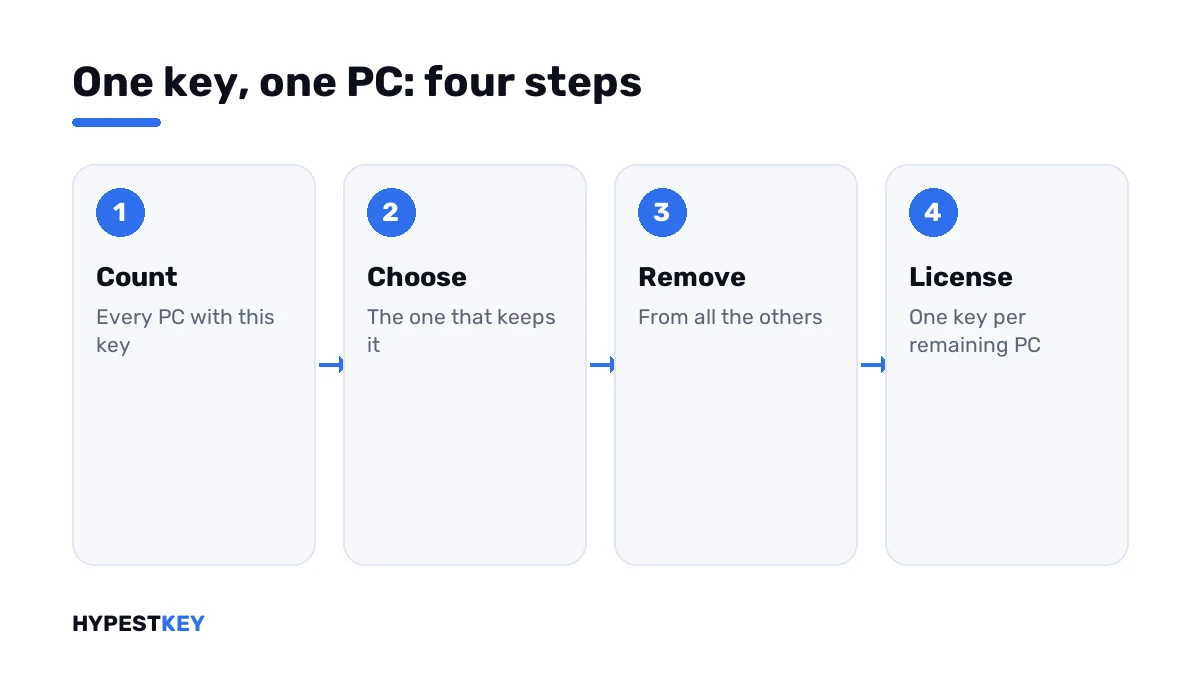
Count the devices first. Then free the key where it shouldn’t be.
- List every PC and virtual machine where you entered this key.
- Decide which one keeps it.
- On each of the others, open Command Prompt as administrator and run the two removal lines, then restart.
- On the PC that keeps the key, open Settings, System, Activation and press Activate, or run the activation line.
- If it’s still refused, press Troubleshoot on the Activation page.
- For every PC left without a key, enter a key of its own under Change product key.
slmgr /dli
slmgr /upk
slmgr /cpky
slmgr /ato| Line | What it does |
|---|---|
slmgr /dli |
Shows the last five characters of the installed key, so you can tell which PCs share it |
slmgr /upk |
Uninstalls the key from this PC |
slmgr /cpky |
Clears it from the registry |
slmgr /ato |
Asks for activation on the PC that keeps the key |
The first line is the handy one. Same five characters on two machines? Then you’ve found the pair.
Which PC should keep the key
There’s no rule from Microsoft on this. It’s your license, and you pick the PC. A few things make the choice easier.
| Question | If yes |
|---|---|
| Did the key come preinstalled on one of them? | It stays there; an OEM key doesn’t move |
| Is one PC about to be sold or retired? | Remove the key there and keep it on the other |
| Does one of them already show “activated”? | Leaving it there saves a step |
| Is one of them a virtual machine for testing? | I’d give the key to the real PC |
Moving a Retail license the proper way is described in transferring a Windows license to a new PC.
The second PC
That machine needs a license of its own. The edition has to match what’s installed there.
Home or Pro? Check Settings, System, About on that PC first. Our keys are genuine and arrive instant to email: Windows 11 Pro or Windows 11 Home. For the older system there’s Windows 10 Pro.
Not sure which edition suits it? Windows 11 Home vs Pro lists the differences.
When the key isn’t really yours
A key copied from a work PC, a school lab or a forum post was licensed to somebody else. Its activations are counted against their agreement.
A company’s MAK has a plain number as its limit. When it’s reached, Microsoft reports it under 0xC004C008 or under 0xC004C020.
No command resets that count from your side. On a work device, I’d tell IT. On a private PC, the clean answer is a key bought for it.
The public generic keys work differently again. They select an edition and never activate, as our generic keys page explains.
How it relates to similar codes
| Code | Short version |
|---|---|
| 0x803FA071 | The key is on more devices than allowed |
| 0xC004C770 | The key is already used on another device |
| 0xC004C008 | The key could not be used; its activations are spent |
| 0x803FA067 | A Home to Pro upgrade was refused; a different problem with a similar number |
| 0xC004C003 | The key is blocked |
Everything else is sorted in our list of Windows 11 activation errors.
Where these steps apply
| System | Notes |
|---|---|
| Windows 11 and Windows 10 | All steps as written; on Windows 10 the Activation page sits under Update & Security |
| Virtual machines | Each one counts as a device |
| Work devices | IT manages the keys; don’t remove one yourself |
Where to type a key and how to read the status line is in how to activate Windows 11.
Mistakes we see most
- Assuming a key is good for “a few PCs”.
- Activating a virtual machine with the host’s key.
- Removing the key from the wrong PC, the one that was activated.
- Taking a key home from the office.
- Trying list keys one after another.
Terms used on this page
| Term | Meaning |
|---|---|
| License terms | Microsoft’s rules for how a copy of Windows may be used |
| Retail | A license bought separately, for one PC at a time |
| OEM | A license tied to the PC it shipped with |
| MAK | A company key with a fixed number of activations |
| Virtual machine | A PC simulated in software; it needs a license of its own |
| Partial key | The last five characters of the installed key |
FAQ
What does error 0x803FA071 mean?
The product key is already on another device, or on more devices than the license terms allow. Microsoft lists it together with two related codes. I'd start by counting where the key has been entered.
How many PCs can I activate with one Windows key?
One at a time with a retail key. An OEM key belongs to the PC it came with. Only company volume keys cover several machines, and those belong to the organisation.
How do I fix 0x803FA071?
Pick the PC that keeps the key. On the others, uninstall the key with slmgr and restart. Then press Activate on the chosen PC. Every other machine needs a key of its own.
Can I use my desktop's key in a virtual machine?
Not alongside the desktop. A virtual machine counts as a separate device, so the same key would be on two. I'd license the virtual machine separately or leave it unactivated for short tests.
I removed the key from the other PC and still get the error. Why?
The server record can lag behind. Wait a little, restart and press Activate again, then run the troubleshooter. With a valid retail key, we'd finish with phone activation.
Is 0x803FA071 the same as 0x803FA067?
No. They only look alike. This code is about one key on too many devices. The other appears when a Home to Pro upgrade is refused, and it has a different fix.
The key came from my workplace. Can I keep using it at home?
That's for your employer to say. A company key counts against the organisation's agreement, and its activations can run out. For a private PC, I'd buy a key that's yours.