Short answer: The 0x80070490 error stands for ERROR_NOT_FOUND: Windows Update couldn't find something it needed, usually in the driver operations queue. Run the Windows Update troubleshooter. Then DISM and SFC, then reset catroot2 and SoftwareDistribution. Still failing? CBS.log shows which of Microsoft's five cases you have.
The 0x80070490 error is ERROR_NOT_FOUND: Windows Update looked for something it needed and didn’t find it. In Microsoft’s own write-up the usual trigger is a driver step that fails during the install. Run the troubleshooter, then DISM and SFC, then reset the update components.
- Run the Windows Update troubleshooter and restart.
- Repair the component store with DISM, then SFC.
- Reset catroot2 and SoftwareDistribution.
- Still failing? Match the sign in CBS.log to one of the cases below.
What the 0x80070490 error means
Element not found. That’s the whole message behind the number. Which element is the hard part.
Microsoft ties most cases to the driver operations queue. Windows keeps a list of driver steps for each update. Stale entry in that list, or a driver file gone? The queue can’t load. Update stops, this code appears.
Causes Microsoft names:
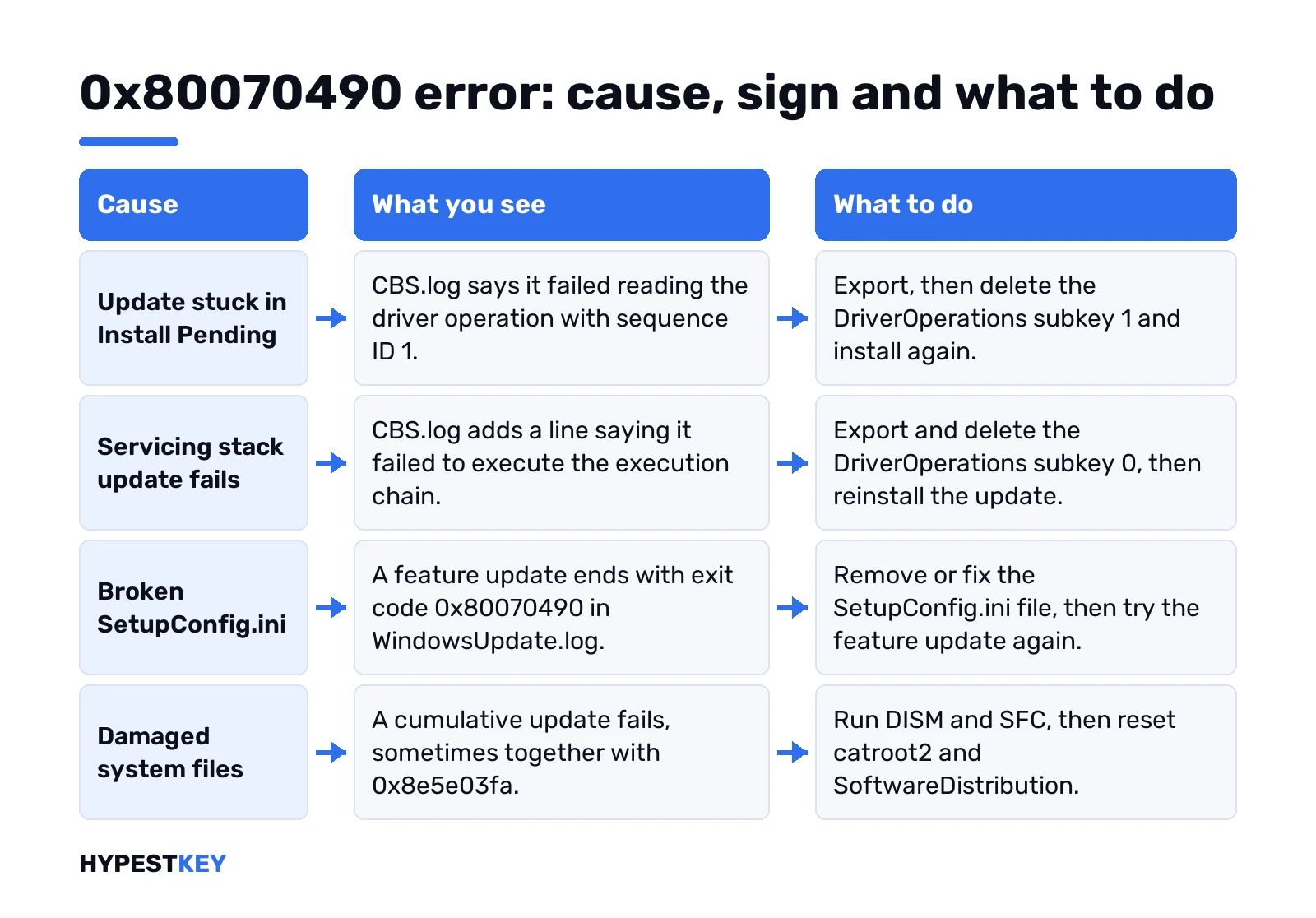
- An update stuck in “Install Pending” that blocks the next one.
- Stale registry entries for driver operations.
- A broken or empty SetupConfig.ini.
- Driver files or hard links missing from the system folders.
Before any registry step, Microsoft asks for a backup of the system disk. We’d do the same, or at least make a restore point in Windows 11.
Checks before the 0x80070490 fixes
Boring, but each one has saved someone a registry edit. From Microsoft’s general list for failing updates:
- Plugged in, online. Shaky Wi-Fi? Our Wi-Fi fixes for Windows 11 help there.
- An administrator account. Standard users can’t finish every update.
- Free space. At least 16 GB on 32-bit Windows, 20 GB on 64-bit.
- Date and time set automatically. A wrong clock breaks more than you’d think.
- External drives and docks unplugged. Keyboard and mouse can stay.
- Third-party drivers updated from the hardware maker.
Third-party antivirus? Microsoft’s upgrade help suggests removing it for the upgrade and using the built-in Windows protection meanwhile. For a monthly update we’d try a clean boot before going that far. Only the essential services and programs start. Update goes through? Then a startup app was in the way.
Quick fixes first: troubleshooter, DISM and SFC
Home PC, one update failing. Start here.
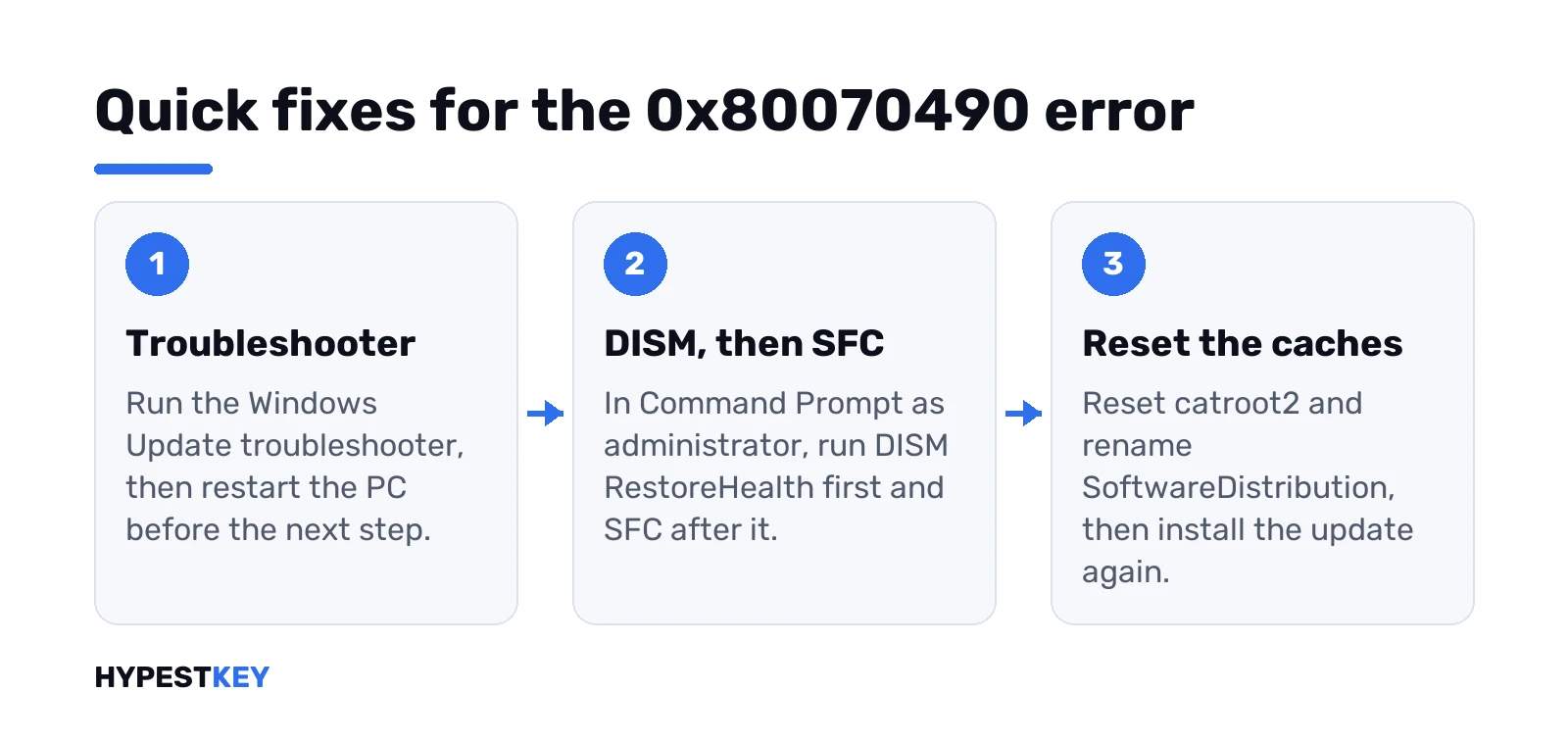
- Restart. Pending work sometimes finishes on its own.
- Run the Windows Update troubleshooter. Restart again.
- Command Prompt, as administrator.
First this one. Give it time:
DISM /Online /Cleanup-Image /RestoreHealthThen:
SFC /ScannowCheck for updates again. If the same KB fails, move on to the reset.
Reset catroot2 and SoftwareDistribution
This is Microsoft’s fix for a cumulative update that fails with 0x80070490, sometimes together with 0x8e5e03fa. Same window, still as administrator.
The catroot2 folder first:
net stop cryptsvc
md %systemroot%\system32\catroot2.old
xcopy %systemroot%\system32\catroot2 %systemroot%\system32\catroot2.old /s
del %systemroot%\system32\catroot2\* /q
net start cryptsvc
Then the update cache:
net stop wuauserv
cd %systemroot%
ren SoftwareDistribution SoftwareDistribution.old
net start wuauserv
Install the update again. Nothing personal goes away here. Only cached update data, and Windows rebuilds it.
An update stuck in Install Pending
Sign: Windows Update shows an update as pending, and nothing new installs. CBS.log has lines like these:
Failed reading Identity for driver operation sequenceID 1 [HRESULT = 0x80070490 - ERROR_NOT_FOUND]
Doqi: Failed loading driver operations queue. [HRESULT = 0x80070490 - ERROR_NOT_FOUND]
Microsoft’s fix has two steps. Delete the subkey named 1 under this key:
HKEY_LOCAL_MACHINE\SOFTWARE\Microsoft\Windows\CurrentVersion\Component Based Servicing\DriverOperations\1Then put TrustedInstaller back on demand start:
sc config trustedinstaller start=demandRestart, try the updates again. Export the key before you delete it. Takes ten seconds and you’ll thank yourself.
Servicing stack update fails
Servicing stack updates prepare Windows for the next updates. Fail here and everything after it fails too. CBS.log shows the same “Failed loading driver operations queue” line, then “Failed to execute execution chain”.
Fix from Microsoft: export and delete the subkey 0 in the same place, then reinstall the servicing stack update.
HKEY_LOCAL_MACHINE\SOFTWARE\Microsoft\Windows\CurrentVersion\Component Based Servicing\DriverOperations0x80070490 during a feature update or upgrade
Two flavours here.
Through Windows Update or Software Center
WindowsUpdate.log ends with “Exit code = 0x80070490” right after Windows Setup starts. Microsoft points to the SetupConfig.ini file in this folder:
C:\Users\Default\AppData\Local\Microsoft\Windows\WSUS\SetupConfig.iniRemove the file or fix it. If it’s empty, Microsoft suggests adding an entry, for example:
Show OOBE = NoneSetup shows 0x80070490 – 0x20007
The part after the dash tells you where setup was. Microsoft’s upgrade table reads this pair as an incompatible device driver. So, drivers:
- Update chipset, storage and network drivers from the PC maker.
- Unplug everything except keyboard, mouse and display.
- Try again. Still failing? The setup logs name the driver.
Clean install instead of an upgrade? Our Windows 11 USB install guide and the clean install guide cover that route, and the Media Creation Tool makes the stick.
Monthly rollup and missing driver files
Older Server builds get this one. CBS.log says “Failed while processing non-critical driver operations queue”, then rolls back because drivers failed.
Microsoft’s example rebuilds one missing driver folder in the DriverStore from a copy in WinSxS. The folder name depends on the driver and the build, so we’d copy it exactly from their article, not from a forum. Microsoft’s 0x80070490 troubleshooting page has all five cases with their log lines.
Find the 0x80070490 error in CBS.log
The log tells you which case is yours. It sits here:
C:\Windows\Logs\CBS\CBS.logCopy it to the desktop, open the copy and search for 80070490. Big log? Older entries roll into CbsPersist files in the same folder.
| Line near the code | Case |
|---|---|
| Failed reading Identity for driver operation sequenceID 1 | Pending update |
| Failed to execute execution chain | Servicing stack update |
| Exit code = 0x80070490 in WindowsUpdate.log | SetupConfig.ini |
| Status: 0x8e5e03fa in Setup events | Cumulative update, reset catroot2 |
| Rolling back KTM, because drivers failed | Missing driver files |
The same code on Xbox and in deployment tools
Not every 0x80070490 comes from Windows Update. Xbox Support has its own page for the code on consoles and Windows devices. Configuration Manager task sequences? Those show it too, usually around disks and partitions. Those are different problems with different fixes, so we’d follow the product’s own help there.
When the update still won’t install
- Safe Mode once, to rule out a background app. See Safe Mode in Windows 11 or Safe Mode in Windows 10.
- In-place repair upgrade with the Media Creation Tool. Files and apps stay.
- Reset this PC. Our factory reset guide says what you keep.
Related update codes: 0x800F0922 when an installer inside the update fails, and 0x8007000D for invalid update data. Wondering whether a long install is just slow? See Windows 11 update time.
After a reset we’d check the activation status. Need a license for the reinstall? Our Windows 11 Pro key is Retail, instant to email.
Related guides
FAQ
What does 0x80070490 mean?
Element not found. Windows Update needed an item, often a driver operation entry, and it wasn't there.
Is it a virus?
No. Just a servicing error code, and nothing in Microsoft's description of it points to malware.
Can I delete the DriverOperations keys safely?
Export them first. Microsoft's fix deletes subkey 1 or 0, depending on the case, and then you install again.
Does resetting SoftwareDistribution delete my files?
No. Only cached update downloads go, and Windows downloads fresh copies the next time it checks.
What does 0x80070490 - 0x20007 mean during setup?
Microsoft reads that pair as an incompatible device driver. Update drivers and unplug extra devices, then retry.
I see it on my Xbox
That one has its own help page on Xbox Support. The Windows Update fixes here don't apply to a console.