Short answer: To cancel a Microsoft 365 subscription, we'd sign in at account.microsoft.com/services/microsoft365 with the account that paid, pick Cancel subscription and confirm. Plans bought through Apple, Google Play or a shop are cancelled there. Business plans are cancelled by an admin in the Microsoft 365 admin center, often within seven days of the start or a renewal.
To cancel a Microsoft 365 subscription, sign in at account.microsoft.com/services/microsoft365 with the account that paid, choose Cancel subscription and confirm with “I don’t want my subscription”. Bought it through Apple, Google Play or a shop? Cancel there. Business plans are cancelled by an admin in the Microsoft 365 admin center.
| Where you bought it | Where to cancel |
|---|---|
| Microsoft, for Personal, Family, Basic or Premium | account.microsoft.com, Services and subscriptions |
| iPhone, iPad or Mac App Store | Apple subscriptions settings |
| Google Play on Android | Google Play subscriptions page |
| A shop such as Amazon | That retailer’s customer service |
| Microsoft 365 for business | Microsoft 365 admin center, Billing |
| A Microsoft partner or reseller | The partner |
Cancel Microsoft 365 subscription: steps on the web
For home plans bought from Microsoft. Five steps, from Microsoft’s cancellation page:
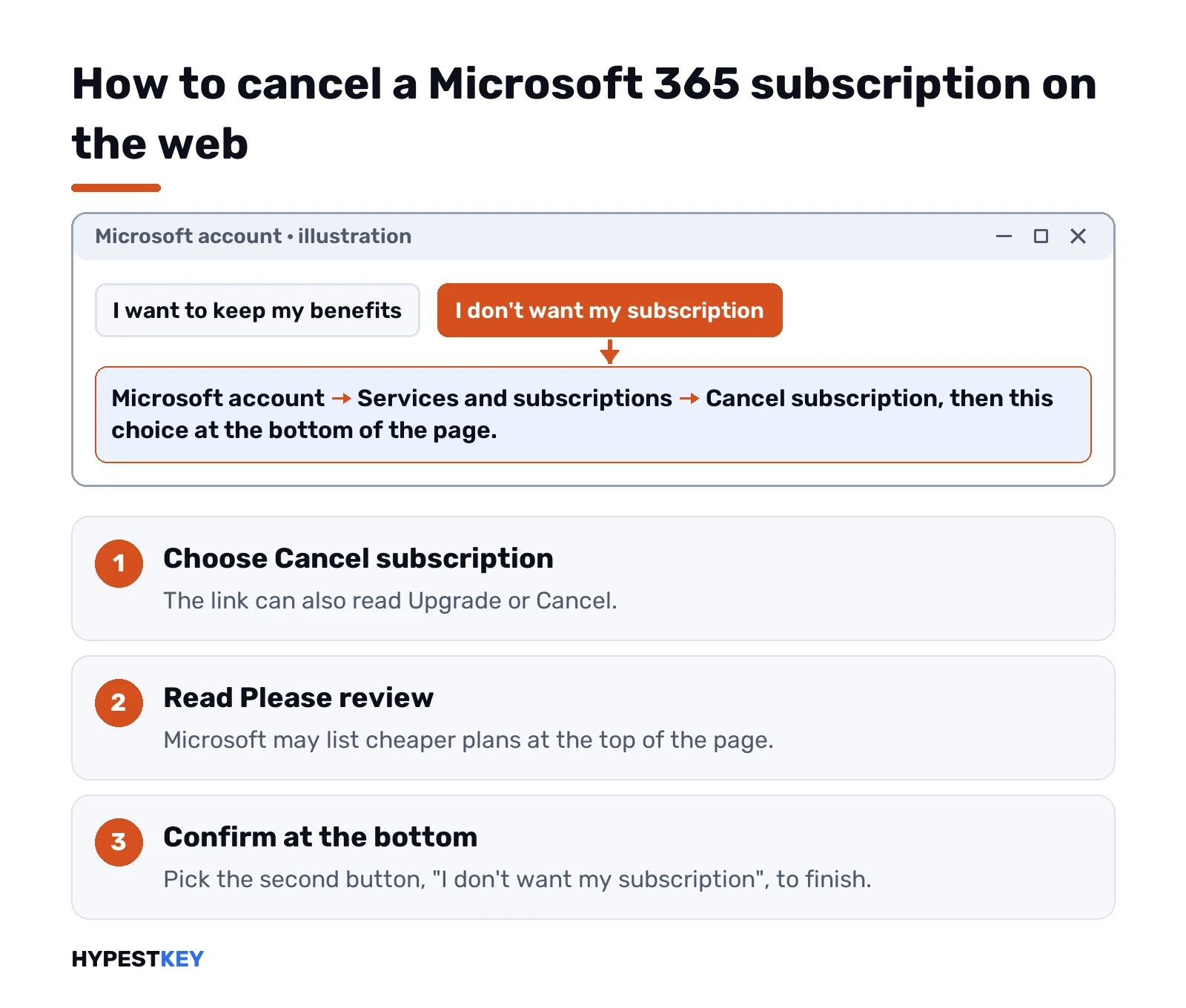
- Open account.microsoft.com/services/microsoft365.
- Sign in with the Microsoft account that bought the plan. Not your work account, not your partner’s.
- Choose Cancel subscription. Sometimes the link reads Upgrade or Cancel.
- Read the Please review box at the top. Microsoft may list cheaper plans here.
- Scroll down and pick “I don’t want my subscription”.
That’s it. We’d screenshot the confirmation, just in case a charge shows up later.
In Germany there’s a shortcut. Microsoft runs a cancellation form at aka.ms/germancancel that works without signing in, as long as you have some subscription details at hand.
Cancel, or just turn off recurring billing
Two different buttons, two different results. Cancelling ends the plan through Microsoft’s flow. That’s where any money back gets decided. Turning off recurring billing? The plan runs to its end date, then stops.
No Cancel link at all, only Turn on recurring billing? Then billing is already off. The plan expires on the date shown and won’t charge you again. Nothing else to do.
Want a smaller plan instead? Microsoft lets you switch between Microsoft 365 subscriptions from the same page. We compare the home plans in what Microsoft 365 is.
Bought on iPhone, Android or in a shop
Microsoft can’t cancel what it didn’t sell. The store that took the payment handles it.
iPhone or iPad:
- Settings, then tap your name.
- Subscriptions.
- Microsoft 365, then the cancel option at the bottom.
On a Mac it’s the App Store. Your name in the sidebar, your name again, Subscriptions, then cancel.
Android goes through Google Play. Open the subscriptions page in the Play app or browser, select Microsoft 365, tap Cancel subscription. Uninstalling the app does nothing for billing, Google says. Access stays until the end of the period you paid for.
A boxed card or a code from a retailer? Contact that retailer. Microsoft names Amazon and Harvey Norman as examples on its page.
Getting money back after you cancel
Not every cancellation pays anything back. Microsoft checks eligibility automatically, and only after you cancel, so there’s no way to see the answer first.
The rules in Microsoft’s subscription policy, for plans bought from Microsoft:
- New plan. Cancel within 30 days of the first purchase, or before the first renewal if that comes sooner.
- Last renewal. Cancel within 30 days of the renewal charge. Once per Microsoft account, per product.
- Prorated amounts. Personal, Family and Basic get them only in listed countries, for example Canada, France and Türkiye. Premium: within 14 days of the first purchase elsewhere.
- App store purchases. Apple or Google decide, not Microsoft.
Missed the window? We’d still turn off recurring billing right away, so the next year isn’t charged.
What happens to OneDrive, Outlook and family members
Storage drops to the free level. Microsoft puts it at 5 GB of cloud storage for OneDrive and Outlook.com attachments, plus 15 GB for Outlook.com mail.
Over that limit, things stop. No new uploads, edits or syncing in OneDrive. Outlook.com stops sending and receiving mail. After six months over quota, Microsoft may delete the OneDrive files.
Family and Premium plans drag everyone along. The people you shared with lose their extra storage too. We’d tell them before cancelling, and give them a week to move files.
The desktop apps go unlicensed once the paid time runs out. After a trial, Microsoft describes view-only mode. Documents open and print, editing stops, and we’d expect the same after a paid plan. Our page on the Office unlicensed product banner explains what that looks like.
Cancel Microsoft 365 subscription for business
Only an admin can do this. With a Microsoft Customer Agreement you need a billing account or billing profile role, owner or contributor. Older MOSA accounts need at least the Billing Administrator role. Steps from the admin center guide:
- Microsoft 365 admin center. Subscriptions in the simplified view, or Billing, then Your products.
- Pick the subscription.
- Under Billing settings, Subscription status, choose Cancel subscription.
- Give a reason, then Cancel subscription again.
The catch is timing. On a Microsoft Customer Agreement, cancelling with prorated credit works only within seven days of the start or a renewal. After that? Only the recurring billing switch. Set it to Off and save. The plan runs to the end of its term.
Annual plan paid monthly? Then the monthly charges continue until the term ends. MOSA accounts with more than 25 licenses must reduce them to 25 or fewer before the cancel button works.
Before any of it, remove your custom domain from the tenant. Microsoft asks for that first. Bought through a partner? The partner cancels, also within seven days for a prorated amount. Our guide to Microsoft 365 Business Standard covers the plan itself if you’re switching rather than leaving.
What happens to business data after cancelling
Business subscriptions pass through stages, for most offers in most countries:
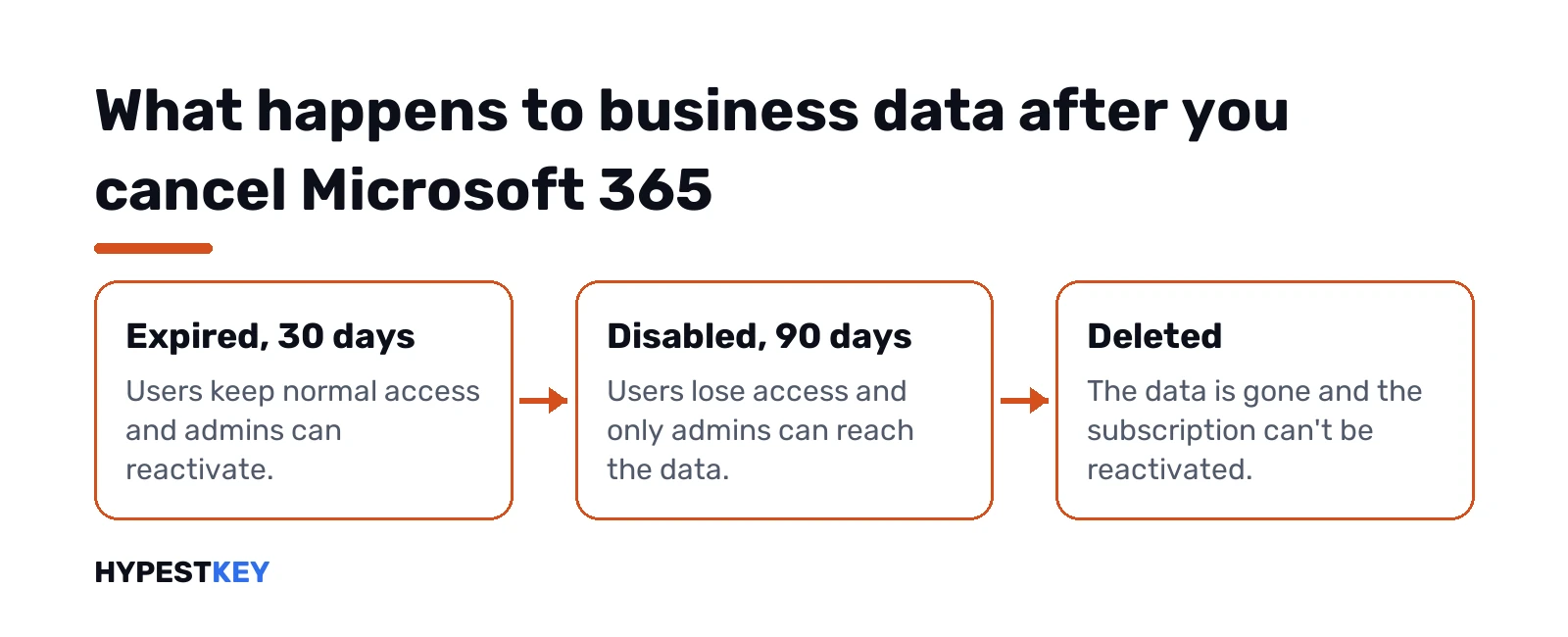
| Status | Users | Admins | Typical length |
|---|---|---|---|
| Expired | Normal access | Can reactivate | 30 days |
| Disabled | No access, data reachable by admins only | Can back up and reactivate | 90 days |
| Deleted | No access | Can’t reactivate | Final |
Cancel inside the policy window and the plan jumps straight to Disabled. Microsoft’s pages give 30 or 90 days as the earliest point data might go, and 180 days as the latest.
Two traps. Deleting a subscription outright skips Expired and Disabled, and SharePoint and OneDrive content goes at once. And a new subscription later won’t bring deleted data back. So we’d export mailboxes to PST files and copy OneDrive and SharePoint content out before pressing anything.
Cancel a Microsoft 365 free trial
Same account page, slightly different signs. Under your Microsoft 365 trial, look at what’s shown:
- Paid with: None. No card on file, so the trial just ends on its date.
- Cancel link. Press it to stop the paid month that follows.
- Turn on recurring billing. Billing is already off. Nothing to do.
Microsoft says cancelling within 30 days of signing up means no charge. Business trials? Recurring billing in the admin center, set to Off. Their data is deleted after the trial ends. Our full guide to the Microsoft Office trial goes deeper, including trials started on a phone.
When the cancel option won’t show up
Usually it’s the wrong account. Microsoft only shows the plan to the account that paid. A second Outlook address, maybe? Sign out, sign in with the other one, try again.
Still nothing? Then check the store that billed you. An App Store plan never shows a Cancel button on Microsoft’s site, we’d note. Microsoft also has help pages for a subscription it can’t find and for one that won’t cancel. For contact routes, we list the official ones on our page about contacting Microsoft support.
Seeing “we couldn’t set up your account” in Office afterwards? That’s a sign-in problem, not billing, and this fix covers it.
Keeping Office after you cancel
Cancelling the subscription doesn’t mean giving up Word and Excel. Office can be licensed once instead, with no renewal date. We compare both models in Microsoft 365 vs Office 2024 and in subscribe or buy once, and a lifetime Office license explains what “lifetime” really covers.
Switching on the same PC? Remove the subscription version first with the Office uninstall tool, then activate the new copy as in activating Office 2024.
Want Office without a yearly bill? Our Office Home and Business 2024 key is a one-time license for one PC or Mac, sent instant to email.
FAQ
Can I cancel Microsoft 365 and keep using it until the end of the year?
Turn off recurring billing instead. The plan then runs to its end date and stops without another charge.
Will I get my money back if I cancel?
Sometimes. Cancelling within 30 days of buying or of the last renewal can qualify, and Microsoft checks that automatically after you cancel.
Can I cancel without signing in?
In Germany, yes, through aka.ms/germancancel. Elsewhere you need the Microsoft account that bought the subscription.
I bought it on my iPhone. Where do I cancel?
In Apple's settings. Tap your name, then Subscriptions, then Microsoft 365, and cancel there.
What happens to my OneDrive files?
Storage drops to 5 GB. Over that, you can't upload or sync, and after six months the files may be deleted.
Do family members lose access too?
Yes. When a Family or Premium plan ends, everyone you shared it with loses the extra storage and apps.
How long does Microsoft keep business data after cancelling?
Admins can still back it up while the plan is Disabled. Microsoft deletes the data no later than 180 days after cancellation.