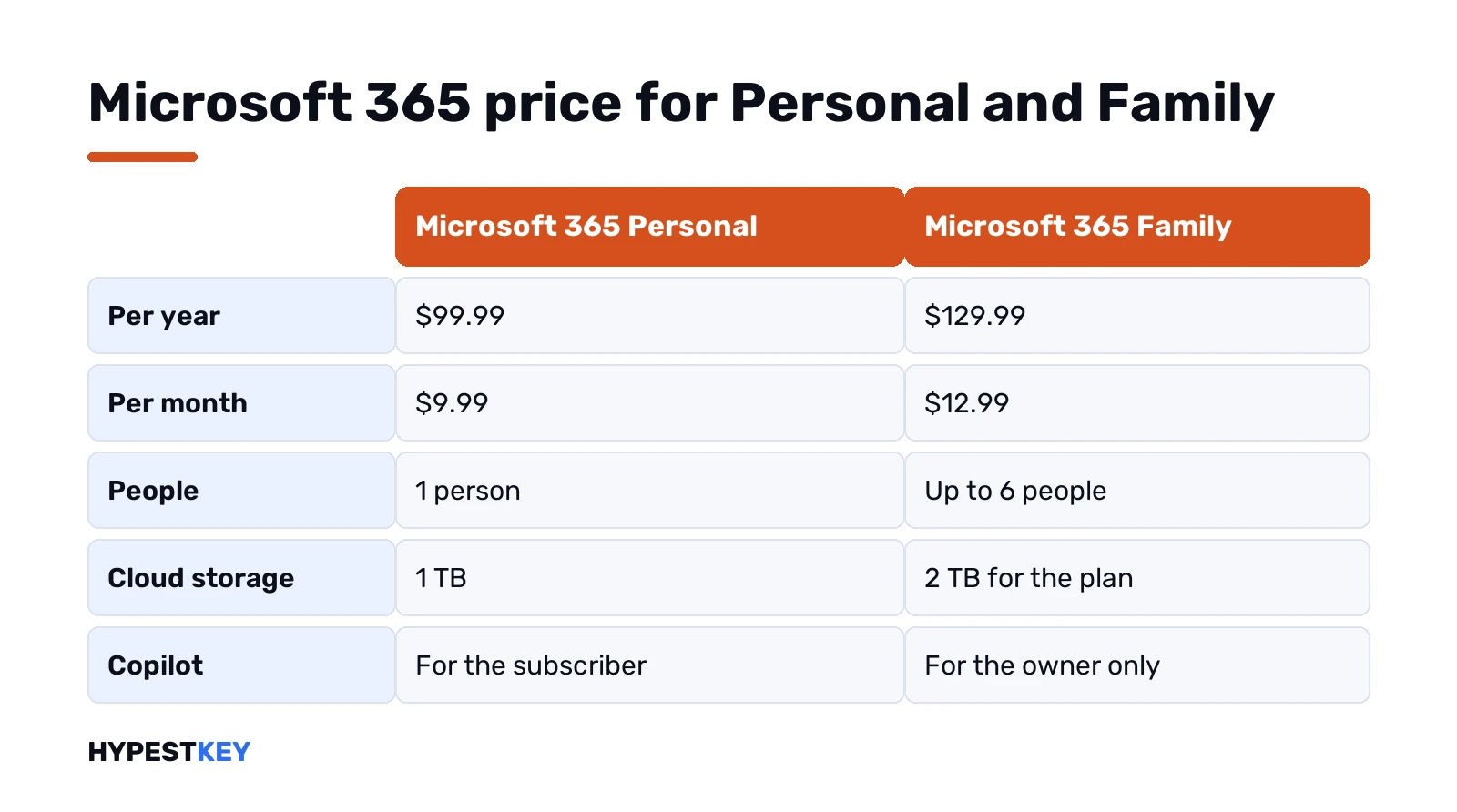
Short answer: The Microsoft 365 price on Microsoft's US site, at the time of writing: Personal costs $99.99 a year or $9.99 a month. Family costs $129.99 a year or $12.99 a month. Basic is $19.99 a year and Premium $199.99. Family covers up to six people, so we'd pick it from two users.
The Microsoft 365 price for home users starts at $99.99 a year or $9.99 a month for Personal, and $129.99 a year or $12.99 a month for Family, at the time of writing on Microsoft’s US plan pages. Basic costs $19.99 a year, Premium $199.99. Below: each plan, Personal vs Family, cheaper routes.
| Plan | Per year | Per month | People | Cloud storage | Desktop apps |
|---|---|---|---|---|---|
| Microsoft 365 Basic | $19.99 | $1.99 | 1 | 100 GB | No, web and mobile only |
| Microsoft 365 Personal | $99.99 | $9.99 | 1 | 1 TB | Yes |
| Microsoft 365 Family | $129.99 | $12.99 | 1 to 6 | 2 TB | Yes, for everyone you share with |
| Microsoft 365 Premium | $199.99 | $19.99 | 1 to 6 | 2 TB | Yes, plus the most Copilot usage |
| Office Home 2024, one-time | $179.99 once | None | 1 PC or Mac | Free 5 GB | Yes, no new features |
Prices are in US dollars as Microsoft lists them on 7 November 2026. Other countries? Own currency, own price. We’d always check the plan page for your region before paying.
Microsoft 365 price list at the time of writing
Four home plans, one ladder. Each step up adds people, storage or AI. The yearly price is always cheaper than twelve monthly payments, by up to 17% according to Microsoft’s comparison page.
- Basic. Storage and an ad-free Outlook, nothing on the desktop.
- Personal. One person, all the desktop apps, 1 TB.
- Family. Same apps for up to six people, 2 TB.
- Premium. Everything in Family, plus far more Copilot usage.
Every plan is bought from Microsoft’s plan comparison page or a retailer. New to all this? Our explainer on what Microsoft 365 is starts from zero.
Microsoft 365 Basic: storage and mail only
$19.99 a year, or $1.99 a month. Cheap for a reason. You get 100 GB of OneDrive storage and Outlook without ads, with 100 GB of mailbox space.
No desktop apps, though. Word, Excel and the rest work only on the web and on phones and tablets, same as with a free account. AI features aren’t available on Basic at all. We’d see it as an online storage plan with nicer mail.
Microsoft 365 Personal price and what you get
$99.99 a year or $9.99 a month. One person, signed in on up to five devices at once. PCs, Macs, phones and tablets all count.
The desktop apps are the reason people pay for it:
- Word and Excel.
- PowerPoint and OneNote.
- Outlook for mail.
- Access, on Windows PCs only.
- Editor, Teams and Forms.
Storage is 1 TB in OneDrive. Copilot is included, with more usage than the free version. Limits still apply. Paying yearly saves $19.89 against twelve monthly payments, and we’d take that.
Already on Personal and want to install it? Our Microsoft 365 setup guide covers Windows, Mac and phones.
Microsoft 365 Family price for up to six people
$129.99 a year or $12.99 a month. The owner shares it with up to five other people, so six in total. Each one uses their own Microsoft account. Each can sign in on five devices at the same time.
The plan comes with 2 TB of cloud storage. Apps are the same as in Personal. One catch: the AI features belong to the subscription owner only and can’t be shared, as Microsoft’s Family page says in its footnote.
Sharing happens from the owner’s Microsoft account page. Invite someone by email or link. They accept. Then they install Office on their own devices, and you’d stop sharing from the same page whenever you like.
Microsoft 365 Personal vs Family: when Family pays off
The math is quick. Two people on Personal pay $199.98 a year. One Family plan costs $129.99 for up to six.
| People in the household | Personal plans, yearly | One Family plan, yearly | Family per person |
|---|---|---|---|
| 1 | $99.99 | $129.99 | $129.99 |
| 2 | $199.98 | $129.99 | about $65 |
| 4 | $399.96 | $129.99 | about $32.50 |
| 6 | $599.94 | $129.99 | about $21.67 |
So Personal only wins when you’re truly alone on it. From the second person on, we’d take Family every time. Easy to miss: Copilot. On Family only the owner gets the AI features, so if two people both want them we’d look at two Personal plans instead.
Storage is the other point. Personal gets 1 TB for one person. Family has 2 TB for the plan.
Premium: the plan with the most Copilot
$199.99 a year or $19.99 a month. It takes everything in Family and adds much heavier Copilot use. Microsoft describes extensive usage of Copilot chat, image creation and visual AI, plus agents for research and analysis.
For plain Word and Excel work it’s overkill. We’d only pick Premium if the AI side is something you’d use daily. Usage limits apply here too.
Paying monthly or yearly for Microsoft 365
Monthly is flexible. Yearly is cheaper. Here’s what the yearly option saves at the current list prices:
- Personal: $19.89 a year.
- Family: $25.89 a year.
- Premium: $39.89 a year.
Monthly makes sense for a short project, or for testing whether you’d really use the desktop apps. After two or three months we’d switch to yearly. You can’t get that money back later by changing your mind mid-year, so decide early.
What you get for $0
Before paying any Microsoft 365 plan, try the free tier. A free Microsoft account gives you the web versions of the main apps in a browser, plus the phone and tablet apps.
- Word and Excel online.
- PowerPoint online.
- Outlook on the web.
- 5 GB of OneDrive storage.
One rule to know: files have to be saved in and shared from OneDrive. Letters, a budget sheet, a school slideshow? Free covers that fine. Macros, Access and offline work don’t fit, and that’s where we’d start paying. Our free Microsoft Office guide lists every legal free route.
Free trial, renewal and cancelling
Personal, Family and Premium each come with one month free. After that it simply becomes the paid plan.
Renewal is automatic. Microsoft’s wording: the subscription renews at the regular price and selected term unless cancelled in your Microsoft account. So a discount from the first year doesn’t carry over by itself. Put a reminder in your calendar.
To stop it, we’d sign in to the Microsoft account and open Services and subscriptions. Recurring billing off, before the next charge. Our page on the Microsoft Office trial walks through cancelling step by step.
Discounts for students and schools
Students and teachers with an eligible school email get Office 365 A1 free. Mostly web apps, though. Desktop apps? That’s the paid A3 plan, bought by the school.
College students in the US have another option right now. Microsoft’s education page offers 12 months of Microsoft 365 Premium with a college email, for a limited time and under its own terms. Worth a look before you pay full price.
Business plans are priced per user
Business Basic, Standard and Premium are a different family. Billed per user. Listed on Microsoft’s business pages, not the home ones.
A team that shares mailboxes and files under work accounts belongs there. We cover the middle option in Microsoft 365 Business Standard.
A one-time Office instead of the Microsoft 365 price
Not everyone wants a yearly bill. Microsoft itself lists Office Home 2024 at $179.99 once. One PC or Mac. No feature updates, and no free upgrade to the next major version.
Against Personal at $99.99 a year, we’d say a one-time license pays off from around the second year. You give up the 1 TB, Copilot and the newest features. Our Microsoft 365 vs Office 2024 comparison runs the numbers over five years, and the Office lifetime license guide explains what “lifetime” really means. More on the old debate in subscribe or buy once.
Want Outlook too and the right to use it for work? We sell an Office Home and Business 2024 key for 1 PC or 1 Mac, sent instant to email. For a Windows PC there’s also the Office LTSC Professional Plus 2024 key.
Which Microsoft 365 plan we’d pick
Short version, by situation:
- Only need storage and clean mail: Basic.
- Living alone, using Word and Excel every week: Personal, paid yearly.
- Two or more people at home: Family, without much thinking.
- Copilot all day for research and writing: Premium.
- One computer, hate subscriptions: a one-time Office key.
Prices change. We’d recheck the plan page on the day you buy, since every figure here is a snapshot from Microsoft’s US site at the time of writing.
Still running an older one-time Office from years ago? Our Microsoft 365 vs Office 2019 page shows what changes when you switch.
What happens when you stop paying
Nothing gets deleted right away. Microsoft says the apps go into Reduced Functionality Mode. You can open and usually print documents, but you can’t create, edit or save until you renew.
OneDrive drops back to the free 5 GB. Over that limit, no new uploads or syncing. Email can stop too once the quota is full. On a Family plan, everyone you shared with goes back to a free account. So we’d move big folders out before the plan ends, not after.
FAQ
How much is Microsoft 365 Personal per month?
$9.99 a month, or $99.99 if you pay for the whole year at once, at today's US list price.
And Family, what does that cost?
$12.99 a month or $129.99 a year at the time of writing, for up to six people.
Personal or Family for two people?
Family. Two Personal plans cost $199.98 a year, one Family plan $129.99, though only the owner gets Copilot.
Is there a free trial?
Yes. Personal, Family and Premium each start with one month free, then renew as a paid plan unless you cancel.
Why is the price different in my country?
Microsoft sets prices per region and currency, and local taxes apply. Check the plan page for your country.
Is there a cheaper way than a subscription?
Depends on how long you'll use it. A one-time Office license costs more up front but has no yearly bill.
What if I stop paying?
The apps switch to Reduced Functionality Mode. You can open files but not edit them, and OneDrive drops to 5 GB.