Short answer: The 0xC004F009 activation error says the grace period expired before Windows was activated, and the system is now in the notification state. We'd check which key is installed and activate the matching way. A MAK goes online or by phone. KMS needs the company network. At home, we'd use a retail key.
The 0xC004F009 activation error says the grace period expired. Windows was installed with a volume key, the time allowed for activating it ran out, and the system switched to reminders. We’d simply activate it the way the key expects, and the reminders stop.
| Where | Fix |
|---|---|
| Company PC with a MAK | Activate now, online or by phone; if the key refuses, IT contacts Microsoft |
| Company PC with KMS | Connect to the office network and activate |
| Home PC | The key isn’t a consumer key; enter a retail key for the installed edition |
Nothing is deleted and nothing stops running. Windows just keeps telling you, and a few settings are locked.
What the 0xC004F009 activation error stands for
The message reads: “The Software Protection Service reported that the grace period expired.”
Microsoft files it under MAK activation in its activation error codes reference. The cause is given in two short statements.
- The grace period expired before the system was activated.
- The system is currently in the Notifications state.
For help, the reference names the Microsoft Licensing Activation Centers. In most cases you won’t need them. A normal activation with a valid key ends the state.
The notification state after the 0xC004F009 activation error
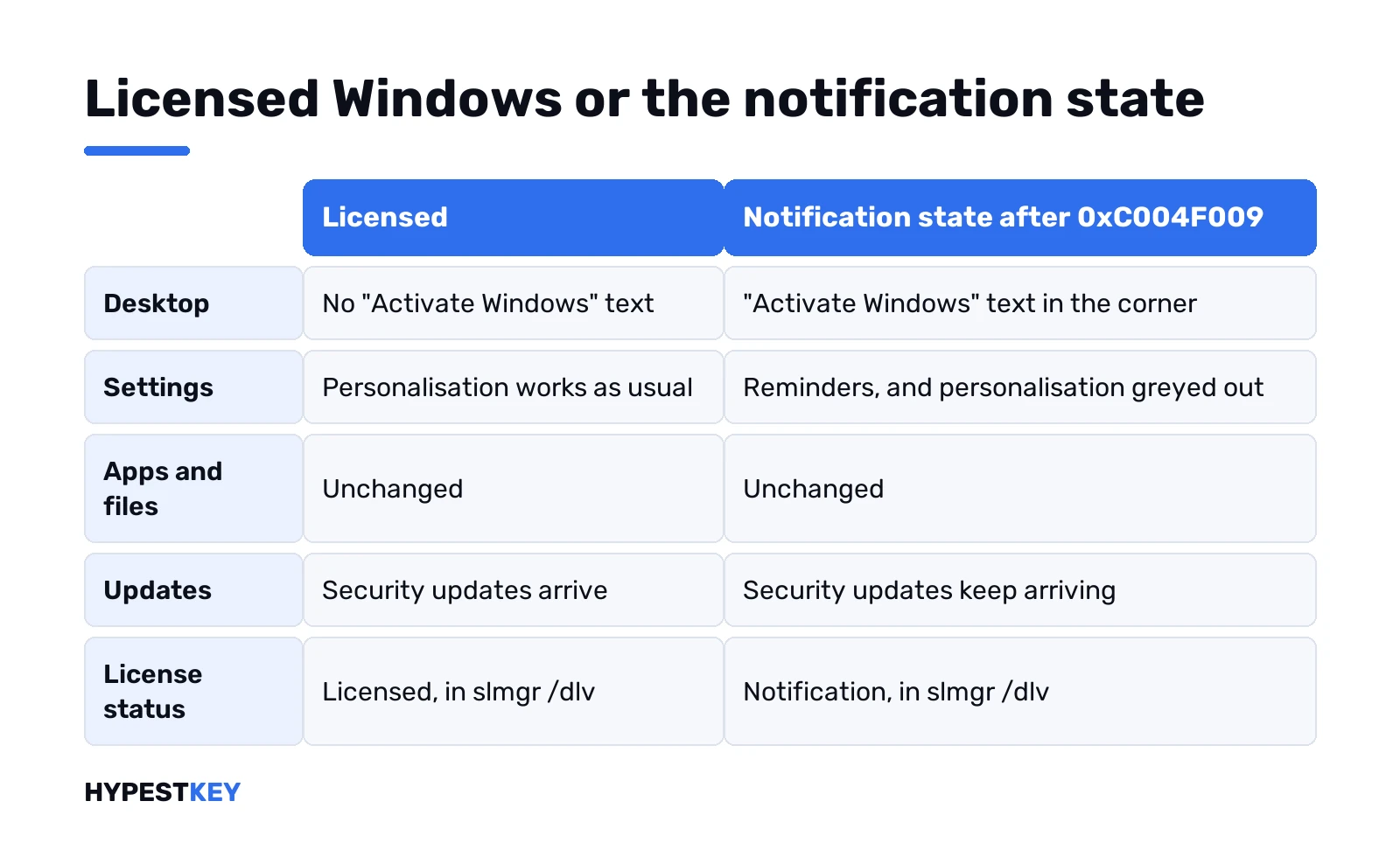
A system in this state works, with a few marks that it isn’t activated.
| Area | What you notice |
|---|---|
| Desktop | The “Activate Windows” text in the corner |
| Settings | Reminders, and personalisation greyed out |
| Apps and files | Unchanged |
| Updates | Security updates keep arriving |
| License status in the command prompt | “Notification” |
What the watermark does and doesn’t limit is described in our watermark guide.
How to fix the 0xC004F009 activation error
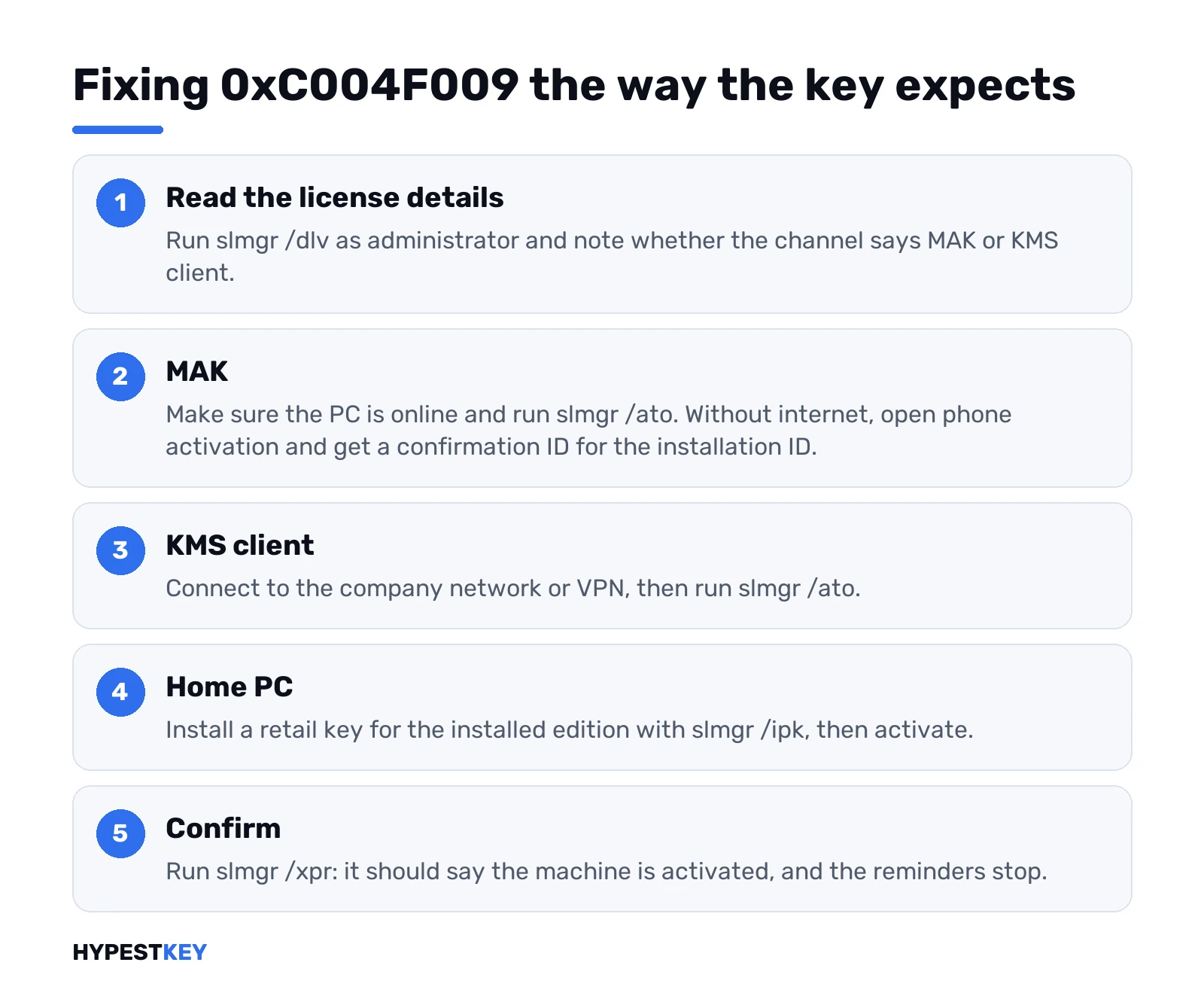
Find out what kind of key is installed, then activate the way that key expects.
- Open Command Prompt as administrator and run the detailed license line.
- Read the description and the license status; note whether the channel says MAK or KMS client.
- MAK: make sure the PC is online and run the activation line.
- MAK without internet: show the installation ID and get a confirmation ID from Microsoft for it.
- KMS client: connect to the company network or VPN and run the activation line.
- Home PC: install a retail key for the installed edition, then activate.
- Run the expiry line and confirm the machine is activated.
slmgr /dlv
slmgr /ato
slui 4
slmgr /ipk XXXXX-XXXXX-XXXXX-XXXXX-XXXXX
slmgr /xpr| Line | What it does |
|---|---|
slmgr /dlv |
Shows the channel, the license status and the remaining rearm count |
slmgr /ato |
Asks for activation |
slui 4 |
Opens phone activation; on the newest Windows 11 builds, use the Activation page instead |
slmgr /ipk |
Installs the key typed after it |
slmgr /xpr |
Shows whether the machine is activated |
When the 0xC004F009 activation error leads to a second code
The grace period is only the messenger. If the activation line returns a new code, that code names the real obstacle.
| Next code | What it points at |
|---|---|
| 0xC004C020 | The MAK has no activations left |
| 0xC004C003 | The key is blocked |
| 0xC004F074 | No KMS host answered |
| 0x8007232B | No KMS host found in DNS |
| 0xC004FC03 | No internet, or a firewall in the way |
That’s the point where IT calls Microsoft for a MAK, as the reference suggests. Everything else is in our list of Windows 11 activation errors.
About the rearm command
Search results for this code love one line: the rearm. It resets the licensing status and gives the activation timers a fresh start.
slmgr /rearmAdministrators use it when they prepare an image. As a fix it only postpones the question, and the number of rearms is limited. The detailed license line shows how many are left.
We wouldn’t build on it. A PC that should be licensed needs activating, not resetting.
On a home PC
Consumer copies of Windows 10 and Windows 11 don’t count down a grace period like this. If yours shows the code, we’d bet on a volume edition or a volume key.
That happens with second-hand business PCs, with company images and with low-priced keys. The channel line settles it in a second.
For a private PC: a retail key for the installed edition. It activates with Microsoft directly. Ours are genuine and arrive instant to email: Windows 11 Pro and Windows 10 Pro.
The channels are compared in Retail vs OEM vs Volume license. The key field is shown in how to activate Windows 11.
Not the same as an evaluation that ran out
Evaluation editions of Windows Server and Windows Enterprise have a fixed trial period of their own. When that ends, the messages and the remedy are different.
A server evaluation can be converted to a full edition with a key. We describe it in converting Windows Server 2022 Evaluation to Standard.
Office has a grace period too, with its own number. That one is 0x4004F00C.
Where these steps apply
| System | Notes |
|---|---|
| Windows 11 and Windows 10 volume editions | All steps as written |
| Windows Server | Same commands; key types are in our Windows Server 2022 activation guide |
| Work devices | Report the code to IT before changing a key |
Common mistakes with an expired grace period
- Running the rearm line again and again.
- Reinstalling Windows to get a new grace period.
- Ignoring the second code that the activation attempt returns.
- Typing a consumer Home key into a volume edition.
- Leaving a company key on a PC bought second-hand.
Related guides
Terms used on this page
| Term | Meaning |
|---|---|
| Grace period | Time a volume-licensed system may run before it has to be activated |
| Notification state | The mode after the grace period, with reminders and a watermark |
| MAK | Multiple Activation Key, a volume key that activates with Microsoft |
| KMS | Key Management Service, activation through the organisation’s own server |
| Rearm | A reset of the licensing status, limited in number |
| Evaluation edition | A trial copy with a fixed running time |
FAQ
What does error 0xC004F009 mean?
The Software Protection Service reported that the grace period expired. Microsoft adds that the system is in the Notifications state. It wasn't activated in time, and we'd activate it now.
How do I fix 0xC004F009?
Activate with a valid key. Check the channel with the detailed license line of slmgr. A MAK activates online or by phone. A KMS client needs the company network.
What happens to Windows in the notification state?
It keeps running. You see the "Activate Windows" text, reminders in Settings and locked personalisation. Apps and files aren't touched. We'd still activate soon, because the state doesn't end by itself.
Does the rearm command fix it?
Only for a while. It resets the licensing status, and the count of rearms is limited. Administrators use it for images. On a PC that should be licensed, we'd activate.
Why does my home PC show a grace period error?
It runs a volume edition or holds a volume key. Consumer copies don't count down like this. It turns up on second-hand business PCs and with low-priced keys. A retail key for the edition settles it.
Activation returns another error after 0xC004F009. What now?
Follow the new code. It names the real reason: no activations left on the MAK, a blocked key, or a KMS host that can't be reached. The grace period message only told you time was up.
Is this the same as an expired evaluation copy?
No. Evaluation editions have their own trial period and their own messages. A server evaluation gets converted to a full edition with a key. This code is about a volume key that wasn't activated in time.