Short answer: Windows XP product key: look for the Certificate of Authenticity sticker on the PC or the label on the original CD sleeve. XP itself shows only the Product ID, never the key. We don't publish XP keys. Microsoft gives XP no updates or tech help, so for a working PC we'd move to Windows 11.
Your Windows XP product key is the 25-character code on the Certificate of Authenticity sticker of the PC or on the sleeve of the original CD, and nobody can hand you a working one. We don’t publish XP keys of any kind. Here’s where yours hides, what activation does now, and what to move to.
| How you got XP | Where the key is | Who can help |
|---|---|---|
| PC sold with XP preinstalled | COA label attached to the PC, often with a hologram in it | The PC manufacturer |
| Retail box, Home or Professional | Label on the CD sleeve, plus a COA label on the box | The retailer |
| Company volume licence | The organisation’s licensing records, not a sticker | The IT department |
| Already installed and running | Not shown anywhere: Windows displays only the Product ID | Nobody can read the key back for you |
Five groups of five characters. That’s the shape to look for.
Where the Windows XP product key is printed
Start with the machine itself. PCs that came with XP preinstalled got a COA label attached to the case, and Microsoft put an embedded holographic design into that label. Laptops too. Turn it over and check the bottom panel before anything else.

Bought XP in a box? Then look at the CD sleeve. That’s where the retail key was usually printed, and the box carried a COA label as well. We’d check the manual and any envelope that came with the disc too.
Old stickers fade. B and 8 look alike. So do 2 and Z. A smudged key fails at setup with no hint about which character is wrong. We’d copy it down in good light and read it twice.
Same hunt on a newer PC? Our guide to finding a Windows product key covers Windows 10 and 11, where the answer is often a digital license and no sticker at all.
Windows XP Professional and Home keys don’t swap
Edition and channel both matter. A key has to match the disc you install from, and Microsoft’s deployment guide is strict about it:
- Retail CD: needs a retail key.
- Volume licensing CD: needs the organisation’s volume key, and never asks for activation.
- Upgrade CD: wants an upgrade key; a full CD wants a full key.
- OEM recovery disc from the PC maker: built for that maker’s machines.
One more trap. A key from the Windows you upgraded from won’t work on XP; only keys made for XP do. So we’d ignore the Windows 98 sticker on an old upgraded tower.
XP Professional x64 Edition is its own product. Setup still asks for a key, but Microsoft says product activation isn’t needed on 64-bit XP. The difference between key channels is the same idea we explain in retail vs OEM vs volume licences.
Windows XP product key not working at setup
Your own key, typed carefully, and setup still says no. Microsoft’s old Knowledge Base article 310637 dealt with exactly this. The messages it lists:
- The CD Key which you entered is invalid. Please try again.
- The Product Key used to install Windows is invalid.
- Please contact your system administrator or retailer immediately to obtain a valid Product Key.
Mostly a typo. Not always.
| Cause in the article | What we’d check |
|---|---|
| The key wasn’t entered correctly | B against 8, 2 against Z, read the sticker in daylight |
| Typed on the numeric keypad | Use the number row above the letters instead |
| Antivirus running during setup | Boot from the CD, or switch off antivirus in the BIOS if the board has that option |
| A damaged installation CD | Scratches, or a burned copy that read badly |
| A wrong system date | Set the clock in the BIOS before setup |
| Setup started from inside Windows | Start it from the CD at boot instead |
One more cause the article doesn’t spell out. We’d bet on it first: the wrong disc. OEM sticker, retail CD? Turned down. Upgrade key, full CD? Same. The channel rules are in the section above.
The article’s last resort: copy the CD to the hard disk, run setup from there. In a VM we’d do the same with a clean image of your own disc.
What an installed XP system shows you
Here’s the catch. XP never shows the full key on screen. What it shows is the Product ID, a separate number that setup builds from the key.
Right-click My Computer and pick Properties. General tab, under Registered to. Twenty digits in four groups.
Not the key, but useful. A Product ID with OEM in its second group came from a PC maker’s copy, which tells you whose sticker to go looking for. We’d write it down before any reinstall.
Key finder programs read an encoded registry value and decode it. Microsoft doesn’t document that route, so we leave it out of this guide.
No sticker and no CD sleeve
Then the key is most likely gone. For preinstalled Windows, Microsoft’s general advice is to ask the PC maker; for a boxed copy, the retailer. With hardware this old we’d call that a long shot, though a business that bought through volume licensing may still have its records.
What doesn’t help: lists of “free XP keys” on random pages. Shared keys like those end up blocked. Microsoft even published a set of generic XP keys for deployment that are blocked at its clearinghouse on purpose. They install. They never activate. We don’t repeat any of them here.
Stuck with a Windows key that throws an error on a newer PC instead? Our page on checking Windows activation status is the better start.
XP activation: how it worked and what happens now
Activation arrived with XP. Setup turns your key into a Product ID, adds a hardware hash and sends both to Microsoft as an installation ID. A confirmation ID comes back, and that’s it.
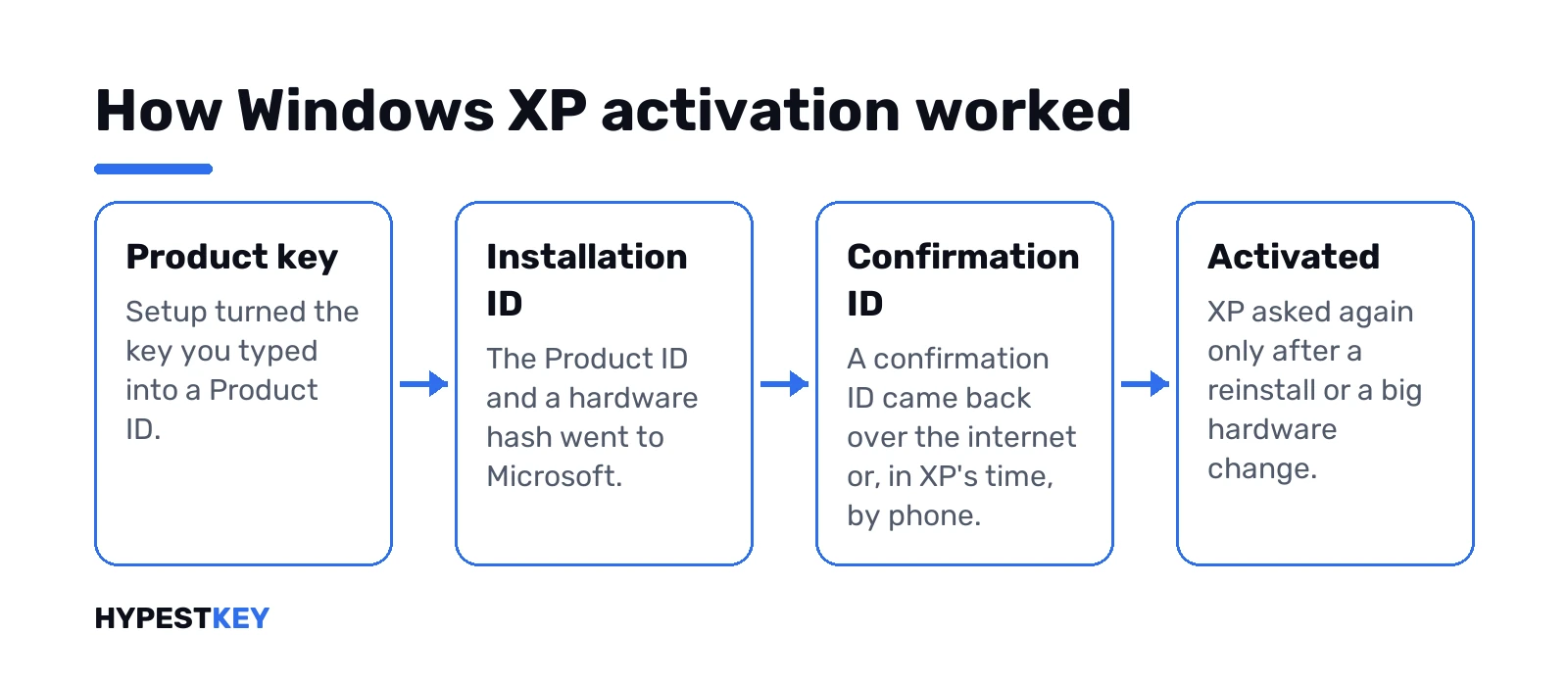
- Internet: the wizard sends the installation ID over a secure connection.
- Phone, back then: you read out a 50-digit installation ID and typed in the 42-digit confirmation ID you were given.
- Preinstalled PCs: many came pre-activated, locked to the maker’s BIOS, and never asked.
- Volume licence copies: no activation step at all.
Retail copies had 30 days from installation. After that, XP won’t allow an interactive logon until it’s activated. Services keep running; you just can’t sign in at the desk.
And today? Microsoft gives XP no updates and no technical help of any kind. A failed activation has nobody to be escalated to. We can’t promise that either route still gets through on a given day, and we wouldn’t plan a working PC around it.
The phone line itself is gone, too. Microsoft moved telephone activation for perpetual products online, to its Product Activation portal at aka.ms/aoh. Whether XP still appears in its product list, we can’t promise. On current Windows that portal is the offline route, as we describe in activating Windows without a phone call.
Reinstalling XP on the same PC
Good news here, at least on paper. Microsoft’s technical bulletin says a reinstall on the same or similar hardware can be reactivated any number of times. Hardware swaps count as well, though we’d note it takes several changed parts before XP asks again.
BIOS-locked OEM copies are friendlier still. Use the maker’s recovery disc on the same PC and the BIOS check takes the place of activation.
Before you wipe anything, note the Product ID and photograph the COA. Ten seconds now saves a lot of grief later.
Windows XP product key in a virtual machine
Same rules inside VirtualBox. The guest copy needs a key of its own. Virtual hardware looks nothing like the old PC, so activation runs again. A BIOS-locked OEM copy won’t pass its BIOS check there either.
Old CD on the shelf with its sleeve? We’d make an image of your own disc rather than pull one from an archive site. And keep the VM away from the internet: Microsoft warns that Windows without updates is at greater risk from viruses and malware.
The ProductKey error in VirtualBox with a newer Windows is a different problem. That one has its own fix.
Moving on from XP: Windows 11 and a new product key
Most XP-era PCs can’t take Windows 11. Microsoft says an old PC is unlikely to meet the requirements, and its suggestion is a new PC with Windows 11. We’d check any machine against the Windows 11 hardware requirements before you spend money on it.
- Windows 11 Home key: enough for a home PC.
- Windows 11 Pro key: for work machines; Home vs Pro shows what you’d gain.
Copy your documents to a USB drive first. Then a clean Windows 11 install on the new machine with Microsoft’s Media Creation Tool. Activation with the new key right after. We’d expect the key to turn into a digital license tied to the hardware.
An old Windows 7 box in the cupboard as well. Our Windows 7 product key page covers that one, and all our Windows keys sit in one place.
Need a key for the new PC? Ours for Windows 11 Pro comes as a genuine Retail license, instant to email. For XP itself we sell nothing, and we don’t list XP keys.
Sources we used: Microsoft’s technical details on XP product activation and its note on using a Windows version without updates.
Related guides
FAQ
Can you just give me a working XP key?
No. We don't publish XP keys of any kind, and shared keys from online lists end up blocked anyway.
Where's the key on my old Dell or HP tower?
On the Certificate of Authenticity label attached to the case. No label left? The PC maker is the one to ask.
Is the number in System Properties my key?
Nope. That's the Product ID. Setup builds it from the key, but you can't type it in as one.
Does XP activation still work at all?
We can't promise it. Microsoft gives XP no technical help now, and its phone line moved online to the Product Activation portal at aka.ms/aoh. A failed activation has nowhere to go.
Setup says my XP key is invalid. Now what?
Usually a typo. Use the number row, not the keypad, check B against 8, and make sure the disc matches the key: OEM, retail or upgrade.
Will my Windows 7 key activate XP?
No. Only keys made for XP work on XP, and keys from other Windows versions get rejected at setup.
What happens if I never activate it?
After the 30-day grace period, XP stops letting you sign in at the desk until it's activated.
Can my old XP PC run Windows 11 instead?
Rarely. Most hardware from that era misses the requirements, so Microsoft suggests a new PC with Windows 11.