Short answer: Windows 10 minimum requirements: a 1 GHz processor with PAE, NX and SSE2. RAM: 1 GB for 32-bit or 2 GB for 64-bit. Storage: 32 GB. Graphics: DirectX 9. Display: 800 x 600. No TPM or Secure Boot is needed on an existing PC. We'd still want 4 GB of RAM.
Windows 10 minimum requirements are a 1 GHz processor, 1 GB of RAM for 32-bit or 2 GB for 64-bit, 32 GB of storage, a DirectX 9 graphics chip and an 800 x 600 display. Low bar. Plenty of older PCs clear it, so the real question is how comfortable the PC will feel.
| Component | Windows 10 minimum | Good to know |
|---|---|---|
| Processor | 1 GHz or faster, x86 or x64, or an SoC | Needs PAE, NX and SSE2 |
| RAM | 1 GB for 32-bit, 2 GB for 64-bit | 64-bit uses 4 GB and more far better |
| Storage | 32 GB, version 1903 and later | 16 GB or 20 GB applied up to version 1809 |
| Graphics | GPU with DirectX 9 or later | Check it with dxdiag |
| Display | 800 x 600, 32-bit colour | At least 7 inches on laptops and tablets |
| Network | Wi-Fi or Ethernet | One of the two is enough |
Those numbers come from Microsoft’s own hardware specification, linked from its minimum hardware requirements page. Short list. The details below are where old PCs trip.
Windows 10 minimum requirements for the processor
Speed is the easy part. Any chip at 1 GHz or above qualifies, and so does a system on a chip.
The instruction sets matter more. Three of them are required:
- PAE. Lets a 32-bit system address memory past the old limit.
- NX. Blocks code from running in data areas of memory.
- SSE2. Standard on desktop chips for many years now.
A 64-bit install wants three more: CMPXCHG16b, LAHF/SAHF and PrefetchW. Very early 64-bit processors can miss one of these. On such a machine we’d stay with 32-bit.
RAM: 1 GB or 2 GB, and what we’d actually want
The floor is 1 GB for 32-bit Windows 10 and 2 GB for 64-bit. It boots. It runs. A browser with a few tabs will fill that quickly, though.
Microsoft’s own 32-bit and 64-bit FAQ notes that the 64-bit advantage shows most at about 4 GB of RAM and above. A 32-bit system handles large amounts of memory less efficiently. So with 4 GB or more installed, we’d pick 64-bit every time.
Planning an upgrade or a build? Our RAM calculator helps size memory for the work you do.
Storage: the 32 GB line since version 1903
This one changed over time. Older releases asked for less.
| Windows 10 version | 32-bit | 64-bit |
|---|---|---|
| 1809 and earlier | 16 GB | 20 GB |
| 1903 and later | 32 GB | 32 GB |
Current media is far newer than 1903. So 32 GB it is. Tight, too. Feature updates need room to unpack, and we’d expect a drive that small to fill up after a couple of apps. A 64 GB drive gives you breathing space.
One more line in the spec: the storage controller has to support booting through EFI.
Graphics, display and network
Windows 10 for desktop editions needs a GPU that supports DirectX 9 or later. Integrated graphics count. Want to know what yours supports? Run this from the Start search box:
dxdiagThe System tab shows the DirectX version. The Display tab shows the graphics chip and its driver.
The display minimum is SVGA, 800 x 600 at 32-bit colour depth. Laptops, tablets and 2-in-1s also need a primary screen of 7 inches or more. A desktop PC doesn’t need a display at all, by the spec.
Network? One option is enough. Wi-Fi or an Ethernet port.
TPM, UEFI and Secure Boot on Windows 10
Here Windows 10 differs most from Windows 11. Microsoft wrote this part of the specification for PC makers.
New device models from July 28, 2016 on had to ship with TPM 2.0 enabled. UEFI mode too, with Secure Boot on. Special builds and custom images were exempt. An older PC without a TPM? We’d still install Windows 10 on it, and that’s the big contrast with the newer system.
Not sure what’s in your machine? Our TPM 2.0 guide shows how to check it, and the Secure Boot guide covers the firmware switch.
32-bit or 64-bit Windows 10: which minimum applies
Check what you run now. Settings, System, About. Look at System type under Device specifications.
Moving from 32-bit to 64-bit isn’t an in-place upgrade. Per Microsoft’s 32-bit and 64-bit FAQ, it means reformatting the disk and reinstalling your programs. Back up first.
New PCs? Different story. From version 2004, all new Windows 10 systems from PC makers use 64-bit builds. Microsoft kept 32-bit media in retail channels for existing machines. Our Windows 10 Pro key works with both, 32-bit and 64-bit.
Features that need more than the Windows 10 minimum
The minimum runs Windows. Some built-in features ask for extra hardware or a specific edition.
Hyper-V is the clearest example. Requirements, from Microsoft’s Hyper-V install page:
- Windows 10 Pro or Enterprise. Home can’t install the role.
- A 64-bit processor with Second Level Address Translation.
- CPU support for VM Monitor Mode Extension.
- At least 4 GB of memory.
Edition gaps like this one are listed in our Windows 10 Home vs Pro comparison. Running Windows on a Mac instead? See installing Windows 10 on a Mac.
How to check a PC against the Windows 10 minimum requirements
Five minutes, no tools to download.
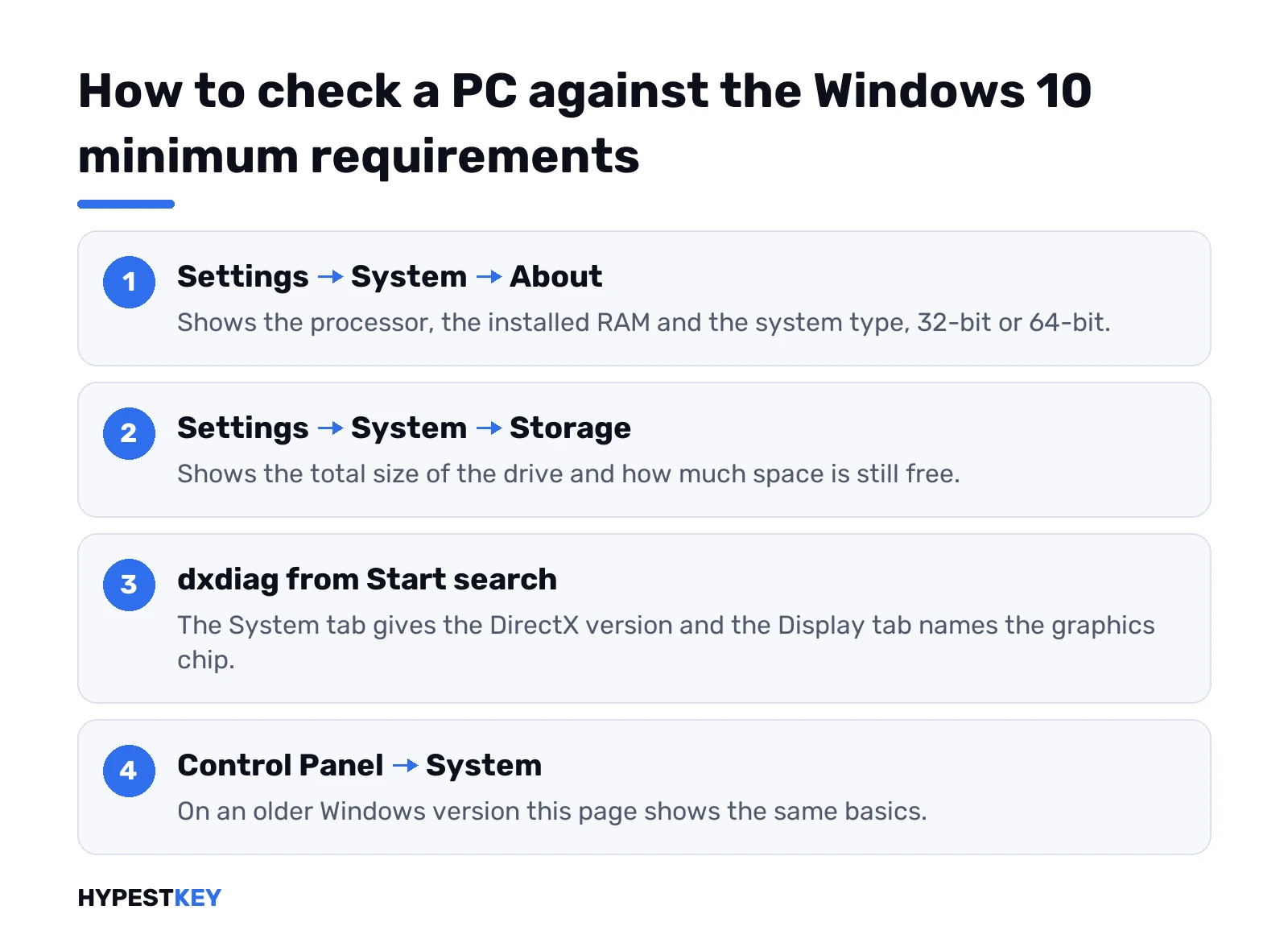
- Settings, System, About. Processor, installed RAM and System type are all there.
- Settings, System, Storage. Total size and free space.
- Start search, dxdiag. DirectX version and graphics chip.
- Older system on the PC now? System in Control Panel shows the same basics.
Coming from an older system? Our walkthrough for upgrading from Windows 7 picks up from here. So does the one for moving from Windows 8.
Windows 10 minimum requirements vs Windows 11
Same PC, very different verdicts. The table puts the two minimums side by side.
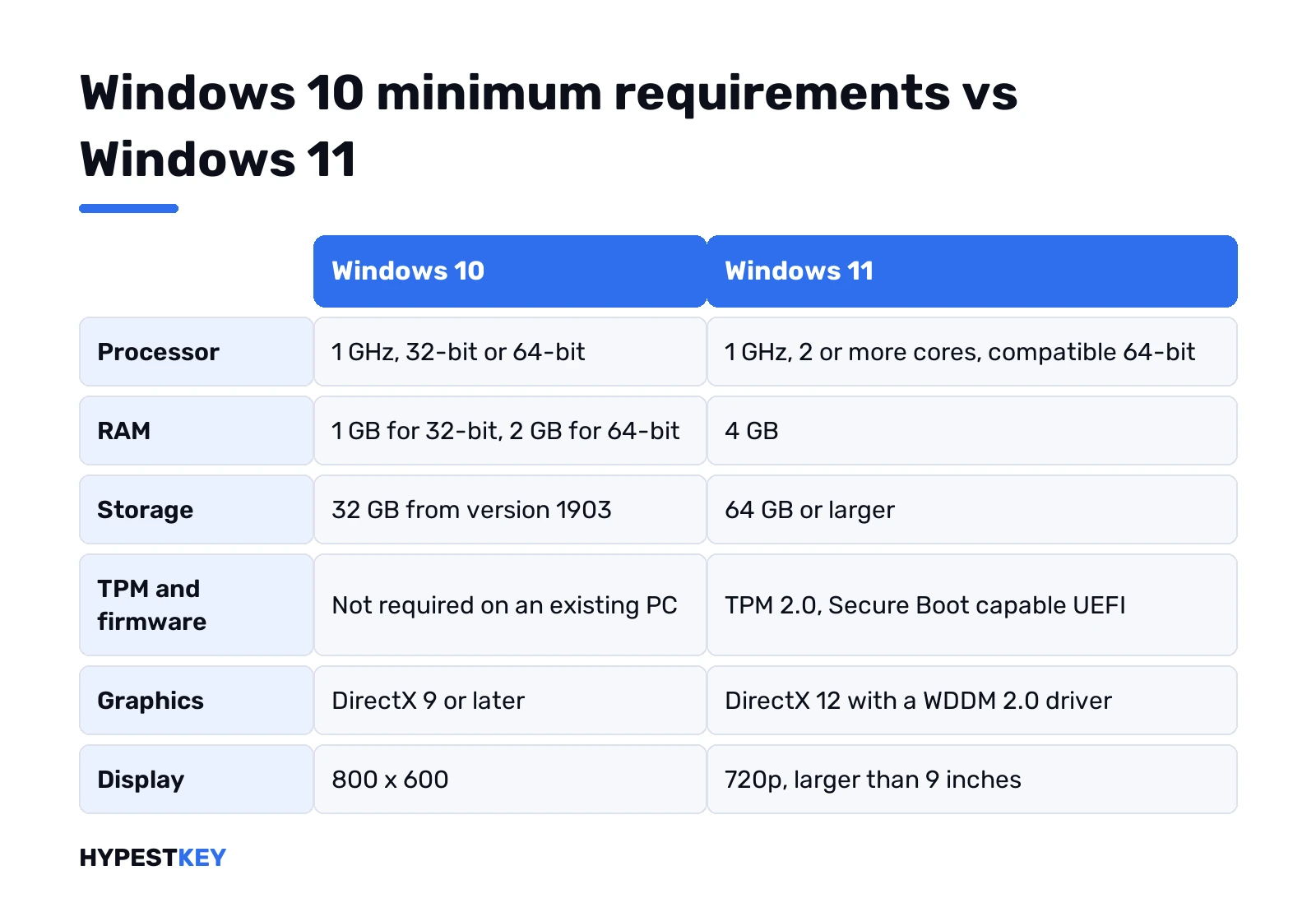
| Component | Windows 10 | Windows 11 |
|---|---|---|
| Processor | 1 GHz, 32-bit or 64-bit | 1 GHz, 2 or more cores, compatible 64-bit |
| RAM | 1 GB or 2 GB | 4 GB |
| Storage | 32 GB | 64 GB |
| Firmware | No requirement for an existing PC | UEFI, Secure Boot capable |
| TPM | No requirement for an existing PC | TPM 2.0 |
| Graphics | DirectX 9 | DirectX 12 with a WDDM 2.0 driver |
| Display | 800 x 600 | 720p, larger than 9 inches |
A PC that barely clears the Windows 10 list rarely passes the newer one. So we’d read our Windows 11 requirements guide before buying anything. Hardware qualifies? Then the Windows 11 vs Windows 10 comparison helps.
Two details from Microsoft’s Windows 10 page. A PC that meets the Windows 11 minimum should show the upgrade offer in Windows Update. No offer there? The hardware check above is the first suspect.
- Windows 10 Home in S mode. Moves to Windows 11 Home in S mode, if the PC meets the minimum.
- Windows 10 Pro in S mode. Has to leave S mode first. Windows 11 Pro doesn’t come in S mode.
Installing once the hardware checks out
Hardware fine? Then it’s the install. Make the stick with our bootable Windows 10 USB guide. Boot from it with the BIOS steps. The media itself comes from our Windows 10 download guide.
Besides the PC, the Windows 10 download page asks for three things before you start:
- An internet connection. Provider fees may apply, as the page puts it.
- A blank USB stick of at least 8 GB, or a blank DVD and a burner.
- A license for Windows 10. Reinstalling on a PC that was already activated? No key to type then.
Activation comes last, covered in how to activate Windows 10. Need a license? We send our Windows 10 Home key as a Retail license, instant to email.
Windows 10 compatibility scan with Setup
This is the part most guides skip. Windows Setup has a switch that runs only the compatibility checks, then exits without installing.
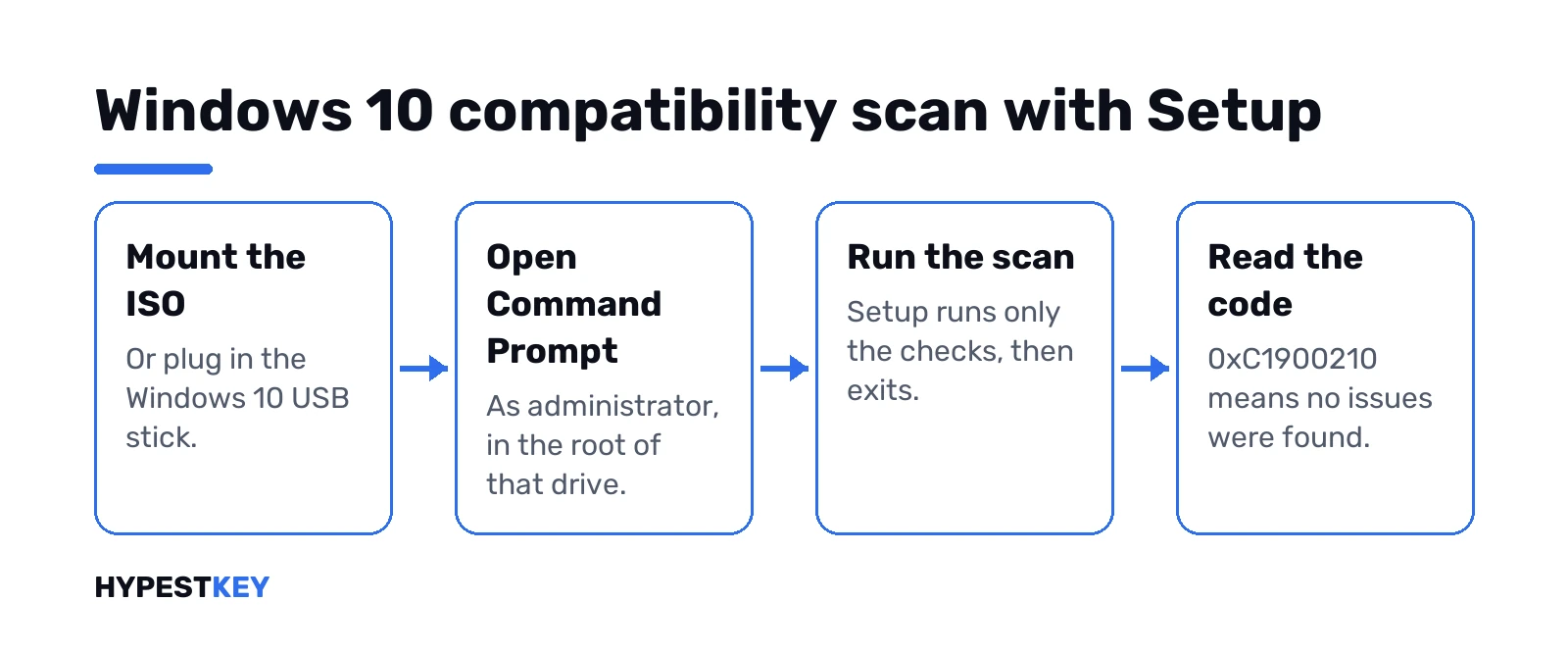
Mount the Windows 10 ISO or plug in the USB stick. Command Prompt, as administrator, in the root of that drive. Then:
start /wait setup.exe /auto upgrade /quiet /compat scanonly
echo %errorlevel%
The first line runs the scan with no windows. The second prints the result code. A catch: Microsoft documents this switch for Setup started from Windows 10 or later, so on Windows 7 we’d rely on the normal Setup screens instead.
Need the media first? Our guides on mounting a Windows 10 ISO and building a bootable Windows 10 USB cover both. All switches are on Microsoft’s Windows Setup command-line options page.
What the scan’s result codes mean
Command Prompt prints the code as a negative decimal number. Here’s how to read it:
| Code | As echo %errorlevel% shows it | Meaning |
|---|---|---|
| 0xC1900210 | -1047526896 | No compatibility issues found |
| 0xC1900208 | -1047526904 | Actionable issues found, for example apps |
| 0xC1900204 | -1047526908 | The chosen migration option isn’t available |
| 0xC1900200 | -1047526912 | The machine isn’t eligible |
| 0xC190020E | -1047526898 | Not enough free disk space to install |
With 0xC1900208, some app is in the way. Setup writes the details to its logs. The CopyLogs option on the same Microsoft page collects them in one place.
Checking Windows 10 compatibility from Windows 7 or 8.1
Update the old system first. Microsoft wants the latest version, Windows 7 SP1 or Windows 8.1 Update.
A license matters here too. Microsoft’s upgrade steps assume you already have one for Windows 10. Old keys won’t do it: Windows 7 and 8.1 keys stopped activating Windows 10 and 11 in 2023.
Then run the Media Creation Tool on that PC and pick Upgrade this PC now. Setup runs its compatibility checks first. Any message it finds shows up before the install starts.
We wrote step-by-step guides for both: the Windows 7 upgrade and the Windows 8 upgrade. Want a fresh start instead? See the Windows 10 clean install guide.
Drivers and hardware: ask the manufacturer
Microsoft’s advice on its download page is short. Go to the PC maker’s website for updated drivers and hardware compatibility information.
So we’d look up the exact model there. Laptop, motherboard, printer, audio interface. If the maker lists a Windows 10 driver, good. No listing? Then the device may still work with a built-in driver, but there’s no promise.
Old programs and Windows 10 compatibility for apps
Apps are where upgrades usually hurt. The hardware passed, and then one program won’t start.
Windows 10 has a Program Compatibility Troubleshooter for that. Settings, Update & Security, Troubleshoot, Additional troubleshooters. Then Program Compatibility Troubleshooter, and follow the prompts.
Microsoft’s article on making older apps compatible adds one more tip. Flickering or freezing apps often need newer device drivers from Windows Update.
Related guides
FAQ
can 2gb ram run windows 10
Yes, 64-bit Windows 10 needs 2 GB at minimum. It runs, but a browser with several tabs will slow it down.
Is 4 GB of RAM enough for Windows 10?
For everyday work, yes. At 4 GB we'd install 64-bit, since it handles that much memory better than 32-bit.
how much storage does windows 10 need
32 GB for version 1903 and later, 32-bit or 64-bit. Older releases asked for 16 GB or 20 GB.
Does Windows 10 need TPM 2.0?
Not on an existing PC. Microsoft set TPM 2.0 as a rule for PC makers shipping new models, while Windows 11 needs it everywhere.
What processor does Windows 10 need at minimum?
Any 1 GHz or faster chip with PAE, NX and SSE2. A 64-bit install also needs CMPXCHG16b, LAHF/SAHF and PrefetchW.
Can I switch from 32-bit to 64-bit without reinstalling?
No. Microsoft says it takes a reformat and a fresh install, so back up your files and programs first.
my pc runs windows 10, will it run windows 11
Not always. Windows 11 needs TPM 2.0, Secure Boot capable UEFI, 4 GB of RAM, 64 GB of storage and a compatible 64-bit CPU.
Will my old PC run Windows 10?
Probably, if it has a 1 GHz processor, 2 GB of RAM for 64-bit and a 32 GB disk.