Short answer: Windows 10 download is free from Microsoft's Download Windows 10 page. On a Windows PC, we'd run the Media Creation Tool to upgrade or build an 8 GB USB stick. Mac or Linux? The page offers a multi-edition ISO in 64-bit or 32-bit. You still need a license or digital license to activate it.
The official Windows 10 download is free on Microsoft’s Download Windows 10 page, and it comes in three forms: the Update Assistant for this PC, the Media Creation Tool for a USB stick or DVD, and a multi-edition ISO file. You pay only for the license that activates it.
| What you want | Pick this | What you end up with |
|---|---|---|
| Bring this PC to the latest Windows 10 version | Update Assistant, “Update now” | Windows 10 version 22H2 in place, files kept |
| Upgrade this PC or build a bootable USB | Media Creation Tool, “Download Now” | An upgrade, a USB drive or an ISO file |
| Download from a Mac, Linux or a phone | Disc image (ISO file) page | A 64-bit or 32-bit ISO you can burn, write to USB or mount |
| Enterprise edition | Microsoft 365 admin center | Not on the public page at all |
Where the official Windows 10 download lives
One address. Microsoft’s Download Windows 10 page, under Software Download. Nothing to sign in to, nothing to pay at this step.
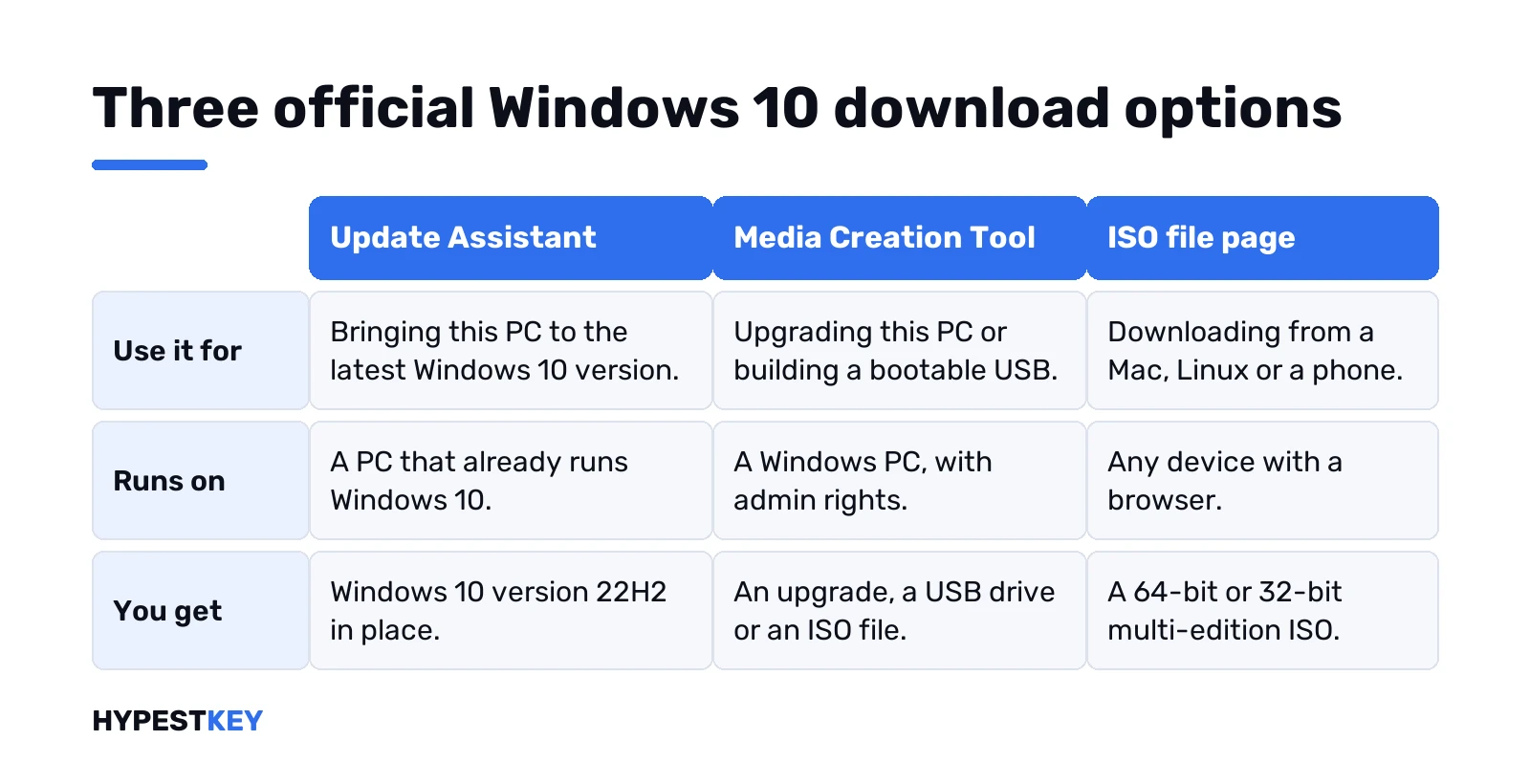
What you see depends on the device. On a Windows PC, the page offers the Update Assistant and the Media Creation Tool. On a Mac, Linux or a phone? Different page. The tool can’t run there, so you’d land on the one with the ISO file.
A banner sits on top about security updates for Windows 10. It suggests Windows 11, and we’d read it before planning a long stay on 10. Our Windows 11 vs Windows 10 comparison lays the two side by side.
Before you download: license, edition, language and bit version
The download is free. Activation isn’t. Microsoft says it plainly on the page: to create installation media, you first need a license to install Windows 10.
Four things to check on the PC you’ll install on, straight from Microsoft’s own list:
- 64-bit or 32-bit processor. System in Control Panel shows it as System type. You’ll download the version that matches.
- Language. Pick the one you use now if you’re reinstalling. Region in Control Panel shows it.
- Edition. Home or Pro, same as before. Look for Windows edition on the same System page.
- Office on a new device. Microsoft suggests redeeming it before the upgrade.
And the hardware floor, which is low:
| Part | Windows 10 needs |
|---|---|
| Processor | 1 GHz or faster, or an SoC |
| Memory | 1 GB for 32-bit, 2 GB for 64-bit |
| Storage | 32 GB or more |
| Graphics | DirectX 9 or later with a WDDM 1.0 driver |
| Display | 800 x 600 |
Not sure which edition you have a key for? Our Windows 10 Home vs Pro guide sorts that out, and the N edition explainer covers the versions without media apps.
Update Assistant: the quickest route for this PC
Top of the page. It’s labelled Windows 10 2022 Update, Version 22H2, with an Update now button underneath.
Who it’s for? A PC on an older Windows 10 version that needs to catch up. No USB, no ISO, no choosing editions. Microsoft says it gets you the latest version. We’d still back up first.
- Press Update now. A small installer downloads.
- Run it, then follow the prompts.
- Keep the laptop plugged in. Several restarts are normal.
Before running it, Microsoft asks you to look at the Windows release information status for known issues. Takes a minute. We’d do it on any PC with unusual hardware or old drivers.
Still on 7 or 8.1? Wrong door. Use the tool below.
Using the Media Creation Tool on a Windows PC
The usual route on a Windows PC. Under “Create Windows 10 installation media”, press Download Now. You get MediaCreationTool.exe, sometimes with the version in its name, like MediaCreationTool_22H2.exe.
- Run it. Admin rights needed.
- Accept the license terms.
- Choose: Upgrade this PC now, or Create installation media for another PC.
- For media: language, edition, 64-bit or 32-bit.
- USB flash drive or ISO file. Then wait.
That tool has more options than fit here. We walk through each screen, plus the error codes, in our Windows 10 Media Creation Tool guide.
Reinstalling on a PC that activated before? Then no product key needed. The digital license kicks in on its own after setup.
Windows 10 ISO download from a Mac, Linux or a phone
Here the page looks different. Its title says Disc Image, ISO File. Same files, minus the tool.
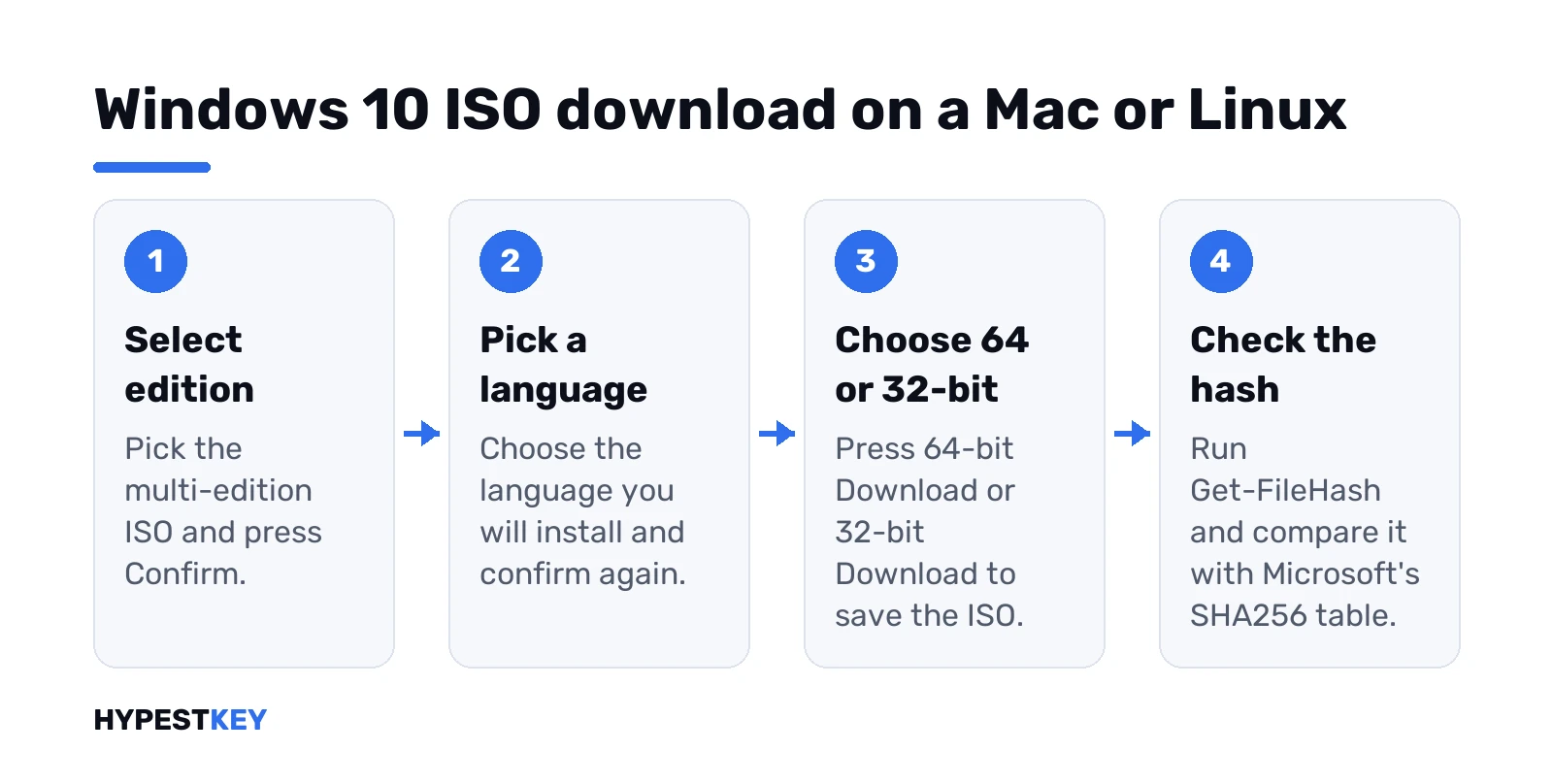
- Select edition. Today the list holds one entry, the multi-edition ISO.
- Confirm.
- Pick the product language. Confirm again.
- Two buttons appear: 64-bit Download and 32-bit Download.
That multi-edition ISO covers both Windows 10 Home and Windows 10 Pro. The key you type during setup, or the one in your PC’s firmware, decides which edition installs.
On a Mac, the ISO is only step one. Our guide to installing Windows 10 on a Mac takes it from the ISO onward.
Want the ISO page on a Windows PC too? You’d normally just use the tool’s ISO option instead. Same result, fewer steps.
Check the ISO with Get-FileHash
Cheap insurance. Microsoft publishes a SHA256 value for every language and bit version on the ISO page, under Verify your download.
PowerShell, then this, with your own path:
Get-FileHash C:\Users\you\Downloads\Win10.isoCompare the long string with your language’s row in Microsoft’s table. Same string? The file arrived intact. No match? Delete it, download again. Your file name may differ. We’d point the command at whatever landed in Downloads.
Windows 10 download links: the 24-hour window
A detail the ISO page mentions in small print. The 64-bit and 32-bit buttons aren’t permanent links. “Links valid for 24 hours from time of creation,” the page says, and it shows the exact expiry time in UTC.
- Slow connection? Start the download soon after the buttons appear, not the next evening.
- Link expired halfway? Go back to the page, pick the edition and language again, and you get fresh buttons.
- Sharing the link with someone else? Pointless after a day. Send them to Microsoft’s page instead.
Space is the other thing. Microsoft asks for enough free storage on the computer, a USB stick or an external drive to hold the download. The ISO is several gigabytes, so we’d check before pressing the button.
Once it’s saved, keep it. Next reinstall, no second download. And the stick? Separate job, covered in how to create a bootable Windows 10 USB.
Install straight from the ISO without a USB stick
Already on Windows and only want an upgrade? Skip the stick. Right-click the ISO, choose Mount, open the new drive, double-click setup.exe.
Microsoft notes this performs an upgrade of the current system. Fine for a repair install that keeps apps. Not for a wipe, though. For a fresh start we’d use our clean install guide for Windows 10, and the guide to mounting ISO files on Windows 10 explains the mount part in more detail.
Which edition the download installs
Coming from an older Windows? Microsoft’s own mapping:
| You run now | Choose in the download |
|---|---|
| Windows 7 Starter, Home Basic, Home Premium, Professional, Ultimate | Windows 10 |
| Windows 8 or 8.1, including Pro, Single Language and with Bing | Windows 10 |
| Windows 10 Home or Pro | Windows 10 |
| Windows 8 or 8.1 Chinese Language Edition | Windows 10 Home China |
Enterprise isn’t in the public download. Microsoft sends that crowd to the Microsoft 365 admin center, and Visual Studio subscribers to their own portal. Insider builds come from the Windows Insider site.
Moving up from an old system? Two step-by-step pages: the upgrade from 7 and the move from 8 to 10.
Activating Windows 10 after setup
Three ways it usually goes:
- PC had Windows 10 before. Digital license, nothing to type.
- Key in the firmware. Many modern devices have one, and setup applies it if the edition matches.
- A 25-character product key. Type it during setup, or later in Settings.
Lost the old key? Our page on how to find your Windows 10 product key shows where it hides. The rest, including phone activation, is in how to activate Windows 10.
Unofficial download sites to skip
Search results mix Microsoft’s page with app portals and file archives. Some carry images labelled as already activated. We’d stay away, full stop. A modified ISO can carry anything, and you can’t check it against Microsoft’s hash table.
Microsoft’s own page is quicker anyway. No ads, no wrappers, no slow mirror.
Windows 10 download or Windows 11 instead
Newer PCs often meet the Windows 11 bar. Then the matching download is the Windows 11 Media Creation Tool, and the Windows 11 requirements tell you in two minutes whether your hardware qualifies.
Staying on 10 for an old app? Grab the download above. Need a key? Our Windows 10 Pro key is Retail, for 32-bit or 64-bit, any language. Instant to email.
Upgrade this PC now
For a PC that runs Windows 7 or Windows 8.1 and has a license for 10. Or a PC that already activated Windows 10 and needs a reinstall.
- Run the tool. Accept the license terms.
- What do you want to do? Upgrade this PC now. Next.
- Let it download. Coffee time.
- No product key prompt on a PC that had Windows 10 before. The digital license activates it later.
- Change what to keep. Three choices below.
- Close your apps. Install.
- Keep personal files and apps. The usual pick.
- Keep personal files only. Apps go, documents stay.
- Nothing. A fresh system, everything wiped.
Then it restarts a few times. Don’t switch it off in the middle. Microsoft repeats that warning, and so do we.
Coming from 7 or 8? We cover the whole move in the upgrade from 7 and the guide for 8 users.
Which edition the Windows 10 Media Creation Tool offers
The edition menu is short on purpose. Microsoft’s table for upgraders:
| Current Windows | Pick in the tool |
|---|---|
| Windows 7 Starter, Home Basic, Home Premium, Professional, Ultimate | Windows 10 |
| Windows 8, 8.1, Pro, Single Language, with Bing, Pro with Media Center | Windows 10 |
| Windows 10 Home or Pro | Windows 10 |
| Windows 8 or 8.1 Chinese Language Edition | Windows 10 Home China |
The plain “Windows 10” choice holds Home and Pro together. Your key, or the one stored in the PC’s firmware, decides which installs. Enterprise isn’t in the tool at all.
Home or Pro, not sure? Our Windows 10 Home vs Pro guide compares them, and the Home to Pro upgrade fixes a wrong pick later without reinstalling.
Windows 10 Media Creation Tool not working
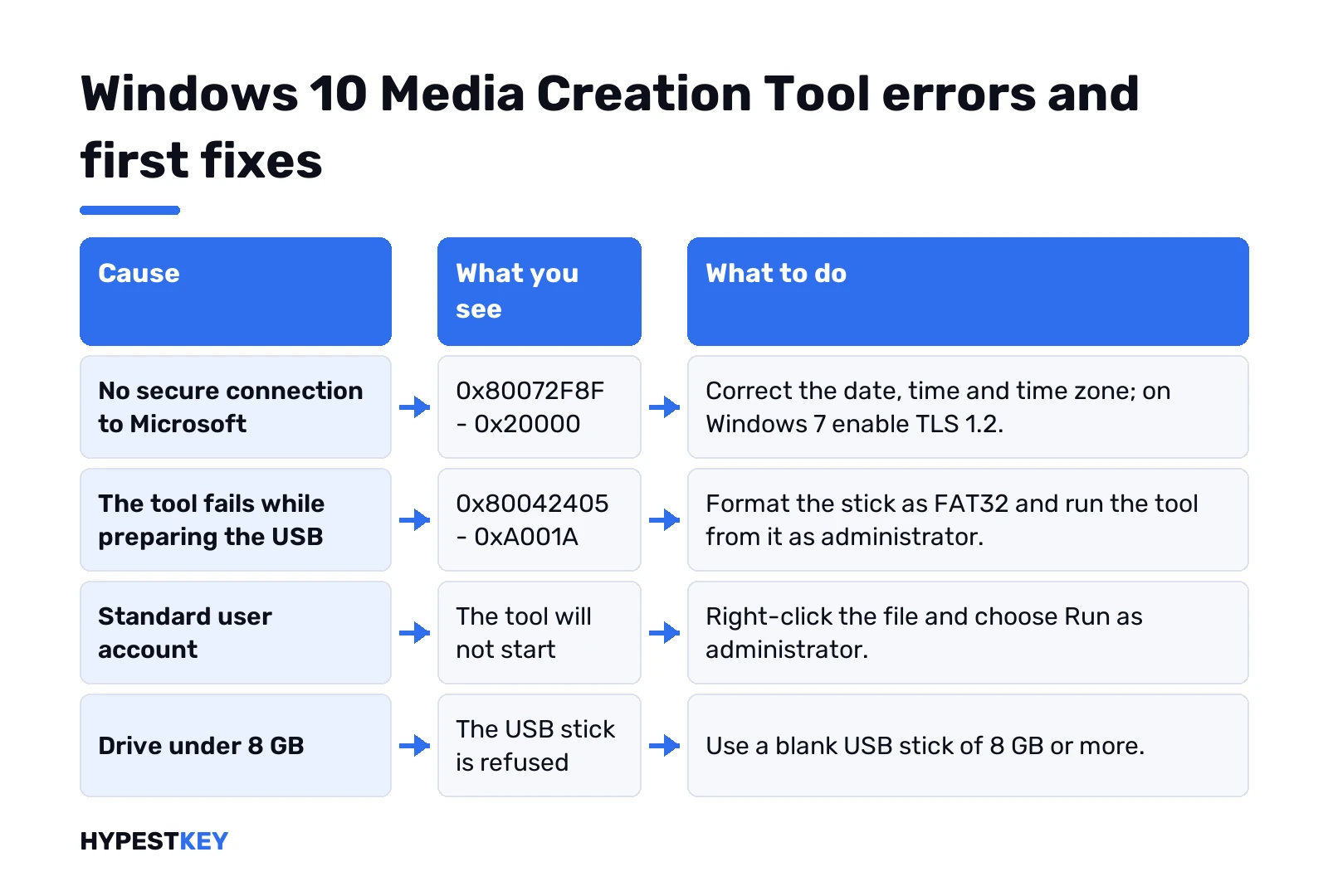
Most failures fall into a few groups. Here’s where we’d look first.
| What you see | Likely cause | First thing to try |
|---|---|---|
| 0x80072F8F – 0x20000 | No secure connection to Microsoft’s servers | Correct date, time and time zone; enable TLS 1.2 on Windows 7 |
| 0x80042405 – 0xA001A | The tool fails while preparing the USB | Format the stick as FAT32, run the tool from it as administrator |
| Tool won’t start | Standard user account | Run as administrator |
| USB stick refused | Drive under 8 GB | Use a blank 8 GB or bigger stick |
| Download stops part way | Connection drops or too little free space | Free some space, check the connection, run it again |
That first code is the one we meet most. Clock first. Off by hours, and the secure handshake fails. Error stays on an old PC? Microsoft’s KB3140245 update adds TLS 1.2 support, and we’d pair it with the Easy Fix that answers on Microsoft Q&A point to. Same code in activation? Our 0x80072F8F fix covers that side.
The USB code is rarer. Microsoft Q&A threads report one way past it. Format the stick as FAT32. Copy the tool onto it. Run it from there as admin.
Windows 10 vs Windows 11 Media Creation Tool
Same idea, different downloads. The Windows 11 tool lives on the Download Windows 11 page and builds media for x64 PCs only. No Arm, no 32-bit. The Windows 10 one still offers 32-bit.
Hardware new enough? We’d go straight to 11. Check the Windows 11 requirements, then follow our Windows 11 Media Creation Tool guide.
Related guides
FAQ
Is the Windows 10 download really free?
Yes. The download from Microsoft costs nothing, but activating Windows 10 needs a license, a digital license or a product key.
Where do I get the Windows 10 ISO on a Windows PC?
Run the Media Creation Tool and pick ISO file. The direct ISO page shows up for Mac, Linux and phones.
Does the ISO include Home and Pro?
Yes. It's a multi-edition ISO, and the key you enter during setup decides whether Home or Pro installs.
How big a USB stick do I need?
At least 8 GB for the Media Creation Tool. The drive gets wiped, so copy anything you need off it first.
Can I download Windows 10 Enterprise from the same page?
No. Enterprise comes through the Microsoft 365 admin center or a Visual Studio subscription, not the public download page.
How do I know my ISO isn't tampered with?
Run Get-FileHash in PowerShell and compare the SHA256 value with the one Microsoft lists for your language and bit version.
Do I need a product key to reinstall?
Usually not. A PC that already activated Windows 10 reactivates on its own with its digital license after setup.
Is the Windows 10 Media Creation Tool still available?
Yes. Microsoft still offers it on the Download Windows 10 page, under Create Windows 10 installation media.