Short answer: Windows 8.1 download as a full ISO is no longer offered by Microsoft: its windows8ISO page returns a 404 error and the old link opens the general page with Windows 11 and 10. Microsoft still hosts the KB2919355 update for an installed 8.1. For a reinstall, we'd use the PC maker's recovery media; otherwise install Windows 11 or Windows 10 from Microsoft with its own key.
A full Windows 8.1 download isn’t on Microsoft’s site anymore: the old Windows 8.1 address now opens the general Software Download page, which offers Windows 11 and Windows 10 only. Microsoft no longer serves a Windows 8.1 image: its windows8ISO download page now returns a 404 “page not found” error. What we can still point to on Microsoft’s site is the Windows 8.1 Update package for a PC that already runs 8.1. For the legal way forward we’d pick Windows 11 or Windows 10, each with its own key.
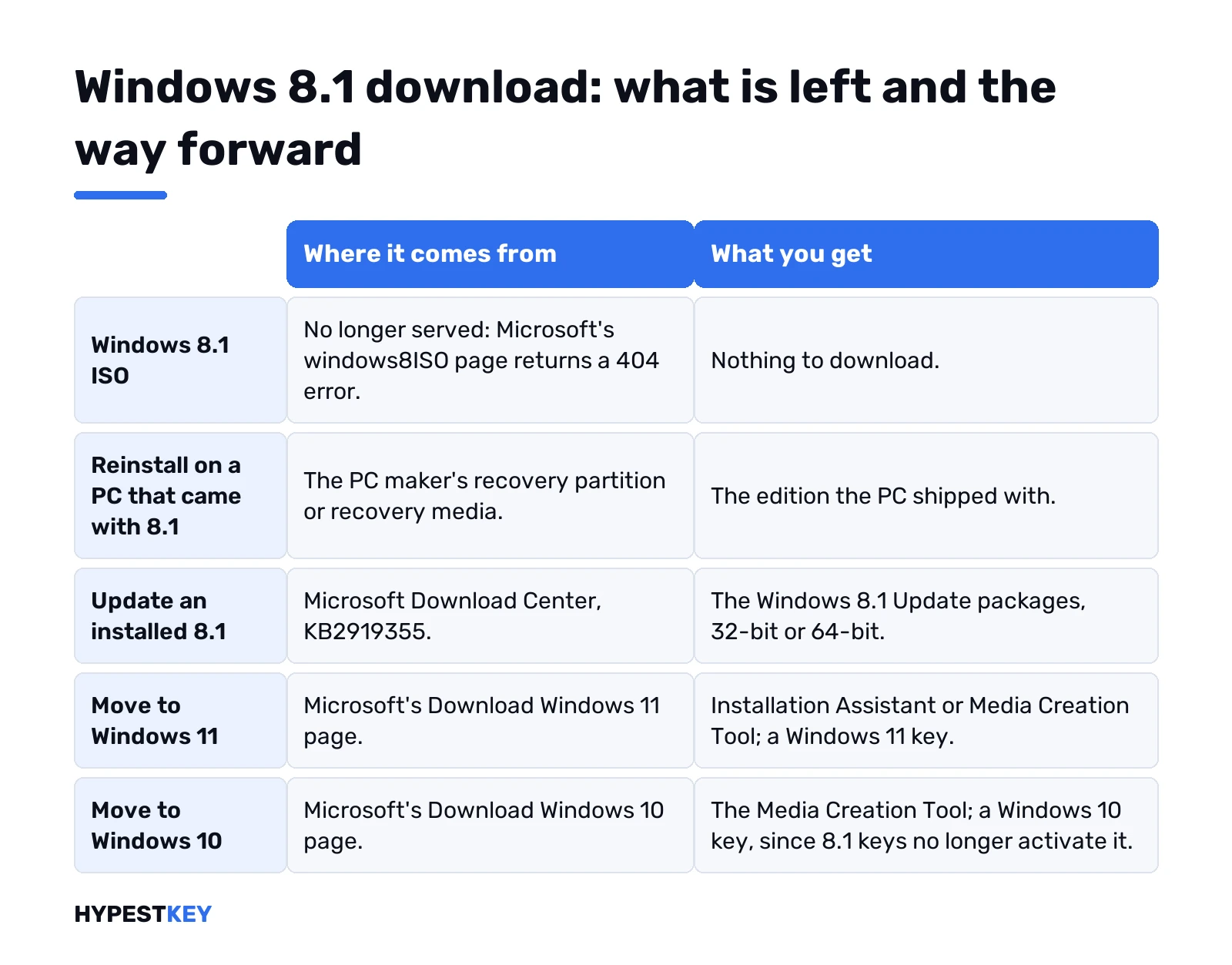
| You need | Where it comes from today | What you get |
|---|---|---|
| Reinstall Windows 8.1 on a PC that came with it | The PC maker’s recovery media or recovery partition | The same edition the PC shipped with |
| Bring an existing 8.1 install up to date | Microsoft Download Center, KB2919355 | The Windows 8.1 Update packages, 32-bit or 64-bit |
| Windows 11 on a PC that meets its requirements | Microsoft’s Download Windows 11 page | Installation Assistant or Media Creation Tool; a Windows 11 key to activate |
| Windows 10 on an older PC | Microsoft’s Download Windows 10 page | The Media Creation Tool; a Windows 10 key to activate |
Where the Windows 8.1 download page went
Short story: Microsoft took it down. The old Microsoft address for 8.1 now lands on the main Software Download page, and the windows8ISO address answers with a “page cannot be found” error. Tiles on the main page? Windows 11 and 11 for Arm. Windows 10. Insider builds, the Media Feature Pack.
Windows 8.1 still shows in the site’s top menu. Click it, though, and you get an information page about the product. No edition picker, no language list, no ISO button.
So the form you remember, product key in, ISO out, is gone. A key alone won’t bring it back either. Answers on Microsoft Q&A say the same: the public page no longer serves 8.1 installation media. We don’t link a Windows 8.1 ISO anywhere on this page, because there is no Microsoft source left to link.
KB2919355: the 8.1 Update package
This part is still there. The Windows 8.1 Update KB2919355 for x64 sits on the Microsoft Download Center. 32-bit PCs get a separate page.
It isn’t a full system, though. It updates an 8.1 that’s already installed. Microsoft calls it a cumulative set of security and critical updates, and says it must be installed for the PC to keep getting Windows Update fixes.
Order matters here. Microsoft lists it like this:
- KB2919442 first. It’s the prerequisite.
- clearcompressionflag.exe.
- KB2919355, the big one. About 690 MB on 64-bit.
- KB2932046.
- KB2959977.
- KB2937592.
- KB2938439.
- KB2934018.
Restart when it asks. Then Windows Update for whatever comes next.
Windows Embedded 8.1 Industry Pro evaluation: not a Windows 8.1 download
Search results still mention a Windows Embedded 8.1 Industry Pro evaluation from Microsoft’s Download Center. It isn’t Windows 8.1 for a home or office PC, and we don’t point to it as a way to get one. It was built for kiosks, tills, factory screens, that sort of device. As Microsoft described the trial:
- Size: 2.6 GB for 32-bit, 3.5 GB for 64-bit.
- Trial: 180 days, registration required.
- Activation: online, within 10 days of installing.
- No upgrade. Clean install only, and no way back except your old media.
- No technical support from Microsoft.
A time-limited trial of a device edition doesn’t replace a licensed desktop system. For a PC people use every day, we’d go to Windows 11 or Windows 10, covered further down.
Reinstalling Windows 8.1 from recovery media
Most 8.1 PCs came with it from the factory. That’s the good news. The maker usually kept a way back.
- Recovery partition. Many laptops have one, started from a key at power-on. Your maker’s manual names it.
- Recovery media. Ask the PC maker. Microsoft Q&A answers point people there for a matching image.
- Your own old disc or USB. Same edition, same bit version, same key.
- Company PC? The licensing admin has the volume licensing downloads.
We’d copy your files off first, every time. A factory restore can wipe the drive.
Windows 8.1 download from archive sites
Search results list file archives and mirror sites with 8.1 ISOs, some labelled as original Microsoft files. We don’t link them, and we don’t link any other unofficial mirror.
The reason is simple. There’s no Microsoft hash table for 8.1 anymore to check them against, and a modified image can carry malware or fail activation. Old PC or not, it’s still a PC on your network. If the PC maker’s recovery media isn’t available, we’d install Windows 11 or Windows 10 from Microsoft instead.
Windows 8.1 system requirements, for the record
Low, even by old standards. A Microsoft-hosted archive post lists them like this:
| Part | 32-bit | 64-bit |
|---|---|---|
| Processor | 1 GHz, with PAE, NX and SSE2 | Same, plus CMPXCHG16b, PrefetchW and LAHF/SAHF |
| RAM | 1 GB | 2 GB |
| Disk space | 16 GB | 20 GB |
| Graphics | DirectX 9 device with a WDDM driver | Same |
Running it in a virtual machine? Give it a bit more than that. Hyper-V inside 8.1 Pro, for comparison, wants a 64-bit system with SLAT and an extra 2 GB of RAM.
Which edition and bitness do you have now? PC settings, PC and devices, PC info. Edition, activation and System type all sit on that one screen. Write them down before anything gets wiped.
Activating Windows 8.1 after a reinstall
Install done, activation next. It sits in PC settings, under Activation. Enter the key there.
No internet on that machine? Telephone activation moved online. Microsoft now sends offline activation to its Product Activation portal, aka.ms/aoh, for Retail, OEM and volume licenses. Its help page doesn’t name Windows 8.1, though, so we’d try online activation first. More in our page on activating Windows without the phone line. Lost the key? Finding your Windows product key covers the usual hiding places.
Not sure it took? Check your activation status in a minute.
Windows 8.1 download alternative: Windows 10 or 11
For anything online, we’d move on. Both current systems come straight from Microsoft. The Download Windows 11 page offers the Installation Assistant and the Media Creation Tool for PCs that meet the Windows 11 requirements. On older hardware we’d use the Download Windows 10 page and its own Media Creation Tool, which expects people coming from 8.1: the tool upgrades an 8.1 PC when you have a Windows 10 license.
- Upgrade path, step by step: moving from Windows 8 to Windows 10.
- The download itself: our Windows 10 download guide, or the Windows 11 Media Creation Tool.
- The USB stick, screen by screen: making a bootable Windows 10 USB.
- Newer hardware: Windows 11 requirements first.
One thing a Windows 8.1 key won’t do. Activate Windows 10 or 11. Microsoft stopped accepting Windows 7 and 8.1 keys for that in 2023, so the newer system needs its own license. Keys for the newer systems: Windows 10 Pro or Windows 11 Pro.
Keeping Windows 8.1 for one old program
Some apps never moved past 8.1. Fair enough. Then we’d keep that machine offline. Or run 8.1 in a virtual machine on a newer PC, so the old program sits in a box. Apple hardware? See our guide to Windows virtual machines on a Mac.
Need a license for that install? Our Windows 8.1 Pro key works on 32-bit and 64-bit, one-time purchase, instant to email.
FAQ
Can I still download Windows 8.1 from Microsoft?
Not as a full ISO. The old download address now opens the main Software Download page with Windows 11 and 10.
Will my Windows 8.1 product key get me the ISO?
No. The key-based ISO form is gone, so a key alone won't open any download on Microsoft's site.
What is KB2919355 for?
It's the Windows 8.1 Update. It goes on an installed 8.1 so the PC keeps getting Windows Update fixes.
Is the Embedded 8.1 evaluation a way to get normal 8.1?
No. Windows Embedded 8.1 Industry Pro was a 180-day evaluation for devices like kiosks and tills, not Windows 8.1 for a home or office PC. We don't point to it as a download route.
How do I reinstall 8.1 on a laptop that came with it?
Use the maker's recovery partition or ask the PC maker for recovery media. Copy your files off first.
Are archive copies of the 8.1 ISO safe?
We can't vouch for them and don't link any mirror. There's no Microsoft hash to check against, and modified images can carry malware. Windows 11 or Windows 10 from Microsoft is the safe route.
Can I go from 8.1 straight to Windows 10?
Yes. The Windows 10 Media Creation Tool upgrades an 8.1 PC when you have a Windows 10 license.
will my 8.1 key activate windows 10?
Nope. Microsoft stopped accepting Windows 7 and 8.1 keys for Windows 10 and 11 in 2023. The newer system needs its own key.