Short answer: The best Publisher alternative for most people is Word or PowerPoint, the pair Microsoft recommends now that the app has left its subscription. Real page layout? Affinity, free for individuals on Windows, Mac and iPad. Old .pub files open in LibreOffice Draw or Scribus, both free. We'd pick by the job.
The best Publisher alternative for most people is Word or PowerPoint, the two apps Microsoft itself suggests now that Publisher has left Microsoft 365. Real desktop publishing? Affinity, free for individuals. Old .pub files to open? LibreOffice Draw or Scribus, both free. We’d match the tool to the job.
| Alternative | Price model | Platforms | Opens .pub files | Best for |
|---|---|---|---|---|
| Microsoft Word | Part of Office or Microsoft 365 | Windows, Mac, web | No, convert to PDF first | Newsletters, letterhead, labels, envelopes |
| Microsoft PowerPoint | Part of Office or Microsoft 365 | Windows, Mac, web | No | Posters, banners, signs, cards |
| Affinity | Free for individuals | Windows, Mac, iPad | Microsoft says it may import them | Brochures, magazines, print layouts |
| LibreOffice Draw | Free, open source | Windows, Mac, Linux | Yes | Opening and editing old .pub files |
| Scribus | Free, open source | Windows, Mac, Linux | Yes | Desktop publishing without paying |
| Adobe InDesign | Subscription, 7-day trial | Desktop | No | Professional print and digital publishing |
| Apple Pages | Apple’s own app, see Apple’s terms | Mac, iPad, iPhone, iCloud web | No | Simple layouts on Apple devices |
What happened to Microsoft Publisher
Microsoft has retired Publisher. In Microsoft 365 it’s gone: subscribers can’t install it anymore, and they can’t open or edit .pub files in it.
Bought Publisher once, as part of a one-time Office? Different story. Microsoft says that copy stays installed and keeps working, files and all. It just won’t get help or fixes from Microsoft.
The files themselves aren’t deleted anywhere. They sit on your disk, in OneDrive or SharePoint, exactly as before. The trouble is only opening them without the app. Microsoft’s page on the Publisher retirement has the official details.
The best Publisher alternative for each job
Microsoft published its own replacement list, task by task. It’s short, and it only names two apps.
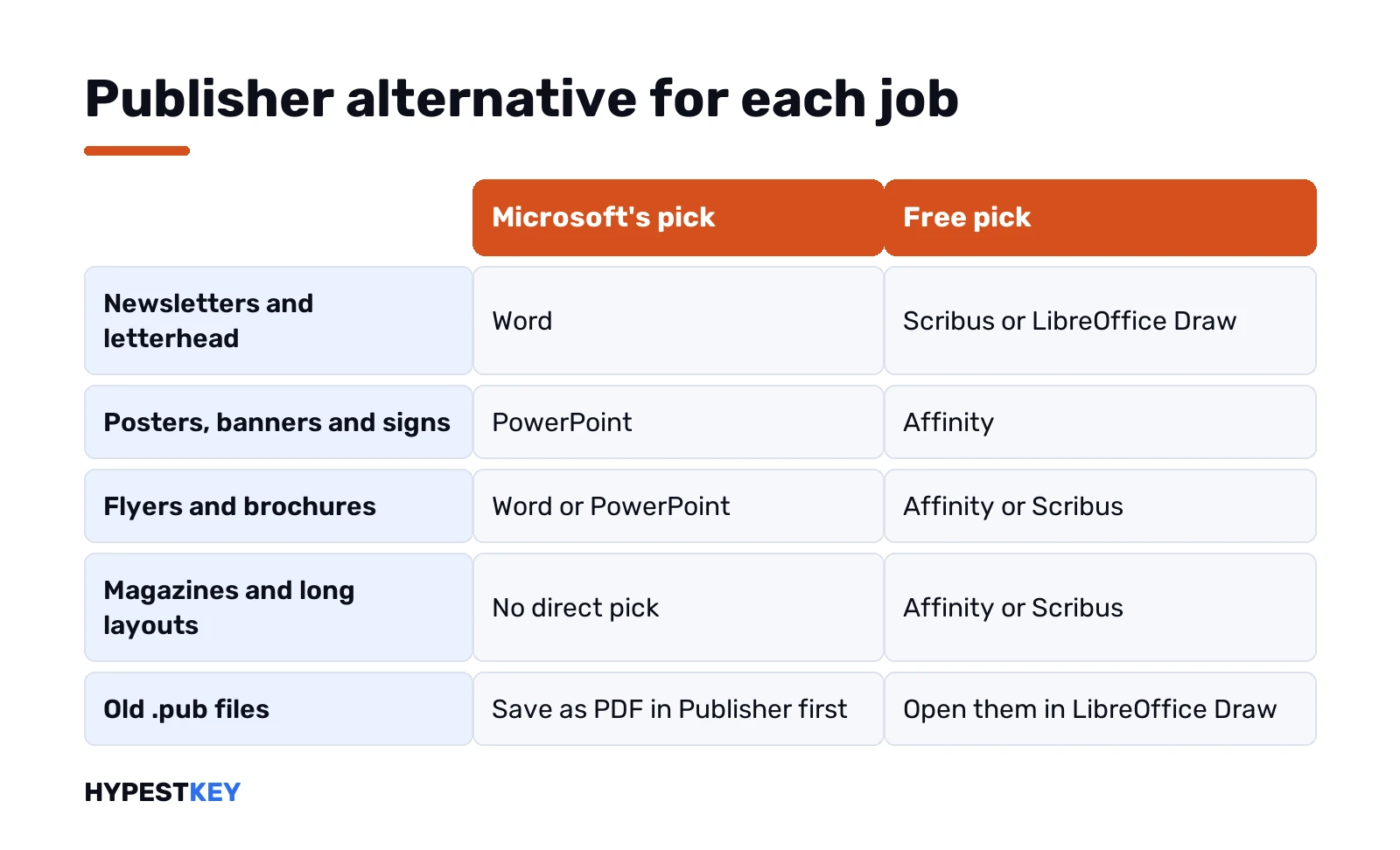
| What you made in Publisher | Microsoft’s suggested app |
|---|---|
| Ads, flyers, brochures | Word or PowerPoint |
| Banners, signs, posters | PowerPoint |
| Certificates, business cards, greeting cards | Word or PowerPoint |
| Calendars | Word or PowerPoint |
| Invoices, applications, forms | Word |
| Envelopes, labels, letterhead | Word |
| Newsletters, programs, folded paper projects | Word |
For a church bulletin or a club newsletter, that list is honestly enough. A magazine with master pages and twenty spreads is another matter. There we’d look at Affinity or Scribus further down.
Word and PowerPoint as a Publisher replacement
Most people already have both. That’s the main argument for them.
Word handles anything that flows like text. Newsletters in columns, letterhead, labels, envelopes, forms. Text boxes, pictures and section breaks do most of what Publisher’s frames did, in our view. Blank pages appearing out of nowhere? We cover the breaks behind them in how to delete pages in Word.
PowerPoint is the better pick for anything that’s one big page. Each slide works like a free canvas. You place things where you want, and nothing reflows.
For posters, change the slide size:
- Design tab, Slide Size, Custom Slide Size.
- Pick the orientation.
- Type width and height. Add in, cm or px after the number.
- OK. If PowerPoint asks, Maximize keeps content big; the other option shrinks it to fit.
The largest custom size is 56 inches. That’s plenty for an A1 poster or a banner. Microsoft’s slide size page has the rest. One catch: every slide in a file shares the same orientation, so we keep posters in their own file.
Forms with tick boxes for an event? Checkboxes in Word and PowerPoint take a minute.
Free Publisher alternatives: Affinity, LibreOffice Draw and Scribus
Three free options, and they’re good at different things.
Affinity
Affinity puts design, photo editing and page layout in one app. Free for individuals, on Mac, Windows and iPad. Canva owns it now. Its AI tools need a paid Canva plan, the layout work doesn’t.
It imports IDML, the InDesign exchange format, with layers kept. Microsoft’s own FAQ mentions Affinity as software that may import native Publisher files. We’d still keep a PDF copy of each .pub as a backup.
LibreOffice Draw
Draw is part of the free LibreOffice suite. It’s the quickest way to open, view and edit old Publisher files, according to The Document Foundation, which makes it. The import comes from libmspub, a library that reverse-engineered the .pub format.
Draw is not a desktop publishing app, and its makers say so. Fine for single pages and short newsletters. Save the result in OpenDocument format, then it’s an open file forever.
Scribus
Scribus is open-source desktop publishing software. It opens .pub files through the same library as Draw. Closest in spirit to Publisher of the three, with frames, pages and print output.
Its own file format isn’t a standard one, though. For long-term storage of old files we’d go with Draw and OpenDocument, and use Scribus for new layouts.
Paid and online options: InDesign, Pages and Canva
- Adobe InDesign. A professional page layout app for print and digital publishing. Sold by subscription, alone or in Creative Cloud Pro, with a seven-day trial that turns paid unless you cancel. Overkill for a bulletin. Right for a print shop.
- Apple Pages. On Mac, iPad and iPhone, plus Pages for iCloud in any browser. Page size and margins are adjustable, so flyers and simple newsletters work.
- Canva. A browser design tool built around templates. Check its plans on Canva’s site before you commit a team to it.
Comparing online suites in general? Our Google Workspace vs Microsoft Office and Google Docs vs Microsoft Office pieces cover that ground.
Publisher alternative for Mac, Windows and Linux
The replacements run on far more kinds of computers. Here’s how we’d split them.
| Your computer | Free pick | Paid or included pick |
|---|---|---|
| Windows PC | Affinity, Scribus, LibreOffice Draw | Word, PowerPoint, InDesign |
| Mac | Affinity, Pages, Scribus | Word, PowerPoint, InDesign |
| Linux | Scribus, LibreOffice Draw | Browser tools only |
| iPad | Affinity, Pages | Word and PowerPoint apps |
| Chromebook or any browser | Canva, Pages for iCloud | Word and PowerPoint for the web |
Switching to a Mac anyway? Both of Microsoft’s suggested apps exist for macOS too. See every Microsoft Office version explained for which editions have which apps. Picking an edition? Read Professional Plus vs Home and Business.
Opening and converting your .pub files
First find them. Search your PC, OneDrive and SharePoint for this:
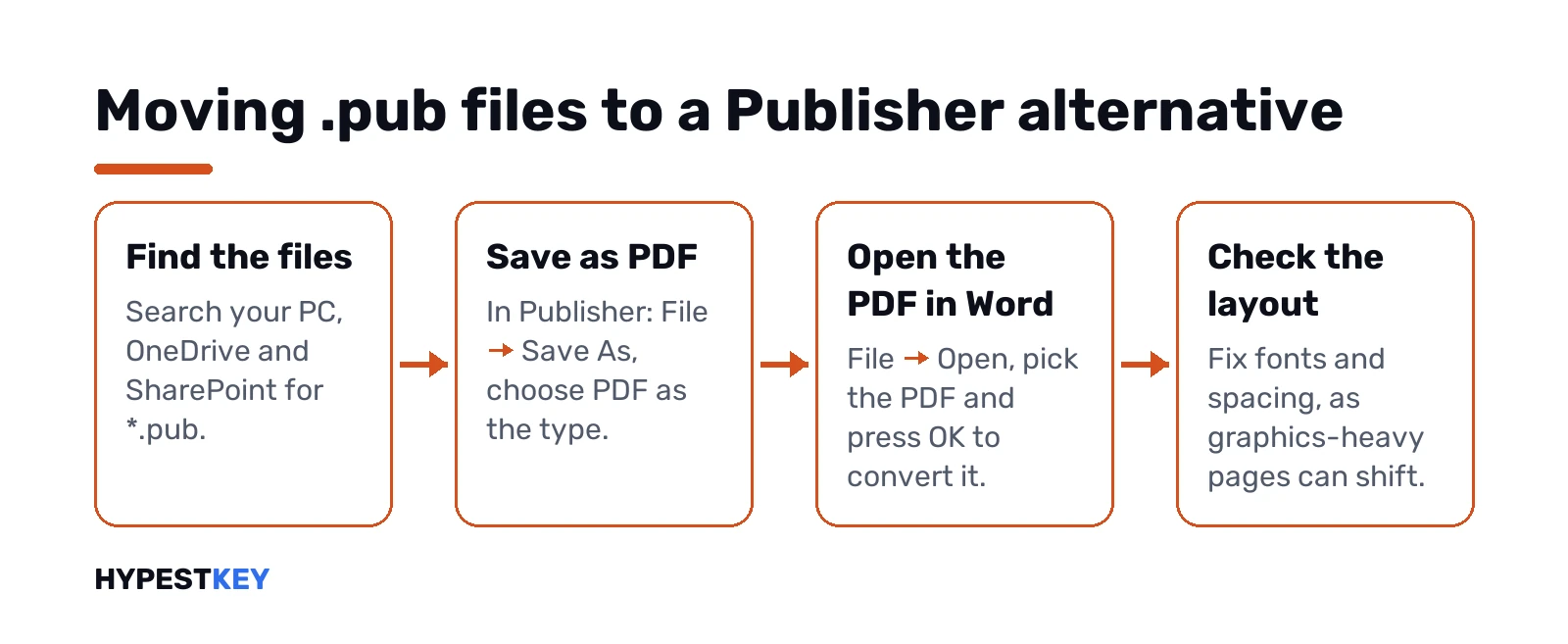
*.pubThen pick a route. Still have a working Publisher on some PC? Use it while you can.
- A PDF to keep. Open the file in Publisher. File, Save As, pick PDF as the type, Save. Good for printing and reading. Not for editing.
- An editable Word file. Make the PDF first. Then in Word: File, Open, pick the PDF, OK. Word converts it into an editable document.
- No Publisher at all. Open the .pub in LibreOffice Draw or Scribus, then save or export from there.
Expect the layout to shift a bit in the PDF-to-Word step. Microsoft warns about it too, especially for files heavy on graphics. We’d fix fonts and spacing by hand on the important pages.
Microsoft also mentions third-party converter services. Quality varies and Microsoft doesn’t support them, so test one file before paying for a batch.
Converting many .pub files at once
Hundreds of files from years of newsletters? Microsoft offers a sample PowerShell script, Convert-PubFileToPDF.ps1, that exports them to PDF in bulk.
- It needs a licensed, working Publisher on that PC. The script drives the app itself.
- It takes one file, a folder, or a folder with subfolders.
- Errors don’t stop it. It reports which files worked and which failed.
- It won’t overwrite a PDF that already exists. Rename or delete old ones before a second run.
Microsoft calls it a starting point to adjust and test. If PowerShell isn’t your thing, the IT person at work or a tech-savvy friend can run it for you.
Which Publisher alternative we’d pick
Short answer, by situation.
- Flyers, newsletters, certificates at home or in a small office: Word and PowerPoint. Nothing new to learn.
- Brochures and magazines that need real layout tools: Affinity, free for individuals.
- A drawer full of old .pub files: LibreOffice Draw to open them, OpenDocument to keep them.
- Linux, or a strict zero budget: Scribus.
- A design team with print clients: InDesign.
Deciding between a subscription and a one-time Office for Word and PowerPoint? What Microsoft 365 includes, Microsoft 365 vs Office 2024 and subscribe or buy once walk through it. On a budget, start with the free ways to get Microsoft Office.
Prefer to own Word and PowerPoint outright? Our Office Home and Business 2024 key covers one PC or Mac, a one-time license, instant to email.
Related guides
FAQ
What is the best free alternative to Microsoft Publisher?
For layout work, Affinity, free for individuals. For opening old .pub files, LibreOffice Draw or Scribus, both free and open source.
What does Microsoft recommend instead of Publisher?
Word and PowerPoint. Word for newsletters, labels and letterhead, PowerPoint for posters, banners and signs.
Can I still use Publisher if I bought it once?
Yes. A one-time Office copy keeps Publisher installed and working, it just gets no fixes from Microsoft.
How do I open a .pub file without Publisher?
LibreOffice Draw or Scribus. Both import .pub files, and Draw can save them as OpenDocument.
Publisher replacement on a Mac, what works?
Affinity, Apple Pages, Scribus, or Word and PowerPoint for Mac. All of them run on macOS today.
Can Word open Publisher files?
Not directly. Save the .pub as PDF in Publisher first, then open that PDF in Word to edit it.
Is Canva a good Publisher alternative?
Depends. Great for quick flyers and social posts from templates. For long print layouts we'd use Affinity or Scribus instead.