Short answer: LibreOffice vs Microsoft Office: LibreOffice is free, open source and runs on Windows, Mac and Linux. Microsoft Office costs money. In return we get Word files exactly as others expect, cloud co-editing, Copilot and working VBA macros. For home use LibreOffice is enough. For files you share at work, Office is safer.
LibreOffice vs Microsoft Office comes down to cost against polish: LibreOffice is free and open source and runs on Windows, Mac and Linux, while Microsoft Office costs money but gives the most faithful Word and Excel files, cloud co-editing, Outlook and Copilot. For simple documents either works. For shared Office files, Microsoft.
| LibreOffice | Microsoft Office | |
|---|---|---|
| Price | Free, open source under MPL 2.0 | One-time license or Microsoft 365 subscription; free web apps |
| Made by | A community of contributors around The Document Foundation | Microsoft |
| Desktop platforms | Windows, macOS, Linux | Windows, macOS |
| Main apps | Writer, Calc, Impress, Draw, Base, Math | Word, Excel, PowerPoint, Outlook, OneNote; Access on Windows editions |
| Default file format | OpenDocument: .odt, .ods, .odp | Office Open XML: .docx, .xlsx, .pptx |
| Macros | LibreOffice Basic, some Excel VBA can run | VBA |
| Email client | Not included | Outlook |
| Cloud and co-editing | No hosted version from The Document Foundation | OneDrive, SharePoint, live co-authoring |
| Phones | Android viewer; Collabora Office on Android and iOS | Office apps for iPhone, iPad, Android |
LibreOffice vs Microsoft Office at a glance
Both are full office suites. Documents, spreadsheets, slides, drawings. The gap is in the edges.
LibreOffice costs nothing, ever, for home or business use. No account, no subscription, no license key. Microsoft Office asks for money, once or every month. In return: tighter file fidelity, a built-in cloud and a mail client.
What decides it for most people we’d say is one question: who else opens your files? Clients, a school or an employer that lives in Word? Then we’d say Microsoft avoids a lot of small surprises. If the files mostly stay with you, LibreOffice is hard to argue with.
Price and license
LibreOffice is free and open source. The source code sits under the Mozilla Public License 2.0, and the download page offers installers for every platform. There’s no paid tier and no trial that runs out.
Microsoft has three routes:
- Free web apps. The main Office apps in a browser, with a Microsoft account. Lighter than desktop. Our page on getting Microsoft Office for free lists the legal options.
- Microsoft 365. A subscription with desktop apps, OneDrive storage and updates for as long as you pay. See what Microsoft 365 includes.
- One-time Office 2024. Pay once, keep the apps. No cloud storage bundled. More in buying Office for life and in all Microsoft Office versions explained.
So the real money question is between LibreOffice and a one-time Office license, or between LibreOffice and the free web apps. Subscription or not? We cover that in Microsoft 365 vs Office 2024.
LibreOffice apps and their Microsoft Office counterparts
| Job | LibreOffice | Microsoft Office |
|---|---|---|
| Word processing | Writer | Word |
| Spreadsheets | Calc | Excel |
| Presentations | Impress | PowerPoint |
| Diagrams and drawings | Draw | No direct twin; Visio is sold separately |
| Databases | Base | Access, Windows only, in some editions |
| Formulas | Math | Equation editor inside Word |
| Email and calendar | None | Outlook |
| Notes | None | OneNote |
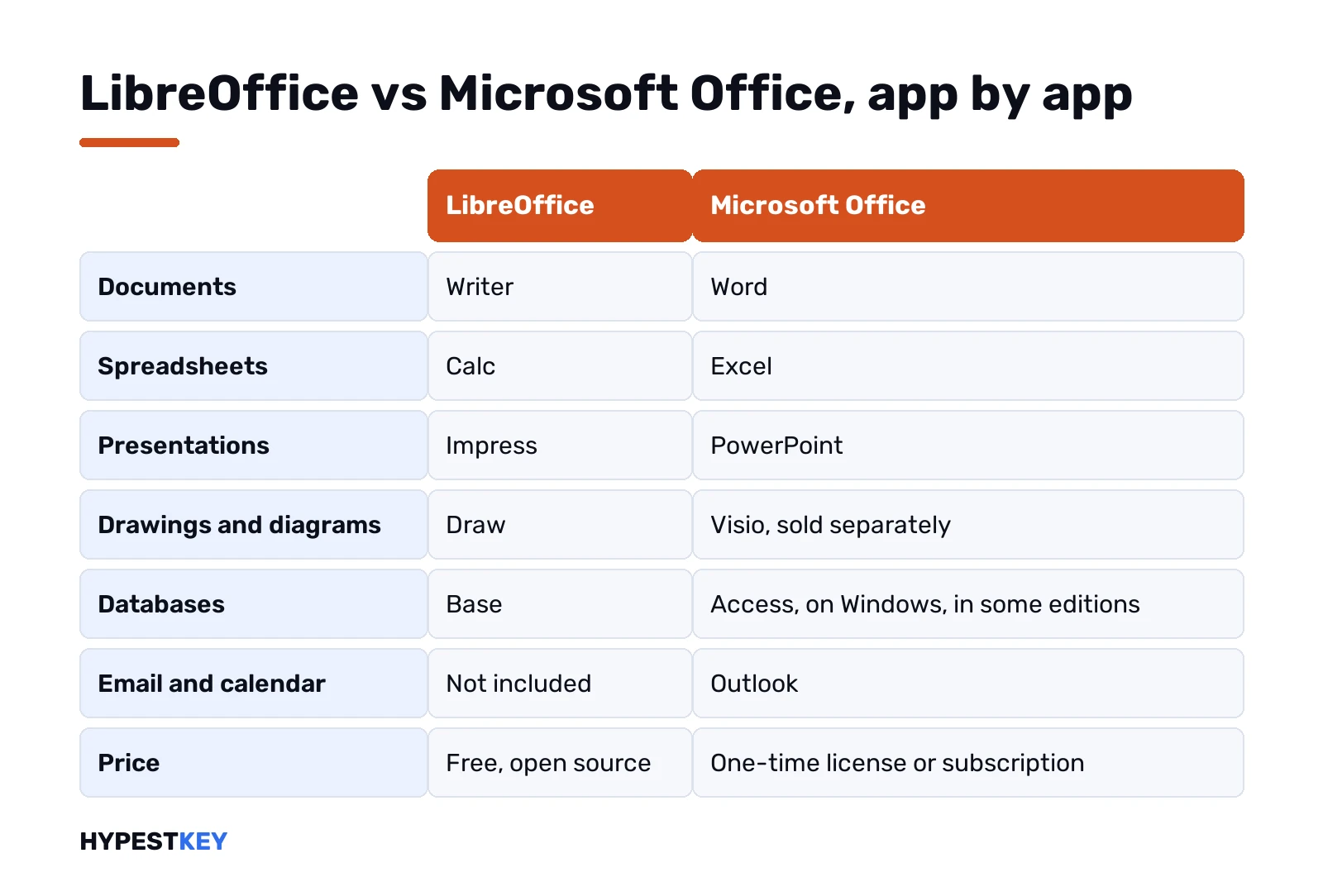
LibreOffice gives you two apps Office doesn’t have as separate programs. Draw handles flowcharts and posters, and even opens old Publisher files, as our Publisher alternative guide shows. Math writes formulas for papers.
Microsoft gives you the two LibreOffice lacks. Outlook for mail and calendar, OneNote for notes. People who switch usually pair LibreOffice with a separate mail app.
Opening Word, Excel and PowerPoint files in LibreOffice
This is the part that matters most. LibreOffice’s own help pages say it opens and saves Microsoft Office formats, including the newer Open XML files.
- .doc and .docx open in Writer.
- .xls and .xlsx open in Calc.
- .ppt, .pps and .pptx open in Impress.
Opening is rarely the problem. The fine detail is. Fonts that Microsoft ships with Office may be missing on a Linux or Mac machine, so lines wrap differently and a page break moves. Complex tables, text boxes and SmartArt-style graphics are where we’d look first after a round trip.
Plan to send files to Word users a lot? Change the default. Tools, Options, then Load/Save, General. Pick the Microsoft format for each document type. LibreOffice then saves .docx and .xlsx without asking.
OpenDocument files in Microsoft Office
It works the other way too. Word opens and saves .odt files. Excel handles .ods, and the slide app handles .odp.
Microsoft’s own support page on .odt and .docx differences lists what changes. A few that bite:
- Macros aren’t supported in .odt.
- Document protection and rights management get removed.
- Saving as .odt accepts all tracked changes.
- Tables with more than 64 columns aren’t supported.
- Nested text boxes aren’t supported either.
The tracked changes one surprises people. A contract with open edits shouldn’t go through .odt. We’d keep that file in .docx from start to finish.
Macros: VBA against LibreOffice Basic
Office macros are written in VBA. LibreOffice has its own Basic, and LibreOffice’s help pages say the same macro code won’t run in both.
A few nuances help:
- LibreOffice loads the VBA code from Office files, so you can read it in its Basic editor.
- Recent versions can run some Excel VBA, once you turn that on under the VBA properties settings.
- Save back to an Office format without touching the macros, and they run in Office as before.
- LibreOffice can also strip VBA macros on load or save, if you’d rather not keep them.
Honest summary: a workbook full of VBA built over ten years is the single biggest reason to stay on Microsoft. Simple recorded macros can be rewritten. Big automated reports usually can’t, at least not cheaply.
Calc against Excel: what to test first
Spreadsheets are where the two suites drift apart most. Plain sums, sorting, filters and charts behave the same in daily use. The trouble hides in bigger workbooks.
Before moving a finance file to Calc, we’d test these on a copy:
- Pivot tables. Calc has them, but layout and refresh feel different.
- Newer Excel functions. Open the file and look for error cells.
- Charts with custom styling. Colours and labels may shift.
- External links between workbooks.
- Conditional formatting with many rules.
- Anything built on VBA, as above.
Ten minutes with a copy tells you more than any comparison table. Ours included.
Interface: ribbon or toolbars
Office uses the ribbon. LibreOffice opens with classic menus and two toolbars by default, which feels a bit older.
That’s easy to change, though. View, then User Interface, and pick Tabbed. LibreOffice then groups commands into tabs, much like the ribbon. There’s a compact tabbed layout for small laptop screens too, and a sidebar layout for people who tweak a lot of settings.
Shortcuts mostly match on the basics. Copy, paste, bold, save. The deeper menus are where you’ll hunt for a while.
Cloud, co-editing and phones
Microsoft built the cloud into Office. Files in OneDrive or SharePoint, several people typing in the same document, version history, sharing links. On Microsoft 365 it’s all there from day one.
LibreOffice is desktop software first. The Document Foundation says plainly that it isn’t planning to fund a hosted cloud version, and leaves online editing to companies and providers that build on LibreOffice.
On phones, the picture is similar:
- The Document Foundation offers an Android viewer with experimental editing.
- Collabora Office, built on LibreOffice by a certified developer, runs on Android and iOS.
- Microsoft has Office apps for iPhone, iPad and Android.
You can still keep LibreOffice files in any sync folder, Dropbox or OneDrive included. Real-time co-editing is the part you lose.
System requirements: LibreOffice vs Microsoft Office
LibreOffice is light. From its system requirements page:
| Windows | macOS | Linux | |
|---|---|---|---|
| Operating system | Windows 10 or 11, Windows Server 2012 through 2022 | macOS 11 or later, Intel or Apple silicon | Kernel 4.18 or newer, glibc 2.27 or newer |
| Memory | 256 MB, 512 MB suggested | 512 MB | 256 MB, 512 MB suggested |
| Disk space | Up to 1.5 GB | Up to 800 MB | Up to 1.55 GB |
| Installers | x86-64 and ARM64 | Apple silicon and Intel | x86-64 and ARM64, deb and rpm |
Java is needed only for some features, Base mostly. Old PCs and Linux machines are where LibreOffice shines.
Microsoft Office runs on Windows and macOS only. No Linux desktop version. Its needs are higher, as our page on Office 2024 system requirements shows. On Linux, the free web apps in a browser are Microsoft’s answer.
Updates and help
LibreOffice’s download page offers two release lines at the time of writing: 26.8.2 as the latest stable release and 26.2.7 alongside it. Updates are free, like the suite.
Help comes from the community: help pages and forums. For companies, LibreOffice’s site points to professional support from partner firms.
Microsoft 365 updates itself continuously while the subscription runs. One-time Office gets security fixes. Microsoft also runs its own support site for Office.
Where to get LibreOffice and Microsoft Office safely
Only from the makers. LibreOffice comes from the official LibreOffice download page, which picks the right installer for your system.
Microsoft Office comes from your Microsoft account after you buy or redeem a license. Repacked installers from download sites? We’d skip them, for either suite.
Want to try Office before paying? Our page on the Microsoft Office trial explains how that works today.
Switching from Microsoft Office to LibreOffice
Thinking of moving a home PC or a small office? A short checklist we’d follow:
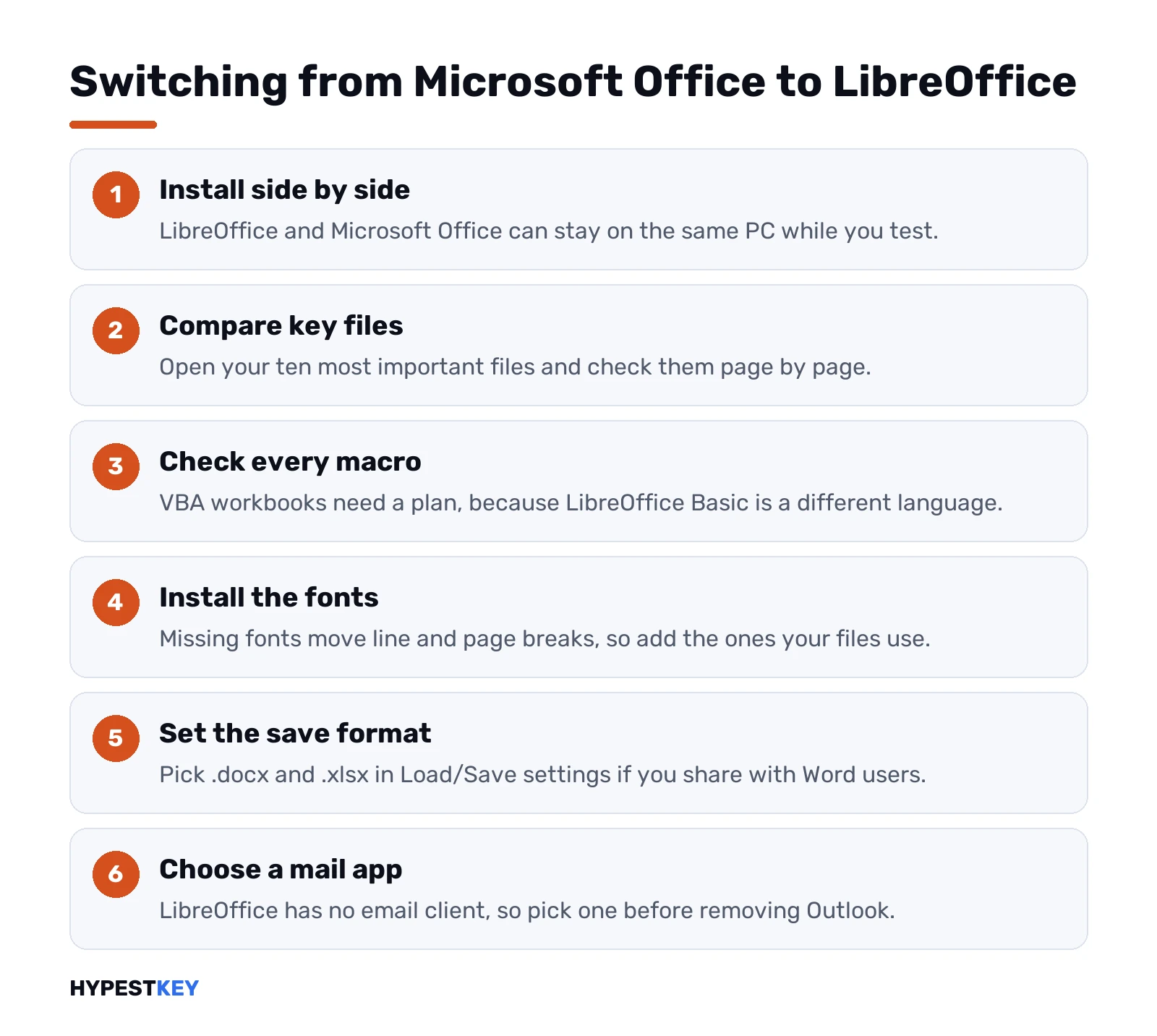
- Install LibreOffice next to Office. They don’t clash.
- Open your ten most important files and compare page by page.
- Find every workbook with macros. Decide what happens to each one.
- Install the fonts your documents use, or pick metric-compatible ones.
- Set the default save format to .docx and .xlsx if you share with Word users.
- Pick a mail app to replace Outlook before you uninstall anything.
Going the other way? The Microsoft apps open your .odt, .ods and .odp files. Save them as .docx and friends once, and keep working.
LibreOffice or Microsoft Office: who should pick which
| You are | We’d pick | Why |
|---|---|---|
| Home user writing letters and budgets | LibreOffice | Free, light, does the job |
| Student whose school uses Word | Microsoft, even the free web apps | Teachers open your file exactly as sent |
| Linux user | LibreOffice | No desktop Office for Linux |
| Accountant with VBA workbooks | Microsoft Office | Macros keep working |
| Small business trading contracts with clients | Microsoft Office | Tracked changes and layout stay intact |
| Old laptop with little memory | LibreOffice | Runs on far less hardware |
| Team that edits files together live | Microsoft 365 | Co-authoring in OneDrive and SharePoint |
Nothing stops you from running both, by the way. Plenty of people keep LibreOffice for Draw and old files, and Office for work.
Comparing other free suites too? Our Google Docs vs Microsoft Office page covers Google’s side, and Google Workspace vs Microsoft Office looks at whole platforms.
Settled on Microsoft and want to pay once? We sell Office Home and Business 2024 for one PC or Mac, delivered instantly to email.
Related guides
FAQ
Is LibreOffice really free for business?
Yes. It's free and open source for home and business use, with no account, subscription or license key needed.
Can LibreOffice open Word and Excel files?
Yes. Writer opens .doc and .docx, Calc opens .xls and .xlsx, and both can save back to those formats.
Will my Excel macros work in LibreOffice?
Not reliably. LibreOffice uses its own Basic, though recent versions can run some Excel VBA once that option is turned on.
Does LibreOffice have an Outlook replacement?
No. LibreOffice has no email client, so people pair it with a separate mail app.
Can Microsoft Word open .odt files?
Yes. Word opens and saves .odt, but macros are dropped and saving as .odt accepts all tracked changes.
Is there a LibreOffice version for phones?
There's an Android viewer with experimental editing, and Collabora Office, built on LibreOffice, runs on Android and iOS.
Which one runs better on an old PC?
LibreOffice. It asks for 256 MB of memory on Windows, with 512 MB suggested, and runs on Linux too.