Short answer: WPS Office vs Microsoft Office: WPS is free to start, light, runs on Linux too and has PDF editing built in. Microsoft Office costs money. In return we get Word files that behave exactly as others expect, cloud co-editing, a mail app and working VBA macros. Light home use suits WPS. Shared work files suit Microsoft.
WPS Office vs Microsoft Office is a free, light suite against the paid standard: WPS opens Word, Excel and PowerPoint files, adds PDF tools and runs on Linux too, while Microsoft Office gives the exact file behaviour others expect, Outlook, OneDrive co-editing and VBA macros. Light home use suits WPS. Shared work files suit Microsoft.
| WPS Office | Microsoft Office | |
|---|---|---|
| Made by | Kingsoft | Microsoft |
| Price model | Free WPS Standard; paid Pro+ tier | One-time license, Microsoft 365 subscription, or free web apps |
| Core apps | Writer, Spreadsheet, Presentation, PDF | Word, Excel, PowerPoint, Outlook, OneNote |
| Email client | Not included | Outlook |
| Office formats | Opens and saves .docx, .xlsx, .pptx and older formats | Native |
| Built-in PDF editing | Save as PDF; Word can open and convert PDFs | |
| Desktop platforms | Windows, Mac, Linux | Windows, Mac |
| Mobile and web | Android, iOS, iPad, WPS Docs online | iPhone, iPad, Android, Office on the web |
| AI | WPS AI, with a daily limit on Pro+ | Copilot |
| Windows install | 5.1 MB download, 200 MB or more of free space | A much larger install, see Microsoft’s requirements |
WPS Office vs Microsoft Office at a glance
Same jobs, very different weight. WPS: a small download that opens Office files and costs nothing to start. Microsoft Office is the format everyone else writes in.
The interfaces look alike on purpose. A ribbon of tabs, a document in the middle, familiar icons. Most people who try WPS find their way around within minutes.
Where they part ways is the deep end. Macros, add-ins, cloud co-editing, mail. That’s where we’d look before picking one.
Who makes WPS and what the free version covers
WPS Office comes from Kingsoft. Its site calls it the free office suite built for everyday work, and the basic WPS Standard plan is free.
The free plan already includes:
- Writer for documents.
- Spreadsheet for tables and charts.
- Presentation for slides.
- A PDF app. Which editing tools are free and which need Pro+ is on WPS’s pricing page.
Above it sits Pro+, a paid tier we’d pick for more AI and PDF features. WPS’s own pricing page notes that Pro+ AI tools have a daily usage limit and pause until the next day once you hit it. The page we loaded didn’t show prices, so we won’t guess them here.
What Microsoft Office costs
Microsoft has three doors in:
- Office on the web. Free with a Microsoft account. Lighter than the desktop apps. Our page on free Microsoft Office lists every legal route.
- Microsoft 365. A subscription with desktop apps, OneDrive storage and ongoing updates. See what is Microsoft 365.
- One-time Office. Office Home and Business 2024 or a Professional Plus edition, paid once. The trade-offs are in subscribing or buying Office once and buying Office for life.
So we’d compare WPS’s free plan with Office on the web. Both cost nothing. Once you want desktop power, it’s WPS Pro+ against one-time Office or a subscription.
The apps side by side: WPS Office and Microsoft Office
| Job | WPS Office | Microsoft Office |
|---|---|---|
| Documents | Writer | Word |
| Spreadsheets | Spreadsheet | Excel |
| Slides | Presentation | PowerPoint |
| PDF editing | PDF, built in | No separate PDF editor |
| Email and calendar | None | Outlook |
| Notes | None | OneNote |
| Database-style tables | DBSheet | Access, in Windows Professional editions |
| Forms and shared sheets | Forms, AirSheet | Forms, Lists in Microsoft 365 |
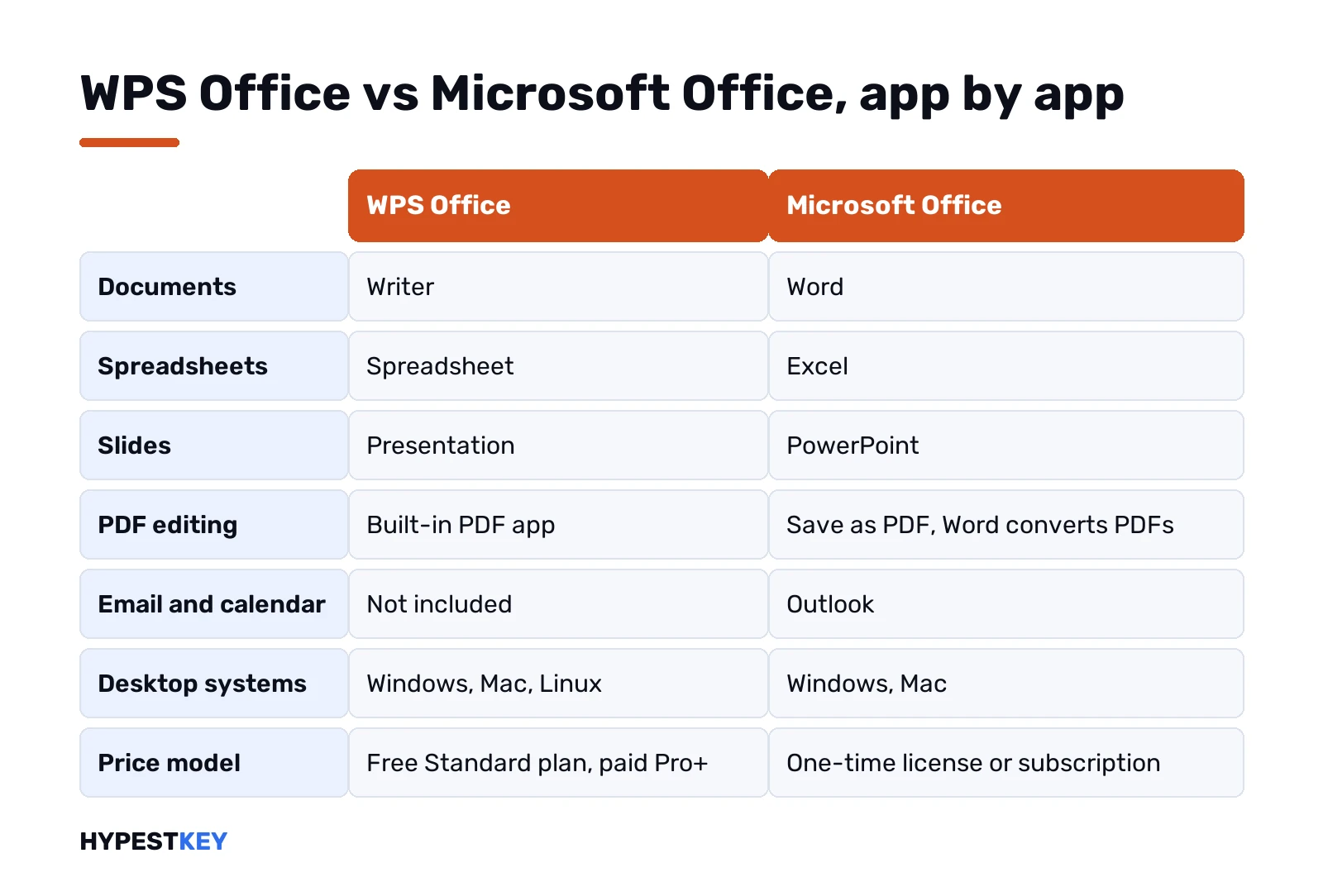
Microsoft’s lineup is wider. WPS sticks to the three classic apps, PDF and a few online tools. For many homes we’d say that’s plenty.
Opening Word, Excel and PowerPoint files in WPS
WPS’s Windows page lists the formats it works with:
- Word files: .doc, .docx, .docm, .dotm.
- Excel files: .xls, .xlsx, .xlsm, .xlt, .csv.
- PowerPoint files: .ppt, .pptx, .pptm.
Saving back works too. WPS lists .doc, .docx, .xls, .xlsx, .ppt, .pptx and PDF among its save formats.
Simple letters, budgets and slides usually come through fine. We’d still check long reports with tracked changes, complex tables and charts before trusting a round trip. Fonts matter as well. A font missing on the other machine moves line breaks and page breaks.
OpenDocument? The Windows page doesn’t list .odt among its formats. If you trade files with LibreOffice users, test that first.
Macros and add-ins
This is Microsoft’s strongest ground. Office runs VBA macros and a huge range of add-ins.
WPS opens macro-enabled files like .xlsm and .docm. Its Windows page doesn’t say whether the VBA code inside actually runs, though. So we’d treat macros as untested until you’ve tried your own workbook.
Same with add-ins from accounting tools, CRMs or reference managers. Most ship for Microsoft Office first. If your work depends on one, that settles it.
PDF tools: where WPS has the edge
PDF is the one area where the free suite gives you more out of the box. WPS bundles a PDF app with editing, converting and form features.
Microsoft Office saves any document as PDF. Word can also open a PDF and turn it into an editable document. Good on text-heavy files, weaker on complex layouts. For real PDF editing on the Microsoft side, we’d add a separate PDF app.
Edit PDFs every day? That alone might push you to WPS, even with Office installed too.
AI: WPS AI and Copilot
Both suites now carry an AI assistant.
- WPS AI. Writing, summarizing, rewording, slides from a prompt, help in spreadsheets and PDF forms. On Pro+, a daily usage limit applies.
- Microsoft Copilot. Copilot Chat comes with eligible Microsoft 365 work accounts. Full Copilot inside the Office apps, reading your mail and files? That needs a separate Microsoft 365 Copilot license for businesses. Details in Microsoft’s Copilot overview.
Features on both sides change month to month. We’d compare them on the vendors’ pages on the day you decide, not from a review.
Platforms: Windows, Mac, Linux and phones
WPS covers more desktops. Its site lists Windows, Mac and Linux, plus Android, iOS, iPad and an online version called WPS Docs.
Microsoft makes desktop Office for Windows and Mac only. On Linux you’d use Office on the web in a browser. The phone apps for iPhone, iPad and Android are good, and Office on the web works on any computer.
A Linux desktop that needs to open .docx files? WPS is one option. LibreOffice is another, and our Publisher alternative guide uses its Draw app for old .pub files. Google’s browser editors make a third route. See Google Docs vs Microsoft Office.
WPS Office vs Microsoft Office on Android and iPhone
Phones are where a lot of people meet WPS first. It’s often the app that opens an email attachment.
WPS lists apps for Android, iPhone and iPad. Microsoft has the Microsoft 365 app with its mobile editors. Separate apps for each Office program exist too.
For reading a file and fixing a typo, both do the job. Things we’d check on a phone before choosing:
- Does the file keep its layout when you send it back?
- Can you sign in with the account your files live in?
- How does the app handle PDFs you need to sign or fill in?
- Where does it save by default, on the phone or in a cloud?
Already on Microsoft 365 at work? The Microsoft apps open your OneDrive and SharePoint files directly. That usually settles it on a work phone.
System requirements and install size
WPS is tiny on Windows. From its Windows page:
| WPS Office for Windows | |
|---|---|
| Windows versions | Windows 11, 10, 8 and 7, 32-bit and 64-bit |
| Download size | 5.1 MB |
| Free disk space | 200 MB or more |
| Processor | 1 GHz, 32-bit or 64-bit |
An old laptop that struggles with modern software will run WPS. Microsoft Office asks for more, and for a current Windows or macOS. The exact numbers are in our guide to Office 2024 system requirements.
Cloud, sign-in and working together
Its Windows page ties sign-in to the cloud features. Sign in, and it syncs cloud documents across your devices and links Google Drive.
Microsoft goes further on teamwork. Files in OneDrive or SharePoint, several people editing the same document live, comments, version history. Microsoft 365 business plans put Teams on top, for calls and chat.
A family sharing a budget sheet won’t notice the gap. A team of ten editing one proposal at once will.
WPS Office vs Microsoft Office for business use
For a company, a few questions decide it faster than any feature list:
- Do clients send you Word and Excel files with tracked changes? Microsoft.
- Do you run Excel macros or add-ins? Microsoft.
- Do you need hosted email and calendars? Microsoft 365, or another mail service next to WPS.
- Is the job mostly simple documents and PDFs on mixed hardware? WPS could do it.
- Do you have IT rules about which software is approved? Check them first.
Many offices end up mixed. Office on the desks that trade files with clients, a lighter suite elsewhere. We’d keep the shared templates in .docx and .xlsx either way.
Switching from Microsoft Office to WPS
Office already on the PC and curious about the free suite? A short plan we’d follow:
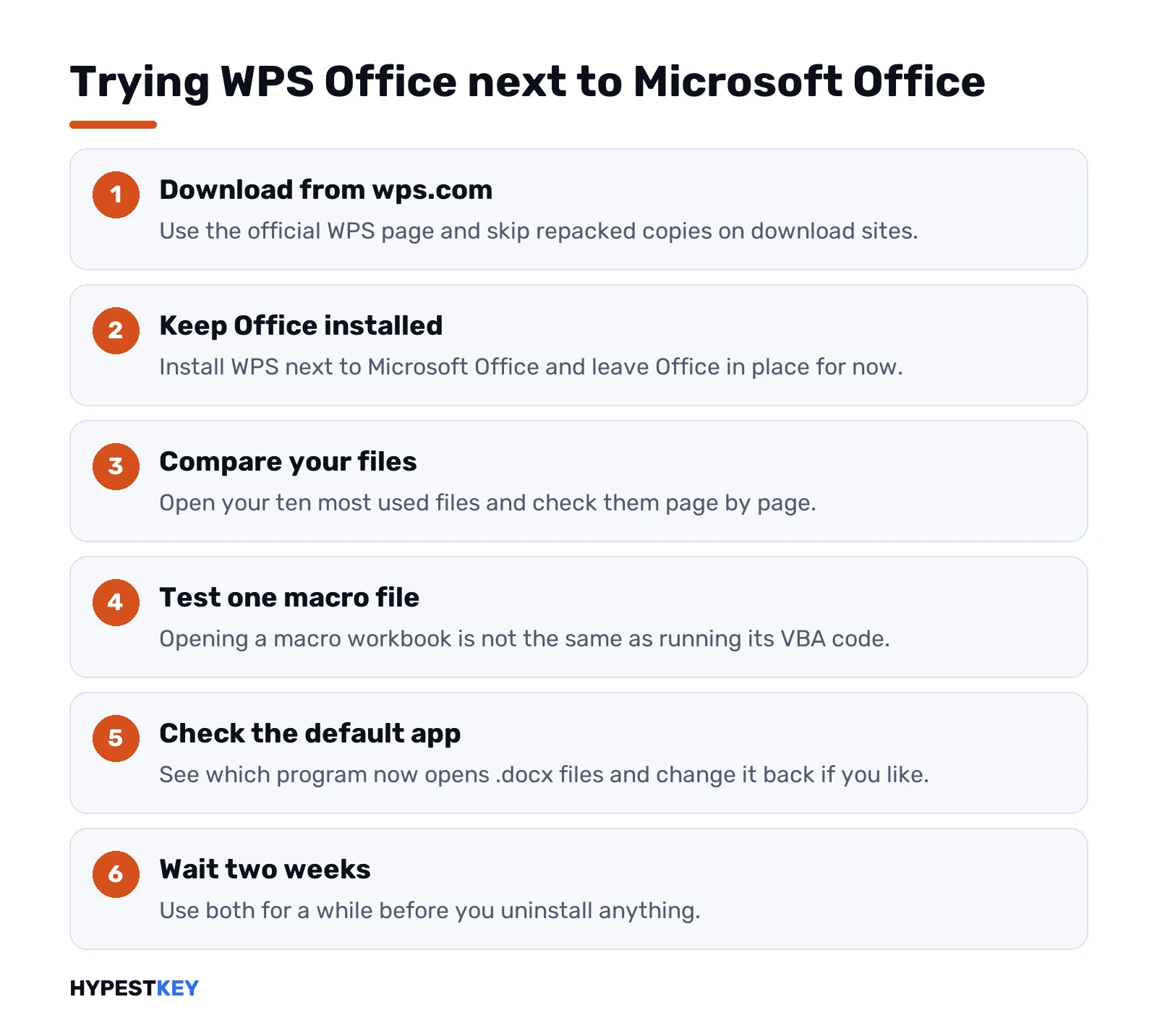
- Download WPS only from the official WPS Office for Windows page. Skip repacked copies on download sites.
- Install it next to Office. Leave Office in place for now.
- Open your ten most used files and compare them page by page.
- Test one macro workbook, if you have any.
- Check which app now opens .docx by default, and change it back if you like.
- Give it two weeks before you uninstall anything.
Going the other way is simpler. Office opens anything WPS saved as .docx, .xlsx or .pptx. Our Office 2024 install guide covers the setup.
Mistakes people make when comparing the two
- Testing with a two-page letter. Test with your hardest file instead.
- Assuming macro-enabled formats mean macros run. Opening and running are different things.
- Forgetting email. Neither WPS nor Office on the web replaces a mail service.
- Downloading WPS from a mirror site. Go to wps.com.
- Paying for a subscription when one-time Office would cover a single PC.
WPS Office or Microsoft Office: our pick
| You are | We’d pick | Why |
|---|---|---|
| Home user with letters and a budget | WPS or Office on the web | Both free, both enough |
| Student who submits Word files | Microsoft Office | Teachers see the file exactly as sent |
| Someone who edits PDFs daily | WPS | PDF tools in the box |
| Linux desktop user | WPS or LibreOffice | No desktop Office on Linux |
| Accountant with macros | Microsoft Office | VBA and add-ins work |
| Small team editing together | Microsoft 365 | Live co-authoring, Outlook, Teams |
| Old, slow laptop | WPS | Small install, low requirements |
Looking at other alternatives as well? Our Google Workspace vs Microsoft Office comparison covers Google’s suite, and Microsoft 365 vs Office 2024 helps once you’ve chosen Microsoft.
Prefer Microsoft without a monthly bill? We sell Office Home and Business 2024 for one PC or Mac, delivered instantly to email.
Related guides
FAQ
Is WPS Office free?
Yes. The WPS Standard plan is free, and a paid Pro+ tier adds more AI and PDF features on top.
Can WPS open Word and Excel files?
Yes. WPS opens and saves .doc, .docx, .xls, .xlsx, .ppt and .pptx, plus macro-enabled formats like .xlsm.
Do Excel macros work in WPS?
WPS opens files with macros, but its Windows page doesn't say VBA runs. Test your own workbook before relying on it.
Does WPS have an Outlook replacement?
No. WPS covers documents, spreadsheets, slides and PDF, so email needs a separate app or service.
Is WPS available on Linux?
Yes. WPS lists Windows, Mac, Linux, Android, iOS and iPad, plus WPS Docs in the browser.
Which one is better for PDFs?
WPS. It includes a PDF app with editing, while Office mainly saves to PDF and lets Word convert PDFs.
Can we use WPS for business?
For simple documents and PDFs, yes. Teams that trade tracked changes, run macros or need hosted email are better off on Microsoft.