Short answer: The Office 2024 release date was October 1, 2024. That day Microsoft launched the Home and Home & Business editions for Windows and Mac. Volume license customers could get Office LTSC 2024 from September 16, 2024.
The Office 2024 release date was October 1, 2024, for Office Home 2024 and Office Home & Business 2024 on Windows and Mac. People still ask, as if the new Office hadn’t come out yet. It’s been out for two years. Still the newest one-time suite, too.
That day Microsoft put the Home and the Home & Business editions on sale for Windows and Mac.
Volume license customers got Office LTSC 2024 a couple of weeks earlier, in mid-September 2024.
So the useful question has changed. Which edition launched, and what did it bring.
| Point | What to know |
|---|---|
| Office LTSC 2024, volume licensing | Available from September 16, 2024; Microsoft opened it to all customers on October 1, 2024 |
| Consumer Office 2024 | Home and Home & Business launched on October 1, 2024 for Windows and Mac |
| License | A one-time purchase; it gets security fixes, not new features |
Office 2024 release date
October 1, 2024. On that day Microsoft made the two consumer editions available worldwide for Windows and macOS.
The same day it opened the LTSC line to all customers. Project 2024 arrived then too, along with the new Visio.
Organizations with volume licensing agreements could already download Office LTSC 2024 from September 16, 2024.
Unlike the rumors before launch, there was no slow country-by-country rollout of the consumer suite.
The products were listed in the Microsoft Store and through retailers on the same day.
And the download came from the same Microsoft account page used for earlier versions.
| Product | Who it’s for | Available from |
|---|---|---|
| Office LTSC Professional Plus 2024 and Standard 2024 | Organizations with volume licensing | September 16, 2024 for existing agreements; October 1, 2024 for all customers |
| Office Home 2024 | Home and students | October 1, 2024 |
| Office Home & Business 2024 | Home users and small businesses, with commercial use | October 1, 2024 |
| Project 2024 and Visio LTSC 2024 | Project and diagram users | October 1, 2024 |
Compared with earlier versions
Office has followed a roughly three-year rhythm since 2016. Each release comes with a perpetual license.
| Version | Shipped |
|---|---|
| Office 2019 | September 2018 |
| Office 2021 | October 2021 |
| Office 2024 | October 2024 |
Our timeline of all Microsoft Office versions covers each release in more detail.
Which editions came out on the Office 2024 release date
Microsoft released two consumer editions and two volume license editions.
| Edition | Apps | Platforms | Commercial use |
|---|---|---|---|
| Office Home 2024 | Word, Excel, PowerPoint, OneNote | Windows, Mac | No |
| Office Home & Business 2024 | Word, Excel, PowerPoint, OneNote, Outlook | Windows, Mac | Yes |
| Office LTSC Standard 2024 | Word, Excel, PowerPoint, OneNote, Outlook | Windows, Mac | Yes |
| Office LTSC Professional Plus 2024 | Word, Excel, PowerPoint, OneNote, Outlook, Access | Windows | Yes |
The two LTSC editions are for organizations. Home & Business adds Outlook and commercial use rights to the Home edition.
| If you are | Edition to look at |
|---|---|
| A student or a household | Home |
| A freelancer or a small business | Home & Business |
| An organization with volume licensing | One of the two LTSC editions |
Two apps are missing compared with older suites.
- Publisher isn’t part of the 2024 suite.
- Teams isn’t preinstalled either. It comes as a separate free download.
If you depend on Publisher files, we’d convert them to Word or PDF while you still have a working copy.
For a side-by-side look at the two consumer editions, see Office 2024 Home vs Home & Business.
What’s new since the Office 2024 release
Microsoft’s own What’s new in Office 2024 list breaks the changes down by app.
| App | What it brings |
|---|---|
| All apps | A new default Office theme, OpenDocument Format 1.4 and better accessibility tools |
| Excel 2024 | Dynamic charts that follow dynamic array ranges, the IMAGE function for pictures inside cells, text and array functions such as TEXTSPLIT, VSTACK and HSTACK, and faster workbooks |
| Word 2024 | Session recovery after a crash or restart, Like reactions on comments, inserting a picture from a phone |
| PowerPoint 2024 | Presenting with cameo, your camera feed inside the slide; Recording Studio for video; closed captions for audio and video; embedded Microsoft Stream videos |
| Outlook 2024 | Faster search across email, calendar and contacts, and more meeting options; on Mac, scheduled send and Focused Inbox |
| OneNote | An improved Draw tab and ink |
| Access | A Dataverse connector with Power Platform |
AI Copilot features stay in Microsoft 365.
The 2024 suite doesn’t get feature updates. What shipped in October 2024 is what you keep, plus monthly security and quality fixes. Co-authoring through OneDrive still works for files stored in the cloud.
Coming from the 2021 suite, the jump is usually smaller than from the older ones.
The 2021 release already had dynamic arrays, XLOOKUP and LET. The new text and array functions, IMAGE and cameo are the main gains.
Our Office 2021 vs 2024 comparison lists the exact differences.
What you need to run it
The suite runs on Windows 11 and on the three most recent versions of macOS.
| On a PC | Requirement |
|---|---|
| Processor | 1.1 GHz, two cores |
| RAM | 4 GB |
| Free disk space | 4 GB |
| Display | 1280 x 768 |
New installs belong on Windows 11. Office often still starts on Windows 10.
| Platform | Notes |
|---|---|
| Windows | Windows 11; Arm-based PCs need Windows 11; Office LTSC 2024 also runs on Windows Server 2022 and 2025 |
| Mac | One of the three latest macOS versions; new installs of Office 2024 for Mac need macOS 14 Sonoma or later |
| Internet and account | Needed once to download and activate; daily use normally works offline |
Microsoft lists the macOS requirements on its site. On a Mac, we’d keep the suite updated through Microsoft AutoUpdate.
Full details, including 32-bit versus 64-bit advice, are in our Office 2024 system requirements guide.
One-time purchase or Microsoft 365
For most people who just need the core apps, we’d call the 2024 suite the economical choice. You pay once and use it with no renewal.
Microsoft 365 works as a subscription that adds cloud storage, Copilot and constant feature updates. You pay for it every year you use it.
| Question | Office 2024 | Microsoft 365 |
|---|---|---|
| How you pay | Once | Monthly or yearly, every year |
| New features | No, security updates only | Yes, continuous |
| Cloud storage | Not included; the free OneDrive tier works | Included with the plan |
| Devices | One PC or Mac per license | Several devices per user |
| Works without paying again | Yes | No; the apps drop to reduced functionality when the subscription lapses |
Here’s how we typically explain it. If you write documents, keep spreadsheets and send email, the apps you get on day one will serve you for years.
Paying a subscription for features you’ll never open makes little sense.
Teams who live in shared cloud files and want AI features generally fit Microsoft 365 better.
Our Microsoft 365 vs Office 2024 guide goes through the trade-offs.
Need a key? Our Microsoft Office Home and Business 2024 comes as a genuine one-time license for PC or Mac. Delivery is instant to email.
How to upgrade in 2026
If you still use an older perpetual suite, we’d upgrade.
| Your suite now | Advice |
|---|---|
| Office 2016 | Upgrade |
| Office 2019 | Upgrade |
| Office 2021 | Upgrade |
| Office 2024 | Nothing to do; Microsoft hasn’t dated the next perpetual release yet |
The new suite opens the same files and keeps the familiar ribbon.
In practice, people rarely need training after the switch. The first questions are usually about the new theme.
The interface looks a little cleaner, and the menus stay where they were. Old files open without conversion.
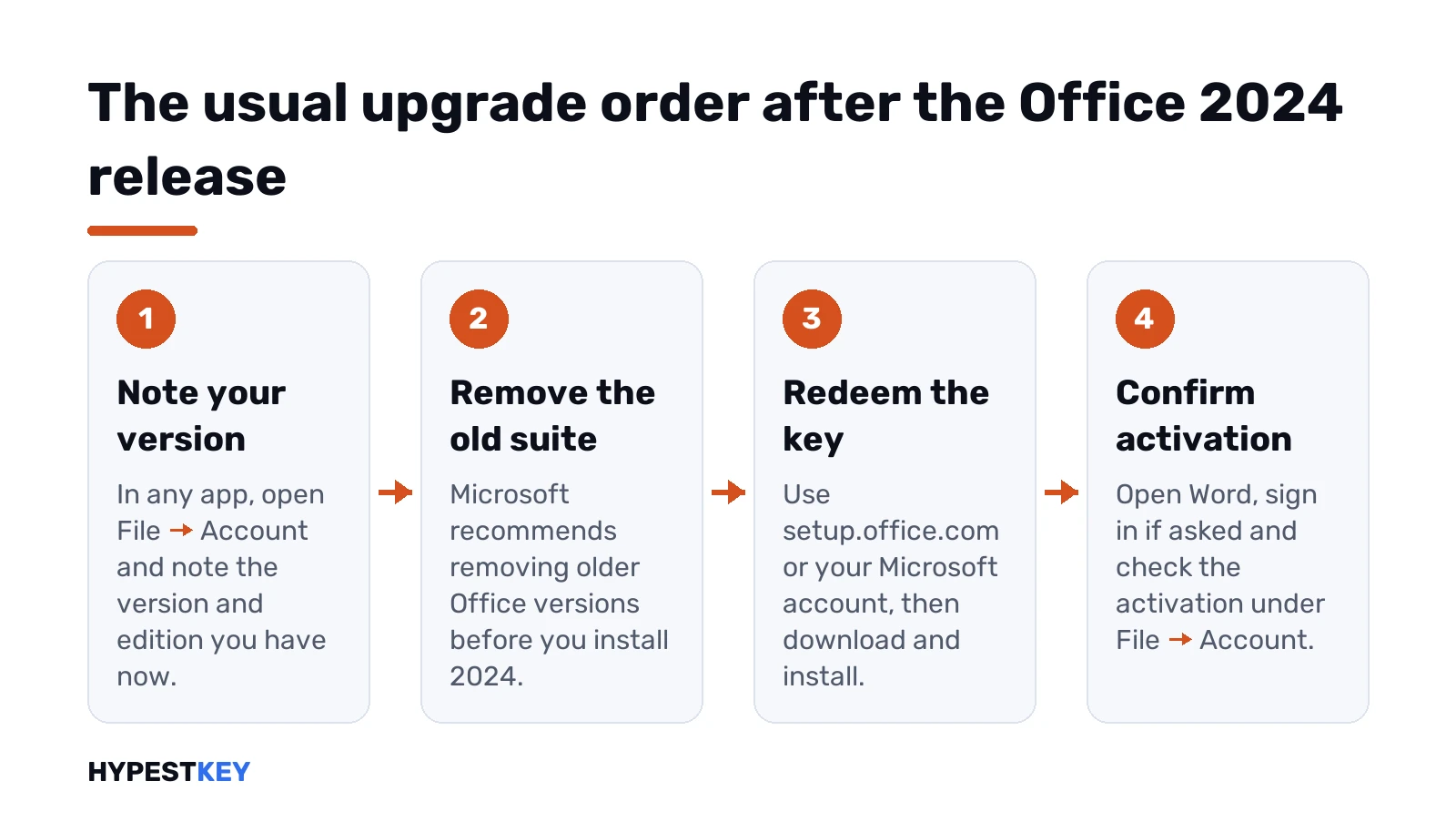
The usual order:
- Note which version and edition you have now, under File, Account in any app.
- Uninstall the old suite first. Microsoft recommends removing older Office versions before installing 2024.
- Redeem your Office 2024 key at
setup.office.comor in your Microsoft account. Then download and install. - Open Word and sign in if asked. Confirm activation under File, Account.
Before uninstalling an old Outlook, check where your mail is stored. POP accounts typically keep everything in a local
.pstfile. We’d copy it to a safe place first and reopen it in Outlook 2024.
Common mistakes about the Office 2024 release
- Waiting for a launch that already happened.
- Expecting Publisher in the box. It isn’t part of the suite.
- Looking for Teams after setup. It comes as a separate free download.
- Expecting new features later. The feature set is fixed.
- Installing over an old suite. Remove the old one first.
- Deleting an old Outlook before copying the local mail file.
Related guides
Terms used on this page
| Term | Meaning |
|---|---|
| Perpetual license | You pay once and keep using the apps |
| LTSC | Long-Term Servicing Channel, the volume license line |
| Volume licensing | Microsoft’s license agreements for organizations |
| Consumer edition | Home or Home & Business, sold to individuals |
| Cameo | A camera feed inside a slide |
| Session recovery | Word reopens your documents after a crash or restart |
| ODF 1.4 | A version of the OpenDocument file format |
| POP account | A mail account that keeps messages in a local file |
Office 2024 version numbers since the release date
Which build do you have? File, Account, then About. The version line there tells you which of the two Office 2024 families is on the PC.
| Family | Version after the release | How it moves |
|---|---|---|
| Office LTSC 2024, volume licensed | Version 2408, build 17932.x | The version number stays 2408. Monthly security and quality fixes change only the build |
| Office 2024 retail: Home, Home & Business | Version 2409 in the first listed update of October 8, 2024 | The version number climbs month by month: 2410, 2411 and onward |
So a retail copy showing 26xx isn’t a newer Office. Same 2024 suite, same apps, just patched. The retail number moving doesn’t bring new features either.
An LTSC copy that still reads 2408 is normal. Check the build instead. Microsoft lists every one on its update history for Office LTSC 2024 and Office 2024.
Behind? Updates run through Office’s own updater on Windows. File, Account, Update Options, Update Now. On a Mac it’s Microsoft AutoUpdate.
Office 2024 for Mac release date
Same day as Windows: October 1, 2024. Home and Home & Business both came out for macOS then.
- Office LTSC Standard for Mac 2024 is the volume edition for organizations.
- Professional Plus is Windows only. Access has no Mac version anyway.
- New installs need macOS 14 Sonoma or later, as listed above.
More on the Mac side, from Outlook to Microsoft AutoUpdate, is in our look at Office 2024 for Mac.
Office 2024 editions and systems this page covers
The dates, editions and upgrade steps above apply to the setups below.
| Edition | System |
|---|---|
| Office Home 2024 and Office Home & Business 2024 | Windows 11 24H2 and 25H2; current macOS releases |
| Office LTSC Professional Plus 2024 | Windows 11; Windows Server 2022 and 2025 |
FAQ
When did Office 2024 come out?
On October 1, 2024, for consumers and small businesses on Windows and Mac. Office LTSC 2024 reached existing volume agreement customers on September 16, 2024. All other customers got it on October 1.
Is Office 2024 a one-time purchase?
Yes. The two consumer editions are perpetual licenses: you pay once and keep using the apps. They get security updates but no new features.
Does Office 2024 include Publisher?
No. Publisher isn't part of the suite. Teams isn't preinstalled either and comes as a separate free download.
Can I install Office 2024 on Windows 10?
It may install and run. For a setup Microsoft lists, we'd use Windows 11 or one of the three latest macOS versions.
Will there be an Office 2027?
Microsoft has said there will be another perpetual release after LTSC 2024. As of November 2026 it hasn't announced a name or date. Earlier versions arrived about every three years, so the 2024 one is the current perpetual release.
When did Office 2024 for Mac come out?
The same day as Windows, October 1, 2024. Home and Home & Business launched for macOS then. New installs need macOS 14 Sonoma or later.
Why does my Office 2024 show version 2408 and my friend's 2610?
Different families. Office LTSC 2024 stays on version 2408 and only the build changes. Retail Office 2024 climbs a version number every month. Both are the same 2024 suite.