Short answer: The 0x80041023 activation error shows that Windows refused to install the product key. Almost always the key doesn't match the installed edition. Think of a Pro key on Home, or an N key. We'd make key and edition match, then install the key and activate.
The 0x80041023 activation error usually appears when you enter a product key that Windows refuses to install on the current edition. We’d check the edition under Settings, System, About first. Typing the same key again and again won’t change the result.
| Typical mismatch |
|---|
| A Windows 11 or 10 Pro key typed into a Home installation |
| A Home key on Pro |
| An old Windows 7 or 8 key |
To fix it, make the key and the edition match. Upgrade or reinstall the edition the key is for, or use a key for the edition you have.
The code itself comes from WMI.
Microsoft’s WMI error constants reference lists it as WBEM_E_READ_ONLY, “an attempt was made to modify a read-only property”.
Activation tools such as Settings and slmgr.vbs talk to the licensing service through WMI. When the service rejects the key, this generic code bubbles up.
That’s a little odd. It explains, though, why the message rarely says what’s wrong with the key.
| Point | Detail |
|---|---|
| What the code is | A WMI code (WBEM_E_READ_ONLY) shown when the licensing service will not accept the key you are trying to install |
| Usual reason | An edition mismatch: Pro key on Home, Home key on Pro, N key on a non-N edition, or a key from another product |
| Classic case | Laptops with a Home key in the firmware, after someone installs Pro or tries to upgrade with an OEM Pro key |
| Old keys | Windows 7 and 8 keys no longer activate new Windows 10 or 11 installs. Microsoft closed that path in September 2023 |
| Fixes, in order | Confirm the edition, paste the key correctly, use slmgr /ipk, switch the edition first if needed, then activate |
What the 0x80041023 activation error stands for
Windows refused to install or replace the product key. Technically, the licensing provider won’t let the key property be modified.
In practice it nearly always points to a key that doesn’t fit the installed edition. So matching key and edition is the fix.
| Where the message shows | What you see |
|---|---|
| Settings → System → Activation → Change product key | The dialog typically says the key did not work, with the code 0x80041023 |
An elevated Command Prompt, after slmgr /ipk |
A Windows Script Host box with “Error: 0x80041023” |
Either way the old key stays in place. Windows remains in its previous state, activated or not.
What causes the 0x80041023 activation error
| Cause | Detail |
|---|---|
| Edition mismatch | Microsoft’s own activation guidance for key problems is the same every time: enter a product key that matches the edition of Windows on the device. A Home key cannot install on Pro, and a Pro key is not always accepted on Home directly |
| Firmware key on a laptop | Most laptops carry a Home key in the firmware (the OA3 key). Install Pro from a USB stick and Windows picks up the Home key, fails, and later refuses your Pro key in some setups |
| OEM Pro key used as an upgrade | OEM keys are meant for installation on a fresh machine. Some of them do not install as an in-place upgrade over Home, and 0x80041023 is a common result |
| N editions | Windows 11 Pro N and Pro use separate keys. The same goes for Home N and Home |
| Wrong product or typo | Office and Server keys look the same as Windows keys. B, 8, O and 0 get mixed up |
| Windows 7 or 8 keys | Those worked for years as a free upgrade path. For fresh activations they no longer do |
Corrupted licensing files are possible, but much rarer.
How to fix the 0x80041023 activation error
First find out which edition is installed and which edition your key is for. If they match, reinstall the key and activate.
If they don’t, switch Windows to the key’s edition first.
- Open Settings, System, About and note the Edition, for example Windows 11 Home.
- Check the edition your key is for. The order email, invoice or label normally names it.
- Copy the key and paste it; don’t type it. Open Command Prompt as administrator and run the key line below.
- If the key installs, run the activation line. Then confirm “License Status: Licensed” in the detailed view.
- For a Pro key on Home, switch the edition first. Enter the generic Pro key from the table under Change product key.
- After the restart, select Change product key again and paste your real Pro key.
- For a Home key on Pro, reinstall Home with the Media Creation Tool, and back up first.
- If a matching key is still refused, run the Activation troubleshooter and the system file checker, then retry.
DISM /Online /Get-CurrentEdition
slmgr /ipk XXXXX-XXXXX-XXXXX-XXXXX-XXXXX
slmgr /ato
slmgr /dlv
sfc /scannow| Line | What it does |
|---|---|
DISM /Online /Get-CurrentEdition |
Shows the installed edition, as an alternative to the About page |
slmgr /ipk |
Installs your key |
slmgr /ato |
Activates |
slmgr /dlv |
Confirms the status |
sfc /scannow |
Repairs protected system files |
| Key | Value | What it does | Copy |
|---|---|---|---|
| Generic installation key, Windows 11 and 10 Pro: installs, doesn’t activate | VK7JG-NPHTM-C97JM-9MPGT-3V66T | Switches Home to Pro. Windows installs the Pro features and restarts, unactivated |
The Activation troubleshooter sits under Settings, System, Activation, Troubleshoot. There’s no in-place downgrade from Pro to Home.
The generic Pro key only switches the edition. It never activates Windows, and it only tells Windows which edition to install. We’d have a valid Pro license ready for afterwards.
Matching the fix to the cause
Three facts identify the cause in a minute.
- The installed edition
- The key’s edition
- The key’s type: retail, OEM or volume
With those, the right fix is usually obvious.
| Cause | How you recognise it | Fix |
|---|---|---|
| Pro key entered on Home | About shows Home, the key is for Pro | Switch to Pro with the generic key, then install your Pro key and run slmgr /ato |
| Home key entered on Pro | About shows Pro, the key is for Home | Reinstall Home, or buy a Pro key and keep Pro |
| Firmware Home key on a Pro install | The laptop shipped with Home; Pro was installed later | Reinstall Home (activates from firmware), or switch with the generic key and use a Pro key |
| N or non-N mismatch | The key says Pro N, About says Pro (or the reverse) | Install the edition the key is for |
| Office, Server or Windows 7/8 key | The key came with Office, a server, or an old PC | Use a current Windows 10 or 11 key for the installed edition |
| Typo or hidden characters | The key was typed by hand or copied from a PDF | Paste into Notepad first, check, then paste into slmgr /ipk |
| Damaged licensing components (rare) | A matching key is refused on a PC with other system faults | sfc /scannow, DISM /Online /Cleanup-Image /RestoreHealth, retry |
A Pro key that fails on Home
Some keys, OEM keys in particular, can’t drive an in-place upgrade from Home. Windows tries to replace the installed key, and the licensing service refuses.
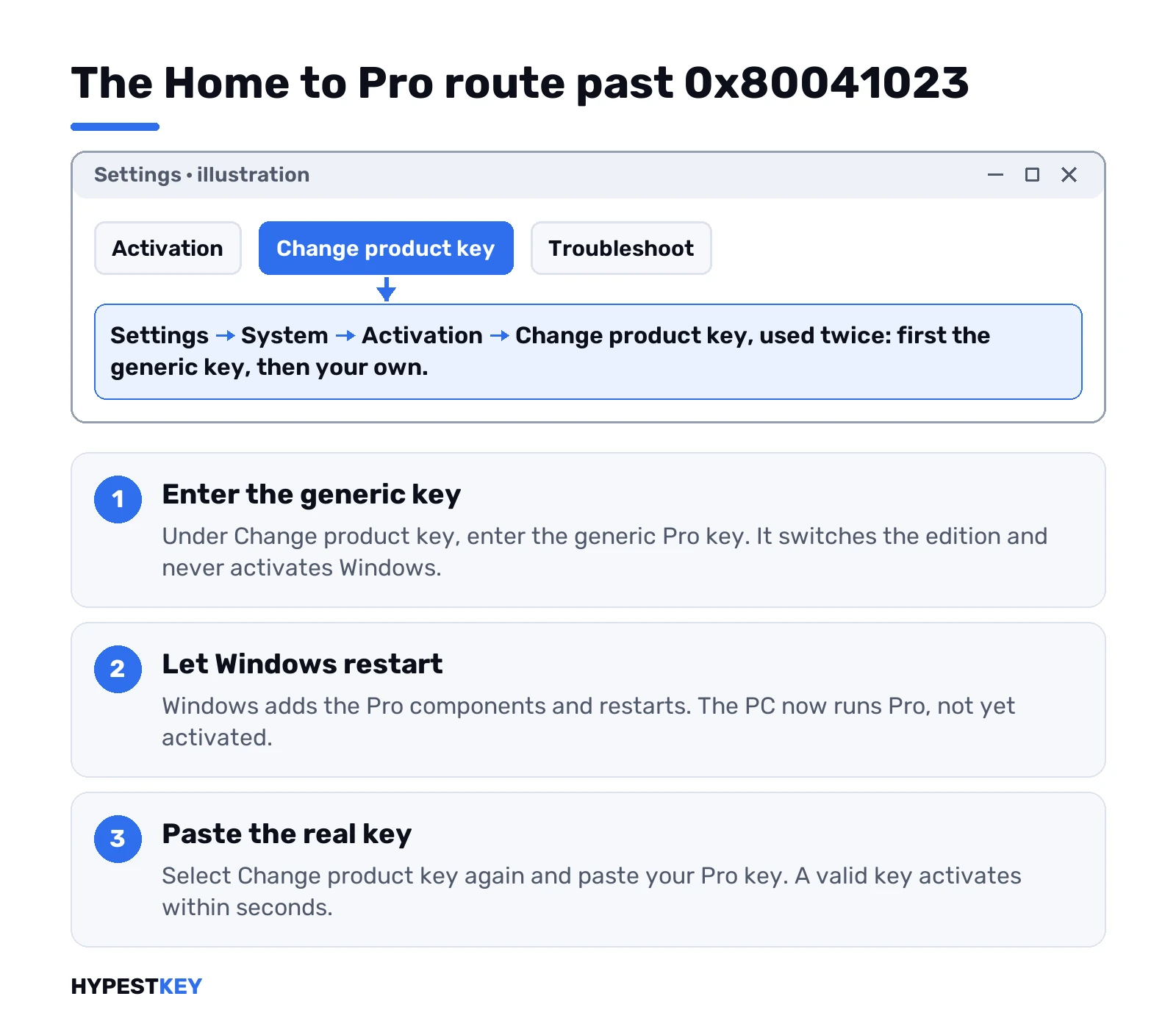
The WMI layer then reports a read-only failure. Switching to Pro first with the generic key typically solves it.
That two-step route, in order:
- Enter the generic key.
- Let Windows add the Pro components and restart.
- Paste the real key.
| Pro components that get added |
|---|
| BitLocker |
| Hyper-V |
| Remote Desktop host |
| Group policy |
After the restart the PC runs Windows 11 Pro with no activation. If the real key is valid for Pro, activation goes through within seconds.
Our step-by-step page on upgrading Windows 11 Home to Pro shows the same path with all the screens in order.
Activation may now fail with a different code. That’s progress.
A message such as 0xC004C003 or 0xC004F034 shows the key was installed and checked. The remaining problem is the key itself, not the edition.
Windows 7 and 8 keys
Those keys no longer work for fresh activations.
| Fact | Detail |
|---|---|
| When | Microsoft told its device partners on September 20, 2023 |
| What ended | The free upgrade path from Windows 7 and Windows 8 |
| Today | Microsoft’s forum moderators confirm that such keys no longer activate new Windows 10 or 11 installations |
| Result of trying | Commonly 0x80041023 or another key error |
PCs that already got a digital license keep it. That license is stored with Microsoft.
It reactivates the same hardware after a clean install of the same edition, with no key needed.
You only hit this code when you use the old key itself on a fresh install or on another PC. Then only a current license helps.
Need a key? Our Windows 11 Pro key comes as a genuine license. We email it instantly after payment.
Corrupted system files and the 0x80041023 activation error
That’s rarely the cause. Because the code comes from WMI, some pages blame a broken WMI repository.
In activation cases the key or the edition is almost always the real reason.
System file repairs are worth trying only in one situation. A key that clearly matches the edition is refused, and other system tools also misbehave.
Then run these from an elevated Command Prompt, one after the other, and restart afterwards:
sfc /scannow
DISM /Online /Cleanup-Image /RestoreHealth
winmgmt /verifyrepository| Line | Purpose |
|---|---|
sfc /scannow |
Repairs protected system files |
DISM /Online /Cleanup-Image /RestoreHealth |
Repairs the component store that sfc relies on |
winmgmt /verifyrepository |
Checks that the WMI repository is consistent |
Don’t delete or rebuild the WMI repository as a first move. Microsoft’s WMI documentation explicitly warns against it.
It can damage the system or installed applications. A failed key install never justifies that.
What to avoid with the 0x80041023 activation error
Avoid unofficial KMS servers, keys from video comments and scripts that promise free Pro. They don’t solve an edition mismatch.
They often leave Windows on a volume channel that fails later, and they commonly carry malware.
Also avoid repeated reinstalls before you’ve checked the edition your key is for.
One more habit is worth breaking: entering the same key again and again in Settings.
If it fails three times with this code, it will fail the fourth time too. Check the edition, then switch the edition or the key.
The general Windows 11 activation errors guide lists the other codes you may see along the way.
0x80041023 on a new Windows 11 PC with an OEM key
A new build. An OEM Pro key in the box. Windows installed from the media, key entered, and this code.
A common answer on Microsoft Q&A for exactly this case: OEM keys are locked to the edition they were issued for. So the installed edition decides.
- About says Home? The setup picked Home, maybe from a key in the firmware. The generic Pro key switches it, then the OEM key goes in.
- About says Pro and the key still fails? Then the key itself. Already bound to another machine, or never valid.
- Installing again anyway? Pick Windows 11 Pro on the edition screen of setup, and enter the key there.
The second case? Seller, proof of purchase, done. A key that fails on the right edition won’t start working by retyping.
No key yet and Home is fine for the rest? The Activation page has its own route too. Upgrade your edition of Windows, then Open Store. Or a key from us; the Windows 11 Pro key goes in under Change product key.
0x80041023 vs other key errors
Same dialog, different numbers. Each one points to a different stage.
| Code | Stage | What it says |
|---|---|---|
| 0x80041023 | Installing the key | Windows won’t take this key for the edition on the PC |
| 0xC004F050 | Installing the key | The key is invalid: a typo, a beta key, the wrong product |
| 0xC004C003 | Activating | The server blocked the key |
| 0xC004F034 | Activating | No valid license found for the key |
Stuck at the first stage? Edition or key format. Past it, the key went in, and Microsoft’s servers are the ones deciding.
Where these steps apply
| System | What applies |
|---|---|
| Windows 11 Home, Pro, Home N, Pro N (23H2, 24H2, 25H2) | All steps |
| Windows 10 Home and Pro 22H2 | All steps; the generic Pro key is the same |
| Enterprise and Education with volume licensing | Edition and key changes are handled by IT, usually with DISM /Online /Set-Edition or a KMS client key |
The generic key route covers Home to Pro only. On Windows 10 the Activation page sits under Update & Security.
Common mistakes with this code
- Typing a Pro key into Home and retrying when it’s refused.
- Expecting the generic key to activate Windows.
- Using an old Windows 7 or 8 key on a fresh install.
- Typing the key by hand, or copying it from a PDF with hidden characters.
- Mixing up Pro and Pro N.
- Rebuilding the WMI repository over a key problem.
- Running a script that promises free Pro.
- Reinstalling before checking the key’s edition.
Terms used on this page
| Term | Meaning |
|---|---|
| Edition | The variant of Windows, such as Home, Pro or Pro N |
| Generic key | A public key that only switches the edition and never activates |
| Firmware key | The OA3 key a PC maker stored in the firmware |
| OEM key | A key meant for installation on a fresh machine by its maker |
| N edition | A European variant without some media features, with its own keys |
| WMI | Windows Management Instrumentation, the layer activation tools talk through |
| WBEM_E_READ_ONLY | The WMI status behind this code |
| Licensing service | The Windows service that accepts or rejects a key |
| Digital license | An activation Microsoft stores for your hardware |
| In-place upgrade | Switching the edition with apps and files kept |
| Component store | The system’s own repair source, which DISM can fix |
Typical situations behind 0x80041023
The OEM Pro key
A typical case: an OEM Pro key goes in on Home, and the code appears. The generic key switches the edition first. Then the OEM key installs and activates.
The laptop that returns to Home
A common one: a laptop reinstalled as Pro keeps picking its firmware Home key, while Pro is what’s wanted. The generic key and a Pro key settle it.
The old sticker
It also happens that the key from a Windows 7 sticker goes into a fresh install. The code appears. A current key activates the PC.
The PDF copy
Typical sign: the key was copied from a PDF, and it’s refused. Notepad shows a stray character. Pasted clean, it installs.
The N edition
Another usual one: a Pro N key fails on Pro. The edition names differ by one letter. With Pro N installed, the key works.
The legal way: a genuine product key that activates on Microsoft’s servers. We sell Windows keys that activate online with Microsoft, with no scripts and nothing left running on the PC. We send each key instant to email.
FAQ
What does error 0x80041023 mean when activating Windows?
Windows refused to change the product key. The code is the WMI status WBEM_E_READ_ONLY. The activation tools pass it on when the licensing service rejects the key. In practice the key usually doesn't match the installed edition, so we'd compare the two.
How do I fix 0x80041023 when upgrading Windows 11 Home to Pro?
Switch the edition first. Enter the generic Pro key VK7JG-NPHTM-C97JM-9MPGT-3V66T under Settings, System, Activation, Change product key. Let Windows restart as Pro. Then we'd enter the real Pro key and activate.
Will the generic Pro key activate Windows?
No. It only switches the edition from Home to Pro. Windows stays unactivated until a valid Pro key is installed and activated. We'd do that under Change product key.
Can I use my Windows 7 key to activate Windows 11?
Not on a fresh installation. Microsoft closed the key path from those older versions in September 2023. A PC that already upgraded keeps its digital license. We'd expect it to reactivate the same edition after a clean install.
Is 0x80041023 a sign of a broken WMI repository?
Almost never in an activation context. We'd check the key and edition first. If a matching key is still refused, run the system file checker and the DISM health repair. Don't delete the WMI repository.
Why does my laptop keep going back to the Home key?
Many laptops store a Home key in the firmware, and Windows uses it automatically during setup. For Pro on that laptop, we'd switch the edition with the generic key and install a Pro key. Or keep Home, which the firmware key activates.
New PC, OEM Pro key, and 0x80041023 right away. What now?
Check the edition first. OEM keys are locked to the edition they were issued for, so Home has to become Pro before the key goes in. Already Pro and still refused? Then the key itself, and the seller is the one to ask.