Short answer: Retail vs OEM vs Volume license in one breath. A Retail key is bought on its own and can move to another PC you own. OEM comes preinstalled and stays with that device. Volume belongs to an organization and activates through MAK or KMS.
Retail vs OEM vs Volume license, the short version. Retail is the key you buy by itself, and it can move to another PC. OEM comes with a computer and stays with it. Volume belongs to an organization and gets activated by its IT people.
Same Windows, same Office, same features. The channel only changes the rules around the key. Who may move it, how it activates, and what the PC says when you ask it.
Retail vs OEM vs Volume license at a glance
| Retail | OEM | Volume | |
|---|---|---|---|
| Who it’s for | Anyone buying one copy | Buyers of a new PC, system builders | Organizations with a volume agreement |
| How you get it | A key or a box; one unique key per copy | Preinstalled; the key sits in the PC’s firmware | Through a volume licensing agreement |
| Moves to another PC | Yes, to a device you own, one at a time | Only together with the original device | It follows the agreement |
| Activation | Online, with the key | Automatic on that hardware | MAK, KMS or Active Directory |
| Does activation run out | No | No | MAK no; KMS renews within 180 days |
| The license window shows | RETAIL channel | An OEM channel name | VOLUME_MAK or VOLUME_KMSCLIENT channel |
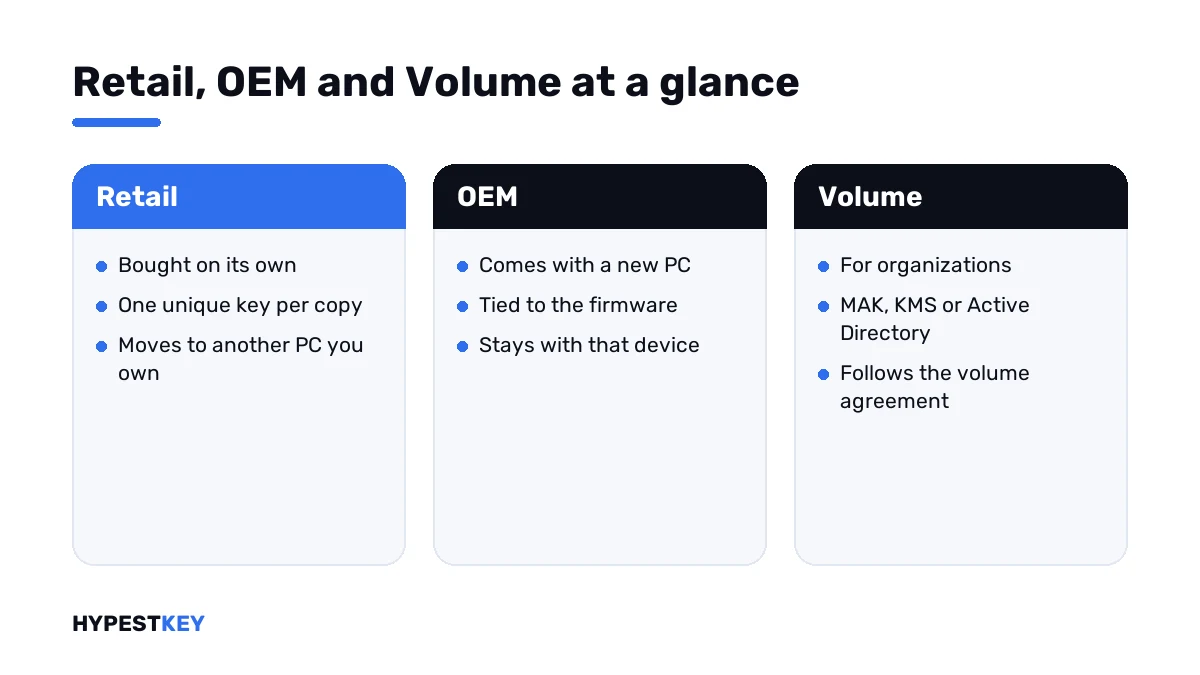
Microsoft names the same three itself: retail, original equipment manufacturer, and volume licensing agreements.
Retail
The one you buy on its own. Each copy comes with one unique product key, in a box or by email.
The big advantage sits in the terms. Stand-alone software may move to another device that belongs to you. The catch: it has to leave the old device first.
Good for a PC you built. Good for one you’ll replace in a few years. The steps are in how to transfer a Windows license to a new PC.
OEM
The copy that arrives on a new computer. The manufacturer ties it to the machine’s firmware, so it activates by itself on that hardware, reinstall after reinstall.
Per the terms, a preinstalled copy transfers only with the licensed device. Sell the laptop and it goes along. Buy a new laptop and it stays behind.
Nothing wrong with OEM on a PC that keeps its motherboard. Change the board and activation usually starts over. More on that pair in Windows 10 OEM vs Retail keys.
Volume
This one isn’t sold per copy. An organization signs a volume licensing agreement and activates many PCs under it. For desktop Windows it covers upgrades only. Each PC still needs a base license underneath.
| Method | How it activates | Good to know |
|---|---|---|
| MAK, Multiple Activation Key | Once, against Microsoft’s hosted activation service | Works like a retail key that’s valid for many computers |
| KMS, Key Management Service | Against a host inside the company network | Needs 25 client PCs, or 5 servers; the activation is valid for 180 days, and clients try to renew every 7 days |
| Active Directory-based activation | Through the company domain | The PC has to reach the domain at least once every 180 days |
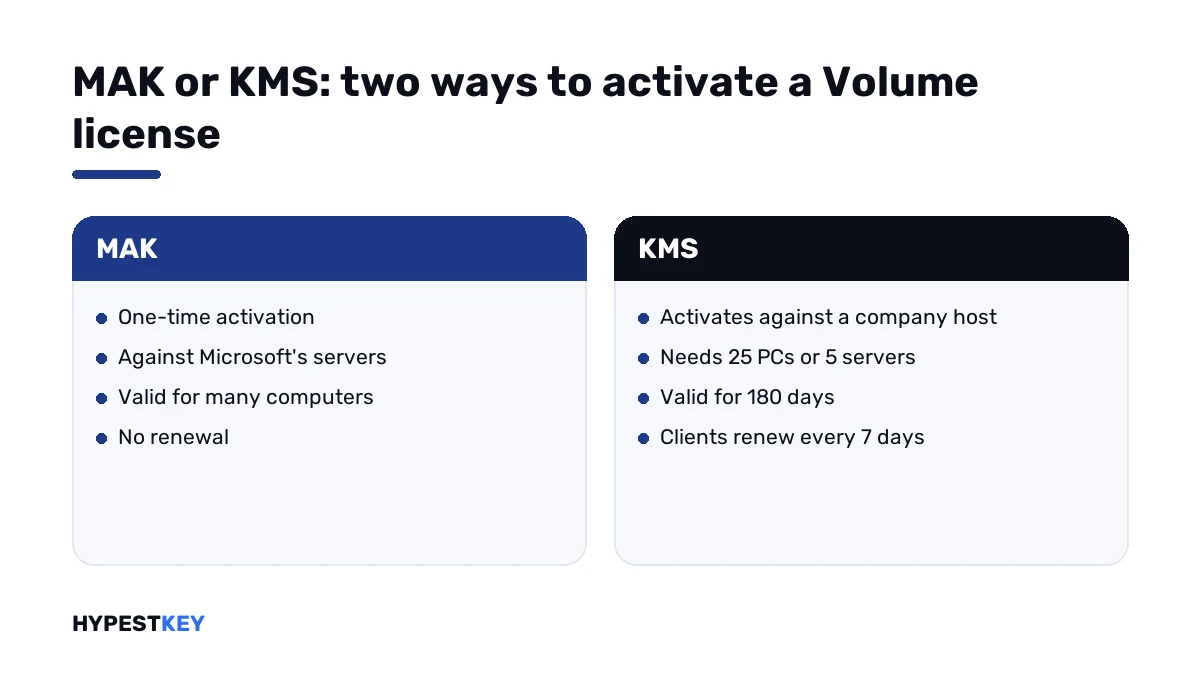
That’s why a KMS-activated PC taken out of the office eventually complains. It can’t find its host. Error 0xC004F074 is the usual sign, and 0x8007232B shows up when the DNS record for the host is missing.
Office follows the same split. The 2024 Home editions are Retail products tied to a Microsoft account. Office LTSC sits on the Volume side, activated with MAK or KMS. The two are compared in Office 2024 Professional Plus vs Home and Business.
Where the digital license fits
It isn’t a fourth channel. It’s a way of activating without typing a key. Microsoft describes it as associated with your hardware and linked to your Microsoft account.
A Retail purchase can live as a digital license. So can a factory install. The channel underneath stays what it was, and so do the rules about moving it.
The status wording and the account link are covered in how to activate Windows 11. Microsoft Helps also has a short video on keys and digital licenses.
How to check which one you have
One command. No administrator window needed.
- Press Win + R, type cmd and press Enter.
- Run the command shown below.
- Read the Description line in the window that opens.
- Match its last words against the table.
slmgr /dli| Description ends with | Type | In Microsoft’s documentation |
|---|---|---|
| RETAIL channel | Retail | Yes |
| VOLUME_KMSCLIENT channel | Volume, with a KMS client key installed | Yes |
| VOLUME_MAK channel | Volume, MAK | Seen in practice |
| OEM_DM channel | OEM, key stored in the firmware by the maker | Seen in practice |
| OEM_SLP or OEM_COA channel | OEM, older preinstall types | Seen in practice |
Want more detail? There’s a longer version of the same window.
slmgr /dlvOne warning. The line shows the key that’s installed, not what you paid for. Install from the wrong media, or let setup pick up the firmware key, and the channel follows that. Bought a Retail key and it says OEM? Enter your key under Change product key and look again.
The same check for Office
Office has its own script. It lives in the Office16 folder, and it doesn’t work for Microsoft 365 Apps.
cd "C:\Program Files\Microsoft Office\root\Office16"
cscript ospp.vbs /dstatus
Look at License Name and License Description. Retail copies usually say RETAIL channel there. Volume copies name MAK or KMSCLIENT. More on that script in our 0x4004F00C guide.
Which one to buy
| Your situation | Type that fits | Where to look |
|---|---|---|
| A PC you built yourself | Retail | Windows 11 Pro key |
| A laptop that came with Windows | It already has OEM; nothing to buy unless you want another edition | Nothing needed |
| You replace PCs often | Retail, because it moves | The same Windows 11 Pro key |
| Word and Excel on one home PC or Mac | Retail Office | Office Home and Business 2024 |
| Office with Access on a Windows PC | LTSC, the Volume line | Office LTSC Professional Plus 2024 |
| A company server | A server license plus CALs | Windows Server 2025 Standard |
Each of our product pages names the type. We’re a trusted reseller with genuine keys, and the key reaches you by email right after payment.
Mistakes we see most
| Mistake | What’s really going on |
|---|---|
| Expecting a laptop’s key to work on a new desktop | It’s OEM; it stays with the laptop |
| Reading the channel as a receipt | It only shows the installed key |
| Taking a KMS-activated work PC home for good | It needs its host within 180 days |
| Entering a Volume key into a Retail install of Office | The install type has to match the key |
| Running the remove-key command on the wrong PC | Check which machine you’re on first |
The first one fills our chat every week. All keys look the same, people think. The terms disagree, and so does the activation server.
Where this applies
Windows 10 and Windows 11. Office too, from 2016 through 2024. Quotes and command names come from Microsoft’s pages as they read in November 2026.
Sources I checked the facts against:
- Microsoft Learn: Plan for volume activation
- Microsoft Learn: KMS activation planning
- Microsoft license terms
- Microsoft Learn: Tools to manage volume activation of Office
Words on this page
| Word | Short explanation |
|---|---|
| Channel | The way a copy was sold: Retail, OEM or Volume |
| MAK | Multiple Activation Key: one key, many one-time activations |
| KMS | Key Management Service: a company host that activates PCs and renews them |
| GVLK | The public client key a PC uses to talk to a KMS host |
| Digital license | Activation without typing a key, associated with the hardware |
| Firmware | The chip on the motherboard where a PC maker stores the OEM key |
FAQ
Can I transfer an OEM license to a new computer?
No. Per Microsoft's terms it transfers only together with the original device. A new PC needs its own license.
Is it bad to buy an OEM key?
Not if the PC keeps its motherboard. The catch is that it won't move. For a machine you'll replace soon, I'd pay for Retail.
I bought a Retail key but the PC shows OEM_DM. Why?
The window shows the key that's installed. Setup probably picked up the key in the firmware. Enter your own key under Change product key and check again.
Does KMS activation expire?
It runs for 180 days. Clients try to renew every 7 days, so inside the company network it never lapses. Away from the host it eventually does.
What's the difference between MAK and KMS?
MAK activates once against Microsoft's servers. KMS activates against a host in the company network and keeps renewing. Small fleets usually take MAK.
Is a digital license the same as Retail?
No. Digital license only describes activation without a key. Underneath it can be Retail or OEM, and the transfer rules follow that.
How do I check the license type of Office?
Run the ospp script with the dstatus switch from the Office16 folder. Read the License Description line. It doesn't work for Microsoft 365 Apps.