
 Microsoft Windows
 Microsoft Office
 Office for Mac
 Windows Server
November 1, 2024 is the official Windows Server 2025 release date, and if you haven’t looked at it yet, you probably should because Microsoft went LTSC on this one (10 years of patches, support runs through October 2034). We had a test VM going that same week and pushed it into production sometime around mid-December after we felt comfortable with it.
My background is Windows Server administration going back to 2011, mostly AD, Hyper-V, file services. At HypestKey we have three people with sysadmin experience. We installed 2025, ran workloads on it, broke some stuff, and I read through probably 30-40 threads on r/sysadmin to see what tripped up other admins. All of that went into this article.
When Did Microsoft Release Windows Server 2025?
Jeff Woolsey dropped a blog post on the Windows Server blog, January 26, 2024. Didn’t say much, just that a new Server was in the works. Insider builds trickled in through March and April and I was refreshing the Insider page way too often. Microsoft finally pulled the trigger on November 1, 2024 at Ignite. The Microsoft docs page for Server 2025 has the full rundown on features.
Build number is 26100 if anyone asks. Under the hood, it’s the same Germanium (24H2) code that powers Windows 11, minus the consumer fluff, plus all the server-specific bits. One interesting thing happened in January 2026: Microsoft split the server codebase into a separate branch. Before that, Windows 11 client updates kept introducing weird regressions on the server side. We hit one ourselves with a network driver issue in a preview build. The fork fixed that whole mess.
Windows Server Version History and Release Dates
For context, here’s every major Windows Server release going back to 2003. I keep this list bookmarked because clients always ask about EOL dates during upgrade planning calls.
| Version | Release Date | Mainstream End | Extended End | Status |
|---|---|---|---|---|
| Server 2003 | April 24, 2003 | July 13, 2010 | July 14, 2015 | End of life |
| Server 2008 | February 27, 2008 | January 13, 2015 | January 14, 2020 | End of life |
| Server 2008 R2 | October 22, 2009 | January 13, 2015 | January 14, 2020 | End of life |
| Server 2012 | September 4, 2012 | October 9, 2018 | October 10, 2023 | End of life |
| Server 2012 R2 | October 18, 2013 | October 9, 2018 | October 10, 2023 | End of life |
| Server 2016 | October 12, 2016 | January 11, 2022 | January 12, 2027 | Extended support |
| Server 2019 | October 2, 2018 | January 9, 2024 | January 9, 2029 | Extended support |
| Server 2022 | August 18, 2021 | October 13, 2026 | October 14, 2031 | Mainstream support |
| Server 2025 | November 1, 2024 | October 10, 2029 | October 10, 2034 | Mainstream support |
Quick scan of this table and you can see the problem. 2012, 2012 R2: completely dead, October 2023 was the last patch either of them got. 2016 is still in extended but January 2027 is right around the corner and I don’t think most people realize how close that is. 2019 quietly dropped out of mainstream in January 2024. Got a hardware budget? Skip everything else and go straight to 2025. You won’t think about it again until the 2030s.
Windows Server 2025 Support Dates and End of Life
Microsoft hasn’t changed the formula in years. Five years of mainstream where they ship everything, then five more years of extended where it’s security patches only.
| Milestone | Date |
|---|---|
| General Availability (Release) | November 1, 2024 |
| End of Mainstream Support | October 10, 2029 |
| End of Extended Support | October 10, 2034 |
Features, bugfixes, security patches all come through until 2029. After that Microsoft only does security stuff, and they stop even that in October 2034. I keep seeing the same question on TechCommunity: “will they sell ESUs like they did for 2012?” Nobody knows. Microsoft hasn’t said a word about it.
Every edition gets the same dates. Standard, Datacenter, Azure Edition, Essentials. No variation. One thing I want to flag because it keeps catching people off guard: Server 2016 dies in January 2027. We told a client about this last month (they had four 2016 DCs) and the look on their face said it all.
Windows Server 2025 Editions and Pricing
Three editions, same as 2022. Since the Windows Server 2025 release date, pricing moved up slightly on some SKUs. Wrong edition choice means either wasting money or hitting a licensing wall when you need more VMs.
Standard Edition
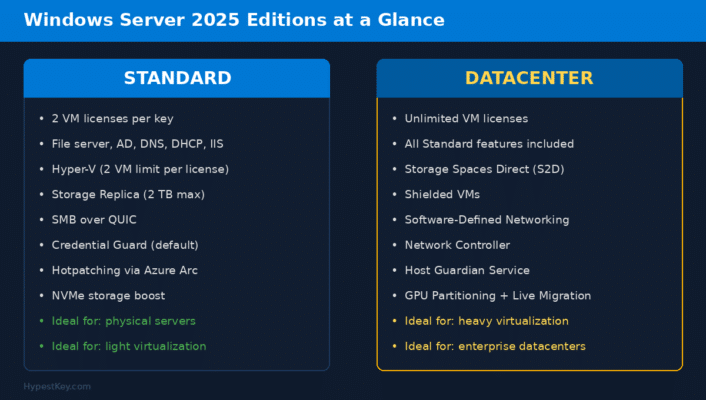
About $1,176 for a 16-core license pack. That covers your usual stuff: AD, DNS, DHCP, file shares, IIS, Hyper-V. You get 2 VM licenses per key. Need a third VM? Buy another Standard license and “stack” it. Two more VMs per stack. Gets expensive fast if you’re running a bunch of VMs, though.
Datacenter Edition
$6,771 for the same 16-core pack. Yeah, the sticker price hurts. But here’s the thing: unlimited VMs. Run as many as your hardware can handle. Plus you get the good stuff that Standard doesn’t include: Storage Spaces Direct, Shielded VMs, software-defined networking, Network Controller. If you’re running 3+ VMs per physical host, do the math. Datacenter almost always wins at that density.
Essentials Edition
Honestly, this barely exists anymore. It’s for tiny offices with 25 users max. You can only get it pre-installed from an OEM. Microsoft gutted all the unique features back in 2019. It’s just a licensing shortcut at this point.
Licensing: How It Actually Works
Licensing always trips people up, so let me just lay it out. Per-core model. You count the physical cores on your server, then buy enough licenses to cover all of them. Microsoft sets a floor at 8 cores per socket and 16 cores per server. They sell 2-core packs and 16-core packs. And then there’s CALs on top of that. Every person or device that connects to the server needs a CAL. If you run Remote Desktop, those need their own RDS CALs, purchased separately. One client of ours got flagged in a Microsoft audit last year because they never bought CALs for their branch office. Don’t be that company.
Microsoft added a pay-as-you-go model in 2025. It runs through Azure Arc. $33.58 per core per month, billed to your Azure subscription. We had a client ask about this for a trade show season where they needed extra capacity for three months. Made sense for them. Wouldn’t recommend it for permanent workloads though, the math doesn’t work out long-term.
Ready to buy? You can grab a Windows Server 2025 Standard key or the Datacenter edition from us. Keys arrive by email in minutes.
What Actually Changed in Windows Server 2025?
More than I expected, honestly. The 2019 to 2022 jump felt minor. This one? There’s real substance here. Let me walk through what matters if you actually manage servers day to day.
Hotpatching (Finally in Standard and Datacenter)
Only Azure Edition had this before, which was frustrating. With 2025, Standard and Datacenter can do it too. You connect the server to Azure Arc, and from that point on, security patches install without a reboot. We started using this in July 2025 when the subscription went GA. Last three Patch Tuesdays, we didn’t reboot a single production box. Our monitoring guy thought the patching script was broken until he checked the logs.
NVMe Storage Got Way Faster
Microsoft says 60% more IOPS on identical hardware. We tested it ourselves with Samsung 990 Pro drives on the same box, same workload. Got about 45-50% improvement over Server 2022. Not quite 60%, but honestly? Still a big deal if you’re running SQL Server or heavy Hyper-V storage. You feel the difference.
Security Changes in Server 2025
Biggest changes in the whole release, if I’m being honest. Credential Guard is on by default now. Saw a thread on r/sysadmin where someone estimated maybe 20% of 2022 deployments had it enabled. The rest? Wide open to pass-the-hash. That’s fixed. SMB signing is forced on outbound connections, which makes relay attacks way harder to pull off. Microsoft is actively pushing NTLM out and moving everyone to Kerberos, that transition started with 2025. TLS 1.0 and 1.1 are straight up gone from the OS. We found this out when a client’s 2008-era inventory system broke during a test migration. Had to get the vendor involved. Check your apps before you upgrade. The other big one: SMB over QUIC works in Standard and Datacenter now (used to be Azure-only). A construction company we work with has techs in the field pulling blueprints off the file server over cellular. No VPN. Took about an hour to get QUIC configured on their end.
Active Directory Got a Real Upgrade
New functional level: 10. The headline feature is optional 32K database page sizes, up from 8K. Sounds boring until you manage a forest with 50,000+ objects and replication starts choking. Bigger pages mean AD can handle more attributes per object without tanking performance. They also added AD object repair and dMSA (Delegated Managed Service Accounts) so service account passwords rotate automatically. No more PowerShell scripts doing password resets on a schedule.
Hyper-V Scale Improvements
On paper the specs are wild. 2,048 vCPUs per VM. 240 TB of RAM per VM. I don’t know anyone who actually needs that right now, but Microsoft clearly built this for AI inference and maybe SAP HANA type workloads. What I do care about: GPU partitioning (GPU-P). Stick a GPU in the host, carve it into slices, hand each slice to a different VM. We tried this for a VDI proof-of-concept last fall with an RTX A4000. Worked well. And GPU-P VMs can live migrate now. On Server 2022, attaching a GPU to a VM meant that VM was stuck on that host. If the host needed maintenance, you had to shut the VM down. With 2025, you just migrate it.
The UI Looks Like Windows 11 Now
First time I RDP’d into 2025 I did a double take. Looks like Windows 11. Rounded corners everywhere, Start menu has pinned apps, Task Manager got the dark mode treatment. Windows Terminal is already installed (finally). Winget works out of the box too, which is great for scripted deployments. Right-click in Explorer and you can compress stuff to 7z or TAR, not just ZIP. They even put Bluetooth and Wi-Fi drivers in by default. Nobody is running WiFi on a rackmount server, obviously, but for test labs and small office boxes where you occasionally sit down at the console, these little things add up.
Known Issues at Launch
Launch day had bugs. Every Windows Server release does, but these were worth documenting because some of them could brick an install if you didn’t know about them.
Blue screens on servers with 256+ logical processors. Dual-socket EPYC 9004 boxes, some Xeon Scalable configs with HyperThreading pushing past that threshold. If you had one of these and tried installing on launch day, you got a BSOD. December 2024 CU (KB5044384) fixed it. We didn’t hit this ourselves because our biggest client box only has 128 logical processors, but I saw at least three threads about it on r/sysadmin the first weekend.
And then there was the iSCSI boot thing. If your server boots off an iSCSI target (some SAN setups do this), the 2025 installer could throw a “boot device inaccessible” error and just stop. Microsoft put a workaround in a KB article and eventually fixed it properly around February or March 2025.
There was also a language bug. If you installed from USB or DVD media with a non-English language selected, some screens would show English text anyway. Cosmetic, but confusing during setup. Fixed in a later servicing update.
All three bugs are fixed as of April 2026. If you download a fresh ISO today from the Evaluation Center or VLSC, you’re fine. The only time you’d hit these is if somebody gives you that original November 2024 ISO and you don’t patch the box right after install.
Windows Server 2025 System Requirements
Not a lot changed versus 2022 honestly. The two new things are SSE4.2 and POPCNT becoming hard requirements, but Intel has had SSE4.2 in everything since Nehalem (that’s 2008) and AMD since Bulldozer in 2011, so unless you’re deploying on seriously ancient hardware this won’t be an issue.
| Component | Minimum | What You Actually Want |
|---|---|---|
| CPU | 1.4 GHz 64-bit, SSE4.2, SLAT, NX/DEP | Multi-core Xeon or EPYC |
| RAM | 512 MB (Core) / 2 GB (Desktop Experience) | 16 GB+ for anything real |
| Storage | 32 GB | 64 GB+ on NVMe |
| Network | Gigabit Ethernet (PCIe) | 10 GbE for clusters |
| Firmware | UEFI 2.3.1c + Secure Boot | TPM 2.0 required |
No SLAT on your CPU? Installer won’t even start. Run the Coreinfo tool from Sysinternals to check. Takes maybe 10 seconds to confirm.
VM installs have a gotcha. I allocated 512 MB to a test VM and the installer just sat there. Nothing on screen, no error code, just frozen. Turns out 800 MB is the actual minimum. Microsoft’s docs say 512 MB for Core, but that only works on bare metal. For VMs, go with 2 GB on Core and 4 GB on Desktop Experience.
How to Download Windows Server 2025
Free 180-day trial is on Microsoft’s Evaluation Center at microsoft.com/en-us/evalcenter/evaluate-windows-server-2025. Standard and Datacenter both available. ISO download, roughly 5.2 GB. Throw it on a VM or install on bare metal, run it for six months, see if it works for your environment.
When the 180 days are up, either buy a key and activate (we sell Standard and Datacenter keys), or use DISM to convert the eval to a licensed edition without wiping the box. One warning though: when the eval expires, the server shuts itself down every hour on the hour. I got a panicked support ticket about this at 2 AM once. Client was convinced it was a hardware failure. Nope, just a forgotten eval. Put it in your Outlook calendar or something.
If you’re on a Volume License agreement or have Visual Studio, the full ISO is available from VLSC or the VS downloads page. Those come pre-configured for your license type so you don’t have to pick an edition during setup.
How to Upgrade to Windows Server 2025
Best thing about 2025 is the upgrade path. Since the Windows Server 2025 release date you can jump from 2012 R2 or 2016 or 2019 or 2022 directly to 2025, one in-place upgrade and you’re done. I remember upgrading a client’s 2012 R2 file server to 2019 back in the day, had to stop at 2016 first, wait an hour for that to finish, reboot, confirm everything still worked, then kick off the 2019 upgrade. Whole Saturday gone for one server. Never again.
Upgrade via ISO like always (USB, DVD, mount it in Hyper-V) or, new option, through Windows Update. Microsoft never offered full version upgrades through Windows Update on Server before. For DCs, run ADPREP first. Forestprep and domainprep off the 2025 media. A customer of ours skipped ADPREP on a test DC last year and had replication failures within a few hours.

On Hyper-V, the VM drivers update themselves during the upgrade process. VMware is different: make sure VMware Tools are current before starting, or the upgrade can stall. Physical servers need a firmware check against your vendor’s HCL. Dell has their list on the support site, HPE and Lenovo do too.
Got an evaluation copy running? You can convert it to full Standard or Datacenter with DISM. No reinstall needed. Our DISM activation guide for Windows Server walks through every step.
I probably don’t need to say this but Server 2012 R2 has been completely unsupported since October 2023. Over two years with no patches. Walked into a client site last quarter where their main file server was still running it. The conversation was not fun.
What Got Removed in Windows Server 2025
Microsoft axed a few things. If any of these are still in your environment, figure out alternatives before you upgrade. Not after.
- SMTP Server role. Dead. Use Exchange Online, SendGrid, or spin up a Postfix box on Linux.
- PowerShell 2.0 Engine. If you still have scripts that need it, time to rewrite them for 5.1+.
- IIS 6 Management Console. Yes, it was still hanging around. Not anymore.
- WordPad. Gone from server too, same as Windows 11.
- TLS 1.0 and 1.1. Not deprecated this time. Straight up removed. Test your apps before upgrading.
- 32-bit app support. 64-bit only. Period.
Deprecated but still working: WSUS, NTLM, VBScript, WMIC, Computer Browser. Microsoft will probably yank these from the next major release, so start planning replacements now.
WINS is deprecated too. Server 2025 is the last version that will ship with it. Microsoft gave everyone until 2034 to move to DNS. If you’re still running WINS in production… I have questions.
Windows Server 2025 vs Windows Server 2022
People email us about this constantly. My answer is always yes, upgrade. Table below shows you why.
| Feature | Server 2022 | Server 2025 |
|---|---|---|
| Hotpatching | Azure Edition only | All editions (via Azure Arc) |
| NVMe IOPS | Baseline | Up to 60% more |
| Credential Guard | Optional | On by default |
| SMB over QUIC | Azure Edition only | All editions |
| AD Functional Level | Level 7 | Level 10 (32K pages) |
| Max VM vCPUs | 2,048 | 2,048 |
| Max VM RAM | 12 TB | 240 TB |
| GPU Partitioning | Limited | Full + Live Migration |
| Upgrade via Windows Update | No | Yes |
| End of Extended Support | October 2031 | October 2034 |
The security improvements justify the upgrade for most environments. Ever since the Windows Server 2025 release date, the two things I see admins mention most on Reddit are Credential Guard running by default and forced SMB signing. On 2022, both of those needed manual GPO configuration. Most shops never did it. Now it’s automatic.
Curious about the difference between regular Windows and Server? We wrote a whole piece on Windows vs Windows Server that explains it.
Windows Server 2025 Release Date FAQ
When was Windows Server 2025 released?
The Windows Server 2025 release date was November 1, 2024. Build 26100, LTSC channel, fourteenth Windows Server version.
How long will Microsoft support Windows Server 2025?
October 10, 2029 for mainstream (features + bugfixes + security). October 10, 2034 for extended (security only). Ten years from GA.
How much does Windows Server 2025 cost?
Standard: $1,176 per 16-core pack. Datacenter: $6,771 per 16-core pack. CALs sold separately. Resellers vary, we’ve seen 10-20% markups over MSRP.
What are the minimum system requirements for Windows Server 2025?
64-bit, 1.4 GHz, SSE4.2, SLAT. RAM: 512 MB Core / 2 GB Desktop Experience (4 GB recommended for either). 32 GB disk. UEFI 2.3.1c + Secure Boot + TPM 2.0. Gigabit Ethernet. Servers from 2010 onward should be fine.
Can I upgrade directly from Windows Server 2019 to 2025?
Direct in-place upgrade, yes. Works from 2012 R2, 2016, 2019, 2022. Windows Update is also an option now (new for Server).
What is the difference between Windows Server 2025 Standard and Datacenter?
Standard: 2 VMs per license, basic server roles. Datacenter: unlimited VMs, Storage Spaces Direct, Shielded VMs, SDN, Network Controller. Around 3 VMs per host is where Datacenter starts being cheaper than stacking Standard.
Does Windows Server 2025 support hotpatching?
Yes, via Azure Arc. Subscription went GA July 1, 2025. Works on Standard and Datacenter. Patches install without a reboot.
Having trouble activating your key? Check our Windows Server activation guide for every method: DISM, slmgr, KMS, ADBA, the works.
Last updated: April 2026
