
 Microsoft Windows
 Microsoft Office
 Office for Mac
 Windows Server
Microsoft project management used to be simple. You bought Microsoft Project, installed it, done. Not anymore. Now there are like six different products under three different names, and half of them got rebranded to “Planner” last year. I spent a good chunk of time sorting through all of it so you don’t have to.
Plan 1 costs $10/month. Plan 3 is $30/month and comes with the desktop app most people actually want. Plan 5 runs $55/month for big organizations with portfolio needs. Oh, and Project Online? Microsoft is killing it off September 30, 2026. Desktop client stays though.
What Is Microsoft Project Management Software?
Microsoft Project first showed up in 1984. It’s scheduling software. PMs build Gantt charts in it, set up task dependencies, put people on assignments, watch the budget. It’s wired into Microsoft 365, so Teams, SharePoint, Power BI, Outlook all connect to it without extra setup.
Problem is, “Microsoft Project” doesn’t mean one thing anymore. There’s a web version (they used to call it Project for the web), a desktop client (Project Professional), and a cloud platform (Project Online) that’s getting shut down. Microsoft crammed all of this under the “Planner” brand recently, and that made the whole thing way more confusing than it needed to be.
But the core idea hasn’t changed. You plan work, assign people, track time, and report to whoever needs reporting. Construction companies, IT shops, engineering firms, government agencies. The software still holds around 66% market share in the PM space, so it’s not going anywhere.
Every Microsoft Project Management Tool in One Place
Most people hear “microsoft project management” and think of one product. Microsoft actually has about ten different tools that touch project work in some way. Some overlap, some don’t. I went through every one of them and here’s what each tool is actually for.
Microsoft To Do is just a personal checklist app. It syncs with Outlook tasks. Not a project management tool by any definition, but Microsoft lumps it into the same family, and some PMs use it to track their own action items from bigger projects.
Microsoft Planner (the basic version) is a kanban board for teams. You create buckets, drag cards around, assign people. It lives inside Teams. Free with any Microsoft 365 subscription. Good for simple team task tracking, bad for anything with dependencies or timelines.
Microsoft Project for the web got folded into Planner recently. It added Gantt views, dependencies, and timeline tracking to the basic Planner experience. If you hear someone say “Planner Premium” or “Planner Plan 1,” they’re talking about this layer. It’s browser-only.
Microsoft Project desktop (Standard and Professional) is the Windows app. The one everyone pictures when someone says “MS Project.” Critical path, resource leveling, earned value, baselines, the full scheduling engine. Been around since the 80s and still gets updates.
Microsoft Project Online used to be the cloud version of Project Server. Microsoft is killing it September 30, 2026. If you’re on it, start migrating yesterday.
Microsoft Project Server Subscription Edition is the on-premises enterprise platform. Banks and government agencies use it when they can’t put project data in the cloud. Still supported.
Microsoft Teams isn’t a PM tool by itself, but the Tasks app inside Teams pulls together your Planner boards and To Do lists in one view. A lot of teams run their day-to-day project work right inside Teams channels without ever opening Project.
Microsoft Excel deserves a mention because honestly, tons of project managers still run their projects in spreadsheets. Microsoft even publishes Gantt chart templates for Excel. It works until your project has more than 50 tasks, then it falls apart.
Power Automate handles workflow automation. You can set up flows that trigger when a task gets completed, send notifications, update status fields, or move data between Project and other apps. Most teams don’t touch it, but PMOs with custom processes use it a lot.
Dynamics 365 Project Operations is a different beast entirely. Microsoft built it for consulting firms, agencies, and service companies that bill by the hour. It handles sales pipelines, resource staffing, project scheduling, time tracking, and invoicing all in one place. Way bigger and way more expensive than regular Project plans.
Microsoft says all these tools work together perfectly. Reality is mixed. Project + Teams + Power BI integration is solid. Planner to Project desktop sync? Still janky in 2026. And every paid plan has a 30-day free trial on Microsoft’s site, so you can test before buying anything.
Which Microsoft Project Management Tool Should You Use?
Ten tools is a lot. The table below should save you some time. Match your situation to the right tool.
| Your situation | Use this | Why |
|---|---|---|
| Personal tasks, just you | Microsoft To Do | Free, syncs with Outlook, dead simple |
| Small team, basic boards | Planner (free with M365) | Kanban cards, no overhead, lives in Teams |
| Team needs timelines and Gantt | Planner Plan 1 ($10/mo) | Gantt views and dependencies in the browser |
| PM with real scheduling needs | Project Plan 3 ($30/mo) | Desktop app, resource leveling, baselines |
| PMO managing a portfolio | Project Plan 5 ($55/mo) | Portfolio optimization, demand management |
| Service firm billing hourly | Dynamics 365 Project Ops | Sales + resourcing + billing + PM in one |
| Regulated industry, on-prem only | Project Server SE | Your servers, your data, your rules |
Most teams I’ve talked to start with Planner (free) and only upgrade when they hit a wall. Usually that wall is resource management or complex dependencies. If you can’t tell who’s overbooked or which tasks are blocking what, Plan 3 or the desktop app is the move.
By the way, every paid plan has a 30-day free trial. Worth trying on a real project first. Microsoft’s site handles it, no credit card required.
Microsoft Project Management Plans and Pricing in 2026
Microsoft renamed a bunch of things last year. “Project Plan” became “Planner Plan” in some tiers. Confused me at first too. I broke down every Microsoft Project pricing tier with what you get for the money. All prices current as of April 2026.
Planner Basic (Free with Microsoft 365)
If your company pays for Microsoft 365 E3 or E5, you already have Planner Basic without knowing it. It’s a task board. Lists, basic views, collaboration inside Teams. That’s the whole thing.
No Gantt charts. No resource management. No real reporting. It’s fine for a team that needs a shared to-do list, but calling it “project management” is generous.
Planner Plan 1 at $10 per User per Month
Plan 1 is the cheapest tier with actual microsoft project management capabilities. Gantt chart views, task dependencies, timeline tracking. Also grid, board, schedule, and chart views. Storage caps at 1 GB per user though, and there’s no desktop app. Browser only.
I’d recommend it for smaller teams. Maybe a marketing crew running campaign timelines, or a small IT group tracking sprint work. Once you need resource allocation or timesheets, you’ve outgrown this tier.
Planner and Project Plan 3 at $30 per User per Month
Plan 3 is where it gets real. You get the desktop client (Project Professional), timesheets, roadmaps, Power BI integration, and actual resource management. Storage goes to 2 GB. Most PMs I’ve talked to end up on this tier.
That desktop client matters a lot. It’s the Windows app that can do critical path analysis, resource leveling, baselines, earned value. The web interface can’t do half of this. If you run construction projects or software releases with 200+ dependent tasks, you need the desktop app.
Don’t want a subscription? You can buy Microsoft Project Professional 2021 once and keep it. You get the same desktop app without paying every month.
Microsoft Project Plan 5 at $55 per User per Month
Plan 5 has everything Plan 3 has, plus portfolio management, demand management, and enterprise resource capacity planning. Storage goes up to 5 GB per user.
Most teams honestly won’t need Plan 5. It exists for PMOs running 20+ projects at once who need to model different investment scenarios and report on portfolio health to leadership. If you’re doing that kind of work, you already know you need it. Everyone else should stick with Plan 3.

Microsoft Project Management: Perpetual License Options
Not everyone wants a subscription. Microsoft still sells desktop licenses. Standard 2021 is $679.99 for one person doing basic scheduling. Professional 2021 is $1,129.99, which gets you SharePoint sync and resource management across multiple projects on top of that.
If you just want the Microsoft Project desktop app on one machine and never think about it again, perpetual makes sense. We also carry Microsoft Project Professional 2019 at a lower price if you don’t need the newest build.
| Plan | Price | Desktop Client | Gantt Charts | Resource Mgmt | Portfolio Mgmt |
|---|---|---|---|---|---|
| Planner Basic | Free (with M365) | No | No | No | No |
| Planner Plan 1 | $10/user/month | No | Yes | No | No |
| Plan 3 | $30/user/month | Yes | Yes | Yes | No |
| Plan 5 | $55/user/month | Yes | Yes | Yes | Yes |
| Standard 2021 | $679.99 (one-time) | Yes | Yes | No | No |
| Professional 2021 | $1,129.99 (one-time) | Yes | Yes | Yes | No |
Project Online Retirement: What Happens in September 2026
Microsoft is shutting down Project Online. Completely. September 30, 2026 is the date. After that, all your data in Project Online is gone, not moved somewhere, not archived, just inaccessible. If your organization still uses Project Online, read this part carefully.
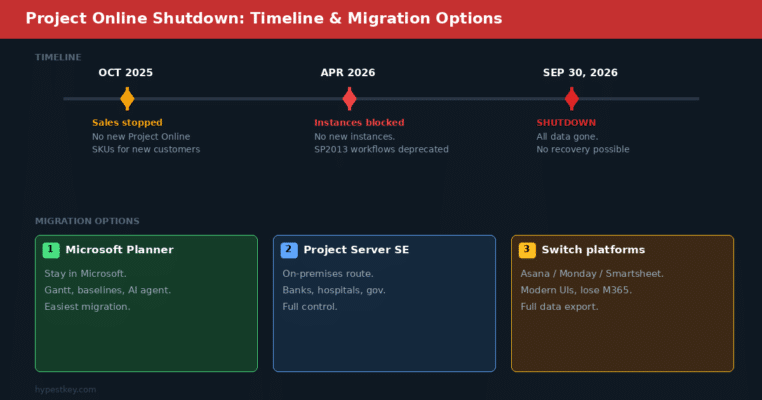
The whole microsoft project management situation got shaken up because of this. Three dates matter:
- October 1, 2025 – Microsoft stopped selling Project Online-only SKUs to new customers
- April 2026 – Can’t spin up new Project Online instances. SharePoint 2013 workflows are also getting deprecated, and a lot of teams relied on those for custom reporting
- September 30, 2026 – Project Online shuts down completely. No access to anything
The desktop app is not affected. Neither is Project Server Subscription Edition. This retirement only hits the cloud-hosted Project Online service.
Why did Microsoft do it? Because Project Online sits on old architecture that doesn’t play nice with Copilot, Power Platform, or the new Planner. They want everyone on the new stuff.
Microsoft Project Management Migration Paths
You’ve got three options if you’re leaving Project Online.
Option 1: Microsoft Planner with premium features. This is what Microsoft wants you to pick. If you already pay for Plan 3 or Plan 5, you already have access to Planner premium. Gantt charts, dependencies, baselines, and the new AI Project Manager agent are all there. Easiest path because you stay in the Microsoft world.
Option 2: Project Server Subscription Edition. This is the on-prem route. Your own servers, your own rules. Banks, hospitals, government agencies tend to go this way because they can’t or won’t put project data in Microsoft’s cloud.
Option 3: Jump ship entirely. Smartsheet, Monday.com, and Asana are all going hard after this migration moment. They’ve got modern interfaces and AI features. But switching means exporting everything, rebuilding workflows, and losing the deep Microsoft 365 integration.
Whatever you pick, start now. Migration takes three to six months minimum. I’ve seen threads on Reddit from IT admins who waited too long and got burned. Don’t be that team.
Key Features of Microsoft Project Management Software
Gantt Charts and Task Scheduling
Gantt charts are the whole reason most people buy this software. Each task sits on a timeline as a bar. You connect tasks with dependencies, and if one task moves, every connected task shifts with it. The scheduling engine recalculates everything. Microsoft Project has been doing this longer than most alternatives have existed, and it shows.
The path highlighting feature is something I use all the time. Click a task and the chart shows every predecessor, every successor, and the full critical path. Makes it obvious which tasks have slack and which ones are going to wreck the schedule if they slip.
Resource Allocation and Leveling
Assigning people to tasks is the easy part. The real win is resource leveling. Someone’s overbooked across three projects? The tool redistributes their work automatically. Saves you from those “wait, I thought you were available” conversations.
Plan 3 and up give you a consolidated capacity view across all projects. Who’s slammed? Who’s free next week? Answers without building spreadsheets.
Baseline Tracking and Earned Value
You save a baseline before the project kicks off. Original schedule, original budget, original scope. Then as work happens, Microsoft Project shows you how reality stacks up against the plan.
Earned value analysis tells you if you’re ahead or behind, and by how much in dollars and days. Stakeholders love these numbers. PMOs need them to flag projects in trouble early.
Copilot and the AI Project Manager Agent
New for 2026. Microsoft dropped an AI agent inside Planner called “Project Manager.” It uses Copilot to auto-create tasks, write status reports, and keep tabs on project progress. Sounds like marketing speak, but people on the Microsoft community forums say it actually cuts down on the admin grind.
Still in preview though. Available on Plan 3 and Plan 5. I’d keep expectations reasonable for now, but it’s worth watching.
Microsoft Teams Integration
Every plan tier connects to Teams. Pin your project as a tab in a channel. Share task boards. Get notifications when someone finishes something or falls behind. If your team already lives in Teams for calls and chat, project updates just show up where they already are.
Power BI Reporting
Plan 3 and Plan 5 connect to Power BI directly. So you can set up dashboards that show live schedule data, budget status, resource workload, whatever your stakeholders keep asking about. The nice part is your executives don’t need a Project license to see the reports. With Asana or Monday.com, you’re stuck with whatever reporting they give you.
Microsoft Project vs. Competitors in 2026
I checked review sites, went through Reddit, and tried a few alternatives myself. For small teams doing basic task tracking, microsoft project management is probably more than you need. For anything with real scheduling complexity, nothing else comes close.
vs. Asana: Way easier to learn. Better for agile teams or creative work. But it can’t do waterfall scheduling with complex dependencies the way Project can. Asana runs about $11/user/month. If your company is already on Microsoft 365, switching to Asana means dealing with two separate platforms that don’t really talk to each other.
vs. Monday.com: Slick interface, decent AI automation. The scheduling engine under the hood isn’t as deep though. Their basic plans start at $9/user/month. Works for task tracking, but it’s not replacing a real PM tool with Gantt dependencies and resource leveling.
vs. Smartsheet: Great if your team thinks in spreadsheets. Kind of lives between Excel and a dedicated PM tool. Microsoft Project wins when you need Gantt-first workflows and Power BI dashboards. Smartsheet charges about $19/user/month on their Business tier, so it’s not cheap either.
If you build visual workflows alongside schedules, Microsoft Visio Professional 2021 works well with Project for process diagrams and network maps.
How to Choose the Right Microsoft Project Management Plan
It comes down to your projects. Simple task tracking or complex multi-team schedules? Working solo or collaborating across departments? Running one project or managing a portfolio?
For Small Teams and Startups
Planner Basic comes free with Microsoft 365. Use that until you actually need Gantt charts and timelines, then move to Plan 1 at $10/month. A 5-person marketing team or a small dev group won’t need anything more.
For Project Managers and Mid-Sized Teams
Plan 3 at $30/month. That’s the answer for most PMs. Desktop client, resource management, scheduling, timesheets. Construction, IT, engineering teams all land here. Want to skip the subscription? Get a perpetual Project Professional 2021 license and pay once.
For Enterprise PMOs and Large Organizations
Plan 5 at $55/month. If you run a PMO that juggles project proposals, tracks capacity across departments, and briefs leadership on portfolio health, this is your tier. Portfolio optimization and demand management are what Plan 3 doesn’t have.
Hidden Costs of Microsoft Project Management
The subscription price is just where the bill starts. I’ve talked to people who budgeted for licenses and then got hit with a bunch of extra costs nobody mentioned. Microsoft project management rollouts can get expensive once you add these up:
- Implementation: Basic setup runs $500 to $2,000. Bigger rollouts with custom config and data migration? I’ve seen quotes hit $10,000+. This never shows up in the sales pitch.
- Training: $500 to $3,000 depending on how many people need it. MS Project is not intuitive like Asana or Monday.com. New users spend 20 to 40 hours getting comfortable with the interface, and that time comes out of their regular work.
- Data migration: Moving off Project Online or another tool costs $1,000 to $5,000. Got custom workflows? It’ll cost more.
- Power BI licensing: Serious dashboarding needs Power BI Pro at $10/user/month or Premium. Plan 5 has some reporting built in, but it won’t cover everything a PMO wants.
- Change management: People hate switching tools. Budget time for complaints, retraining, updated docs, and general friction. Always worse than you expect.
Microsoft Project Management Desktop: System Requirements
The Microsoft Project desktop client runs on Windows only. No Mac version. Mac users either use the Planner web app or run a Windows VM. Microsoft has zero plans to change this.
On the hardware side, you want a 1.6 GHz dual-core, 4 GB RAM at minimum (bump to 8 GB if your .mpp files get large), 4 GB disk space, and a 1280 x 768 screen. Windows 10 or 11 only. For more on Microsoft’s product lineup, we wrote about who owns Microsoft and how their software strategy works.
Tips for Getting More Out of Microsoft Project Management
Most project managers I’ve met use maybe 30% of what this tool can do. A few things that made a real difference for me and for people I’ve talked to in forums:
Save a baseline before anything starts. Can’t measure progress without one. Save it after plan approval. Scope changes? Save a second baseline and compare both.
Don’t lock tasks to fixed dates. This breaks the scheduling engine. Let the software figure out dates from dependencies and durations. Only hardcode external deadlines you can’t move.
Run resource leveling every week. People get double-booked constantly, especially across multiple projects. Weekly leveling catches overloads before they cause real damage.
Memorize a few keyboard shortcuts. F5 opens Go To, Alt+F8 runs macros, Ctrl+Shift+F5 clears leveling. Small savings that compound over months of daily use.
Power BI dashboards from day one. A lot of teams set up reporting at the end of a project. By then half the value is gone. Wire up Power BI during planning so leadership can track things from the start.
Need diagrams and flowcharts alongside your schedules? Browse the Microsoft Project license catalog for the right edition.
Frequently Asked Questions About Microsoft Project Management
How much does Microsoft Project cost per month?
Microsoft Project costs $10 to $55 per user per month in 2026. Planner Plan 1 is $10/month for basic task management. Planner and Project Plan 3 is $30/month and includes the desktop client. Planner and Project Plan 5 is $55/month with full portfolio management. One-time desktop licenses start at $679.99 for Standard and $1,129.99 for Professional.
Is Microsoft Project Online shutting down?
Yes. Microsoft Project Online retires on September 30, 2026. After that date, Project Online data will no longer be accessible. Microsoft stopped selling Project Online-only SKUs to new customers in October 2025. The desktop app and Project Server are not affected. Microsoft recommends migrating to Planner with premium features.
What is replacing Microsoft Project Online?
Microsoft Planner with premium features is the official replacement for Project Online. Planner now combines To Do, the original Planner, and Project for the web into one platform. Premium features include Gantt charts, dependencies, baselines, and portfolio management. The new AI-powered Project Manager agent is also part of the Planner experience.
Can I still buy Microsoft Project as a one-time purchase?
Yes. Microsoft still sells perpetual desktop licenses for Project. Project Standard 2021 costs $679.99 as a one-time purchase. Project Professional 2021 costs $1,129.99 and adds collaboration features like SharePoint sync and resource sharing across projects. These licenses work permanently with no subscription fees.
What is the difference between Microsoft Project Plan 3 and Plan 5?
Plan 3 ($30/month) includes the desktop client, resource management, advanced scheduling, timesheets, and Power BI reporting. Plan 5 ($55/month) adds portfolio management, demand management, and enterprise resource capacity planning on top of everything in Plan 3. Most mid-sized teams work fine with Plan 3. Plan 5 targets large organizations running multiple project portfolios.
Does Microsoft Project work with Teams?
Yes. Microsoft Project integrates directly with Microsoft Teams. You can add project plans as tabs in Teams channels, share task boards with team members, and get real-time updates on project progress without leaving Teams. Planner tasks also sync with Teams, making collaboration straightforward for remote and hybrid teams.
Last updated: April 2026
Need Microsoft software at a fair price? We sell genuine keys with instant delivery. Check our store or browse the Microsoft Project official page for plan details.
